How to install Wallos with Docker: track your subscriptions in euros
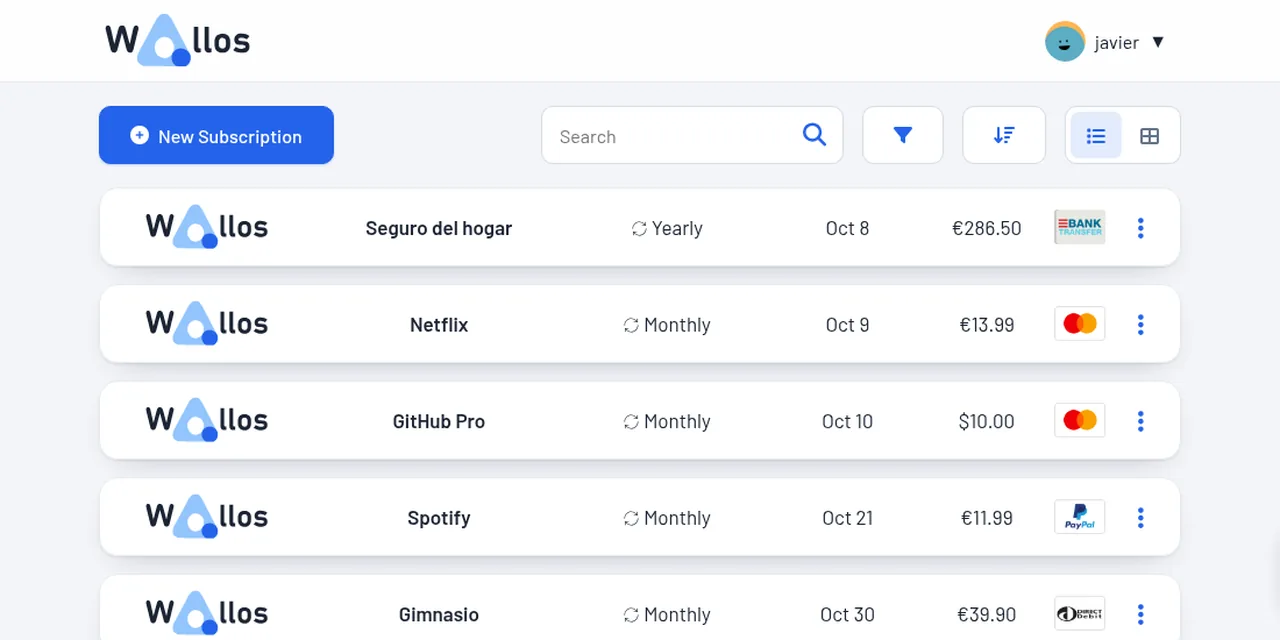
Table of contents
- Key takeaways
- What Wallos does and when it fits
- Install Wallos with Docker Compose
- Add subscriptions in euros with categories and payment methods
- Set up currency conversion
- Set up alerts with ntfy
- Backups and restore
- Frequently asked questions
- Does Wallos work without an internet connection?
- Can I change the language of the categories?
- How do I update Wallos?
- Conclusion
- Sources
Wallos is an open-source web application you host yourself to keep track of your subscriptions: what you pay, when it renews and how much it costs per year. I installed version 5.8.3 with Docker on 7 October 2026, loaded 7 realistic subscriptions in euros, connected my own ntfy server for alerts and restored a backup. Everything you see here I ran myself. There is also a Spanish version.
Key takeaways
- The project description reads: "Wallos is a powerful, open-source, and self-hostable web application designed to empower you in managing your finances with ease."
- The
bellamy/wallos:5.8.3image is 301 MB and keeps everything in one SQLite file, so mounting two folders keeps your data safe. - My 7 subscriptions add up to EUR 104.14 a month and EUR 1,249.68 a year, with one of them in dollars converted to euros.
- To alert an ntfy on your internal network you must declare it in the
SSRF_ALLOWLISTvariable; without it Wallos blocks it. - The alert fires only on the exact day you configure: with 3 days of notice, a renewal due in 2 days does not alert.
- The backup is a 37-file, 313,518-byte zip that you restore from the admin screen.
What Wallos does and when it fits
Wallos stores each subscription with its price, billing cycle, category and payment method, and tells you how much you spend per month, per year and per category. It replaces the spreadsheet you forget to update: it warns you before each charge. If you already set up ntfy or Gotify for notifications, Wallos connects to either.
The good part is that it needs no separate database: it uses SQLite inside the db folder. The downside is that it has no mobile app of its own; you use it from the browser, although it can push alerts to your phone through ntfy.
Install Wallos with Docker Compose
I wrote a compose.yml with Wallos and an ntfy to test the alerts. The ports are the ones from my test; change them to yours:
services:
  wallos:
    image: bellamy/wallos:5.8.3
    container_name: wallos
    ports: ["8282:80"]
    environment:
      TZ: Europe/Madrid
      SSRF_ALLOWLIST: ntfy
    volumes:
      - ./db:/var/www/html/db
      - ./logos:/var/www/html/images/uploads/logos
  ntfy:
    image: binwiederhier/ntfy:v2.15.0
    container_name: ntfy
    command: serve
    ports: ["8283:80"]
    environment:
      TZ: Europe/Madrid
I started it with docker compose up -d. Two details are worth pinning down:
TZdecides when alerts go out. The container’s cron runs the alerts at 09:00 in its time zone.- The two volumes are your live backup.
dbholdswallos.dbandlogosstores the icons you upload.
Open http://localhost:8282/registration.php and create the admin user. The first account to register is the administrator. On my install the form showed a PHP warning about main_currency on submit, but the user was created and the main currency ended up as euro, the first one in the list.
Add subscriptions in euros with categories and payment methods
Wallos ships with 17 categories (plus "No category"), 31 payment methods with their logos and 34 currencies. I added a custom category, Homelab, from Settings, then created 7 subscriptions with "New Subscription". The amounts are example values of mine, not official prices:
| Subscription | Amount | Cycle | Category | Payment method |
|---|---|---|---|---|
| Netflix | EUR 13.99 | monthly | Entertainment | Credit Card |
| Spotify | EUR 11.99 | monthly | Music | PayPal |
| Hetzner Cloud | EUR 4.49 | monthly | Homelab | SEPA |
| Domain jacar-demo.es | EUR 12.00 | yearly | Technology | Direct Debit |
| Home insurance | EUR 286.50 | yearly | Insurance | Bank Transfer |
| GitHub Pro | USD 10.00 | monthly | Software | Credit Card |
| Gym | EUR 39.90 | monthly | Health & Wellbeing | Direct Debit |
I entered the start date and next payment date for each, and switched alerts on for Netflix, the insurance and GitHub Pro. The statistics page normalises everything to a month and gives EUR 104.14 a month and EUR 1,249.68 a year. The domain counts as EUR 1.00 a month and GitHub Pro is converted from dollars.
Set up currency conversion
With one subscription in dollars, Wallos needs exchange rates to total everything in euros. In Settings, in the currency provider section, I chose frankfurter.dev, which publishes the European Central Bank reference rates with no account or key. The other two options, fixer.io and apilayer.com, ask for a free key.
When I saved the provider, Wallos downloaded the rates at once: the dollar landed at 1.1242 per euro, and GitHub Pro’s USD 10 counted as about EUR 8.90 in the total. It then refreshes them every night at 02:00. The Frankfurter service[1] is free, but it depends on your server reaching the internet.
Set up alerts with ntfy
In Settings, under Notifications, I opened Ntfy and filled in the server http://ntfy, the topic wallos and a custom JSON header, {"Title": "Wallos", "Tags": "moneybag"}. Pressing "Test" failed with this message:
Security Block: The target IP/Port is private and not present in the Webhook Allowlist.
Wallos resolves the server name and blocks private addresses to prevent SSRF attacks. In those, someone uses the application to reach your internal network. An ntfy in another container or on your LAN is a private address.
The fix is the SSRF_ALLOWLIST variable with the server’s name or IP, already included in the compose.yml above. After recreating the container, "Test" answered "Notification sent successfully" and the message showed up in ntfy’s wallos topic. The block only applies to private destinations: with a public ntfy or one behind HTTPS on a domain, you need to change nothing.
Then I set "Notify 3 days before" and tested the real alert by running the scheduled job by hand:
docker exec wallos php /var/www/html/endpoints/cronjobs/sendnotifications.php
Only one message reached ntfy:
GitHub Pro for $10.00 (In 3 days)
Netflix (in 2 days) and the insurance (in 1 day) did not alert. I read the code: Wallos compares the days remaining with the configured value and alerts only when they are identical. The cron checks again every day, so Netflix will alert tomorrow morning, but if you want another margin, pick it per subscription under "Notify me" or change it in Settings.
If you use email, Wallos also supports SMTP, and Gotify or Telegram are on the same list. The ntfy documentation[2] explains the headers you can add, such as priority or tags.
Backups and restore
The admin screen has a "Backup" button that downloads a zip. Mine, Wallos-Backup-20261007-0859.zip, held 37 files and 313,518 bytes uncompressed: wallos.db, the setup token, the payment method icons and the logos folder.
To check that it works I deleted 4 subscriptions straight from the database (3 were left) and uploaded the zip with the "Restore" button. All 7 came back. Two precautions:
- The zip carries your credentials.
wallos.dbstores the SMTP password and the alert channel details in plain text; keep the copy somewhere private. - Also back up the two folders. With
dbandlogoson a volume or path you already back up, you get the same thing without the button.
Frequently asked questions
Does Wallos work without an internet connection?
Yes for the basics. It needs internet to refresh exchange rates, search for logos and check for new versions.
Can I change the language of the categories?
The interface can be translated from your profile, but categories and payment methods that already exist keep their names; edit them by hand in Settings.
How do I update Wallos?
Change the image tag, for example from 5.8.3 to the next version, and run docker compose up -d. Your data lives in db, so it survives the change; take a backup first.
Conclusion
Wallos does one thing well: it shows what you pay and warns you before it is charged. In my test, 7 subscriptions added up to EUR 104.14 a month, and the install fits in a 20-line compose.yml. The only non-obvious parts are the internal-network block and the exact-day alert, and both are solved with one variable and one setting.
If you already run ntfy, the next step is to point Wallos at it and move your subscription list out of the spreadsheet.
Sources: [1] Wallos repository on GitHub[3], [2] bellamy/wallos image on Docker Hub[4], [3] Frankfurter, ECB exchange rates[1], [4] Publishing messages in ntfy[2].
Sources
Source code
Access all the source code for this post on GitHub.
View on GitHub