How to upgrade Plausible CE 2.1 to 3.2.2 with Docker and fix Code: 516 Authentication failed
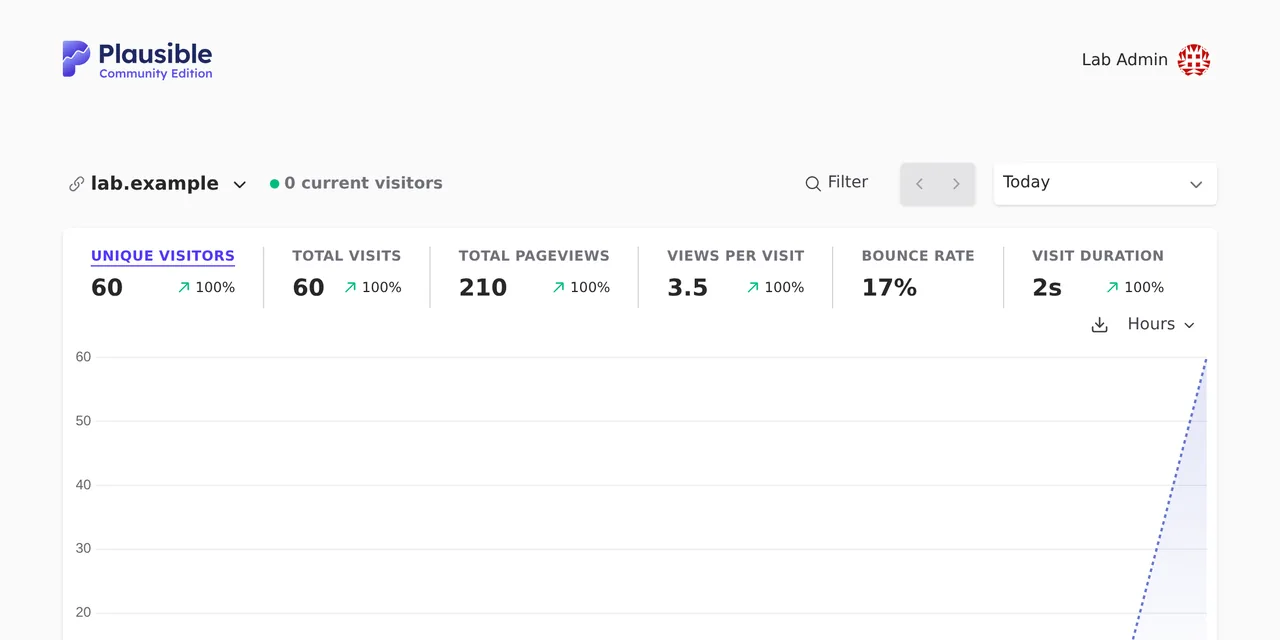
Table of contents
- Key takeaways
- What changes between Plausible CE 2.1.5 and 3.2.1
- How I tested the upgrade
- Step 1: stop Plausible and archive both volumes
- Step 2: check out the v3.2.2 branch of the repository and start
- Error "Code: 516. DB::Exception: default: Authentication failed" after upgrading ClickHouse
- What happens if you only change the Plausible image and keep ClickHouse 24.3
- The missing profile file that Docker turns into a directory
- Error "database files are incompatible with server" if you come from PostgreSQL 14
- How to check that the old statistics are still there
- Am I affected by CVE-2026-8467 in /storybook?
- How to roll back to Plausible CE 2.1.5 if something goes wrong
- FAQ
- Can I jump from 2.1.5 to 3.2.1 without stopping at 3.0 and 3.1?
- Do I have to change the tracking script on my pages?
- Can I use a ClickHouse newer than 24.12?
- Conclusion
- Sources
To move from Plausible Community Edition (CE) 2.1.5 to 3.2.1 with Docker Compose, stop the stack, archive the db-data and event-data volumes and check out the v3.2.1 branch of the community-edition repository. If you bump ClickHouse to 24.12 without the CLICKHOUSE_SKIP_USER_SETUP=1 variable, Plausible stops starting with Code: 516. DB::Exception: default: Authentication failed. The branch carries that variable, the new image and a ClickHouse profile file that did not exist before. I repeated the upgrade on 22 November 2026 on an install with data and broke each step on purpose to see which error it gives. On 23 November 3.2.2 came out: it closes another remote code execution and is the release to install. Its v3.2.2 branch only changes the image tag, and on 27 November I repeated the direct jump from 2.1.5 with it, with the same counts. The same guide is available in Spanish.
Key takeaways
- 3.2.2, from 23 November 2026, is the latest stable release and closes a remote code execution in the Plugins API that affects 2.1.0 to 3.2.1. 3.2.1, from 15 May, had already closed CVE-2026-8467, another one in
/storybookthat affects 3.0.0 to 3.2.0. - The direct jump from 2.1.5 to 3.2.1 worked: 215 events and 60 visitors before and after, with 19 new migrations in ClickHouse and 56 in PostgreSQL.
- ClickHouse 24.12 without
CLICKHOUSE_SKIP_USER_SETUP=1cuts network access for thedefaultuser. Plausible goes into a restart loop withCode: 516and, if it was already running, answers 202 to events it does not store. - Changing only the Plausible image and leaving ClickHouse 24.3 starts with no visible errors, but one migration fails silently with
Unknown setting 'deduplicate_merge_projection_mode'. - Going back to 2.1.5 by changing the tags does not work: ClickHouse 24.3 cannot load the migrated
ingest_counterstable. Restore the backup archives.
What changes between Plausible CE 2.1.5 and 3.2.1
Three parts of compose.yml change between 2.1.5 and 3.2.1: the Plausible image, the ClickHouse image and the ClickHouse configuration. PostgreSQL stays on postgres:16-alpine. 3.0.0 came out on 11 April 2025 and 3.1.0 on 13 November that year. 3.2.0 is from 26 January 2026 and 3.2.1 from 15 May.
| Part | Branch v2.1.5 | Branch v3.2.1 |
|---|---|---|
| Plausible image | community-edition:v2.1.5 |
community-edition:v3.2.1 |
| ClickHouse image | 24.3.3.102-alpine |
24.12-alpine |
| ClickHouse variable | none | CLICKHOUSE_SKIP_USER_SETUP=1 |
Files in clickhouse/ |
3 | 4, with the low-resources profile |
| PostgreSQL image | postgres:16-alpine |
postgres:16-alpine |
Each release's notes only cover the step from the previous one. About old branches, the wiki says: "Security patches and bug fixes are not backported, so upgrading is essential to ensure you receive the latest updates." If you have spent a year on 2.1, you apply the 3.0.0 and 3.2.0 changes in one go. Besides what you see in the dashboard (teams, segments, scroll depth), 3.0.0 renews ClickHouse and 3.2.0 fixes a memory profile that was not being applied.
The new images take less disk space. These are the docker images figures on arm64:
How I tested the upgrade
I cloned the v2.1.5 branch of the plausible/community-edition repository and started it with Docker 29.5.2 and Docker Compose 2.40.3 on an arm64 Linux machine. Ports and memory limits go in a compose.override.yml, and BASE_URL and SECRET_KEY_BASE in .env, as the README asks. That leaves compose.yml untouched, so switching branches causes no conflicts.
I registered a user, created the lab.example site and sent /api/event 210 pageviews from 60 visitors and 5 Signup events. The starting install had ClickHouse 24.3.3.102, PostgreSQL 16.16, 32 migrations in ClickHouse and 166 in PostgreSQL. It is a small volume and the machine was shared, so I give no timings: only counts, versions and behaviour.
Step 1: stop Plausible and archive both volumes
The archive of both volumes with the stack stopped is the only thing that lets you go back to 2.1.5. Users, sites and goals live in PostgreSQL (the db-data volume), and events and sessions in ClickHouse (the event-data volume). Stop the three containers and archive both from a helper container:
docker compose stop
mkdir -p backup
docker run --rm \
  -v plausible-ce_db-data:/pg:ro \
  -v plausible-ce_event-data:/ch:ro \
  -v "$PWD/backup":/backup alpine:3.22 sh -c \
  'tar czf /backup/plausible-v2.1.5-db-data.tar.gz -C /pg . &&
   tar czf /backup/plausible-v2.1.5-event-data.tar.gz -C /ch .'
Docker prefixes each volume with the project name, which defaults to the directory name. Check it with docker volume ls: my lab project had a different name and I changed both -v flags. The archives took 7.2 MB for PostgreSQL and 2.3 MB for ClickHouse. If you already take encrypted backups with restic, add the backup directory before you continue.
Step 2: check out the v3.2.2 branch of the repository and start
The documented path is to fetch the release branch of the repository, v3.2.2 today, not to edit the image tag by hand. The 3.2.0 notes ask for it because the files in clickhouse/ changed. With the backup in place:
git fetch origin v3.2.2:v3.2.2
git checkout v3.2.2
docker compose up -d
docker compose logs -f plausible
If you edited compose.yml, Git refuses to switch branches until you stash or discard the change. Move those settings to compose.override.yml. On start, Plausible runs db createdb and db migrate before serving, and the log ends with the team data migrations:
Plausible.Repo database already exists
Plausible.IngestRepo database already exists
Creation of Db successful!
[2026-11-22 11:13:55Z] Found 1 sites without teams...
[2026-11-22 11:13:55Z] Backfilled 1 teams.
[2026-11-22 11:13:55Z] All data are up to date now!
Migration completed!
In my test the three containers came up, with ClickHouse 24.12.6.70 and Plausible 3.2.1. Migrations went from 32 to 51 in ClickHouse and from 166 to 222 in PostgreSQL, and the site ended up inside a new team called "My Personal Sites". There was no need to stop at 3.0 or 3.1.
Error "Code: 516. DB::Exception: default: Authentication failed" after upgrading ClickHouse
This error appears when ClickHouse 24.12 starts without CLICKHOUSE_SKIP_USER_SETUP=1, which is what happens if you bump the tags by hand and do not copy the environment block from the new branch. I reproduced it by changing only the ClickHouse image. The Plausible log piled up this block 84 times before I restarted the container:
[error] Ch.Connection (#PID<0.4660.0>) failed to connect:
** (Ch.Error) Code: 516. DB::Exception: default: Authentication failed:
password is incorrect, or there is no user with such name.

If you have installed ClickHouse and forgot password you can reset it
in the configuration file.
The password for default user is typically located at
/etc/clickhouse-server/users.d/default-password.xml
and deleting this file will reset the password.
. (AUTHENTICATION_FAILED) (version 24.12.6.70 (official build))
The full message on one line is Code: 516. DB::Exception: default: Authentication failed: password is incorrect, or there is no user with such name. The password hint is misleading, because there is no password to recover here. The cause is in the ClickHouse container log, in a single line from the entrypoint script:
/entrypoint.sh: neither CLICKHOUSE_USER nor CLICKHOUSE_PASSWORD is set,
disabling network access for user 'default'
The official image's README describes it this way: "The user default has disabled network access by default in the case none of CLICKHOUSE_USER, CLICKHOUSE_PASSWORD, or CLICKHOUSE_DEFAULT_ACCESS_MANAGEMENT are set." The script writes a users.d/default-user.xml that limits default to 127.0.0.1 and ::1. That is why the ClickHouse health check, which queries from inside the container, stays green while Plausible, which comes in over the Docker network, gets the 516.
I saw two different symptoms depending on timing. With Plausible already running, the container stays "Up", the dashboard comes out empty, /api/health answers 500 with "clickhouse":"error" and /api/event still replies 202. I sent 5 pageviews in that state, all 5 got a 202 and none reached ClickHouse: the count was still 224 after the fix. After restarting Plausible, the container no longer starts and loops (9 restarts in the first minute) with this variant:
Plausible.Repo database already exists
** (MatchError) no match of right hand side value:
    {:error,
     %Ch.Error{
       code: 516,
       message: "Code: 516. DB::Exception: default: Authentication
       failed: password is incorrect, or there is no user with such
       name. [...]"
     }}
    (plausible 0.0.1) lib/plausible_release.ex:151:
      anonymous fn/2 in Plausible.Release.createdb/1
The fix is the variable the v3.2.1 branch sets on the plausible_events_db service. Add it and recreate the containers with docker compose up -d:
  plausible_events_db:
    image: clickhouse/clickhouse-server:24.12-alpine
    environment:
      - CLICKHOUSE_SKIP_USER_SETUP=1
With the variable, the script leaves default without a password and reachable over the network, as in 24.3. That is acceptable because compose.yml publishes no ClickHouse port: only containers on the same network reach it. Do not add a ports entry to that service. After recreating it, /api/health went back to 200 and the earlier 224 events were still there.
What happens if you only change the Plausible image and keep ClickHouse 24.3
Plausible 3.2.1 starts on ClickHouse 24.3.3.102 and the dashboard works, so this shortcut gives no warning. It is also what an automatic updater such as Watchtower does if your Compose file uses latest, because it only changes the image with a moving tag. On 22 November 2026, latest, v3, v3.2 and v3.2.1 share the same digest.
The failure stays in the ClickHouse log. A 3.0 migration tries to set a setting that ClickHouse added in 24.8, and 24.3 rejects it:
<Error> executeQuery: Code: 115. DB::Exception: Unknown setting
'deduplicate_merge_projection_mode'. (UNKNOWN_SETTING)
(version 24.3.3.102 (official build)) (in query: ALTER TABLE
ingest_counters MODIFY SETTING
deduplicate_merge_projection_mode='rebuild')
The migration code catches that error on purpose and carries on, so all 51 migrations end up marked as applied. The ingest_counters table ends with its new projection but without the setting. When I later moved ClickHouse to 24.12, the table loaded and an OPTIMIZE TABLE gave no error, but the setting was still absent and the server default is throw. In the upgrade done in order, the table does carry deduplicate_merge_projection_mode = 'rebuild'.
If you are already in that state, move ClickHouse to 24.12 with the variable from the previous section and apply the setting by hand. I ran it on 24.12.6.70 and the table ended up the same as in the in-order upgrade:
docker compose exec plausible_events_db clickhouse-client -q \
  "ALTER TABLE plausible_events_db.ingest_counters
   MODIFY SETTING deduplicate_merge_projection_mode='rebuild'"
docker compose exec plausible_events_db clickhouse-client \
  --format=TSVRaw -q \
  "SHOW CREATE TABLE plausible_events_db.ingest_counters" | tail -1
The missing profile file that Docker turns into a directory
If you copy the new compose.yml without the rest of the branch, ClickHouse starts without the low-resources profile and nothing warns you. The v3.2.1 branch mounts a fourth file, clickhouse/default-profile-low-resources-overrides.xml. When the source of a bind mount does not exist, Docker creates an empty directory with that name, owned by root, and ClickHouse ignores it.
I checked by asking for the effective settings. With the file in place, max_threads is 1 and max_block_size is 8192. Without it, ClickHouse used auto(18) threads and blocks of 65409, the same as on the v2.1.5 branch, where the profile sat in a file that ClickHouse did not read as a profile.
That is the bug 3.2.0 fixed. The README recommends at least 2 GB of memory so the system does not kill the process, and this profile is what keeps ClickHouse inside that margin.
docker compose exec plausible_events_db clickhouse-client -q \
  "SELECT name, value FROM system.settings
   WHERE name IN ('max_threads','max_block_size')"
The empty directory causes a second error later on. If the container was created with the file and the file disappears afterwards, the next start fails with a message from Docker, not from ClickHouse:
Error response from daemon: failed to create task for container: [...]
error mounting "[...]/clickhouse/default-profile-low-resources-overrides.xml"
to rootfs at "/etc/clickhouse-server/users.d/
default-profile-low-resources-overrides.xml": [...] not a directory:
Are you trying to mount a directory onto a file (or vice-versa)?
The repair is the same in both cases: stop ClickHouse, remove the empty directory, get the file back from the branch and recreate the service. Then repeat the settings query, which went back to 1 and 8192 in my test:
docker compose stop plausible_events_db
sudo rmdir clickhouse/default-profile-low-resources-overrides.xml
git checkout v3.2.2 -- clickhouse/
docker compose up -d --force-recreate plausible_events_db
Error "database files are incompatible with server" if you come from PostgreSQL 14
This error only affects you if your install was born with Plausible 2.0, whose Compose file used postgres:14-alpine, and you never migrated the database. The v2.1.0 branch already moved to postgres:16-alpine, and v3.2.1 stays there. I reproduced it with the lab's PostgreSQL converted to 14.25: after switching branches, the plausible_db container went into a restart loop with exit code 1 and Plausible stayed in "Created":
FATAL:  database files are incompatible with server
DETAIL:  The data directory was initialized by PostgreSQL version 14,
  which is not compatible with this version 16.16.
The fix is the dump and restore described in the Plausible wiki: pg_dump with the old version, a new volume, createdb and psql with the new one. If you already switched branches, go back to the previous one first so PostgreSQL 14 starts. This is the sequence I ran, with the upgrade to 3.2.1 included:
docker compose stop plausible
docker compose exec plausible_db sh -c \
  "pg_dump -U postgres plausible_db > plausible_db.bak"
docker compose cp plausible_db:plausible_db.bak plausible_db.bak
docker compose rm -sf plausible_db
docker volume rm plausible-ce_db-data
git checkout v3.2.2
docker compose up -d plausible_db
docker compose exec plausible_db createdb -U postgres plausible_db
docker compose cp plausible_db.bak plausible_db:plausible_db.bak
docker compose exec plausible_db sh -c \
  "psql -U postgres -d plausible_db < plausible_db.bak"
docker compose up -d
When it finished, 3.2.1 started on PostgreSQL 16.16 with 1 user, 1 site, 222 migrations and the 215 events, without a single psql error. Take the step 1 backup first, because docker volume rm cannot be undone. It is the same pattern the guide to PostgreSQL 19 as latest on Docker explains, with a different version number.
How to check that the old statistics are still there
The reliable check is counting in both databases before and after, not looking at the dashboard. Write these numbers down on 2.1.5 and repeat the queries on 3.2.1:
docker compose exec plausible_events_db clickhouse-client -q \
  "SELECT count(), uniq(user_id) FROM plausible_events_db.events_v2"
docker compose exec plausible_events_db clickhouse-client -q \
  "SELECT sum(sign) FROM plausible_events_db.sessions_v2"
docker compose exec plausible_db psql -U postgres -d plausible_db \
  -Atc "select count(*) from users; select count(*) from sites;"
curl -s http://localhost:8000/api/health
In my lab the four answers matched before and after: 215 events from 60 visitors, 60 sessions, 1 user and 1 site. The 3.2.1 dashboard showed the same 60 unique visitors, 210 pageviews and 17% bounce rate as the 2.1.5 one. Health must answer {"sessions":"ok","postgres":"ok","clickhouse":"ok","sites_cache":"ok"}.
Then send a test visit and repeat the count, because the 202 from /api/event does not prove the event is stored. In my test, 14 new pageviews took the total from 215 to 229. If you watch Plausible with Docker Compose healthchecks, 3.0.0 adds /api/system/health/ready, which answered 500 during the 516 error and 200 afterwards.
Am I affected by CVE-2026-8467 in /storybook?
You are affected if you run any release from 3.0.0 to 3.2.0 and the /storybook route is reachable from a network you do not control. CVE-2026-8467 (Common Vulnerabilities and Exposures) is an unauthenticated remote code execution in the phoenix_storybook library, with a CVSS 4.0 score of 9.5 according to its GitHub advisory. The 3.2.1 notes say: "All affected versions of Plausible Community Edition should be updated to v3.2.1 as soon as possible."
The check is one request. In my lab, 3.2.0 answered /storybook with a 302 to /storybook/button without being logged in, and 3.2.1 answered 404:
curl -s -o /dev/null -w '%{http_code}\n' \
  https://plausible.your_domain_example.com/storybook
A 302 or a 200 means the route exists and you must upgrade now. If you cannot do it today, block /storybook in the reverse proxy, which is the mitigation the notes propose. The 2.1 branch is not in the list of versions affected by this CVE, but it is in the list for the flaw 3.2.2 closes. The Plugins API accepted pagination cursors without verifying them, and a token for that API is enough to run code on the server. If you cannot upgrade yet, block /api/plugins/ in the reverse proxy, which breaks the WordPress integration, or revoke the tokens you do not use.
How to roll back to Plausible CE 2.1.5 if something goes wrong
The reliable rollback is restoring the two archives from step 1. Switching the branch to v2.1.5 on already migrated data does not work, because ClickHouse 24.3 does not recognise the setting that 24.12 stored in the ingest_counters table. The ClickHouse container never becomes healthy and Plausible stays in "Created":
<Error> Application: Code: 695. DB::Exception: Load job 'load table
plausible_events_db.ingest_counters' failed: Code: 115. DB::Exception:
Unknown setting 'deduplicate_merge_projection_mode': for storage
SummingMergeTree: Cannot attach table
`plausible_events_db`.`ingest_counters` from metadata file
/var/lib/clickhouse/store/c7f/[...]/ingest_counters.sql
The restore empties both volumes and unpacks the archives. Then go back to the old branch and start:
docker compose stop
docker run --rm \
  -v plausible-ce_db-data:/pg -v plausible-ce_event-data:/ch \
  -v "$PWD/backup":/backup:ro alpine:3.22 sh -c \
  'find /pg /ch -mindepth 1 -delete &&
   tar xzf /backup/plausible-v2.1.5-db-data.tar.gz -C /pg &&
   tar xzf /backup/plausible-v2.1.5-event-data.tar.gz -C /ch'
git checkout v2.1.5
docker compose up -d
After the restore, 2.1.5 saw the 215 events, the 60 visitors, the 32 ClickHouse migrations and the 166 PostgreSQL ones again. Anything Plausible recorded on 3.2.1 between the backup and the rollback is lost. Because ClickHouse failed first, I did not get to check whether the 2.1.5 application would have accepted the migrated PostgreSQL.
FAQ
Can I jump from 2.1.5 to 3.2.1 without stopping at 3.0 and 3.1?
Yes. I did it in one step and the intermediate migrations were applied in order: from 32 to 51 in ClickHouse and from 166 to 222 in PostgreSQL. The wiki only requires reading the instructions of each major release, and those of 3.0.0 and 3.2.0 come down to fetching the new branch of the repository.
Do I have to change the tracking script on my pages?
Not right away. On 3.2.1, /js/script.js and /js/script.outbound-links.js kept answering 200, and the 3.1.0 notes say legacy snippets continue to work. 3.1.0 offers a new per-site script, and Plausible's script update guide explains when switching pays off. If you serve the script through your own proxy, forward the sd, e and v parameters that 3.0.0 added.
Can I use a ClickHouse newer than 24.12?
I have not tested it, so I do not recommend it. The v3.2.1 branch pins clickhouse/clickhouse-server:24.12-alpine, and that is the combination I ran (24.12.6.70). What I did verify is that going backwards does not work: once the 3.2.1 migrations are applied on 24.12, 24.3 does not start.
Conclusion
Upgrading Plausible CE from 2.1.5 to 3.2.1 is a branch change, not a tag change. The branch brings together the new image, ClickHouse 24.12, the CLICKHOUSE_SKIP_USER_SETUP=1 variable and the low-resources profile, and each missing piece produces a different failure. ClickHouse without the variable is the only one that stops the service, and even then Plausible answered 202 to events it did not store.
Stop the stack, archive db-data and event-data, check out v3.2.2, start it and count events before and after. Check /storybook if you were already on branch 3, and keep the archives until you are sure, because they are the only way back to 2.1.5. If you do not run PostgreSQL in containers outside Plausible yet, the guide to install PostgreSQL with Docker explains the volumes you archived here.
Sources: [1] Plausible CE, release notes for 3.2.1[1], [2] Plausible CE, release notes for 3.2.0[2], [3] Plausible CE, release notes for 3.0.0[3], [4] Plausible CE wiki, upgrade[4], [5] Plausible CE wiki, upgrade PostgreSQL[5], [6] README of the ClickHouse Docker image[6], [7] ClickHouse documentation, MergeTree settings[7], [8] phoenix_storybook advisory GHSA-55hg-8qxv-qj4p[8], [9] PostgreSQL 16 documentation, upgrading a cluster[9], [10] Plausible script update guide[10], [11] Low-resources profile fix in community-edition[11], [12] Plausible CE, release notes for 3.2.2[12].
Sources
- Plausible CE, release notes for 3.2.1
- Plausible CE, release notes for 3.2.0
- Plausible CE, release notes for 3.0.0
- Plausible CE wiki, upgrade
- Plausible CE wiki, upgrade PostgreSQL
- README of the ClickHouse Docker image
- ClickHouse documentation, MergeTree settings
- phoenix_storybook advisory GHSA-55hg-8qxv-qj4p
- PostgreSQL 16 documentation, upgrading a cluster
- Plausible script update guide
- Low-resources profile fix in community-edition
- Plausible CE, release notes for 3.2.2
Source code
Access all the source code for this post on GitHub.
View on GitHub