pi and llama.cpp: fix «Server is not running in llama.cpp router mode»
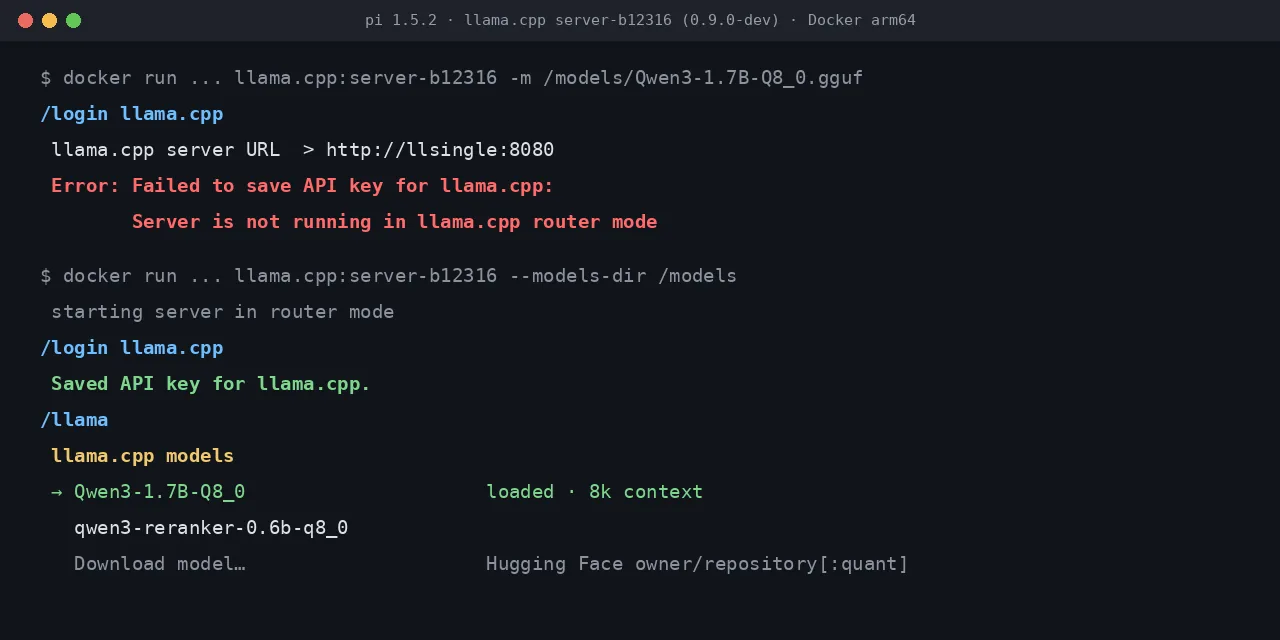
Table of contents
- Key takeaways
- What does pi check, and why does it fail with -m?
- Which error you see, depending on the server you point at
- How to run llama-server in router mode with Docker
- If you used to start it with -hf
- Connecting pi to the router: /login, /llama and /model
- How to keep -m: a provider in models.json
- Why pi truncates the answer with a 4096 context
- Frequently asked questions
- Does adding /v1 to the URL help?
- Does updating pi to 1.5.2 fix it?
- Can I use the router path with Ollama or Open WebUI?
- Conclusion
- Sources
The error Failed to save API key for llama.cpp: Server is not running in llama.cpp router mode appears because the /login llama.cpp of the pi coding agent only accepts a llama-server in router mode, and yours was started with a fixed model (-m, --model or -hf). The fix is to start the server with no model and with --models-dir, then load the model from pi with /llama. If you would rather leave the server alone, add it as an OpenAI-compatible provider in models.json. I reproduced it on 12 November 2026 with pi 1.5.0 and 1.5.2 and the llama.cpp image from release 0.9.0, in Docker on arm64. There is also a Spanish version of this guide.
Key takeaways
- pi requests
/modelsfrom the server before saving the connection, and rejects any model without astatusfield. Only router mode returns it. - With
-mor-hf, llama-server starts in single-model mode and/modelsanswers"status": null. I checked pi 1.5.0 and 1.5.2, and both give the same error. - Started with no model and with
--models-dir, the router listed 2 models in 0.028 s and pi saved the connection. Loading Qwen3 1.7B from/llamatook 0.86 s. - If you point pi at another server, the error changes: Open WebUI gives
invalid model catalogand Ollama givesllama.cpp returned HTTP 404. - To keep
-m, add the server tomodels.jsonwith"api": "openai-completions"and setcontextWindow. With 4,096 tokens, pi cut the answer at 1 token; with 8,192, it answered.
What does pi check, and why does it fail with -m?
pi fails because it validates the shape of the model catalog before saving anything. When /login llama.cpp finishes, its client sends GET /models and requires two things: a data field holding a list, and a string id and status.value on every model. In the 1.5.0 and 1.5.2 code (dist/extensions/llama/client.js), the first check raises llama.cpp returned an invalid model catalog and the second Server is not running in llama.cpp router mode.
The status field only exists in router mode, because it is each model's load state. With a server started with -m you can see it yourself:
curl -s http://127.0.0.1:8080/models | jq '.data[0] | {id, status}'
{
  "id": "/models/Qwen3-1.7B-Q8_0.gguf",
  "status": null
}
pi's llama.cpp guide[1] warns about it in one line: "Passing a model starts single-model mode instead of router mode". The trouble is that almost every llama.cpp guide, including ours on llama-server as an OpenAI-compatible API, starts the server with -m. Starting it with -hf fails the same way: I tried it with ggml-org/SmolLM2-135M-GGUF.
Which error you see, depending on the server you point at
The message depends on what /models returns at the address you type into /login. I repeated the login against four different servers on the same Docker network:
| Server at the URL | /models response |
Error in pi |
|---|---|---|
llama-server with -m or -hf |
List without status |
Server is not running in llama.cpp router mode |
| Open WebUI 0.12.5 | HTML with status 200 | llama.cpp returned an invalid model catalog |
| Ollama 0.40.16 | 404 | llama.cpp returned HTTP 404 |
Router with --api-key, no key in pi |
401 | Invalid API Key |
| Port with nothing listening | None | fetch failed on 1.5.0 |
The last row changed in 1.5.1, according to pi's changelog[2]. PR 11779[3], merged on 4 November, adds the network cause to the message. On 1.5.2 you see Could not reach llama.cpp server at http://nohost:8080: getaddrinfo ENOTFOUND nohost, instead of the bare fetch failed reported in issue 11745[4].
Watch the port too. The llama.cpp Docker image sets LLAMA_ARG_PORT=8080, but the binary listens on 9931 unless told otherwise. pi suggests http://127.0.0.1:8080 at login, while the 1.5.2 docs already say 9931. Setting --port on the server removes the doubt.
How to run llama-server in router mode with Docker
The router is the same llama-server started with no model, and the llama serve documentation[5] describes it as a process that "loads and unloads models on demand and forwards each request to the right instance". The llama.cpp server README[6] sums it up: "To start in router mode, launch llama-server without specifying any model". In that mode it looks for GGUF files in a folder, starts one child process for each model you load, and routes requests by their model field. This is the Compose file I used with the server-b12316 image, which reports itself as 0.9.0-dev (build 12316):
services:
  llama:
    image: ghcr.io/ggml-org/llama.cpp:server-b12316
    ports: ["127.0.0.1:8080:8080"]
    volumes: ["./modelos:/models:ro"]
    command: >
      --models-dir /models --no-models-autoload
      --port 8080 -c 8192 -t 4
      --api-key-file /run/secrets/llama_keys
    secrets: [llama_keys]
    healthcheck:
      test: ["CMD", "curl", "-fs", "http://127.0.0.1:8080/health"]
      interval: 10s
secrets:
  llama_keys:
    file: ./llama_keys.txt
Each option has a reason:
--models-dir /models: the folder holding the GGUF files. A single-file model sits directly in it; a multimodal or sharded one goes in its own subfolder--no-models-autoload: the router loads nothing until you ask from/llama. pi's guide uses it in its example-c 8192 -t 4: the context and threads that each model's child process inherits--api-key-file: the key pi's login will ask for. On startup the router warns that it must not be exposed to networks you do not trust
On startup the log says starting server in router mode and lists the models it finds. With the key, /models already carries each model's state, and /props confirms the mode:
curl -s -H "Authorization: Bearer your_llama_key" \
  http://127.0.0.1:8080/props | jq '{role, models_autoload}'
{
  "role": "router",
  "models_autoload": false
}
On a server started with -m, the same query returns "role": null. It is the shortest way to know which mode it is in before opening pi.
If you used to start it with -hf
With -hf, llama-server downloads the model into the Hugging Face cache, which in the Docker image lives at /root/.cache/huggingface. The router looks in that cache by default. Mount the cache on a volume, drop -hf, and the router lists the downloaded model: in my test it showed up as [cache] ggml-org/SmolLM2-135M-GGUF:Q4_K_M with no extra option.
Connecting pi to the router: /login, /llama and /model
With the server in router mode, the login works and the model loads in two more steps. The order is:
- Run
/login llama.cpp, type the router URL and the key fromllama_keys.txt. pi answersSaved API key for llama.cpp. Credentials saved to /root/.pi/agent/auth.json - Run
/llama, pick the model and press Enter to load it. Qwen3 1.7B in Q8_0 reachedloaded · 8k contextin 0.86 s - Run
/modeland pick the loaded model, listed asQwen3-1.7B-Q8_0 [llama.cpp]
After step 1, pi prints a second line starting with Error:: "No llama.cpp models are loaded. Use /llama to load a model, then /model to select it." It is not a failure. The login was saved, and it tells you no model is loaded yet. After those three steps, the model answered my first request.
If you keep autoload on, which is the router's default, mind one pi limitation. /model only offers unloaded models when they come from a preset (--models-preset). Models from --models-dir do not show up until you load them with /llama. With an INI presets file, /model showed qwen3-1.7b unloaded and the router started it when the first request arrived:
[qwen3-1.7b]
model = /models/Qwen3-1.7B-Q8_0.gguf
ctx-size = 8192
threads = 4
If you do not want to go through /login, pi also reads LLAMA_BASE_URL and LLAMA_API_KEY from the environment. With both variables exported, /llama listed the router's models without any previous login.
How to keep -m: a provider in models.json
If your server feeds other tools with a single model, there is no need to switch it to a router. pi accepts any OpenAI-compatible API from ~/.pi/agent/models.json, which is what a user suggested in issue 10522[7] after hitting this error on llama.cpp 0.6.0. This block worked against a server started with -m and -c 8192:
{
  "providers": {
    "llama-local": {
      "baseUrl": "http://127.0.0.1:8080/v1",
      "api": "openai-completions",
      "apiKey": "your_llama_key",
      "models": [
        { "id": "qwen3-1.7b", "contextWindow": 8192 }
      ]
    }
  }
}
pi rereads the file when you open /model, where the model shows up as qwen3-1.7b [llama-local]. Set contextWindow to the server's real context: without it, pi assumes 128,000 tokens and asks for up to 16,384 output tokens, more than fits. On this route you lose /llama, because you load models yourself when starting the server. It is the same setup that works to use OpenCode with local models.
Why pi truncates the answer with a 4096 context
With -c 4096 and "contextWindow": 4096, pi answered Response was truncated before completion. after generating 1 token. I routed the request through a proxy and pi was sending "max_completion_tokens": 1. The reason is in how it sizes the output: it reserves a fixed margin of 4,096 tokens (or 15% of the input, if larger) on top of what the conversation already takes. Its system prompt, the tool definitions and my one-line request added up to 1,315 tokens, so with 4,096 there is no room left for the answer.
With 8,192, the same request went out with "max_completion_tokens": 2597 and the model answered. Start the server with at least 8,192 tokens of context; pi's guide uses 32,768.
Frequently asked questions
Does adding /v1 to the URL help?
It is accepted, but it fixes nothing. pi strips the /v1 suffix from the URL before requesting /models, so http://127.0.0.1:8080/v1 and http://127.0.0.1:8080 give the same result. The error depends on the server's mode, not on the path.
Does updating pi to 1.5.2 fix it?
No. 1.5.2 runs the same check and prints the same message against a server with -m. The only change between 1.5.0 and 1.5.2 in this client is the connection error, which now includes the cause.
Can I use the router path with Ollama or Open WebUI?
Not with /login llama.cpp, which only talks to llama-server. For Ollama, pi's docs point to models.json with "baseUrl": "http://localhost:11434/v1". Open WebUI is not a model server: if you run it in front of llama.cpp, as in the guide to install Open WebUI with Docker, point pi at the llama-server behind it.
Conclusion
Server is not running in llama.cpp router mode is not a llama.cpp bug or a network problem: pi requires router mode for its login, and your server is in single-model mode. If you want pi to load and unload models with /llama, start llama-server without -m and with --models-dir, as in the Compose file above. If the server already feeds other tools, keep -m and add the model to models.json with its contextWindow, at least 8,192 tokens. If you do not have llama.cpp running yet, start with the guide to install llama.cpp.
Sources: [1] pi repository on GitHub[8], [2] pi, Local Models with llama.cpp[1], [3] pi, issue 10522[7], [4] pi, issue 11745[4], [5] pi, PR 11779[3], [6] llama.cpp server README, router mode[6], [7] llama.cpp, release notes for 0.9.0[9], [8] pi changelog[2], [9] llama.app, llama serve in router mode[5].
Sources
Source code
Access all the source code for this post on GitHub.
View on GitHub