llama.cpp 1.0.0: fix error: invalid argument: --defrag-thold and the tools without an API key refusal
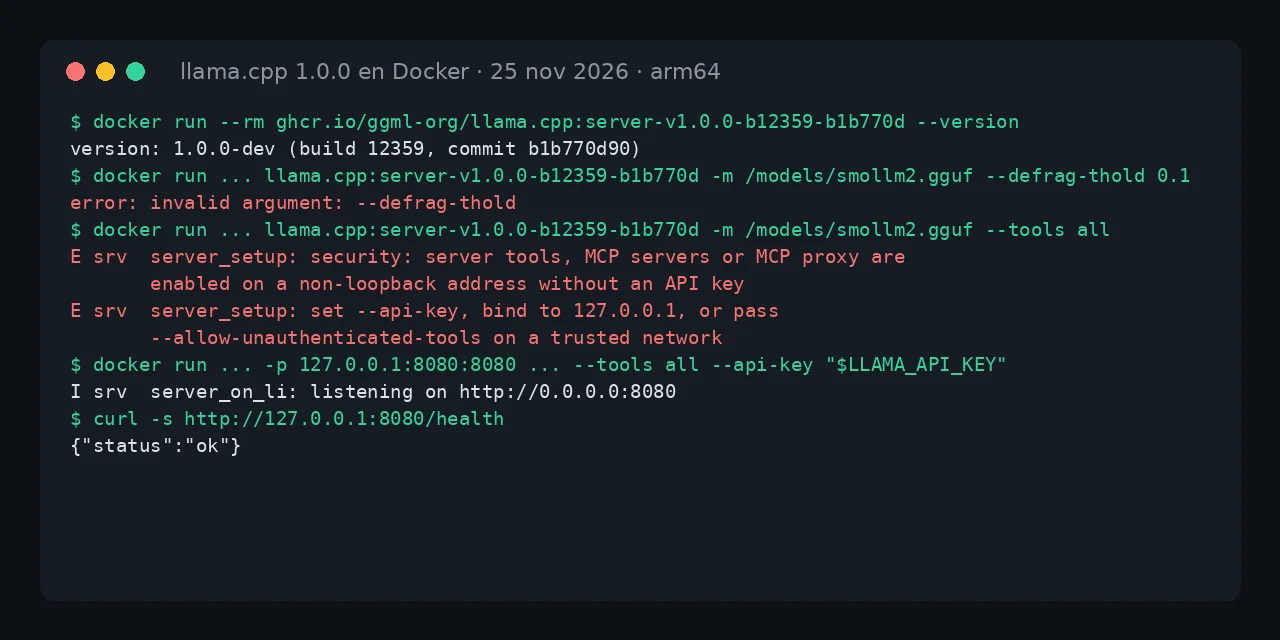
Table of contents
- Key takeaways
- What does error: invalid argument: --defrag-thold mean?
- Which llama.cpp version removed --defrag-thold?
- The second error: server tools, MCP servers or MCP proxy are enabled on a non-loopback address without an API key
- The three fixes the message suggests, tested in Docker
- The fixed docker-compose.yml, with a key and a loopback port
- The third change: host is not a public address in image_url
- Which options change between v0.5.0 and v1.0.0, copied from --help
- Difficulties I ran into while upgrading
- Frequently asked questions
- What do I replace --defrag-thold with?
- Can I use --allow-unauthenticated-tools instead of a key?
- Does it affect me if I use neither --tools, --agent nor MCP?
- Conclusion
- Sources
The error: invalid argument: --defrag-thold message appears because llama.cpp 1.0.0 deleted that option, and the fix is to remove it from your command or your docker-compose.yml: it has no replacement. The same release brings a second break: with --tools, --agent or MCP servers, llama-server no longer starts in Docker without an API key. I reproduced it on 25 November 2026 on Linux arm64 with Docker Engine 29.5.2 and the ghcr.io/ggml-org/llama.cpp:server-v1.0.0-b12359-b1b770d image. There is a Spanish version of this guide.
Key takeaways
--defrag-tholdand its short form-dtreturninvalid argumentfrom build b12352 onwards; the last published image that accepts them isserver-b12316.- The
LLAMA_ARG_DEFRAG_THOLDvariable does not fail: the server starts and ignores it without writing anything to the log. --tools,--agent,--mcp-servers-configand--ui-mcp-proxyexit with code 1 when no API key is set, because the Docker image listens on0.0.0.0.- Of the three fixes the message suggests,
--host 127.0.0.1does not work in Docker: the container reportshealthyand the published port answersConnection reset by peer. - There are 1,213 builds between v0.5.0 and v1.0.0, and the
llama-serverhelp loses a single option, this one.
What does error: invalid argument: --defrag-thold mean?
It means your binary's argument parser no longer knows the option. llama-server rejects the whole command line before it opens the GGUF file, so nothing is wrong with the model or the image. This is the output with the image tagged v1.0.0 and a 135-million-parameter SmolLM2 that takes 105 MB:
$ docker run --rm -v $PWD/models:/models:ro \
    ghcr.io/ggml-org/llama.cpp:server-v1.0.0-b12359-b1b770d \
    -m /models/smollm2-135m-q4.gguf --defrag-thold 0.1
error: invalid argument: --defrag-thold
$ echo $?
1
The short form fails the same way with error: invalid argument: -dt, and llama-cli, the binary of the light-v1.0.0-b12359-b1b770d image, prints the same text. Because the process exits with code 1, a restart: unless-stopped policy restarts it in a loop. With that Compose file, docker ps showed Restarting (1) and the log repeated the error line on every attempt.
It is the same family of failure as the one from September, when --mlock and --no-mmap went away. If your command still carries one of those, the fix is in the guide to error: invalid argument: --mlock or --no-mmap.
Which llama.cpp version removed --defrag-thold?
PR #30565[1], "llama : prune", by Georgi Gerganov removed it; it was merged on 12 November 2026, one day before v1.0.0 was tagged. Its description presents it as preparation for the release and lists what it deletes: llama_set_warmup, the 35 functions marked as deprecated in llama.h, the defrag_thold field and the -dt, --defrag-thold option. The v1.0.0 release notes[2] record it in the first line of the API changes.
The option had done nothing for months. The v0.5.0 help, from 23 September, already described it as KV cache defragmentation threshold (DEPRECATED), and builds before the cut only logged a warning. I ran the same command on five published images:
| Image | --version |
--defrag-thold 0.1 |
--tools all with no key |
|---|---|---|---|
server-b12199 |
0.9.0-dev (build 12199) | Starts with a warning | Starts with a warning |
server-b12316 |
0.9.0-dev (build 12316) | Starts with a warning | Starts with a warning |
server-b12352 |
0.9.0-dev (build 12352) | invalid argument |
Refuses to start |
server-v1.0.0-b12359-b1b770d |
1.0.0-dev (build 12359) | invalid argument |
Refuses to start |
server-b12723 |
1.0.0-dev (build 12723) | invalid argument |
Refuses to start |
The warning in the first two is DEPRECATED: --defrag-thold is deprecated and no longer necessary to specify. Build b12352 shows that the version number is no boundary: it still reports 0.9.0-dev and already rejects the option. Check the build number of your image:
docker run --rm \
  ghcr.io/ggml-org/llama.cpp:server-v1.0.0-b12359-b1b770d --version
# version: 1.0.0-dev (build 12359, commit b1b770d90)
The image tagged v1.0.0 identifies itself as 1.0.0-dev, suffix included. Any build at 12352 or above rejects --defrag-thold, and the fix is to delete the option and its value.
The second error: server tools, MCP servers or MCP proxy are enabled on a non-loopback address without an API key
This error stops startup when you enable server tools and llama-server listens on a non-loopback address with no API key. It is two consecutive log lines, each unbroken in the original; they are wrapped here to fit:
E srv  server_setup: security: server tools, MCP servers or MCP proxy
       are enabled on a non-loopback address without an API key
E srv  server_setup: set --api-key, bind to 127.0.0.1, or pass
       --allow-unauthenticated-tools on a trusted network
In the v1.0.0 image five options trigger it: --tools all, --agent, --mcp-servers-config, --ui-mcp-proxy and its alias --webui-mcp-proxy. MCP is the Model Context Protocol, the protocol a model uses to call external tools. The container exits with code 1 in all five cases, and b12316 started with the same commands.
In Docker the failure is guaranteed because the official image sets LLAMA_ARG_HOST=0.0.0.0, as docker inspect shows. The change comes from PR #32113[3] by Xuan-Son Nguyen, also merged on 12 November. The author does not sell it as an improvement: "None of those are actually vulnerability, but since people nitpick this too much, we now forced to hurt the UX a bit".
The caution has a basis. With --tools all, the /tools endpoint of v1.0.0 lists seven tools, among them exec_shell_command, write_file and edit_file. A server like that, open to the network with no key, runs commands for anyone who reaches the port.
The three fixes the message suggests, tested in Docker
Two of the three fixes work inside a container and the third leaves the service unreachable. I tested each one with the v1.0.0 image and the port published on 127.0.0.1:
| Fix | Result in Docker |
|---|---|
--api-key, --api-key-file or the LLAMA_API_KEY variable |
Starts; /health answers 200 and every other route asks for the key |
--allow-unauthenticated-tools or LLAMA_ARG_ALLOW_UNAUTHENTICATED_TOOLS=1 |
Starts with no key and the tools open |
--host 127.0.0.1 |
Starts, but the published port does not answer |
With the key set, /health stays open and /v1/models, /props and /tools return 401 with {"error":{"message":"Invalid API Key","type":"authentication_error","code":401}}. Your clients have to send the Authorization: Bearer header with the key. The web UI shows "Server Connection Error. Access denied" and an Enter API Key button.
The third fix fails because 127.0.0.1 inside the container is the container's loopback, not your machine's. The log says listening on http://127.0.0.1:8080 and Docker forwards the port to an interface where nothing listens. From the host it looks like this, and on another attempt curl answered curl: (52) Empty reply from server:
$ curl -sS http://127.0.0.1:8080/health
curl: (56) Recv failure: Connection reset by peer
$ docker ps --format '{{.Status}}'
Up 44 seconds (healthy)
The healthy status misleads because the image's health check calls http://localhost:8080/health from inside the container. To restrict access to your machine, do it on the Docker side with -p 127.0.0.1:8080:8080. The Docker documentation on port publishing[4] confirms that with that address only the host reaches the port.
The fixed docker-compose.yml, with a key and a loopback port
The setup I recommend combines the API key with the port published on 127.0.0.1 only and a pinned build tag. Generate the key with export LLAMA_API_KEY=$(openssl rand -hex 24) and bring this file up with docker compose up -d:
services:
  llama:
    image: ghcr.io/ggml-org/llama.cpp:server-v1.0.0-b12359-b1b770d
    command: >
      -m /models/smollm2-135m-q4.gguf
      -c 4096
      --tools all
    environment:
      LLAMA_API_KEY: "${LLAMA_API_KEY}"
    restart: unless-stopped
    volumes:
      - ./models:/models:ro
    ports:
      - "127.0.0.1:8080:8080"
The command no longer carries --defrag-thold and the key comes in through the environment, so it is not written in the file. These three checks confirm that the server answers, that it requires the key and which build it runs:
curl -s http://127.0.0.1:8080/health
# {"status":"ok"}
curl -s -o /dev/null -w '%{http_code}\n' http://127.0.0.1:8080/v1/models
# 401
curl -s -H "Authorization: Bearer $LLAMA_API_KEY" \
  http://127.0.0.1:8080/props | grep -o '"build_info":"[^"]*"'
# "build_info":"b12359-b1b770d90"
With the key, /v1/chat/completions answered and /tools returned the seven tools. If another container on the same Compose network uses the server, pass it the same variable. The guide to llama-server as an OpenAI-compatible API in Docker shows where the official SDKs put the key.
The third change: host is not a public address in image_url
Since v1.0.0, llama-server rejects images whose URL points to a private address, and the option that allows them again is --media-allow-private-urls. I checked it with SmolVLM-256M in Q8_0 (175 MB plus a 104 MB projector) and a file server on the same Docker network. The request to /v1/chat/completions with image_url set to http://nas/red.png returns a 400:
{"error":{"code":400,
  "message":"host is not a public address: nas",
  "type":"invalid_request_error"}}
Only the name changes in the message: with an IP it says host is not a public address: 172.23.0.2, and with localhost it says the same. Build b12316 downloaded that image and answered "Red", and v1.0.0 with --media-allow-private-urls does so again. The change is PR #32115[5], which closes a server-side request forgery (SSRF) hole. Images sent as base64 inside the request do not go through that address check.
Which options change between v0.5.0 and v1.0.0, copied from --help
--defrag-thold is the only option llama-server loses between v0.5.0 (b11146) and v1.0.0 (b12359). I dumped --help from both images and compared the names: 411 in v0.5.0 and 423 in v1.0.0. --defrag-thold, -dt and the LLAMA_ARG_DEFRAG_THOLD variable go away; 14 names appear, among them --allow-unauthenticated-tools and --media-allow-private-urls.
To repeat the comparison with your current tag and the new one, extract the names from each help and compare the two files:
img=ghcr.io/ggml-org/llama.cpp
for t in server-v0.5.0 server-v1.0.0-b12359-b1b770d; do
  docker run --rm $img:$t --help | grep '^-' \
    | grep -oE '(^|[ ,])--?[A-Za-z][A-Za-z0-9-]*' \
    | tr -d ' ,' | sort -u > $t.txt
done
diff server-v0.5.0.txt server-v1.0.0-b12359-b1b770d.txt
The stability promise of 1.0.0 does not cover these options. The announcement on the Hugging Face blog[6] says: "Moving forward, both llama.cpp and ggml will reflect API and ABI incompatibilities with major-version bumps." Its table of rules talks about the public C API in ./include and does not mention the command line. A llama-server option can go away in any build. If you link against libllama, the 35 deleted functions affect you when you rebuild; I read that part in the PR and did not test it.
Difficulties I ran into while upgrading
Four details cost me time and none of them is in the release notes:
- The old variable stays silent. With
LLAMA_ARG_DEFRAG_THOLD=0.1in the environment, v1.0.0 started, answered 200 on/healthand left no line about it in the log. Delete it from your.envfiles even though it breaks nothing. - The
:servertag moves. On 25 November 2026 its digest matched that ofserver-b12723, 364 builds ahead of v1.0.0. That build already adds another option,--ui-mcp-proxy-allow-private-urls. --versiondoes not say 1.0.0. It says1.0.0-dev (build 12359, commit b1b770d90), and b12352 says0.9.0-devwith the new behaviour. Compare by build number.- A CORS warning comes with the error. Before it refuses to start, the log warns that the allowed origin for cross-origin requests (CORS) becomes
localhost. A web UI served from another domain needs--cors-origins.
Frequently asked questions
What do I replace --defrag-thold with?
With nothing. The option tuned KV cache defragmentation and had been marked as deprecated since v0.5.0 at least; the warning said it was no longer necessary to specify it. Delete --defrag-thold and its value, or -dt and its value, and the server starts as before.
Can I use --allow-unauthenticated-tools instead of a key?
It starts, and I also checked it with the LLAMA_ARG_ALLOW_UNAUTHENTICATED_TOOLS=1 variable. Use it only when the port is published on 127.0.0.1 or the network is yours, because --tools all includes exec_shell_command. With the port open to the network, the key is the option that protects the tools.
Does it affect me if I use neither --tools, --agent nor MCP?
The second error does not. A llama-server without those options starts on 0.0.0.0 with no key as before, with the no API key is set and CORS allows all origins warning. What affects you is --defrag-thold if you passed it, and the private URL rejection if you send images through image_url.
Conclusion
error: invalid argument: --defrag-thold is fixed by deleting the option, and the refusal of tools without a key is fixed with LLAMA_API_KEY and the port published on 127.0.0.1. Do not use --host 127.0.0.1 inside the container. Pin the server-v1.0.0-b12359-b1b770d tag or a specific server-bNNNNN, because semantic versioning protects the C API and not the llama-server options.
If you are installing from scratch, start with the guide on how to install llama.cpp on Linux, macOS and Docker. If the failure reaches you from a coding agent, see the pi error with llama.cpp in router mode.
Sources: [1] llama.cpp, v1.0.0 release notes[2], [2] llama.cpp, PR #30565: removing the deprecated API and --defrag-thold[1], [3] llama.cpp, PR #32113: tools without a key on non-loopback addresses[3], [4] llama.cpp, PR #32115: private URLs in the proxy and in media[5], [5] Hugging Face, llama.cpp v1.0.0 announcement[6], [6] Docker, port publishing[4], [7] llama.cpp, images on GitHub Container Registry[7].
Sources
Source code
Access all the source code for this post on GitHub.
View on GitHub