How to fix Can't handle RDB format version 17 after Redis 8.12 on Docker
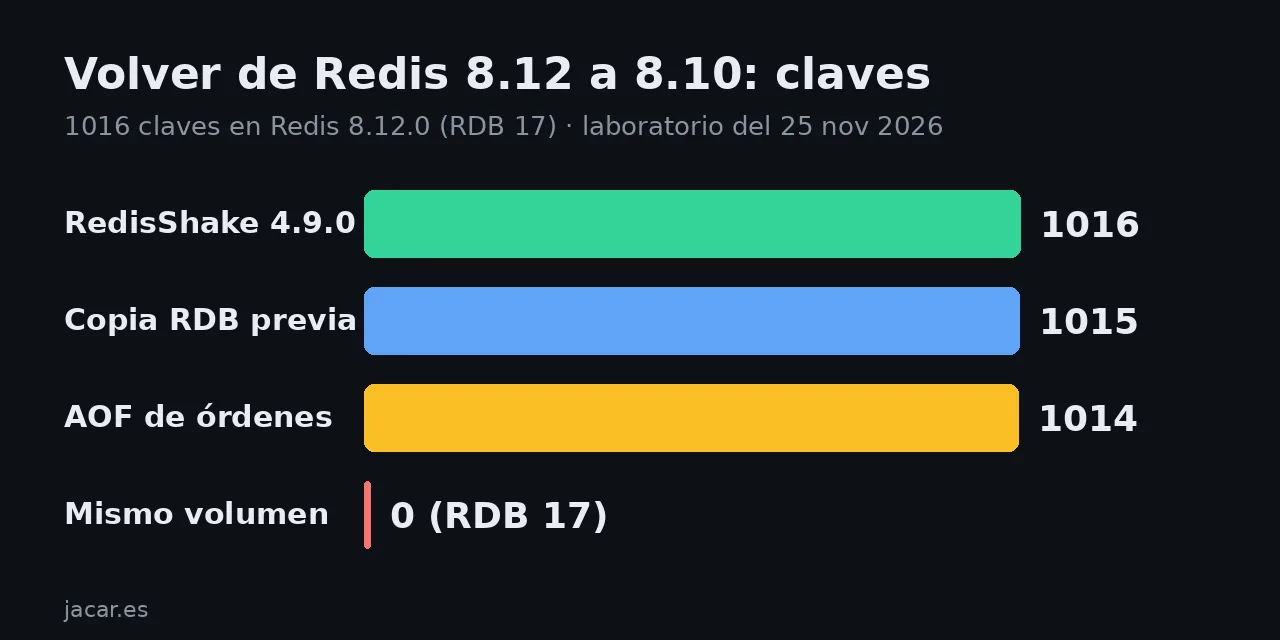
Table of contents
- Key takeaways
- Can't handle RDB format version 17: the error and its variants
- Why does it appear after upgrading to Redis 8.12?
- Which format is your file in, and which version wrote it?
- Immediate fix: pin the image to redis:8.12
- Going back to Redis 8.10 with the pre-upgrade backup
- Going back to Redis 8.10 with no backup: RedisShake 4.9.0
- Gotchas I ran into with the new 8.12 types
- The AOF route without the RDB preamble
- Moving the data from Redis 8.12 to Valkey 9.2
- What does not work: replication, MIGRATE and rdb-version-check relaxed
- FAQ
- Can I downgrade from Redis 8.12 to 8.10 by changing only the image tag?
- Have I lost my data if I see this error?
- Do I have to upgrade to Redis 8.12 now?
- Conclusion
- Sources
If Redis or Valkey exits with Can't handle RDB format version 17, the data file was written by Redis 8.12, which saves in RDB format 17, and the version you are starting now cannot read it. To get the service back, pin the image to redis:8.12: the data is intact. Going back to Redis 8.10 or moving to Valkey 9.2 takes the backup from before the upgrade, or a copy by commands with RedisShake 4.9.0. I tested every route on 25 November 2026 on arm64 Linux with Docker and 1016 keys. There is a Spanish version of this guide.
Key takeaways
redis:latest,redis:8andredis:8-alpinehave pointed to Redis 8.12.0 since 23 November 2026, and that version writesREDIS0017in the file header.- Redis 8.12.0 only had to load the old file and stop, with no writes at all, to leave it in format 17.
- Redis 8.10.3, 8.6.3, 8.2.11 and 8.0.6 and Valkey 9.1.3 and 9.2.0 rejected that file with the same message.
- The
dump.rdbbackup taken before the upgrade gave Redis 8.10.3 back 1015 of 1016 keys, and RedisShake 4.9.0 copied all 1016. - Replication,
MIGRATEand the default AOF file failed, because they carry the same format 17. - Reaching Valkey 9.2.0 meant deleting the three module keys first (JSON, time series and Bloom filter): 1013 identical keys arrived.
Can't handle RDB format version 17: the error and its variants
The error shows up in the container log at startup, and the server exits with code 1. These are the two lines Redis 8.10.3 wrote on a volume that Redis 8.12.0 had used:
1:M 25 Nov 2026 13:22:04.845 # Can't handle RDB format version 17
1:M 25 Nov 2026 13:22:04.845 # Fatal error loading the DB, check
server logs. Exiting.
Your terminal prints the second line as one. Valkey 9.2.0 writes the same two lines with the 7:M prefix. With restart: unless-stopped in Docker Compose, the container goes into a restart loop: docker compose ps showed Restarting (1) and the restart counter stood at 7 when I checked it.
The same failure changes its text depending on how the data arrives. These are the variants I got in the lab, all with Redis 8.12.0 as the source:
| Where it appears | Message |
|---|---|
Volume with dump.rdb |
Fatal error loading the DB, check server logs. Exiting. |
| Volume with AOF | Error reading the RDB base file appendonly.aof.1.base.rdb, AOF loading aborted |
| Redis 8.10.3 replica | Failed trying to load the MASTER synchronization DB from disk, check server logs. |
| Valkey 9.2.0 replica | Failed trying to load the PRIMARY synchronization DB from disk, check server logs. |
MIGRATE or RESTORE |
ERR DUMP payload version or checksum are wrong |
In the first four cases, the previous log line is Can't handle RDB format version 17. AOF is the Append Only File and RDB is the Redis Database binary dump.
Why does it appear after upgrading to Redis 8.12?
It appears because Redis 8.12 raises the dump format number from 15 to 17, and earlier versions check that number before reading anything. The source code explains it in src/rdb.h[1]: "The current RDB version. When the format changes in a way that is no longer backward compatible this number gets incremented". On the 8.12 branch the constant is RDB_VERSION 17, and on the 8.10 branch it is 15.
The Redis 8.12 release notes[2] date the general availability release 22 November 2026. Their changes include compressed bitmaps, a B+ tree encoding for large sorted sets and set member expiration. I found no mention of the format number in them.
Floating tags did the rest. The Docker official images list[3] moved latest, 8, 8-alpine and alpine to 8.12.0 on 23 November 2026. If your Compose file uses redis:8 or redis:latest, the next docker compose pull upgraded you without touching the file.
The format change does not wait for your first write. I started Redis 8.12.0 on a copy of the 8.10.3 dump, wrote nothing and stopped the container. The log showed Saving the final RDB snapshot before exiting and the header went from REDIS0015 to REDIS0017, with the same 19,561 bytes. The official image ships the save points 3600 1 300 100 60 10000, and with them active Redis saves when it receives the stop signal.
Which format is your file in, and which version wrote it?
The first nine bytes of dump.rdb give the format, and redis-check-rdb names the version that wrote it. Run both commands with an image that does not start the server on the volume, replacing redis_data with the name of your volume:
docker run --rm -v redis_data:/data redis:8.12-alpine \
  sh -c 'head -c 9 /data/dump.rdb; echo'
docker run --rm -v redis_data:/data redis:8.12-alpine \
  redis-check-rdb /data/dump.rdb
The first prints REDIS0017 if the file is already in the new format, or REDIS0015 if 8.10 saved it. On my volume the second printed AUX FIELD redis-ver = '8.12.0' and ended with RDB looks OK!. Use the 8.12 image for this check, because earlier ones cannot read format 17.
Immediate fix: pin the image to redis:8.12
What brings the service back is starting Redis 8.12 again on the same volume, with the tag pinned. Change the image in your compose.yml and stop using redis:8 or redis:latest:
services:
  redis:
    image: redis:8.12-alpine
    restart: unless-stopped
    volumes:
      - redis_data:/data
volumes:
  redis_data:
With the container looping on 8.10, I changed that line and ran docker compose up -d. The log showed Loading RDB produced by version 8.12.0 and Done loading RDB, keys loaded: 1016, keys expired: 0. The failed attempts do not damage the file: the old versions exit before they write.
Pinning 8.12 keeps the same thing from happening when the next series ships. If you set Redis up with the Redis with Docker guide, check which tag you left in the Compose file.
Going back to Redis 8.10 with the pre-upgrade backup
If you have a dump.rdb saved before moving to 8.12, Redis 8.10 loads it, and you lose what was written since. I copied the 8.10.3 file with docker cp before upgrading. To go back, I put it in a new volume and started 8.10 on it:
docker volume create redis_data_810
docker run --rm -v redis_data_810:/data -v "$PWD":/src:ro \
  redis:8.10-alpine sh -c 'cp /src/dump-8.10-backup.rdb \
  /data/dump.rdb; chown redis:redis /data/dump.rdb'
docker run -d --name redis-810 -v redis_data_810:/data \
  redis:8.10-alpine
The first command creates the volume, the second copies the file with redis as its owner, and the third starts the server. Redis 8.10.3 wrote Done loading RDB, keys loaded: 1015 and answered queries, the JSON key included. The key I added on 8.12 was gone: the backup is worth what it was worth the day you took it.
Do not reuse the original volume for this test. Until you confirm that 8.10 has everything you need, the volume in format 17 is your only complete copy.
Going back to Redis 8.10 with no backup: RedisShake 4.9.0
With no earlier backup, the route that kept every key was to read from the running 8.12 and write by commands into an empty 8.10 with RedisShake[4]. Version 4.9.0 came out on 24 November 2026 and its notes announce support for Redis 8.12 and Valkey 9.2. This chart sums up how many of the 1016 keys each route recovered on Redis 8.10.3:
Download the binary from the releases page and edit three lines of shake.toml: the source address, the target address and sync_aof = false so that it exits when the copy ends:
[sync_reader]
address = "redis-812:6379"
sync_rdb = true
sync_aof = false

[redis_writer]
address = "redis-810:6379"
I started an empty 8.10 on the same Docker network as 8.12 and ran the binary in a container on that network, with the RedisShake directory mounted:
docker run -d --name redis-810 --network redis-net redis:8.10-alpine
docker run --rm --network redis-net -v "$PWD/shake:/shake" \
  -w /shake --entrypoint /shake/redis-shake \
  redis:8.10-alpine shake.toml
RedisShake ended with all done and 8.10.3 held all 1016 keys. I compared type, value and whether it had an expiry, key by key, with a script of my own, and the two dumps were identical. The JSON key and the time series arrived too, which RedisShake sends with RESTORE, as did the Bloom filter and the hash with per-field expiry. When it saved, 8.10.3 wrote REDIS0015.
RedisShake reads as a replica does, so the source stays in service and does not change. Writes made during the copy do not arrive with sync_aof = false: for data you cannot lose, stop the writes before you launch it.
Gotchas I ran into with the new 8.12 types
The copy stops if you already used the 8.12 set member expiration. I added a set with SEXPIRE on one member to a copy of the source, and RedisShake stopped with ERR Bad data format when it sent that set with RESTORE. With target_redis_proto_max_bulk_len = 0, which makes it write everything by commands, it stopped with ERR unknown command 'spexpireat'.
The copy completed once I added block_command = ["SPEXPIREAT"] to the [filter] section, next to that 0 value. The set arrived with its three members and without the expiry, which 8.10 does not have. Removing the expiry first with SPERSIST did not help: the set kept the listpackex encoding and RESTORE failed again.
The large sorted set caused no trouble. One with 20,000 members had the btree encoding on 8.12 and reached 8.10 with all 20,000 members and the skiplist encoding. I could not produce a compressed bitmap (my 3000-bit one stayed raw), so I do not know how that type behaves.
The AOF route without the RDB preamble
An AOF written with commands only works as a bridge with no external tools, with two limits worth knowing first. It does not work by default: with aof-use-rdb-preamble yes, the AOF base file is an RDB with a REDIS0017 header and 8.10 rejects it. Turn the preamble off on 8.12 and rewrite:
docker exec redis-812 redis-cli CONFIG SET aof-use-rdb-preamble no
docker exec redis-812 redis-cli CONFIG SET appendonly yes
docker exec redis-812 redis-cli INFO persistence \
  | grep aof_last_bgrewrite_status
Enabling appendonly triggers a rewrite, and the third command tells you whether it ended well. If AOF was already on, run BGREWRITEAOF after changing the preamble. Then copy the appendonlydir directory to a new volume and start the old version with redis-server --appendonly yes.
The first limit is the JSON key. With a single one in the database, the rewrite failed with aof_last_bgrewrite_status:err and this message: "the module data type 'ReJSON-RL' does not implement the aof_rewrite callback. Enable aof-use-rdb-preamble to rewrite the AOF for this data type". I had to delete it for the rewrite to complete.
The second one is silent. Redis 8.10.3 loaded 1014 of the remaining 1015 keys and kept starting: the time series was in the AOF as a RESTORE, and the log left a == CRITICAL == line with DUMP payload version or checksum are wrong. The 1014 loaded keys, the Bloom filter included, were identical to the source. Count the keys with DBSIZE on both sides before you call the way back good.
Moving the data from Redis 8.12 to Valkey 9.2
Valkey 9.2.0 does not read format 17 from a file or over replication, and the copy by commands works if you remove the Redis module keys first. The reason is in Valkey's rdb.h[5]: it reserves numbers 12 to 79 for non-compatible Redis formats and uses 81 on the 9.2 branch. The Valkey 9.1 vs Redis 8 comparison records the same rejection with formats 12, 13 and 15.
With the default configuration, RedisShake 4.9.0 stopped at the stream key with ERR Bad data format, after copying 131 keys. Its compatibility page[6] asks for target_redis_proto_max_bulk_len = 0 between Redis and Valkey. With that value it stopped at the JSON key: "unknown module requires RESTORE and cannot be split into commands". Excluding the key with block_keys did not avoid it.
What worked was preparing a copy without modules and reading from it. I started another 8.12 as a replica of the source, detached it and deleted on it the three keys Valkey cannot receive:
docker run -d --name redis-stage --network redis-net \
  redis:8.12-alpine redis-server --replicaof redis-812 6379
docker exec redis-stage redis-cli REPLICAOF NO ONE
docker exec redis-stage redis-cli DEL doc:1 temp seen
Wait until INFO replication shows master_link_status:up before the second command. The source is untouched: the deletions happen on the copy. To find your module keys, walk redis-cli --scan and look at TYPE: mine were ReJSON-RL, TSDB-TYPE and MBbloom--.
With the RedisShake source pointing to redis-stage and target_redis_proto_max_bulk_len = 0, Valkey 9.2.0 received all 1013 keys. The key-by-key comparison came out identical, the per-field hash expiry survived and Valkey saved with the VALKEY081 header. The AOF without preamble from a copy without those three keys also loaded on Valkey 9.2.0 with all 1013 keys. With the Bloom filter in it, it had failed with unknown command 'BF.LOADCHUNK'.
What does not work: replication, MIGRATE and rdb-version-check relaxed
Three shortcuts that look reasonable failed, and it pays to rule them out before spending time on them. An 8.10.3 replica of 8.12.0 stayed at master_link_status:down with 0 keys, repeating the sync, because the initial load travels as an RDB in format 17. MIGRATE with the COPY option returned ERR Target instance replied with error: ERR DUMP payload version or checksum are wrong towards 8.10.3 and towards Valkey 9.2.0.
Valkey has the rdb-version-check relaxed option, which tries to read formats it does not know. With it, Valkey got past the number check but exited with Can't handle foreign type or opcode 27 in RDB with version 17 on a file with no module keys. With modules, the error was no matching module type 'TSDB-TYPE'. It loaded no keys in either case.
I did not test RIOT, Redis 8.8, a cluster or the query engine indexes, so I cannot tell you how they behave. The Valkey as a Redis replacement guide covers the migration from Redis 7.2, whose file Valkey does read.
FAQ
Can I downgrade from Redis 8.12 to 8.10 by changing only the image tag?
No. As soon as 8.12 saves, and it does so when the container stops, the volume is in format 17 and 8.10 exits with Can't handle RDB format version 17. You need a new volume, loaded from the earlier backup or with RedisShake.
Have I lost my data if I see this error?
No. The error means the version you are starting cannot read the file, not that the file is damaged. In my test, Redis 8.12.0 loaded all 1016 keys from the same volume after the failed attempts by 8.10.3.
Do I have to upgrade to Redis 8.12 now?
It depends on your series. According to endoflife.date[7], Redis 8.6 lost support on 25 November 2026 and Redis 8.0 loses it on 1 December. Version 8.2 keeps it until September 2030. Before you upgrade, save a copy of dump.rdb outside the volume: it is the way back with the fewest steps.
Conclusion
The error does not signal corruption: Redis 8.12 writes RDB format 17 and only Redis 8.12 reads it. Pin redis:8.12-alpine in your Compose file to start today, and decide afterwards whether you stay. To go back to 8.10, use the earlier backup if you have one, or RedisShake 4.9.0 from the running 8.12, and compare DBSIZE on both sides. For Valkey 9.2, prepare a copy without module keys and copy it by commands.
Sources: [1] Redis, 8.12 release notes[2], [2] Redis, src/rdb.h on the 8.12 branch[1], [3] Docker official-images, Redis: Update to 8.12.0[3], [4] Valkey, src/rdb.h on the 9.2 branch[5], [5] RedisShake, release 4.9.0[4], [6] RedisShake, version compatibility and cross-engine migration[6], [7] Redis Docs, persistence[8], [8] endoflife.date, Redis[7].
Sources
Source code
Access all the source code for this post on GitHub.
View on GitHub