How to prepare your self-hosted n8n for n8n 3.0

Table of contents
- Key takeaways
- Which version do you run and what changes in n8n 3.0?
- Step 1: open the 2.39.6 migration report
- Step 2: replace the nodes that go away
- Step 3: pin the variables whose default changes
- If you use Tailscale or Headscale with SSRF protection
- Why two notices stay in the report
- Step 4: move from binaryData to storage before 3.0 does
- Step 5: copy the instance and start the nightly on the copy
- Why the way back has to come from the dump
- If you still run n8n with npm
- What this test does not cover
- Frequently asked questions
- When does n8n 3.0 come out?
- Can I use the v3-nightly image in production?
- Does the migration report catch every problem?
- Conclusion
- Sources
n8n 3.0 has not been released yet: n8n’s breaking-changes page lists it as scheduled for October 2026, and on 16 September the stable release is 2.39.6. What you can do now is prepare your install so that nothing catches you out on upgrade day. In this guide I open the migration report that ships with 2.39.6, fix every item on an instance backed by PostgreSQL, make a copy and start the v3-nightly image on it, which is a preview and not the final release. I ran all of it on 16 September 2026 on an 18-core arm64 machine with Docker Engine 29.5.2.
Key takeaways
- n8n 3.0 is not out. 2.39.6 is the stable release (
latestandstableon Docker Hub), 2.40.1 is the beta, and npm has no 3.x version. - 2.39.6 already checks your instance against 3.0 under Settings > Migration Report. Its header subtracts one workflow for every rule it breaks: mine said 1 of 7 compatible when 3 of 7 were.
- What breaks most on a Docker install: 37 node types that go away, the 60 s limit on the Code node, the move from
binaryDatatostorage, and the100.64.0.0/10range if you turned SSRF protection on. - A failed start of the nightly had already applied 7 migrations and dropped two tables, and 2.39.6 then started on that database without complaint. Your way back is the dump, not a tag change.
- The 16 September nightly reports itself as 2.39.0 and does not block
100.64.0.0/10yet. Run it on a copy and do not mistake it for 3.0.
Which version do you run and what changes in n8n 3.0?
3.0 is a clean-up release: it removes nodes, tightens defaults and leaves the Docker image as the only way to install. The developer guide in the n8n repository puts it like this: "v3 is an operational release: breaking changes, removals, and legacy cleanup". The same guide explains that the 3.x branch is the main branch plus the breaking changes, and that it is synced daily. Its v3-nightly and v3-rc images are there for testing, with a clear warning: "Do not use them in production".
On 16 September 2026, the Docker install page[1] lists 2.39.6 as stable and 2.40.1 as beta. On Docker Hub, latest and stable point to the same 2.39.6 image (sha256:1eb33706d9bd), while beta and next point to 2.40.1, released the same day. Check which one you run:
docker compose exec n8n n8n --version
The official list of 3.0 changes[2] is long. These are the ones that affect you if you self-host n8n with Docker, along with what you can do on 2.39.6 today:
| Change in 3.0 | What breaks | What you do now |
|---|---|---|
| Docker only | Installs run with npm or npx | Move to the official image |
| Removed nodes | Function, Function Item, Item Lists, Cron and 33 others | Replace them |
| AI Agent version 1 | The Conversational, OpenAI Functions, Plan and Execute, ReAct and SQL Agent modes | Move to the current version |
| Execute Workflow per item | The "Run once for each item" mode | Loop Over Items in front |
N8N_RUNNERS_TASK_TIMEOUT |
Drops from 300 to 60 s | Pin the value |
N8N_UNVERIFIED_PACKAGES_ENABLED |
Goes from true to false |
Pin the value |
| Compression node limits | 2 GiB becomes 256 MiB and 5000 entries become 1000 | Pin the values |
| Default SSRF list | Adds 100.64.0.0/10 |
Allow list |
binaryData becomes storage |
No start if both exist | Migrate now |
default binary mode |
Switches to filesystem |
Pick a mode |
| Chat Hub | Turned off | N8N_ENABLED_MODULES |
Step 1: open the 2.39.6 migration report
The report already compares your instance with 3.0: it lives under Settings > Migration Report and only global admins can see it. The migration tool documentation[3] is still written for 2.0. On 2.39.6, however, the header already talks about "version 3.0.0".
To test it I set up a 2.39.6 instance with PostgreSQL 18 and seven workflows built on purpose. Between them they use:
- The Function, Function Item and Item Lists nodes
- A Cron trigger
- An AI Agent 1.7 in ReAct mode
- An Execute Workflow in per-item mode
- A Code node that waits 75 s
- An HTTP request to
100.64.10.10, a Python container acting as a tailnet node - A convert-to-file step
This is what the report showed:
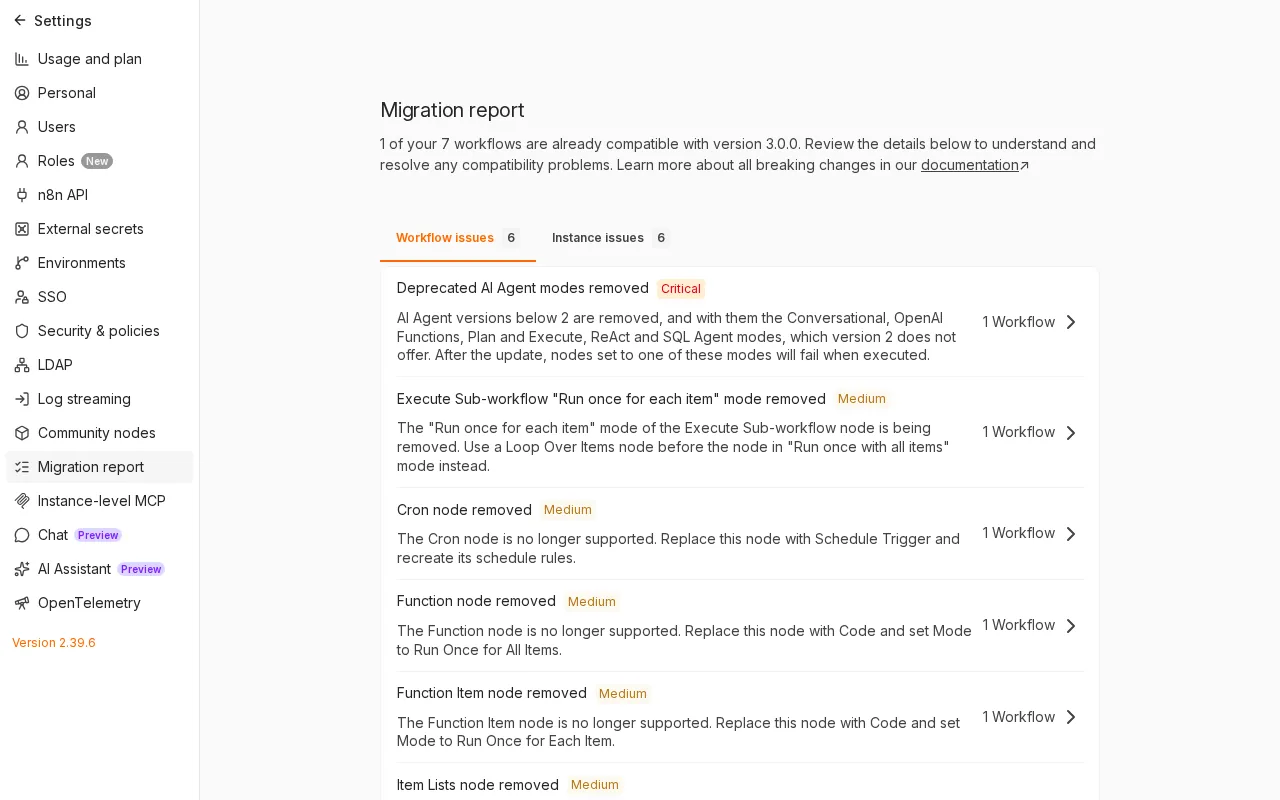
The workflow tab flagged 6 rules: removed AI Agent modes as critical, and the other five (Execute Workflow per item, Cron, Function, Function Item and Item Lists) as medium. The instance tab flagged another 6: SSRF, the directory rename and unverified packages as medium, and compression limits, the Code node timeout and import from URL as low.
The header says only 1 of the 7 workflows is compatible, but 3 were. The editor subtracts each rule’s affected workflows from the total, so the workflow with Function, Function Item and Item Lists counted three times. The API confirms it: the 6 rules point at 4 distinct workflows.
If you would rather check it from a script, the editor calls this endpoint of its internal API, which is not the public API and can change between versions. It needs an admin session cookie:
curl -s -b cookies.txt \
  "http://localhost:5678/rest/breaking-changes/report?version=v3" \
  | jq -r '.data.report.instanceResults[].ruleId'
The 2.39.6 startup log repeats part of the report. On boot it prints a "There are deprecations related to your n8n setup" block with one line per affected variable:
$ docker compose logs --no-log-prefix n8n \
    | grep -oE '^ - [A-Z0-9_]+' | sort -u
 - N8N_COMPRESSION_NODE_MAX_DECOMPRESSED_SIZE_BYTES
 - N8N_COMPRESSION_NODE_MAX_ZIP_ENTRIES
 - N8N_RUNNERS_MODE
 - N8N_RUNNERS_TASK_TIMEOUT
 - N8N_SSRF_PROTECTION_ENABLED
 - N8N_UNVERIFIED_PACKAGES_ENABLED
The N8N_RUNNERS_MODE line warns that internal task runner mode will go away "in a future version". It is not on the 3.0 list and the nightly still uses it, so I do not treat it as a blocker.
Step 2: replace the nodes that go away
3.0 does not load the removed nodes, and a published workflow that uses them stops responding. On the nightly, the webhook of the workflow with Function and Item Lists returned a 404 with the message Published version not found for workflow with id "b4p3legacy000001", and the log showed Unrecognized node type: n8n-nodes-base.cron.
The real list is longer than the documented one. The node catalogue shipped in each image (types/nodes.json) holds 565 types in 2.39.6 and 528 in the nightly: 37 are gone.
The 3.0 page names five. The report rules suggest a replacement for 28, among them Interval, Read Binary File, Write Binary File, Read PDF, HTML Extract, iCalendar and the old OpenAI node. Six of those 28 are AI nodes for Pinecone, Supabase and in-memory stores. These are the replacements the report suggests for the general-purpose ones:
| Removed node | Replacement |
|---|---|
| Function | Code, Run Once for All Items mode |
| Function Item | Code, Run Once for Each Item mode |
| Item Lists | Aggregate, Limit, Remove Duplicates, Sort, Split Out or Summarize |
| Cron and Interval | Schedule Trigger |
| Read Binary File(s) and Write Binary File | Read/Write Files from Disk |
| Convert to/from binary data | Convert to File or Extract From File |
| Read PDF | Extract From File |
| HTML Extract | HTML |
| Workflow Trigger | n8n Trigger |
| Execute Workflow per item | Loop Over Items plus Execute Workflow in "Run once with all items" |
| AI Agent below version 2 | Current AI Agent; Tools Agent mode behaves the same |
Moving from Function Item to Code changes the code: the item object becomes $json and the node must return $input.item. This is the per-item Code node I used as the replacement:
$json.double = $json.n * 2;
return $input.item;
After replacing the nodes in the 4 affected workflows, the test webhook returned {"n":3,"double":6}, the same as with the old nodes, on both 2.39.6 and the nightly.
Step 3: pin the variables whose default changes
Five defaults change in 3.0, and if you pin them now on 2.39.6 the upgrade will not move them. These are the lines I added to the service’s environment file (the guide on environment variables and secrets in Docker Compose has more context):
N8N_RUNNERS_TASK_TIMEOUT=300
N8N_UNVERIFIED_PACKAGES_ENABLED=false
N8N_COMPRESSION_NODE_MAX_DECOMPRESSED_SIZE_BYTES=268435456
N8N_COMPRESSION_NODE_MAX_ZIP_ENTRIES=1000
N8N_SSRF_BLOCKED_IP_RANGES=default,100.64.0.0/10
N8N_SSRF_ALLOWED_IP_RANGES=100.64.10.10/32
N8N_RUNNERS_TASK_TIMEOUT=300 keeps the current 5 minutes for the Code node. I measured it with a node that waits 75 s:
| Image | Variable | Result |
|---|---|---|
| 2.39.6 | Not set | 200 in 75.2 s |
| Nightly | Not set | 500 after 60.4 s |
| Nightly | 300 | 200 in 75.2 s |
The nightly logged Task execution timed out after 60 seconds. If your Code nodes finish within a minute, you can adopt the new value today.
The two compression lines adopt the new limits. If your archives exceed 256 MiB or 1000 entries, go back to the old values: 2147483648 and 5000. The false value for N8N_UNVERIFIED_PACKAGES_ENABLED is the 3.0 one, so leave it at true only if you use unverified community nodes.
Also check three variables I did not have. If you use N8N_DEFAULT_BINARY_DATA_MODE=default, change it to filesystem, s3, azure or database. When it is unset, 2.39.6 already uses filesystem in regular mode and database in queue mode, according to its code. 3.0 also removes OFFLOAD_MANUAL_EXECUTIONS_TO_WORKERS and stops reading N8N_DB_PING_TIMEOUT: use DB_PING_TIMEOUT_MS instead.
If you use Tailscale or Headscale with SSRF protection
This change only affects you if you turned on N8N_SSRF_PROTECTION_ENABLED, which is off by default and has existed since 2.12.0[4]. With protection on and the default keyword in the block list, 3.0 adds 100.64.0.0/10. That is the range Tailscale and Headscale use for their nodes’ IPv4 addresses, as the Headscale example configuration file[5] states.
The nightly cannot test this change: both the 16 September image and that day’s 3.x branch code carry the old 15-range list, without 100.64.0.0/10. So I rehearsed it on 2.39.6, adding the range by hand with N8N_SSRF_BLOCKED_IP_RANGES=default,100.64.0.0/10. The request to 100.64.10.10 failed with a 500 and this detail in the execution:
The target 100.64.10.10 is not allowed. This is a security measure to prevent Server-Side Request Forgery (SSRF). If you need to access internal resources, ask your n8n administrator to allowlist the hostname or IP range in the environment configuration.
With N8N_SSRF_ALLOWED_IP_RANGES=100.64.10.10/32 the same request returned 200 again. Allow only the hosts you call, or the whole 100.64.0.0/10 if you call the entire tailnet, and keep default in the block list, as the SSRF variables documentation[6] asks. Tailscale’s IPv6 addresses (fd7a:115c:a1e0::/48) already fall inside fd00::/8, which the current list blocks; I did not test that.
Why two notices stay in the report
After all the fixes, the report went to 7 of 7 compatible workflows, but the instance tab kept two notices:
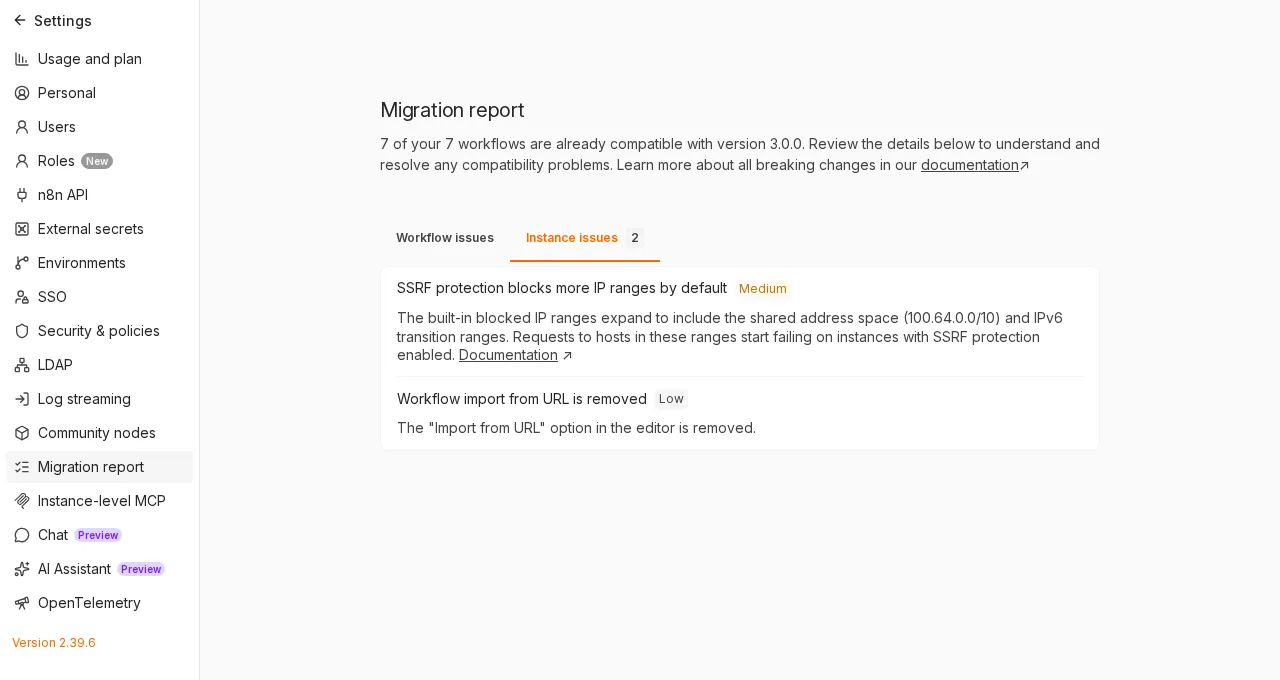
The SSRF rule only checks whether protection is on and whether the list contains default, so it keeps warning after you have allowed your hosts. The import-from-URL notice is informational and shows on every instance. Its "Documentation" link opens the general security variables page, which does not list the SSRF ones.
Step 4: move from binaryData to storage before 3.0 does
3.0 renames ~/.n8n/binaryData to ~/.n8n/storage on first start, and in two cases that rename stops n8n from starting. First look at what you have inside the container:
docker compose exec n8n ls /home/node/.n8n
If you see storage and no binaryData, there is nothing to do: a new volume created by 2.39.6 already uses storage. A volume created by an earlier version (I checked with one from 2.0.0) has binaryData, and 2.39.6 warns about it in the log with will be renamed to "/home/node/.n8n/storage" in n8n v3. To migrate now, set N8N_MIGRATE_FS_STORAGE_PATH=true.
If binaryData lives inside the main volume, start 2.39.6 once with N8N_MIGRATE_FS_STORAGE_PATH=true. In my test it renamed the directory without writing anything to the log and added "fsStorageMigrated": true to the volume’s config file. After I removed the variable and restarted, 2.39.6 kept writing to storage and did not recreate binaryData.
If you mount a volume or a host folder straight onto binaryData, as I did in the lab, the nightly stops with this error:
Failed to migrate /home/node/.n8n/binaryData to /home/node/.n8n/storage because /home/node/.n8n/binaryData is a mount point. Mount the volume at /home/node/.n8n/storage instead, or set N8N_STORAGE_PATH=/home/node/.n8n/binaryData to keep the current path.
Change the mount target in your compose.yml (the guide on volumes and bind mounts explains the difference between the two):
    volumes:
      - n8n_data:/home/node/.n8n
      - ./binarydata:/home/node/.n8n/storage
That is not enough on its own. Docker created an empty binaryData directory inside the main volume to use as a mount point, and that directory is still there. With the mount already moved, the nightly stopped with a second error:
Both /home/node/.n8n/binaryData and /home/node/.n8n/storage exist, so n8n cannot tell which one holds your data. Move the contents of /home/node/.n8n/binaryData into /home/node/.n8n/storage, remove /home/node/.n8n/binaryData, then start n8n again.
Remove it with the service stopped. rmdir only deletes empty directories, so if it fails there is data in there and you must move it first. Replace your_volume_name with the name docker volume ls shows:
docker compose stop n8n
docker run --rm -v your_volume_name:/data alpine:3 \
  rmdir /data/binaryData
docker compose up -d n8n
After the change, 2.39.6 still served the 200,015-byte file stored before the mount moved. New files were written to the same host folder.
Step 5: copy the instance and start the nightly on the copy
Any start of a newer version migrates the database, so you only try the nightly on a copy. With the service stopped, dump PostgreSQL and archive the n8n volume, which holds the config file with the credentials encryption key unless you set it with N8N_ENCRYPTION_KEY:
docker compose stop n8n
docker compose exec -T postgres pg_dump -U n8n -Fc n8n \
  > n8n-2.39.6.dump
docker run --rm -v your_volume_name:/from:ro \
  -v "$PWD":/to alpine:3 \
  tar -C /from -czf /to/n8n_data-2.39.6.tgz .
tar -C binarydata -czf binarydata-2.39.6.tgz .
docker compose start n8n
On my test instance the dump took 484 KB and 0.4 s, a figure that only describes this toy instance.
Restore the copy in a separate Compose project, with its own port and its own volumes, and point its n8n service at the test image. The v3-nightly tag changes every day; to repeat my test exactly, pin the digest n8nio/n8n@sha256:80dabb0dc7f691603c8f798df8d1770e47a40d78f40eb09972d4c82871a9729d, or use an immutable candidate such as v3-rc-20260914.2. To restore the database:
docker compose -p n8n-v3-test up -d --wait postgres
docker compose -p n8n-v3-test exec -T postgres \
  pg_restore -U n8n -d n8n --no-owner < n8n-2.39.6.dump
This is how the four lab webhooks compared. The middle column is a copy where I only moved the storage mount, so the nightly could start:
| Workflow | 2.39.6 | Nightly, unfixed | Nightly, fixed |
|---|---|---|---|
| Function, Function Item and Item Lists | 200 | 404 | 200 (Code and Limit) |
Request to 100.64.10.10 with SSRF on |
200 | 200 | 200 |
| Convert to file | 200 | 200 | 200 |
| Code that waits 75 s | 200 | 500 after 60.4 s | 200 |
On the fixed copy, the nightly applied 7 migrations and /healthz/readiness returned 200 after 6.50, 6.66 and 6.81 s across three clean restores (median 6.66 s). The machine’s load average sat between 28 and 30 on 18 cores, because other jobs shared it.
The nightly log says Recorded version change: 2.39.6 -> 2.39.0, and n8n --version returns 2.39.0. The 14 September candidate reports the same. Keep that in mind if your monitoring compares version numbers.
Why the way back has to come from the dump
A failed start of the nightly had already changed the database. On the first copy, the nightly stopped on the mount point error, but before that it applied 7 migrations. The migrations table went from 263 to 270 rows, and one of them, DropGitConnectionTables, dropped the git_connection and git_connection_project tables.
I then started 2.39.6 on that same database. It started, activated the 5 published workflows and logged no error, but the schema was no longer the one it had created. That is why setting the tag back to 2.39.6 is not enough: restore the dump and the volume.
docker compose stop n8n
docker compose exec -T postgres psql -U n8n -d postgres \
  -c "drop database n8n with (force)" \
  -c "create database n8n owner n8n"
docker compose exec -T postgres \
  pg_restore -U n8n -d n8n --no-owner < n8n-2.39.6.dump
Empty the n8n volume, extract n8n_data-2.39.6.tgz into it, keep the image at n8nio/n8n:2.39.6 and start. Pin the version in production too. The 2.0 page warned that the latest and next tags will be removed in a future major version. If you update with Watchtower on latest, you will either get 3.0 without choosing it or sit on a tag that no longer moves.
If you still run n8n with npm
3.0 will only run from the official image. On npm, latest and stable point to 2.39.6 and there is no 3.x, and the nightly’s package.json carries "private": true, the flag that stops a package from being published to npm. The n8n page promises a step-by-step guide it has not published yet.
The rule text in 2.39.6 gives the path: move to the official image before upgrading, "reusing your existing database and encryption key". The container runs n8n as the node user (uid 1000) with its data in /home/node/.n8n, so mount your ~/.n8n there with that owner, start the same version you had and upgrade afterwards. I did not test an npm install. The n8n Docker install guide we published in October 2025 predates 2.0, so use the n8n documentation for the Compose part.
What this test does not cover
The test ran on a nightly, not on the final 3.0, and the n8n page warns it will be updated "as n8n 3.0 approaches its release". I did not test these cases either:
- The IPv6 transition ranges 3.0 adds to the SSRF list
- Queue mode, where manual executions will always go to workers
- Task runners in external mode
- Chat Hub, community packages and
$getPairedItem - A real migration from npm
Open the report again after every 2.x update: 2.39.6 added the directory rename rule, and more can land before October. If you end up preferring to switch tools, there is a comparison of Activepieces and Windmill against n8n.
Frequently asked questions
When does n8n 3.0 come out?
There is no exact date. The breaking-changes page, checked on 16 September 2026, says "scheduled for October 2026", and the repository guide says "~October 2026".
Can I use the v3-nightly image in production?
No. The n8n repository guide rules it out explicitly, the tag changes every day, and the 16 September nightly does not include the 100.64.0.0/10 block yet.
Does the migration report catch every problem?
In my test it found the 4 affected workflows, although the header counted them as 6. It also does not check whether binaryData is a mount point, which is the case that stops n8n from starting, and the SSRF notice stays after you have allowed your hosts.
Conclusion
Preparing for n8n 3.0 is work you do today on 2.39.6: open the report, replace the removed nodes, pin the five defaults that change and move binaryData to storage. Then rehearse the nightly on a copy, which is not optional, because a failed start already migrates the database. Keep the dump, pin the version and run the report again when the final 3.0 ships. The Spanish version of this guide is at Cómo preparar tu n8n autoalojado para n8n 3.0.
Sources: [1] n8n Docs, v3.0 Breaking changes[2], [2] n8n, DEVELOPING_V3.md repository guide[7], [3] GitHub, n8n@2.39.6 release[8], [4] n8n Docs, install with Docker[1], [5] Docker Hub, n8nio/n8n image[9], [6] n8n Docs, v2.0 Migration tool[3], [7] n8n Docs, SSRF protection variables[6], [8] n8n Docs, enable SSRF protection[4], [9] Headscale, example configuration file[5].
Sources
Source code
Access all the source code for this post on GitHub.
View on GitHub