Upgrading to Podman 6: what breaks and how to check your host first
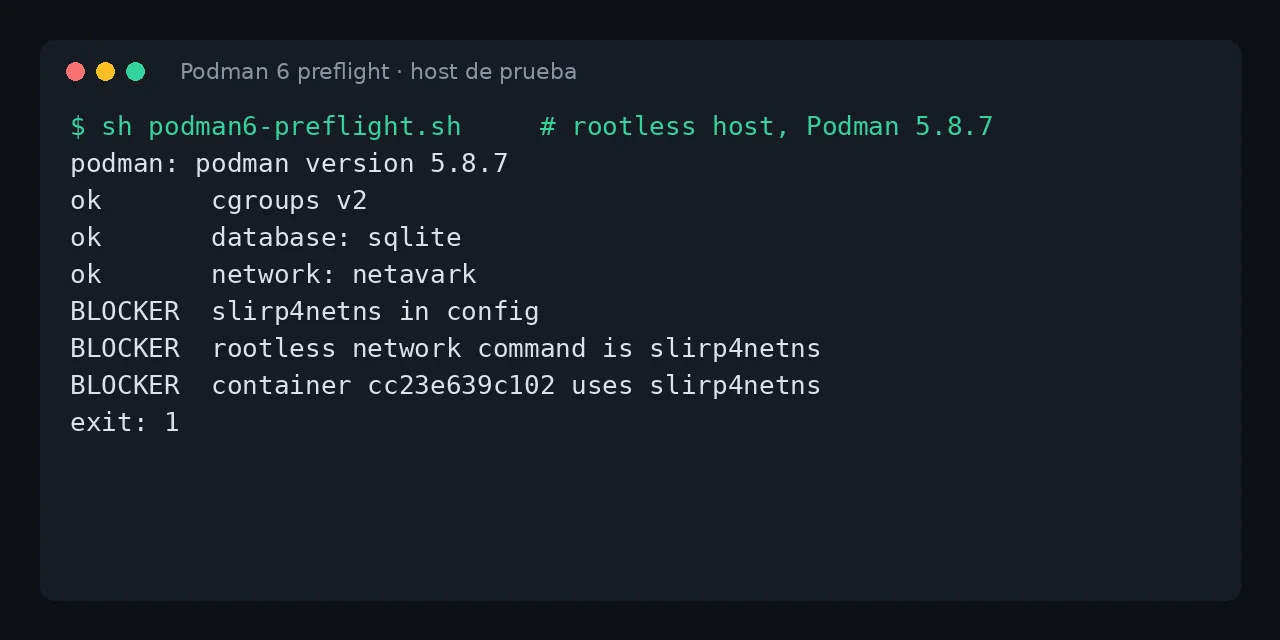
Table of contents
- Key takeaways
- What Podman 6 removes
- How I tested
- What happens to a BoltDB database
- What happens to CNI networks
- What happens to iptables
- What happens to slirp4netns and pasta
- What happens to Quadlet and podman compose
- The preflight script
- Recommended upgrade order
- Frequently asked questions
- Can I jump from Podman 4 straight to Podman 6?
- Do I lose my containers when BoltDB migrates to SQLite?
- Do I have to change my Quadlet files?
- Conclusion
- Sources
Podman 6, released on 24 June 2026, removes seven things at once: cgroups v1, CNI networking, iptables, slirp4netns, the BoltDB database, and support for Intel Macs and Windows 10. I tested Podman 6.1.3, the latest release as of 7 October 2026, against state created by Podman 4.9.4 and 5.8.7. BoltDB and slirp4netns take one command to fix, but a CNI network disappears with no warning. Below, each case is reproduced, plus a preflight script. If you are new to Podman, start with Podman: containers without a daemon or root. There is also a Spanish version.
Key takeaways
- The 6.0.0 release notes say: "Support for CNI networking has been removed. Please use Netavark instead." There are seven support removals and a rewrite of how configuration files are parsed.
- Podman 6.1.3 migrated a BoltDB state created by Podman 4.9.4 to SQLite with no extra steps: it kept the container, volume and network, and left the original as
bolt_state.db-old. - A CNI network is not migrated. With 6.1.3 the container stayed
Exitedandpodman startfailed withunable to find network with name legacy: network not found. - A rootless container created with
--network slirp4netnsdoes not start on Podman 6 until you runpodman system migrate. - Debian forky ships Podman 5.8.6, Ubuntu 26.04 ships 5.7.0 and Fedora 44 ships 5.8.7: of those I checked, only Fedora 45, still in preparation, packages Podman 6.1.3.
What Podman 6 removes
The 6.0.0 release notes[1] list the breaking changes. These are the ones that touch a Linux server:
| Removed | Use instead | Who notices |
|---|---|---|
| cgroups v1 | cgroups v2 | Old distributions or systemd.unified_cgroup_hierarchy=0 |
| CNI (Container Network Interface) | Netavark | Networks created with Podman 3 or 4 that were never migrated |
| iptables | nftables | Anyone who sets NETAVARK_FW=iptables |
| slirp4netns | pasta | Rootless containers using --network slirp4netns |
| BoltDB | SQLite | Old state that was never migrated |
| Intel Mac, Windows 10 | Current hardware and OS | Anyone using podman machine |
The parsing of containers.conf, storage.conf and registries.conf was also rewritten around one search-and-merge logic. Podman 6.0.0 requires specific versions of the other tools: Buildah 1.44.0, Skopeo 1.23, and Netavark and Aardvark 2.0.0. The same release makes podman volume prune remove only unused anonymous volumes, as Docker does; the old behaviour needs --all.
You probably meet three of these already if your distribution is recent. Fedora 44 and Debian trixie boot with cgroups v2. In my tests, Netavark 1.17.2 (Fedora 44) and 1.14.0 (Debian trixie, with Podman 5.4.2) created the nftables inet netavark table with no configuration.
How I tested
Everything ran on 7 October 2026 on Docker Engine 29.5.2, arm64, kernel 7.0.14.
The official quay.io/podman/stable image was still on Podman 5.8.7 with no version 6 tags. I built two Fedora images: fedora:44 with Podman 5.8.7 and fedora:45 with Podman 6.1.3, Netavark 2.1.0, aardvark-dns 2.1.0, passt 20261002 and crun 1.30.1. For the old state I used quay.io/podman/stable:v4.9.4. Containers ran with --privileged and systemd as process 1; storage and networks lived on Docker volumes so the same state passed from one version to the next.
FROM fedora:45
RUN dnf -y install podman podman-compose netavark aardvark-dns passt \
    systemd nftables iptables-nft shadow-utils jq procps-ng iproute \
    iputils curl-minimal fuse-overlayfs crun
RUN useradd -m app
CMD ["/sbin/init"]
The Fedora image leaves newuidmap without the permissions rootless needs; run chmod u+s /usr/bin/newuidmap /usr/bin/newgidmap.
What happens to a BoltDB database
Podman 4.9.4 can still create BoltDB if you ask for it in containers.conf; Podman 5.8.7 cannot (the BoltDB backend has been deprecated, no new BoltDB databases can be created). So I created the state with 4.9.4:
printf '[engine]\ndatabase_backend="boltdb"\n' \
  > /etc/containers/containers.conf.d/50-bolt.conf
podman volume create data
podman network create appnet
podman run -d --name web --network appnet -v data:/usr/share/nginx/html \
  -p 8081:80 nginx:alpine
podman exec web sh -c \
  'echo hello-from-podman4 > /usr/share/nginx/html/index.html'
podman stop web
Then I mounted the same storage (/var/lib/containers) and networks (/etc/containers/networks) in the image with Podman 6.1.3. First command, podman ps -a:
Old database has been renamed to
/var/lib/containers/storage/libpod/bolt_state.db-old
and will no longer be used
web Exited (0) 6 seconds ago appnet
Podman 6.1.3 renamed bolt_state.db to bolt_state.db-old (131,072 bytes) and created /var/lib/containers/storage/db.sql (122,880 bytes). podman info switched to sqlite. The container, the data volume and the appnet network were all still there; podman start web started it and podman exec web cat /usr/share/nginx/html/index.html returned hello-from-podman4. Podman 5.8.7 did the same with the same state, so the migration is not new in 6.
Copy /var/lib/containers/storage (or ~/.local/share/containers/storage if rootless) before the first start. If the migrated state turns out wrong, the -old file is your only way back.
What happens to CNI networks
This is the real risk. To build a CNI network I used Podman 4.9.4 with the containernetworking-plugins 1.3.0 package and network_backend="cni". podman info said net=cni, the legacy network landed in /etc/cni/net.d/legacy.conflist and the web container ran on it. Then I stopped it and opened the same state with Podman 6.1.3, leaving the configuration alone:
$ podman network ls
NETWORK ID    NAME        DRIVER
2f259bab93aa  podman      bridge
$ podman start web
Error: unable to start container "84097e20...":
unable to find network with name legacy: network not found
Podman 6 does not warn that CNI networks exist: it uses Netavark, cannot see the conflist, and the legacy network is gone. The file stays in /etc/cni/net.d, unused. If you force network_backend="cni", Podman 6.1.3 answers unsupported network backend "cni", only netavark is supported, and Fedora’s build of Podman 5.8.7 already said cni support is not enabled in this build.
The way out is to recreate each network with the same range, read from the conflist:
SUB=$(jq -r '.plugins[]|select(.type=="bridge")|.ipam.ranges[0][0].subnet' \
  /etc/cni/net.d/legacy.conflist)
podman network create --subnet "$SUB" legacy
podman start web
With 10.89.0.0/24 the container started, got 10.89.0.2 and answered 200 on the published port. If your containers used CNI’s default podman network and never created their own, there is nothing to recreate.
What happens to iptables
Netavark 2.1.0 accepts only nftables. With NETAVARK_FW=iptables, Podman 6.1.3 failed with netavark: Must provide a valid firewall backend, got iptables. In the same environment, Podman 5.8.7 with Netavark 1.17.2 did create rules in the ip nat and ip filter tables when I set that variable.
Look for it in a .env file, a systemd unit or containers.conf (firewall_driver). If you never set it, nothing changes: the inet netavark table already existed with Podman 5.
What happens to slirp4netns and pasta
Rootless, Podman 6.1.3 reports RootlessNetworkCmd as pasta, and a container with -p 8090:80 answered 200 on 127.0.0.1:8090. The process forwarding the port is pasta:
/usr/sbin/pasta --config-net -t 8090-8090:80-80 --dns-forward 169.254.1.1 ...
Inside the container, pasta copies the host’s address (172.17.0.2/16, that of my test container) instead of creating its own subnet; that is the design of pasta[2], not a fault. Asking for slirp4netns fails at once:
$ podman run --rm --network slirp4netns alpine true
Error: slirp4netns support has been removed, use
--network=pasta instead; for existing containers,
run `podman system migrate`
For a container that already existed, I created one with Podman 5.8.7 (podman create --network slirp4netns) and opened it with 6.1.3. podman start gave slirp4netns support has been removed, run 'podman system migrate' to update this container to use pasta. After podman system migrate, podman inspect showed pasta in HostConfig.NetworkMode.
The later start of the migrated container failed because of the other image’s runtime directory, a quirk of my two-image setup. I do not attribute it to Podman. A clone made with podman container clone did start.
What happens to Quadlet and podman compose
I tested both rootless on Podman 6.1.3. For Quadlet, these two files in ~/.config/containers/systemd/ generated and started the units unchanged:
# hello-data.volume
[Volume]
UID=101
GID=101

# hello.container
[Container]
Image=nginx:alpine
PublishPort=8094:80
Network=pasta
Volume=hello-data.volume:/usr/share/nginx/html:Z

[Install]
WantedBy=default.target
systemctl --user daemon-reload and systemctl --user start hello.service left the unit active, port 8094 answered 200 and podman quadlet list showed hello.container ... active/running. The UID= and GID= keys in .volume are new in Podman 6.0.0. I got one thing wrong: I wrote Volume=hello-data: without .volume and Podman created a plain volume instead of using the Quadlet one. The Quadlet file documentation[3] is clear about it; the suffix is what links the two.
For podman compose, a file with an nginx service that depends on another one:
podman compose up -d
curl -s -o /dev/null -w "%{http_code}\n" http://127.0.0.1:8095/
podman exec stack_web_1 getent hosts api
podman compose hands off to an external provider; here it was podman-compose 1.6.0 and it says so with Executing external compose provider "/usr/sbin/podman-compose". With the file as written, podman compose up -d grouped the services in a pod and failed with unable to create pod cgroup ... was already loaded or has a fragment file.
A bare podman pod create failed the same way with the systemd cgroup manager and worked with --cgroup-manager=cgroupfs. That points at my environment, systemd inside a Docker container, and not at Podman 6; I did not test on a physical server.
I added x-podman: with in_pod: false at the top of the file. Then both services started, port 8095 answered 200 and getent hosts api returned 10.89.0.2 api.dns.podman. If you use Compose on Docker, the article on Docker Compose 5.5 covers the other side of this migration.
The preflight script
I put all of the above into a read-only script, 38 lines of sh. Run it as root and as each rootless user:
#!/bin/sh
warn=0
bad() { echo "BLOCKER  $*"; warn=1; }
ok()  { echo "ok       $*"; }
pi()  { podman info --format "$1" 2>/dev/null; }
echo "podman: $(podman --version)"

fs=$(stat -fc %T /sys/fs/cgroup)
[ "$fs" = cgroup2fs ] && ok "cgroups v2" || bad "cgroups v1 ($fs)"

db=$(pi '{{.Host.DatabaseBackend}}')
[ "$db" = sqlite ] && ok "database: sqlite" \
  || echo "migrate  database: $db (back up first)"

nb=$(pi '{{.Host.NetworkBackend}}')
[ "$nb" = netavark ] && ok "network: netavark" || bad "network: $nb"
for d in /etc/cni/net.d "$HOME/.config/cni/net.d"; do
  ls "$d"/*.conflist >/dev/null 2>&1 && bad "CNI networks in $d"
done
Second half: it looks for settings in the configuration files and checks existing containers.
conf() {
  grep -rEs "$1" /etc/containers /usr/share/containers \
    "$HOME/.config/containers" | grep -vE '^[^:]*:[[:space:]]*#' || true
}
chk() { hits=$(conf "$1"); [ -n "$hits" ] && { echo "$hits"; bad "$2"; }; }
[ "$NETAVARK_FW" = iptables ] && bad "NETAVARK_FW=iptables"
chk '^\s*firewall_driver\s*=\s*"?iptables' "firewall_driver iptables"
chk 'network_backend\s*=\s*"?cni' "network_backend cni in config"
chk 'slirp4netns|network_cmd_path' "slirp4netns in config"

[ "$(pi '{{.Host.RootlessNetworkCmd}}')" = slirp4netns ] \
  && bad "rootless network command is slirp4netns"
for c in $(podman ps -a -q); do
  m=$(podman inspect --format '{{.HostConfig.NetworkMode}}' "$c")
  case "$m" in slirp4netns*) bad "container $c uses $m";; esac
done
echo "exit: $warn"
exit $warn
I ran it against four different states.
- On a clean Podman 6.1.3 it printed
exit: 0. - On Podman 4.9.4 with CNI it flagged
BLOCKER network: cni, theconflistand thenetwork_backendsetting. - On the BoltDB state with
NETAVARK_FW=iptablesit reportedmigrate database: boltdband the iptables blocker. - On Podman 5.8.7 with a slirp4netns container it raised three blockers; that is the cover image.
The script does not see other users’ containers, nor configuration outside /etc/containers, /usr/share/containers and ~/.config/containers.
Recommended upgrade order
- Run the script as root and as each rootless user.
- Copy
/var/lib/containers/storageand~/.local/share/containers/storage. - Recreate CNI networks on Netavark and drop
NETAVARK_FW=iptables. - Upgrade the package. On Fedora and Debian that means the package manager; there is no version 6
quay.io/podman/stableimage as of 7 October 2026. - Run
podman system migrateas each rootless user if you had slirp4netns containers. - Start the containers and check Quadlet units with
podman quadlet list.
Release 6.1.3, from 29 September 2026, fixes CVE-2026-94603 and removes podman run on checkpoint images. If you use checkpoints, read the notes for that release[4].
Frequently asked questions
Can I jump from Podman 4 straight to Podman 6?
For state, yes in my test: a BoltDB store created by 4.9.4 migrated to SQLite on 6.1.3 without passing through 5. The CNI network is what you cannot skip; you recreate it by hand.
Do I lose my containers when BoltDB migrates to SQLite?
No: in my test the container, the volume and the network were still there and the volume kept its content. The backup is still needed, because the migration is one-way and Podman never reads the bolt_state.db-old file again.
Do I have to change my Quadlet files?
Mine, with Network=pasta, PublishPort and a volume linked through .volume, needed no changes. Check only those using Network=slirp4netns: or slirp4netns options, and those that depend on how podman quadlet install lays out files, which changed in 6.0.0.
Conclusion
Podman 6 is a major version with limited consequences if your host is recent: in my tests BoltDB and slirp4netns took one command, and Quadlet and podman compose worked. The exception is CNI, because the network vanishes with no warning. Before you upgrade, run the script, copy the storage and recreate the networks.
Sources: [1] Podman 6.0.0 release notes[1], [2] 6.1.3 release notes[4], [3] Quadlet files (podman-systemd.unit)[3], [4] podman compose[5], [5] passt and pasta[2], [6] Podman on Debian forky[6], [7] Netavark[7].