How to run Grafana Tempo 3.1 with Docker Compose and Alloy
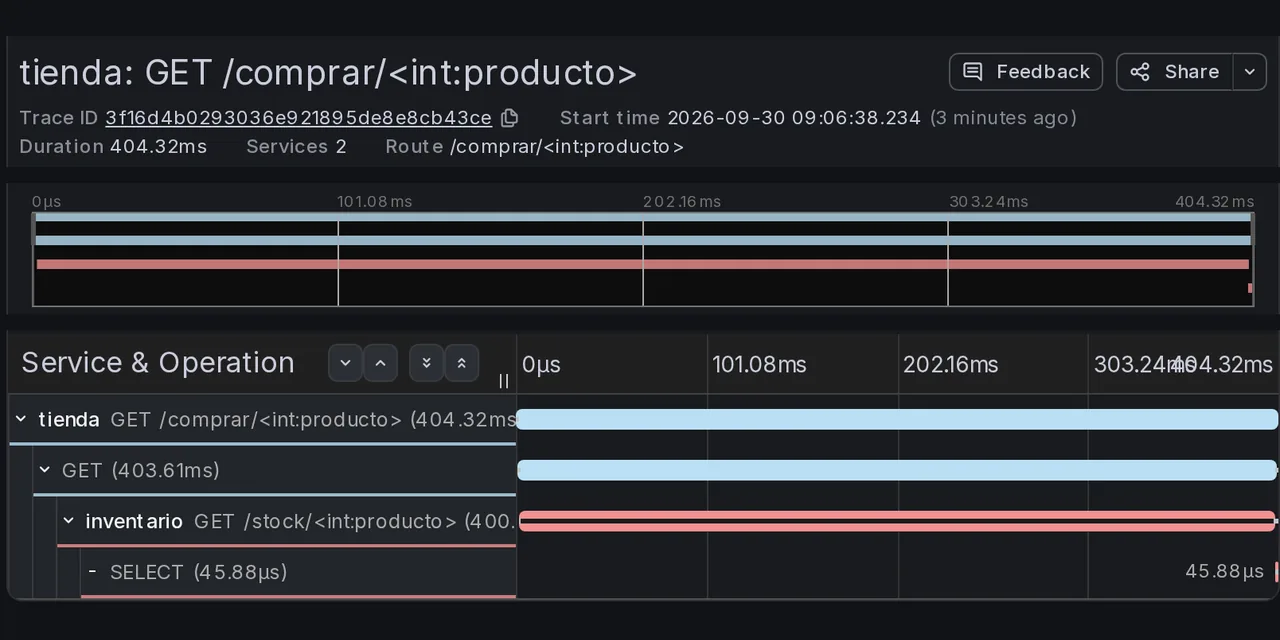
Table of contents
- Key takeaways
- What changes in Tempo 3.1 compared with 3.0
- What I built and which versions
- How to configure Tempo 3.1 in monolithic mode
- How Alloy receives traces and forwards them to Tempo
- The docker-compose.yml for the tracing stack
- How to instrument a Python app without touching its code
- Which TraceQL queries I ran and what they returned
- How to compute an error rate with TraceQL metrics arithmetic
- Service graph and span metrics with the metrics-generator
- How to upgrade from Tempo 2.x to 3.1
- What I did not test
- Frequently asked questions
- Do I need Kafka to run Grafana Tempo 3 with Docker?
- Can I send traces to Tempo without Alloy?
- Do I have to convert my vParquet4 blocks to vParquet5?
- Conclusion
- Sources
Grafana Tempo 3.1 runs in Docker Compose as a single container in monolithic mode, with no Kafka, and receives your applications’ traces through Grafana Alloy. I built the whole stack on 30 September 2026 with Tempo 3.1.0, Alloy v1.20.1, Grafana 13.2.3 and Prometheus 3.15.0, and sent it 1225 requests from a sample Flask shop instrumented with OpenTelemetry. Below are the files I used, the TraceQL queries I ran with their results, and what I hit when migrating a Tempo 2.10 config. There is also a Spanish version of this guide.
Key takeaways
- Tempo 3.1.0 writes new blocks as vParquet5 and still reads vParquet4 and vParquet3 with no data migration; with
vParquet3set as the write format it no longer starts. - Monolithic mode needs no Kafka: one container with
-target=all, local storage and the metrics-generator enabled covers a lab or a small server. - 3.1 supports arithmetic in TraceQL metrics: one query divided the inventory service’s errors by its requests and returned 0.047.
- The metrics-generator created the span metrics and the service graph in Prometheus, with the SQLite database as its own node.
- When migrating from 2.x,
tempo-cli migrate configrefuses to work on old-format overrides and does not removetraces_storage: two blocks need a manual edit first. After the upgrade, all 200 traces written by 2.x were readable with no conversion. - Two Python SDK traps: without
OTEL_EXPORTER_OTLP_PROTOCOLthe app starts with no traces, and sqlite3’sConnection.execute()produces no spans.
What changes in Tempo 3.1 compared with 3.0
Tempo 3.1 is a minor release on top of 3.0, the release that changed the architecture.
3.0.0, published on 28 May 2026[1], removed the ingesters. In microservices mode the distributors write to Kafka, and two new components (block-builder and live-store) build the blocks and serve recent data. The compactor gave way to a backend-scheduler and a backend-worker. Monolithic mode needs no Kafka, because the distributor hands spans straight to the live-store inside the same process.
On that base, the 3.1.0 release notes[2] highlight four changes you will notice in a small deployment:
- vParquet5 by default: new blocks are written as vParquet5 (previously vParquet4)
- Arithmetic in TraceQL metrics:
+,-,*and/between aggregations in a single query - Sampling-aware extrapolation: the
with(extrapolate=true)hint corrects counts using the sampling probability the span carries intracestate - Redaction by query: redaction jobs accept a TraceQL selector instead of a list of trace IDs
The format change needs no migration. In the changelog’s words: "No data migration is required. After upgrading, Tempo writes new blocks in vParquet5 while continuing to read existing vParquet4 and vParquet3 blocks." In my lab, the 15 blocks Tempo wrote carry "format":"vParquet5" in their meta.json and took 2.9 MB after the 1225 requests.
What I built and which versions
The lab runs on Docker 29.5.2 with Compose 2.40.3 on an 18-core arm64 Linux machine shared with other jobs. Every image has an arm64 variant, and these were the versions on 30 September 2026:
| Piece | Image | Role |
|---|---|---|
| Tempo | grafana/tempo:3.1.0 |
Stores and queries traces |
| Alloy | grafana/alloy:v1.20.1 |
Receives OTLP and forwards it |
| Prometheus | prom/prometheus:v3.15.0 |
Stores the generator’s metrics |
| Grafana | grafana/grafana:13.2.3 |
Explores traces and metrics |
| Sample app | python:3.13-slim + OTel SDK 1.45.0 |
Generates traces |

The app is two Flask services: tienda (the shop) serves /comprar/<producto> and calls inventario (the inventory), which queries a SQLite table. The inventory fails on purpose on 5 % of requests and takes 0.4 s longer for products that are multiples of 10, so there are errors and slow traces to look for. Grafana queries Tempo and Prometheus separately; the diagram simplifies that part.
Tempo’s official example, in the repository’s example/docker-compose folder[3], also uses Alloy. At the v3.1.0 tag it still pins the Tempo 3.0.0 images, so change the tag by hand.
How to configure Tempo 3.1 in monolithic mode
Tempo in monolithic mode needs four configuration blocks: the OTLP receiver, the metrics-generator, storage, and the overrides that enable the processors. This is the tempo.yaml I used:
stream_over_http_enabled: true
server:
  http_listen_port: 3200

distributor:
  receivers:
    otlp:
      protocols:
        grpc:
          endpoint: "0.0.0.0:4317"

metrics_generator:
  registry:
    external_labels:
      source: tempo
  storage:
    path: /var/tempo/generator/wal
    remote_write:
      - url: http://prometheus:9090/api/v1/write
        send_exemplars: true
The distributor only listens for OTLP over gRPC on port 4317, because Alloy is the only thing sending it data. stream_over_http_enabled lets Grafana receive search results as a stream. The metrics-generator computes metrics from the spans and writes them to Prometheus through remote write.
The second half sets local disk storage and enables the generator’s two processors in the default overrides:
storage:
  trace:
    backend: local
    wal:
      path: /var/tempo/wal
    local:
      path: /var/tempo/blocks

overrides:
  defaults:
    metrics_generator:
      processors: ["span-metrics", "service-graphs"]

usage_report:
  reporting_enabled: false
There is no ingester: or compactor: block, and the block format is absent because vParquet5 is already the default. Default retention is 336 hours (14 days) according to the configuration reference[4]; in 3.x you change it under backend_worker.compaction.block_retention. usage_report turns off anonymous usage statistics sent to Grafana Labs.
How Alloy receives traces and forwards them to Tempo
Alloy acts as the OpenTelemetry collector between your applications and Tempo: it receives OTLP over gRPC and HTTP, batches the spans and sends them to Tempo. Your applications never need Tempo’s address, and you get a single place to add filtering or sampling. config.alloy chains three components:
otelcol.receiver.otlp "apps" {
  grpc { endpoint = "0.0.0.0:4317" }
  http { endpoint = "0.0.0.0:4318" }
  output { traces = [otelcol.processor.batch.default.input] }
}

otelcol.processor.batch "default" {
  output { traces = [otelcol.exporter.otlp.tempo.input] }
}

otelcol.exporter.otlp "tempo" {
  client {
    endpoint = "tempo:4317"
    tls { insecure = true }
  }
}
otelcol.receiver.otlp opens ports 4317 and 4318, otelcol.processor.batch groups spans, and otelcol.exporter.otlp sends them to Tempo without TLS, which is acceptable only because both share Compose’s internal network. If you already run Alloy for logs, this block adds to your existing config; the migration from Promtail to Grafana Alloy explains how to get there.
The docker-compose.yml for the tracing stack
The Compose file has four services and one volume for Tempo’s data. It publishes ports on 127.0.0.1 only: neither Tempo nor Alloy has authentication in this setup. The first half starts Tempo and Alloy:
services:
  tempo:
    image: grafana/tempo:3.1.0
    command: ["-target=all", "-config.file=/etc/tempo.yaml"]
    volumes:
      - ./tempo.yaml:/etc/tempo.yaml:ro
      - tempo-data:/var/tempo
    ports:
      - "127.0.0.1:3200:3200"

  alloy:
    image: grafana/alloy:v1.20.1
    command: ["run", "/etc/alloy/config.alloy",
              "--server.http.listen-addr=0.0.0.0:12345"]
    volumes:
      - ./config.alloy:/etc/alloy/config.alloy:ro
    ports:
      - "127.0.0.1:12345:12345"
    depends_on: [tempo]
-target=all runs every component in one process. Alloy’s web UI, on port 12345, shows the component graph and its health. The second half adds Prometheus with the remote write receiver enabled and Grafana with anonymous access:
  prometheus:
    image: prom/prometheus:v3.15.0
    command: ["--config.file=/etc/prometheus/prometheus.yml",
              "--web.enable-remote-write-receiver",
              "--enable-feature=exemplar-storage"]
    volumes:
      - ./prometheus.yml:/etc/prometheus/prometheus.yml:ro

  grafana:
    image: grafana/grafana:13.2.3
    environment:
      GF_AUTH_ANONYMOUS_ENABLED: "true"
      GF_AUTH_ANONYMOUS_ORG_ROLE: Admin
    volumes:
      - ./grafana-datasources.yaml:/etc/grafana/provisioning/datasources/ds.yaml:ro
    ports:
      - "127.0.0.1:3000:3000"

volumes:
  tempo-data:
Anonymous admin access is fine for a local lab and nothing else. On a real server, follow the guide to installing Grafana with Docker with a user and password. prometheus.yml only needs one job that scrapes Tempo’s metrics at tempo:3200; if Prometheus is new to you, installing Prometheus with Docker covers the basics.
The Tempo data source in Grafana is provisioned from a YAML file. serviceMap tells Grafana which Prometheus holds the service graph metrics:
apiVersion: 1
datasources:
  - name: Prometheus
    type: prometheus
    uid: prometheus
    url: http://prometheus:9090
  - name: Tempo
    type: tempo
    uid: tempo
    url: http://tempo:3200
    isDefault: true
    jsonData:
      serviceMap:
        datasourceUid: prometheus
      streamingEnabled:
        search: true
        metrics: true
Start everything with docker compose up -d and check that Tempo answers. /ready returned ready and /api/status/buildinfo confirmed the version:
$ curl -s localhost:3200/api/status/buildinfo
{"version":"v3.1.0","revision":"77fc4563d","branch":"HEAD",
 "buildUser":"","buildDate":"","goVersion":"go1.27.1"}
How to instrument a Python app without touching its code
OpenTelemetry’s automatic instrumentation for Python wraps Flask, requests and sqlite3 from the outside: you install the packages and start the app with opentelemetry-instrument. The zero-code instrumentation docs[5] describe it in more detail. The app’s Dockerfile installs these versions:
flask==3.1.3
requests==2.34.2
opentelemetry-distro==0.66b0
opentelemetry-exporter-otlp-proto-http==1.45.0
opentelemetry-instrumentation-flask==0.66b0
opentelemetry-instrumentation-requests==0.66b0
opentelemetry-instrumentation-sqlite3==0.66b0
The shop’s Compose service passes the configuration through environment variables; the inventory’s is identical with a different OTEL_SERVICE_NAME:
  tienda:
    build: ./app
    command: ["opentelemetry-instrument", "flask", "--app", "tienda",
              "run", "--host", "0.0.0.0", "--port", "8000"]
    environment:
      OTEL_SERVICE_NAME: tienda
      OTEL_EXPORTER_OTLP_ENDPOINT: http://alloy:4318
      OTEL_EXPORTER_OTLP_PROTOCOL: http/protobuf
      OTEL_METRICS_EXPORTER: none
      OTEL_LOGS_EXPORTER: none
I hit two traps, and neither shows up as an error in the requests:
- Without
OTEL_EXPORTER_OTLP_PROTOCOL, the app starts with no traces. The default exporter is gRPC; since I only installed the HTTP one, startup printsRuntimeError: Requested component 'otlp_proto_grpc' not found in entry point 'opentelemetry_traces_exporter'andFailed to auto initialize OpenTelemetry, yet Flask keeps serving requests as if nothing happened. - sqlite3’s
Connection.execute()produces no spans. The instrumentation wraps the connection but only traces queries issued from a cursor. Withdb.execute(...)the first 600 requests left not a single database span; after switching tocursor.execute(...)theSELECTspan showed up withdb.system = sqlite.
The second trap also empties the service graph, because without that span Tempo has no way to know the inventory uses a database. For the broader OpenTelemetry picture, the article on how it unifies logs, metrics and traces is a good introduction.
Which TraceQL queries I ran and what they returned
TraceQL filters spans by attributes, status, duration and their relationships. I ran these queries against the search API (/api/search) and in Grafana’s editor, over the traces from the last 15 minutes:
| Query | What it finds | Result |
|---|---|---|
{ resource.service.name = "inventario" && status = error } |
Inventory spans with an error | 53 traces |
{ span.http.route = "/stock/<int:producto>" && duration > 300ms } |
Slow calls to the inventory | 100, the requested limit |
{ resource.service.name = "tienda" } >> { span.db.system = "sqlite" } |
Traces where the shop reaches down to SQLite | 5, the requested limit |
{ span.http.status_code = 502 } >> { status = error } |
502 responses with an error below them | 53 traces |
{ resource.service.name = "inventario" && status = error } && { span.db.system = "sqlite" } |
Error and query in the same trace | 0 traces |
The >> operator requires the second span to descend from the first, and && between two spansets requires both to appear in the same trace. The last query returned zero because the inventory fails before it queries the database: TraceQL confirms the code’s logic without reading it. The featured image is one of those slow traces, with its four cascading spans.
How to compute an error rate with TraceQL metrics arithmetic
TraceQL metrics turns a query into a time series, and 3.1 lets you combine two of them with arithmetic operators. This instant query over the last 30 minutes divides the inventory’s server spans with an error by all of its server spans:
({ resource.service.name = "inventario" && span:kind = server
   && status = error } | count_over_time())
/
({ resource.service.name = "inventario" && span:kind = server }
   | count_over_time())
Tempo returned a single series labelled (count_over_time / count_over_time) with a value of 0.047. The two queries on their own gave 54 errors and 1143 spans, and 54 divided by 1143 gives the same 0.047, close to the 5 % failure rate I programmed. Before 3.1 that division needed two queries and a transformation in Grafana.
The 3.1 release notes in the docs[6] combine the arithmetic with with(extrapolate=true) to correct for sampling. My lab does no sampling, so the hint changes nothing. According to those notes, at 10 % sampling { } | rate() would show about 50 spans per second when real traffic is 500.
Service graph and span metrics with the metrics-generator
The metrics-generator reads every span at ingest and writes two metric families to Prometheus: traces_spanmetrics_* (calls, latency and size per service and operation) and traces_service_graph_* (requests between services). After the 1225 requests, this Prometheus query returned the graph’s three edges:
sum by (client, server, connection_type)
  (traces_service_graph_request_total)
| Client | Server | Type | Requests |
|---|---|---|---|
| user | tienda | virtual_node | 1225 |
| tienda | inventario | (regular) | 1225 |
| inventario | sqlite | database | 600 |
The inventario → sqlite edge only counts 600 because the database span appeared after the switch to a cursor, in the second batch. Tempo recognises a database when a client-kind span carries db.namespace, db.name, db.system or db.system.name, according to the service graph page[7]. Python’s sqlite3 instrumentation still emits the old db.system name, and Tempo accepts it.
In Grafana, the Service Graph tab in Explore draws the graph from those metrics, plus a table of rate, errors and duration per operation. The traces_spanmetrics_calls_total metrics showed 56 inventory spans with an error and 1169 without.
How to upgrade from Tempo 2.x to 3.1
The official guide to migrate from Tempo 2.x to 3.0[8] separates two paths. In monolithic mode you migrate the config and swap the image; in microservices mode you deploy 3.x in parallel with Kafka and switch traffic over. There is no way back: the guide warns that there is no in-place downgrade from 3.0 to 2.x.
I tested it with a monolithic Tempo 2.10.8 configured with the usual 2.x pieces: ingester: and compactor: blocks, the local-blocks processor and overrides in the old flat format. Starting the 3.1.0 image with that file, Tempo stopped while reading the config:
failed parsing config: failed to parse configFile /etc/tempo.yaml:
  line 12: field ingester not found in type app.Config
  line 15: field compactor not found in type app.Config
  line 22: field traces_storage not found in type generator.Config
The intended tool is tempo-cli migrate config, from the grafana/tempo-cli:3.1.0 image. With my file it failed twice before it worked:
- With flat overrides (
metrics_generator_processors) it answerslegacy overrides format detected ... run 'tempo-cli migrate overrides-config' first. But 3.1’smigrate overrides-configcannot read a file containingingester:either. Break the loop by rewriting the overrides by hand in the scoped format (overrides.defaults.metrics_generator.processors), which 2.x already accepts. - With the overrides fixed, it fails with
field traces_storage not found: the tool removeslocal-blocksbut not itsmetrics_generator.traces_storageblock. Delete it by hand.
On the third attempt the tool reported that it had removed ingester, compactor and the local-blocks processor, and it added compaction_disabled: true. That setting exists for running alongside a parallel 2.x; in monolithic mode remove it, or Tempo will not compact. It also drops the 48-hour retention the compactor: block had: set it again under backend_worker.compaction.block_retention, or it becomes 336 hours.
Also review these 3.0 and 3.1 changes before upgrading:
- vParquet3: if your config sets it as the write format, 3.1 does not start; change it to vParquet4 or remove the line
- OpenCensus receiver: removed in 3.0; clients must send OTLP
- SSB mode (scalable single binary): removed; pick monolithic or microservices
- Redis cache: rewritten in 3.1, with Redis Cluster as the default and Sentinel removed
query_shards: replaced byblocks_per_shardfor trace-by-ID lookups
With the migrated config, Tempo 3.1 started on the same volume 2.10.8 had used. All 200 traces 2.x had written, in one vParquet4 block, came back by ID, and the 100 new traces landed next to them in a vParquet5 block.
There were two caveats. Right after the upgrade, search returned none of the old traces. Time ranges more recent than query_backend_after (15 minutes by default) are searched in the live-store only, and the live-store does not hold what 2.x ingested. Once those 15 minutes passed, the same search returned all 300 traces.
The migration guide warns about the second one: TraceQL metrics only reads blocks with replication factor 1, and a count_over_time() on the shop counted 100 spans, only the ones after the upgrade.
What I did not test
Everything above is a monolithic deployment with local storage on a single arm64 machine. I did not test microservices mode with Kafka, an S3 backend, the Redis cache or redaction by query. I also give no latency or memory figures: the machine was running other jobs at the same time, and any timing would be contaminated. The durations visible in the featured image mostly reflect the 0.4 s pause I put in the code.
If you would rather run one tool for logs, metrics and traces instead of four containers, installing OpenObserve with Docker is the alternative I have tested. To see how Tempo fits with Loki and Mimir, there is the overview of the Grafana observability stack.
Frequently asked questions
Do I need Kafka to run Grafana Tempo 3 with Docker?
Not in monolithic mode. The migration guide says so explicitly: monolithic mode does not require Kafka, because the distributor hands spans to the live-store and the metrics-generator inside the same process. Kafka is only mandatory in microservices mode.
Can I send traces to Tempo without Alloy?
Yes. Tempo receives OTLP directly on port 4317 (gRPC) or 4318 (HTTP) if you enable that protocol under distributor.receivers. Alloy adds a single place to batch, filter or sample, and keeps every application from needing Tempo’s address.
Do I have to convert my vParquet4 blocks to vParquet5?
No. Tempo 3.1 reads vParquet4 and vParquet3 as they are and writes new blocks as vParquet5. To keep writing vParquet4, set storage.trace.block.version: vParquet4.
Conclusion
Tempo 3.1 in Docker Compose is one container, a 36-line config file and a volume, with Alloy in front as the collector. TraceQL metrics arithmetic gives you an error rate in a single query, and the metrics-generator fills Prometheus with the service graph with no extra instrumentation. The delicate part is the migration from 2.x: move the overrides to the scoped format, remove traces_storage and compaction_disabled, and set the retention again before swapping the image.
As a next step, instrument a real service and check that its database span shows up in the graph; if it does not, check the two SDK traps first.
Sources: [1] Grafana Tempo v3.1.0 release notes[2], [2] Grafana Tempo v3.0.0 release notes[1], [3] Migrate from Tempo 2.x to 3.0[8], [4] Tempo 3.1 release notes[6], [5] Tempo configuration reference[4], [6] Service graphs in Tempo[7], [7] Tempo single-binary Docker Compose example[3], [8] OpenTelemetry: zero-code Python instrumentation[5].
Sources
Source code
Access all the source code for this post on GitHub.
View on GitHub