How to install and use Open GSD (gsd-pi) with a local model
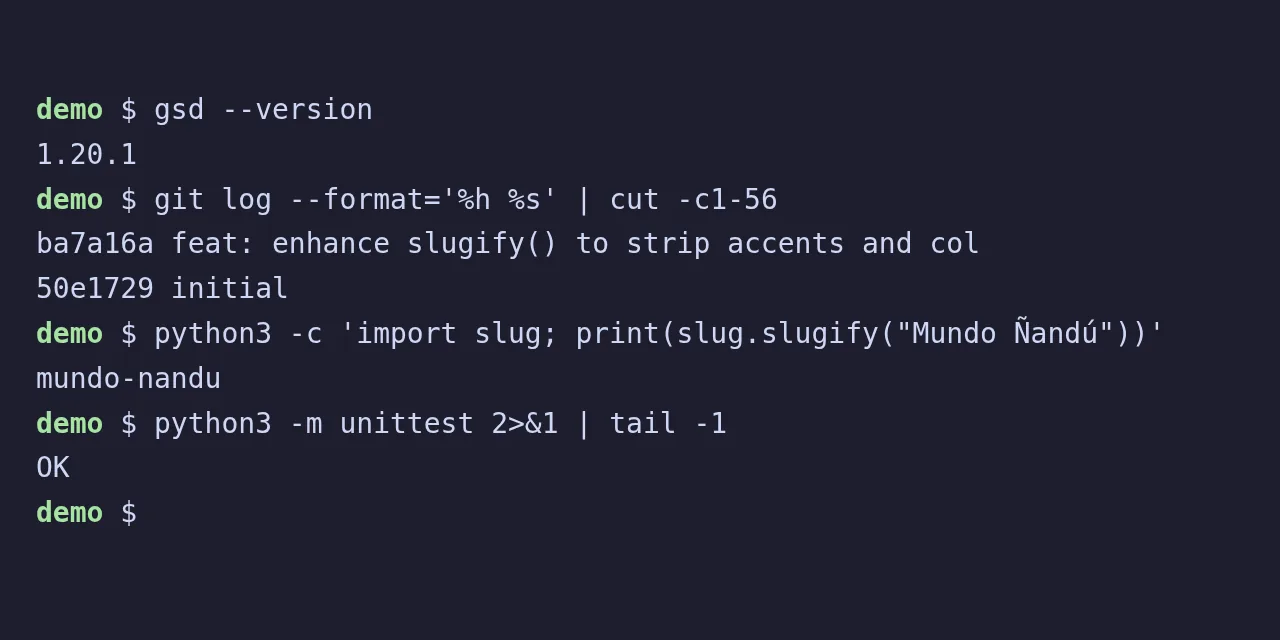
Table of contents
- Key takeaways
- What gsd-pi and gsd-core are, and which one to install
- What you need before installing gsd-pi
- How to install gsd pi step by step
- How to connect gsd-pi to a local model with llama.cpp
- A real task end to end with gsd quick
- The gsd commands and flags you will use most
- How to install gsd-core in your coding agent
- Traps I hit installing and using gsd-pi
- Frequently asked questions
- Does gsd-pi work without an API key?
- What is the difference between gsd pi and gsd core?
- What does Git Ship Done mean?
- Conclusion
- Sources
This guide installs gsd-pi 1.20.1, the Open GSD terminal agent, and hooks it up to a local model served by llama.cpp. Then it hands the agent a real task in a throwaway Git repository. It also covers what gsd-core is, the commands you look up on day one and the seven traps I hit along the way. Everything was tested on 30 September 2026 on arm64 Linux with Docker. Version 1.21.0 came out on 2 October; I checked its code and the 15 s headless timer is unchanged, as it is in 1.21.1, released on 7 October.
Key takeaways
gsd-piis the terminal agent (thegsdcommand) andgsd-coreis a pack of commands and skills that installs inside Claude Code, OpenCode, Codex or Cursor.- Install it with
npx @opengsd/gsd-pi@latest; the unscopedgsd-pipackage (version 3.0.0) is flagged as unsupported on npm and is the wrong one. - It works without an API key: with a
models.jsonpointing at llama.cpp, a 4B Qwen3.5 finished a task with 12 passing tests and a commit. - Every request starts with about 29,400 tokens of instructions, so the model needs a 64k context window.
- Headless
gsd quickends the session after 15 s without events; with a slow CPU model, use the interactive interface.
What gsd-pi and gsd-core are, and which one to install
Open GSD ships two packages that get mixed up because they share the "Git. Ship. Done." motto: one is a complete agent and the other is a set of instructions for the agent you already use.
Our article on what Open GSD is covers the whole catalogue as of 9 October 2026, including gsd-graph, gsd-loop and gsd-path.
| Package | What it is | Version tested | Where it runs |
|---|---|---|---|
@opengsd/gsd-pi |
Terminal agent with memory in .gsd/, worktrees and an autonomous mode |
1.20.1 | Its own TUI (gsd) or headless |
@opengsd/gsd-core |
/gsd-* commands, skills and hooks for the discuss, plan, execute, verify and ship loop |
1.15.0 | Inside Claude Code, OpenCode, Codex, Cursor and others |
gsd-pi (unscoped) |
Previous build of the agent, flagged as unsupported on npm | 3.0.0 | Do not install it |
The rule of thumb: if you already work in Claude Code or OpenCode and want the method, install gsd-core. If you want a standalone agent you can point at any provider, a local model included, install gsd-pi. The "Pi" in the name has a concrete origin: the package.json of its internal packages says the agent core and TUI are "vendored from earendil-works/pi", the Pi agent harness[1].
The project README defines it this way:
"GSD Pi is a local-first coding agent for planning, implementing, verifying, and tracking project work from the command line." (open-gsd/gsd-pi README)
What you need before installing gsd-pi
gsd-pi requires Node.js 22.18.0 or later, Git 2.20 or later and a model provider. I used a node:24-bookworm-slim container (Node 24.21.0, npm 11.19.0, Git 2.39.5) to keep my machine clean, because the installer writes to npm’s global directory and to ~/.gsd.
If you have no API key, the provider can be a local server with an OpenAI-compatible API. The provider docs cover Ollama, LM Studio, vLLM and SGLang; llama.cpp comes in through the same door. If you do not have it yet, follow the guide to install llama.cpp on Linux, macOS and Docker first.
How to install gsd pi step by step
The guided installer runs through npx and, with --yes, asks nothing. My user was not root, so I first pointed npm’s global prefix at my home folder:
export NPM_CONFIG_PREFIX="$HOME/.npm-global"
npx -y @opengsd/gsd-pi@1.20.1 --yes
export PATH="$HOME/.npm-global/bin:$PATH"
gsd --version
The installer put the package in the global directory and linked 14 workspace packages. Then it downloaded a Playwright Chromium for browser automation and tried to install RTK, a third-party tool that condenses shell output. On arm64 it printed RTK: binary validation failed, a harmless warning: the rest carried on and finished with Verified gsd v1.20.1.
The disk footprint surprises you the first time: 771 MB in npm’s global directory and 662 MB of Chromium in ~/.cache/ms-playwright. The package leaves four executables: gsd, gsd-cli, gsd-pi and gsd-mcp-server. On first launch it also downloads ripgrep to ~/.gsd/agent/bin/rg if the system has none.
How to connect gsd-pi to a local model with llama.cpp
gsd-pi reads local providers from ~/.gsd/agent/models.json and reloads the file every time you open /model. I started llama-server (build b11206) in Docker with the model’s chat template (--jinja), a 64k context and reasoning switched off:
services:
  llama:
    image: ghcr.io/ggml-org/llama.cpp:server-b11206
    volumes:
      - ./models:/models:ro
    command: >
      -m /models/Qwen_Qwen3.5-4B-Q4_K_M.gguf
      --alias qwen3.5-4b --host 0.0.0.0 --port 8080
      -c 65536 --jinja -t 6 --parallel 1 --reasoning off
The models.json declares the server as one more provider. The apiKey field is mandatory even though llama.cpp never checks it, and the two compat settings stop gsd-pi from sending the developer role and the reasoning_effort parameter, which local servers do not understand:
{
  "providers": {
    "llamacpp": {
      "baseUrl": "http://llama:8080/v1",
      "api": "openai-completions",
      "apiKey": "not-needed",
      "compat": {
        "supportsDeveloperRole": false,
        "supportsReasoningEffort": false
      },
      "models": [
        { "id": "qwen3.5-4b", "name": "Qwen3.5 4B (llama.cpp)",
          "contextWindow": 65536, "maxTokens": 8192 }
      ]
    }
  }
}
Check that gsd-pi sees it before you open a session. The id must match the alias the server publishes on /v1/models:
$ gsd --list-models llamacpp
provider  model       name                    context  max-out  thinking  images
llamacpp  qwen3.5-4b  Qwen3.5 4B (llama.cpp)  65.5K    8.2K     no        no
The window size is not a detail. The quick task’s first request took 29,425 tokens between instructions, tool definitions and my prompt, and the session ended up using 37k of the 66k available. A 32k-context model cannot even hold the opening request.
A real task end to end with gsd quick
To test it I created a repository with a slugify() function that only swapped spaces for hyphens, plus one test. The task: strip accents and collapse runs of spaces and punctuation into a single hyphen. Open gsd in the repository first, because that first launch creates .gsd/, then launch the task from inside the session:
cd demo
gsd --model llamacpp/qwen3.5-4b
# inside the session, on a single line:
/gsd quick Make slugify() in slug.py strip accents (Mundo Ñandú
  becomes mundo-nandu) and collapse runs of spaces and punctuation
  into one hyphen. Add tests to test_slug.py and run python3 -m unittest.
gsd-pi turned the prompt into quick task number 1, created .gsd/quick/1-make-slugify-in-slug-py-strip-accents-mu/ and gave the model fixed instructions: read the code, write tests, verify, make atomic commits with conventional messages and leave a 1-SUMMARY.md. Over 20 model requests the agent read the files and failed one edit, so it rewrote the whole file. Then it tried a regular expression with \p{}, which Python’s re module does not support, replaced it and left 12 tests passing.
These are the checks I ran myself afterwards, outside gsd-pi:
$ git log --oneline
ba7a16a feat: enhance slugify() to strip accents and collapse
        punctuation into hyphens
50e1729 initial
$ python3 -m unittest 2>&1 | tail -1
OK
$ python3 -c 'import slug; print(slug.slugify("Canción del año, 2026"))'
cancion-del-ano-2026
The commit touched two files, 116 lines added and 2 removed, straight on main: quick tasks open no worktree and no branch. Reviewing the diff is still your job. The docstring the model wrote documents "mundonandu" and "helloworld" as outputs, the opposite of what the code does, and "straße" comes out untransliterated. The tests pass because they test the code, not the comment.
Before settling on the 4B model I tried Nex-N2.5-mini, a 34.66-billion-parameter MoE that takes 22 GB in Q4_K_M. With other processes on the same 47 GB machine, the server started swapping and generation became unusable. For gsd-pi on CPU, pick a model that fits comfortably in free RAM.
The gsd commands and flags you will use most
gsd-pi has two surfaces: executable flags in the shell and /gsd commands inside the session. These are the ones I used or the docs recommend to start with:
| Command | What it does |
|---|---|
gsd |
Opens the TUI in the current directory and creates .gsd/ the first time |
gsd --model provider/model |
Pins the session model, for example llamacpp/qwen3.5-4b |
gsd --list-models [filter] |
Lists the models gsd-pi can see and exits |
/gsd quick [--full] task |
Small task with a commit and a summary; --full adds discussion, research and validation |
/gsd auto |
Autonomous mode: plans, implements, verifies and advances milestone by milestone |
/gsd status and /gsd doctor |
Project status and diagnostics with auto-fix |
gsd headless query |
JSON snapshot of the state without calling the model |
gsd headless quick |
Quick task without the TUI, with exit codes for CI |
gsd upgrade |
Updates gsd-pi (alias gsd update) |
gsd --web |
Web interface instead of the TUI |
Headless exit codes are 0 (complete), 1 (error or timeout), 10 (blocked) and 11 (cancelled). With --output-format json the final result includes the branch, the commits and the artifacts it created.
How to install gsd-core in your coding agent
gsd-core is not an agent: it copies commands, subagents, skills and hooks into the config folder of the tool you already use. I installed it for OpenCode in local mode, inside an empty repository:
npx -y @opengsd/gsd-core@1.15.0 --opencode --local
The result was 899 files under .opencode/: 72 commands, 64 agents, 72 skills and 30 hooks, plus the gsd-core/bin engine. The installer warned that the 72 skills "shadow" the 72 commands of the same name, which is the expected behaviour. For Claude Code the equivalent is --claude --global, and you start with /gsd-new-project or /gsd-onboard. If you run OpenCode with a local model, the guide to OpenCode with llama.cpp and Ollama covers the other half.
Traps I hit installing and using gsd-pi
None of these traps breaks the install, but each one costs time if you do not know it:
- The wrong package.
npm install -g gsd-pipulls version 3.0.0, flagged as unsupported. The right one is@opengsd/gsd-piand its numbering restarted at 1.0.0. If you have the old one, uninstall it and delete~/.gsd/.update-checkand~/.gsd/agent/managed-resources.json. gsdis not found. npm’s globalbindirectory is not on yourPATH. In oh-my-zsh, thegitfastplugin defines agsdalias forgit svn dcommit; check it withalias gsd.- Headless mode needs
.gsd/. In a fresh repository,gsd headless quickfails withNo .gsd/ directory found in current directory. Opengsdonce first. - The 15 s headless timer. After the first tool call,
gsd headless quicktreats the session as finished if 15 s pass without events, even with--timeout 0. With Nex-N2.5-mini on CPU it ended withstatus: timeout, 3 tool calls and 0 commits. TheIDLE_TIMEOUT_MS = 15_000constant lives indist/headless-events.js;automode does not apply it. - State files are not ignored automatically in a quick task. After the task,
git statusstill showed.gsd/and.bg-shell/as untracked. Add them to.gitignoreor check thegit addbefore each of your own commits. - gsd-core touches the global config. Even with
--local, the installer wrote~/.gsd/defaults.json, the same directory gsd-pi uses. Anrm -rf ~/.gsdto uninstall one takes the other’s config with it. - Reasoning multiplies the output. Qwen3.5 thinks by default: to a plain "Say pong" it returned a whole
reasoning_contentblock before "Pong". With--reasoning offin llama-server it answers directly.
Frequently asked questions
Does gsd-pi work without an API key?
Yes. Local providers (Ollama, LM Studio, vLLM, SGLang or any OpenAI-compatible server such as llama.cpp) only need an entry in ~/.gsd/agent/models.json with a dummy apiKey. What you cannot expect is Claude or GPT quality from a 4B model: it finished the task, but with mistakes you have to review.
What is the difference between gsd pi and gsd core?
gsd-pi is a complete agent with its own interface, project database and model selection. gsd-core is an instruction pack that installs inside another agent (Claude Code, OpenCode, Codex, Cursor and others) and adds /gsd-* commands. You can use both, but they share ~/.gsd.
What does Git Ship Done mean?
It is the Open GSD motto and the name shown in the gsd help banner ("GSD v1.20.1, Git Ship Done"). The original GSD was created by Lex Christopherson, known as TÂCHES, and his npm package get-shit-done-cc is still published; the Open GSD site credits that origin on its origin page.
Conclusion
gsd-pi installs with one command and works with a local model if you give it a 64k context and a well-formed models.json. For a first test, open gsd, run /gsd quick on a clean repository and review the diff the way you would review a new colleague’s. If you plan to automate it in CI with a slow model, keep the 15 s headless timer in mind. The background on what problem Open GSD solves is in what Open GSD is, and this guide is also available in Spanish.
Sources: [1] gsd-pi README on GitHub[2], [2] @opengsd/gsd-pi on npm[3], [3] gsd-core README[4], [4] Open GSD origin page[5], [5] Pi agent harness[1], [6] llama.cpp[6].
Sources
Source code
Access all the source code for this post on GitHub.
View on GitHub