How to import a Hugging Face model into Ollama 0.34
Table of contents
- Key takeaways
- What changed about importing models in Ollama 0.34.1
- What you need before importing a Hugging Face model
- How to download the model with hf download
- How to convert the safetensors to GGUF with llama.cpp
- How to quantize the GGUF with llama-quantize
- How to create the model in Ollama with a Modelfile
- Why you do not need TEMPLATE in the Modelfile
- What happens if you import the safetensors directly
- How fast the imported model runs on a CPU
- When to download the GGUF with ollama pull hf.co
- Import errors in Ollama 0.34.1 and how to fix them
- Frequently asked questions
- Can I still quantize with ollama create --quantize?
- Can I import a LoRA adapter in Ollama 0.34.1?
- Can I delete the GGUF after importing it?
- Conclusion
- Sources
Since Ollama 0.34.1, ollama create no longer converts or quantizes the weights you download from Hugging Face: llama.cpp does that part now. The release is dated 14 September 2026, and the one-line command that turned a safetensors folder into a GGUF now answers with an error. This guide imports MiniCPM5-2B end to end with the tools that worked on 16 September, with the times, sizes and errors I got on an arm64 CPU with no GPU. There is also a Spanish version of this guide.
Key takeaways
- In Ollama 0.34.1,
ollama create --quantize q4_K_Manswersunsupported --quantize "q4_K_M": the flag only accepts the MLX formatsint4,int8,nvfp4,mxfp4andmxfp8. - The path that does not depend on MLX is llama.cpp v0.4.1’s
convert_hf_to_gguf.pyandllama-quantize, followed byollama createfrom the GGUF. - With MiniCPM5-2B, conversion to BF16 took 35 s, quantization to Q4_K_M 21 s and the import 2 s, medians of three runs.
- Ollama uses the Jinja chat template that llama.cpp stores in the GGUF: the imported model advertised tools and thinking without a
TEMPLATEline. - On Linux without MLX, importing safetensors fails with
MLX runtime is not available, andADAPTERandtypical_pare no longer accepted. - On a busy machine, set
PARAMETER num_thread: with 4 threads it answered at 52.48 tokens/s, and with the default 18 it had not finished after 4 minutes.
What changed about importing models in Ollama 0.34.1
Ollama 0.34.1 handed GGUF conversion and quantization over to llama.cpp. The release notes sum it up in one sentence: "GGUF model creation now requires using llama.cpp tooling for safetensor conversion and quantization". The change comes from Ollama PR 14969[1], by Daniel Hiltgen, opened in March and merged hours before the release, which removes the built-in converter and server-side quantization. GitHub dates the release 14 September at 22:14 UTC, although the tag points at a commit from the 15th and the Docker image was built that same day.
The Ollama import guide[2] puts it plainly:
"Ollama does not quantize GGUF models during import. Prepare and quantize them first with a GGUF tool such as llama.cpp’s llama-quantize." (Ollama documentation, "Importing a Model")
I ran the same commands on the previous release, 0.34.0, and on 0.34.1, against the MiniCPM5-2B folder and its GGUF. This is what each one answered:
| Command or instruction | Ollama 0.34.0 | Ollama 0.34.1 |
|---|---|---|
ollama create -q q4_K_M from safetensors |
Converts and quantizes: 1.6 GB in 106 s | unsupported --quantize "q4_K_M" |
ollama create -q q4_K_M from a BF16 GGUF |
Quantizes: 1.6 GB in 17 s | create-time quantization is only supported for safetensors imports |
ADAPTER in the Modelfile |
Reads the adapter file | LoRA adapters are no longer supported |
PARAMETER typical_p 0.9 |
Creates the model | typical_p is no longer supported |
--experimental |
Turns on experimental safetensors creation | Hidden flag that does nothing |
PR 18448[3] explains the typical_p case: GGUF models that already carry it keep it, but you cannot create a new one with that parameter. Version 0.34.1 also brings changes unrelated to importing, such as /api/tags dropping from 3.1 s to 294 ms cold in the testing its notes cite.
What you need before importing a Hugging Face model
You need Ollama 0.34.1, llama.cpp’s conversion tools and the Hugging Face command line, plus about 13 GB free for a 2.5-billion-parameter model. If you do not have Ollama yet, follow the guide to installing Ollama on your computer. These are the pieces; you need only one of the first two, because both produce the same file:
- The
fullDocker image:ghcr.io/ggml-org/llama.cpp:full-v0.4.1takes 3.91 GB and shipsconvert_hf_to_gguf.py,llama-quantizeand the Python dependencies - A local install: the v0.4.1 source plus a virtual environment with its requirements, which took 956 MB; the binaries come from the llama.cpp installation guide
- The
hfcommand line: it ships in thehuggingface_hubpackage, version 1.31.0 from 10 September
Disk use adds up to 5.03 GB of safetensors, 5.04 GB for the BF16 GGUF, 1.56 GB for the quantized GGUF and 1.56 GB more for Ollama’s copy.
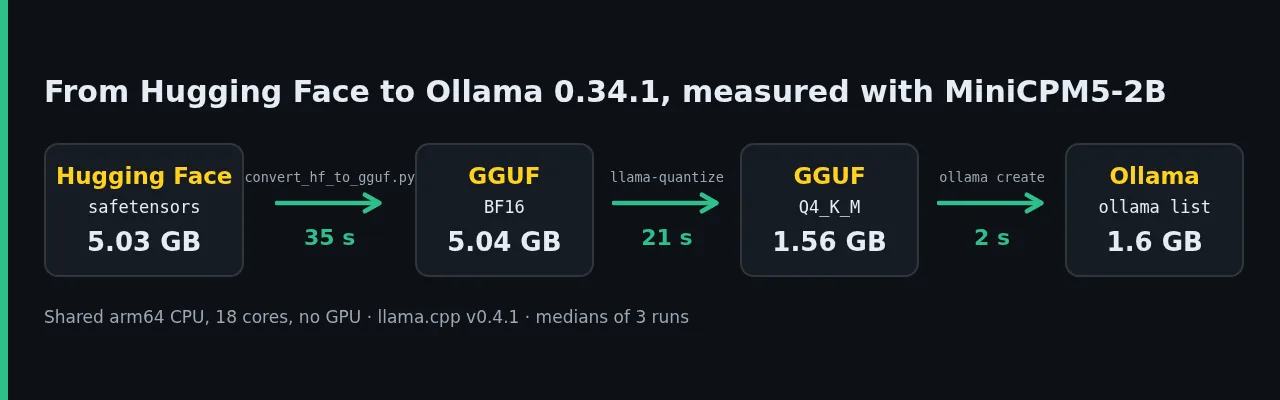
The test model is MiniCPM5-2B[4], which OpenBMB released on 6 September 2026 under the Apache-2.0 licence. It has 2,516 million parameters, 42 layers and a 131,072-token context, and it uses the standard LlamaForCausalLM architecture, so llama.cpp converts it without patches. Every test ran on a Linux arm64 virtual machine on Apple silicon, with 18 cores, 121 GB of RAM and no GPU, shared with other jobs.
How to download the model with hf download
hf download pulls the whole repository into a local folder. Pin the revision if you want the conversion to be repeatable with the same weights:
pip install "huggingface_hub==1.31.0"
hf download openbmb/MiniCPM5-2B \
  --revision 12a3808a956f869c767195e9266b59c4d21d92e2 \
  --local-dir ./MiniCPM5-2B
The download fetched 11 files and 5.05 GB in 68 s, including the package install. The folder holds config.json, tokenizer.json, chat_template.jinja and a single 5,033,557,096-byte model-00000-of-00001.safetensors. Without a token, hf warns that anonymous requests get lower limits; for a gated model, export HF_TOKEN first.
How to convert the safetensors to GGUF with llama.cpp
convert_hf_to_gguf.py reads the Hugging Face folder and writes a GGUF with the weights, the tokenizer and the metadata. Convert to BF16, MiniCPM5-2B’s original type, and quantize afterwards. With the full Docker image, --convert runs the script:
docker run --rm -u "$(id -u):$(id -g)" -e HOME=/tmp \
  -v "$PWD:/models" \
  ghcr.io/ggml-org/llama.cpp:full-v0.4.1 \
  --convert /models/MiniCPM5-2B --outtype bf16 \
  --outfile /models/MiniCPM5-2B-BF16.gguf
Without Docker, clone the v0.4.1 tag and install the converter requirements in a virtual environment. The install took 24 s and left torch 2.11.0 for CPU, transformers 4.57.6 and gguf 0.19.0:
git clone --depth 1 --branch v0.4.1 \
  https://github.com/ggml-org/llama.cpp
python3 -m venv .venv && . .venv/bin/activate
pip install -r llama.cpp/requirements/requirements-convert_hf_to_gguf.txt
python llama.cpp/convert_hf_to_gguf.py ./MiniCPM5-2B \
  --outtype bf16 --outfile MiniCPM5-2B-BF16.gguf
Both routes produced a byte-identical file of 5,039,008,704 bytes and 381 tensors. I ran the Docker conversion three times: 35.0 s, 41.2 s and 32.3 s, with a load average of 31 to 37 on 18 cores. The only warning was Unknown separator token '<s>' in TemplateProcessing<pair>, which did not affect the result.
The script stores the chat template from chat_template.jinja and the sampling defaults from generation_config.json in the GGUF: temperature 1.0 and top_p 0.95. If a model needs transformers 5, the llama-quantize documentation[5] says you can upgrade it with pip install -U transformers; MiniCPM5-2B did not need it.
How to quantize the GGUF with llama-quantize
llama-quantize shrinks the 16-bit GGUF to Q4_K_M in a single command. Model quantization with llama.cpp covers the theory. Here you pick the type in the last argument:
docker run --rm -u "$(id -u):$(id -g)" -v "$PWD:/models" \
  ghcr.io/ggml-org/llama.cpp:full-v0.4.1 \
  --quantize /models/MiniCPM5-2B-BF16.gguf \
  /models/MiniCPM5-2B-Q4_K_M.gguf Q4_K_M
With llama.cpp installed on the system, the equivalent is llama-quantize MiniCPM5-2B-BF16.gguf MiniCPM5-2B-Q4_K_M.gguf Q4_K_M. The end of the output sums up the reduction:
llama_model_quantize_impl: model size  =  4800.66 MiB (16.00 BPW)
llama_model_quantize_impl: quant size  =  1484.08 MiB (4.95 BPW)
llama_quantize: quantize time = 20647.62 ms
The three runs took 32.3 s, 20.5 s and 20.6 s, with a load average of 34 to 38. Q4_K_M does not put everything in 4 bits. The tool moved the output matrix and the attn_v and ffn_down tensors of 21 of the 42 layers to Q6_K, so the average lands at 4.95 bits per weight. I also produced a 2,550.66 MiB Q8_0 for comparison.
OpenBMB publishes its own GGUFs in MiniCPM5-2B-GGUF[6], with a 16-bit file in F16 rather than BF16. My three files are 2,016 bytes larger than theirs: 1,561,320,384 against 1,561,318,368 bytes for Q4_K_M. A constant gap points at the metadata, not the weights. The Ollama 0.34.1 Docker image ships its own llama-quantize in /usr/lib/ollama, built from the llama.cpp b10864 that Ollama bundles, but not the Python converter.
How to create the model in Ollama with a Modelfile
ollama create copies the GGUF into its store and adds the Modelfile parameters. This is the Modelfile I used, in the same folder as the GGUF:
FROM ./MiniCPM5-2B-Q4_K_M.gguf
PARAMETER num_ctx 8192
PARAMETER num_thread 4
SYSTEM """Responde en español de España."""
The num_ctx parameter raises the context above the 4096 tokens Ollama assigns by default on a machine without a GPU, according to its own log. The num_thread parameter caps the CPU threads, and the performance section explains why I added it. The SYSTEM line sets the answer language to peninsular Spanish. Then create and check the model:
ollama create minicpm5-2b
ollama show minicpm5-2b
ollama run minicpm5-2b --think=false --verbose \
  "Resume en una frase qué es un Modelfile de Ollama."
The import took 2.25 s, 1.93 s and 1.99 s over three runs with a load average of 5.5. The ollama show command confirmed the architecture and the capabilities Ollama detected in the GGUF:
  Model
    architecture        llama
    parameters          2.5B
    context length      131072
    embedding length    2048
    quantization        Q4_K_M

  Capabilities
    tools
    thinking
    completion
With --verbose, ollama run prints the metrics at the end. This is the first of three runs, with the machine at a load average of 51:
Un Modelfile de Ollama es una configuración que permite personalizar
y gestionar las modelos que utiliza para la creación de contenido.
total duration:       606.975347ms
prompt eval count:    41 token(s)
prompt eval cached:   40 token(s)
eval count:           30 token(s)
eval rate:            52.48 tokens/s
The Spanish agreement error in the answer ("las modelos") comes from MiniCPM5-2B itself, which makes mistakes in Spanish at 2.5 billion parameters. In another test with thinking on, it defined GGUF as an audio archive format. Without --think=false, MiniCPM5-2B reasons before answering and Ollama returns that text in the API’s thinking field, separate from the answer. If you plan to give it tools, the guide to function calling with Ollama shows how to declare them.
Why you do not need TEMPLATE in the Modelfile
Ollama 0.34.1 uses the Jinja template stored in the GGUF when the Modelfile has no template. It also prefers it when it declares more capabilities than the Modelfile’s Go template, and the log records the choice when the model loads:
msg="template selection" model=…/minicpm5-2b:openbmb-template
selected=gguf_chat_template go_template=[completion]
chat_template="[tools thinking completion]"
That line comes from a test with the Modelfile in OpenBMB’s Ollama guide[7], which adds a Go TEMPLATE block. The guide states that "Ollama 0.24 does not directly evaluate the GGUF-embedded Jinja chat template". In 0.34.1 that block goes unused: its template only covers completion, so Ollama picked the GGUF one and thinking kept working. According to the 0.34.1 source, setting OLLAMA_GO_TEMPLATE=1 on the server makes Ollama use the Modelfile TEMPLATE even when the GGUF carries a template.
The old path did not keep that template. The GGUF that Ollama 0.34.0 generated had 32 metadata keys and no tokenizer.chat_template, and ollama show only credited it with completion. The one llama.cpp writes has 69 keys, template included. Add TEMPLATE only when the GGUF carries no template, or when you want to force a format with OLLAMA_GO_TEMPLATE.
What happens if you import the safetensors directly
On Linux arm64, ollama create from the safetensors folder fails in under a second, because 0.34.1 routes that import to MLX. A Modelfile with FROM ./MiniCPM5-2B produced this:
importing safetensors model
Error: MLX runtime is not available: failed to load MLX dynamic
library (searched: [/usr/lib/ollama …])
The --force flag skips that validation. With it, Ollama imported the model in 26 s as 386 layers and 5.0 GB, but ollama run returned Error: 500 Internal Server Error: MLX runtime is not available. Deleting it with ollama rm shrank the blob store from 7.7 GB to 3.0 GB.
The Ollama v0.34.1 Dockerfile[8] explains the failure: it copies the MLX build, with a CUDA 13 backend, into the amd64 image only, and the arm64 image has none. I could not test that amd64 build or the path on a Mac with Apple silicon, where MLX is native and --quantize accepts int4 or nvfp4: I have neither a Mac nor an NVIDIA GPU. If you work on a Mac and want an MLX-based alternative, read what oMLX is and how it differs from Ollama.
How fast the imported model runs on a CPU
With 4 threads, the Q4_K_M generation medians ranged from 32 to 70 tokens/s depending on the tool and the load. The default thread count was the most serious problem in the test. Without num_thread, Ollama started its internal llama-server with 18 threads, one per core.
In two attempts, with the load average between 10 and 62, neither answer had finished after 4 minutes. With num_thread 4, three runs at a load of 48 to 51 gave 52.48, 53.40 and 50.69 tokens/s.
To compare formats I used llama-bench with 4 threads, three runs of three repetitions each and a load average of 11.3 to 13.4. Perplexity comes from 20 chunks of 512 tokens of Don Quixote from Project Gutenberg[9], in Spanish, with 8 threads:
On this CPU, Q8_0 processed the prompt 58% faster than Q4_K_M and generated at the same pace, and Q4_K_M raises perplexity by 5.5% over Q8_0. Q4_K_M takes 42% less disk than Q8_0; in memory, /api/ps reported 2.03 GB with num_ctx 8192 and 1.79 GB with the default context. BF16 is only an intermediate step: at 2.28 tokens/s it is not usable on this processor.
Importing costs no speed against llama.cpp. I compared Ollama with llama.cpp’s server-v0.4.1 image on the same GGUF, with 4 threads, temperature 0, 128 tokens and thinking off, over five alternating rounds:
| Load average | Ollama 0.34.1 | llama-server v0.4.1 |
|---|---|---|
| 8.6 to 9.6 | 69.99 tokens/s | 59.49 tokens/s |
| 15.9 to 17.6 | 49.29 tokens/s | 29.72 tokens/s |
These are generation medians. I did not isolate the cause of the gap: Ollama’s build does not use OpenMP and loads the model without mmap, while the llama.cpp image uses both.
When to download the GGUF with ollama pull hf.co
If the author already publishes a GGUF, you do not need to convert anything: ollama pull hf.co/user/repository:quantization downloads it from the Hub. The Hub documentation on Ollama[10] says that, without a tag, Q4_K_M is picked when it exists. With the official MiniCPM5-2B GGUF:
ollama pull hf.co/openbmb/MiniCPM5-2B-GGUF:Q4_K_M
The 1.6 GB download took 21 s, and the model showed the same capabilities as the hand-imported one. The Hub also added five stop sequences, because the repository has no params file: <s>, <|im_start|>, <|im_end|>, <think> and <|im_start|>user. Import the model yourself when no GGUF exists, when you want a quantization the author does not publish, or when you start from your own fine-tune. To pick a size and variant, compare with Gemma 4 locally with Ollama.
Import errors in Ollama 0.34.1 and how to fix them
Four error messages came up in the tests, and all four have a fix:
unsupported --quantize "q4_K_M": supported types are int4, int8, nvfp4, mxfp4, mxfp8: the old command from safetensors; convert and quantize with llama.cppcreate-time quantization is only supported for safetensors imports; quantize GGUF models before importing: drop--quantizeand runllama-quantizeMLX runtime is not available: failed to load MLX dynamic library: you are importing safetensors on a system without MLX; convert to GGUFLoRA adapters are no longer supported: merge the adapter into the base model before converting, becauseADAPTERis gone
A fifth case raises no error and is harder to spot: the model does not answer, or takes minutes, because it uses every core on a busy machine. PARAMETER num_thread fixes it.
Frequently asked questions
Can I still quantize with ollama create –quantize?
Only for MLX safetensors imports, and only with int4, int8, nvfp4, mxfp4 or mxfp8. For a GGUF, 0.34.1 rejects the flag and asks you to quantize first with llama-quantize.
Can I import a LoRA adapter in Ollama 0.34.1?
No. The ADAPTER instruction returns LoRA adapters are no longer supported and no longer appears in the Modelfile reference. The way out is to merge the adapter into the base model and convert the result to GGUF.
Can I delete the GGUF after importing it?
Yes. ollama create copies the file into its blob store, which lives in /root/.ollama/models/blobs in the Docker image. The model keeps working without the original GGUF, and ollama rm frees that copy.
Conclusion
To import a Hugging Face model into Ollama 0.34.1, download the safetensors with hf download, convert them with convert_hf_to_gguf.py, quantize with llama-quantize and create the model with a Modelfile that sets num_ctx and, on a shared machine, num_thread. Do not write TEMPLATE if the GGUF carries its own template. On 15 September there was already a v0.34.2-rc0 pre-release whose notes only say "llama.cpp updates"; I checked them on 16 September and they do not change this procedure. Before repeating this guide on another version, read its notes on the Ollama releases page[11].
Sources: [1] Ollama v0.34.1 release notes[12], [2] Ollama PR 14969: MLX imports and the end of GGUF conversion[1], [3] Ollama PR 18448: typical_p deprecation[3], [4] Ollama documentation: importing a model[2], [5] Ollama Modelfile reference[13], [6] Ollama v0.34.1 Dockerfile[8], [7] Ollama v0.34.2-rc0[11], [8] llama.cpp convert_hf_to_gguf.py script[14], [9] llama-quantize README[5], [10] llama.cpp Docker images[15], [11] llama.cpp v0.4.1 release notes[16], [12] MiniCPM5-2B model card on Hugging Face[4], [13] OpenBMB’s MiniCPM5-2B-GGUF[6], [14] OpenBMB guide to MiniCPM5 with Ollama[7], [15] Hub documentation: Ollama with any GGUF[10], [16] Don Quixote on Project Gutenberg[9].
Sources
- Ollama PR 14969
- Ollama import guide
- PR 18448
- MiniCPM5-2B
- llama-quantize documentation
- MiniCPM5-2B-GGUF
- OpenBMB’s Ollama guide
- Ollama v0.34.1 Dockerfile
- Don Quixote from Project Gutenberg
- Hub documentation on Ollama
- Ollama releases page
- Ollama v0.34.1 release notes
- Ollama Modelfile reference
- llama.cpp convert_hf_to_gguf.py script
- llama.cpp Docker images
- llama.cpp v0.4.1 release notes
Source code
Access all the source code for this post on GitHub.
View on GitHub