How to fix Authentik 2026.8 treating HTTPS as HTTP behind a reverse proxy
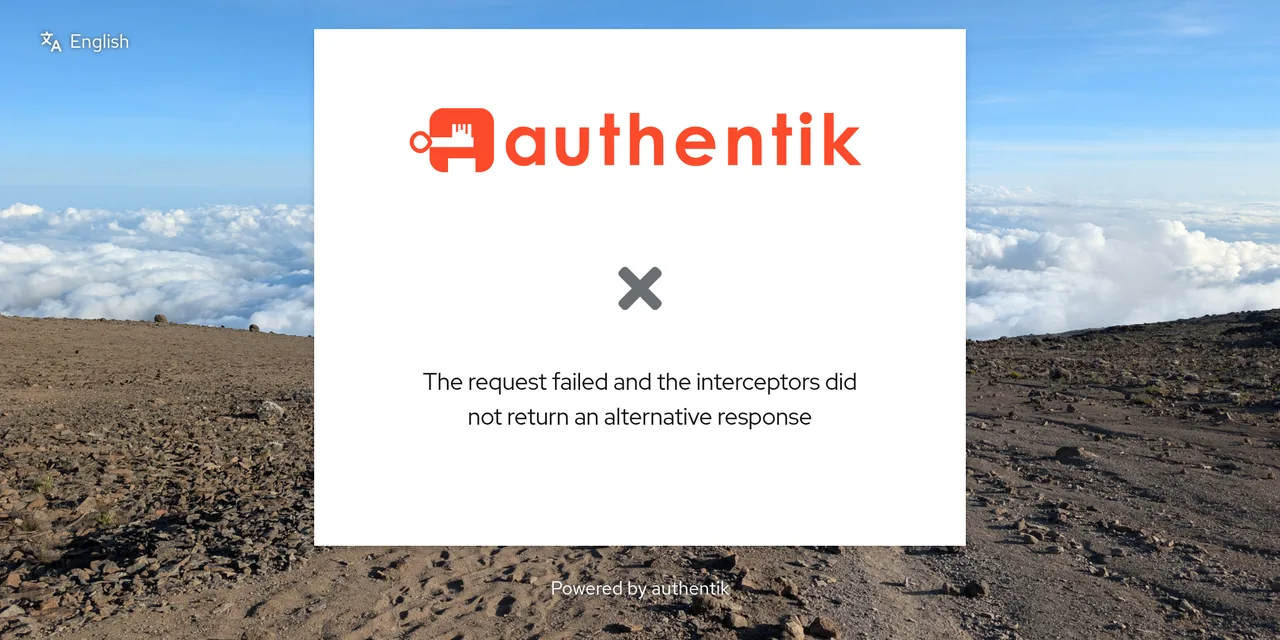
Table of contents
- Key takeaways
- What does Authentik 2026.8 change about proxy headers?
- Who does the change affect?
- How I reproduced the failure with Caddy
- The error The request failed and the interceptors did not return an alternative response
- How to find the IP your proxy connects from
- How to fix it with AUTHENTIK_LISTEN__TRUSTED_PROXY_CIDRS
- How to check that Authentik sees HTTPS again
- hash_password no longer accepts the password as an argument
- Major version skips are not allowed when jumping from 2026.2
- Other 2026.8 changes to review before upgrading
- Steps to upgrade Authentik to 2026.8 without an outage
- Frequently asked questions
- Can I set AUTHENTIK_LISTEN__TRUSTED_PROXY_CIDRS=0.0.0.0/0 to get past it?
- Do I need to change anything if Traefik is on the same Docker network?
- Why does the error only appear after upgrading?
- Conclusion
- Sources
If after upgrading to Authentik 2026.8 the login page shows The request failed and the interceptors did not return an alternative response or keeps loading forever, Authentik is ignoring your reverse proxy’s headers and believes the request arrived over HTTP. Since 2026.8 it only accepts X-Forwarded-Proto, X-Forwarded-Host and X-Forwarded-For when the connection comes from a network listed in AUTHENTIK_LISTEN__TRUSTED_PROXY_CIDRS. The fix is to add the proxy’s IP or network to that variable. I reproduced it on 18 October 2026 with Caddy 2.10.2, upgrading Authentik 2026.5.7 to 2026.8.4 on Docker 29.5.2 on arm64 Linux. This guide is also available in Spanish.
Key takeaways
- Authentik 2026.8.0 shipped on 18 August 2026 and the latest patch is 2026.8.5, from 21 October, which does not change how proxy headers are handled. My tests used 2026.8.4. The previous release is 2026.5: the project ships one major version every three months.
- There are six default trusted networks:
127.0.0.0/8,10.0.0.0/8,172.16.0.0/12,192.168.0.0/16,fe80::/10and::1/128. A proxy on an ordinary Docker network (172.x) keeps working with no change. - With the proxy on
100.64.209.0/24, outside that list, 2026.5.7 returned anhttps://OpenID Connect issuer and 2026.8.4 switched tohttp://. hash_passwordno longer takes the password as an argument: it fails withunrecognized argumentsand exit code 2. The password now goes through standard input or a hidden prompt.- Jumping from 2026.2.7 to 2026.8.4 stops startup with
Major version skips are not allowedbefore migrating: the database stayed at 692 migrations.
What does Authentik 2026.8 change about proxy headers?
Authentik 2026.8 applies the trusted proxy list to every forwarded header, not just some of them. The release notes put it this way: "Previous versions did not apply this restriction consistently to all forwarded headers." Up to 2026.5, a request from any address could set the scheme with X-Forwarded-Proto, which made it spoofable.
The official warning lists the symptoms in one sentence: "An incorrect configuration can cause authentik to interpret HTTPS requests as HTTP, resulting in blocked mixed content, an endless loading indicator, or authentication errors." The reverse proxy page adds a fourth effect: logs record the proxy’s IP instead of the client’s.
The variable in charge is AUTHENTIK_LISTEN__TRUSTED_PROXY_CIDRS, a comma-separated list of CIDR (Classless Inter-Domain Routing, the network/mask notation) ranges. It existed before 2026.8; what is new is that it now governs all three headers. If you set it, it replaces the default list instead of extending it.
Who does the change affect?
It affects you if your proxy connects to Authentik from an address outside the default list. It also does if you set the list by hand and the proxy is not in it. With Docker Compose and the networks Docker creates on its own (172.17.0.0/16 upwards and 192.168.x) the proxy stays trusted. I checked it by sending X-Forwarded-Proto: https from two networks in the same lab:
| Authentik 2026.8.4 setting | From 172.26.0.0/16 | From 100.64.209.0/24 |
|---|---|---|
No TRUSTED_PROXY_CIDRS (default) |
https:// |
http:// |
TRUSTED_PROXY_CIDRS=100.64.209.0/24 |
http:// |
https:// |
The second row shows the catch of replacing the list: by trusting only 100.64.209.0/24 I stopped trusting the 172 network that worked before. The usual setups outside the default list are these:
- Proxy on another machine with a public IP: a VPS running Caddy or Traefik that reaches Authentik over the internet
- Tailscale or Headscale tunnel: it uses addresses from
100.64.0.0/10(RFC 6598), which is not private in the RFC 1918 sense - IPv6 Docker networks: the default list only includes
fe80::/10and::1/128, not thefd00::/8addresses commonly assigned to a custom IPv6 network - A hand-written list: for example one holding only the IP of an old proxy
How I reproduced the failure with Caddy
I ran Authentik’s official compose.yml with PostgreSQL 16 and added Caddy 2.10.2 with an internal certificate as the only HTTPS entry point. To put the proxy outside the default ranges, I connected it to Authentik through a network with the 100.64.209.0/24 subnet, the same address family Tailscale uses. The lab answers as auth.lab.test on port 30943 of the machine itself, which is why the curl calls carry --resolve and -k (the certificate is Caddy’s internal one). This is the Caddyfile:
auth.lab.test {
    tls internal
    reverse_proxy server:9000
}
Caddy needs nothing else, because according to its documentation reverse_proxy sets X-Forwarded-Proto and X-Forwarded-Host and appends X-Forwarded-For by default. This part of the service definition is what moves the proxy out of the private ranges:
  caddy:
    image: mirror.gcr.io/library/caddy:2.10.2-alpine
    ports: ["127.0.0.1:30943:443"]
    volumes: ["./Caddyfile:/etc/caddy/Caddyfile:ro"]
    networks:
      edge: {ipv4_address: 100.64.209.10}
networks:
  edge:
    ipam:
      config: [{subnet: 100.64.209.0/24}]
Authentik’s server service sits on that edge network and on the PostgreSQL one. On 2026.5.7 everything worked: login, the admin interface and a test OpenID Connect (OIDC) application called whoami. Before upgrading I saved the database with pg_dump, which came to 2.8 MB.
The error The request failed and the interceptors did not return an alternative response
That message is what the Authentik 2026.8 login page shows when it mistakes HTTPS for HTTP. I changed AUTHENTIK_TAG from 2026.5.7 to 2026.8.4, ran docker compose pull and docker compose up -d, and Authentik migrated the database from 718 to 777 migrations with no errors. The containers reported healthy, but the login page at https://auth.lab.test:30943 showed this:
The request failed and the interceptors did not return an
alternative response
The Chromium console gives the cause: the page loaded over HTTPS and requested the authentication flow API over HTTP, so the browser blocked it as mixed content. I wrapped the lines to fit:
Mixed Content: The page at 'https://auth.lab.test:30943/if/flow/
default-authentication-flow/?next=%2F' was loaded over HTTPS, but
requested an insecure resource 'http://auth.lab.test:30943/api/v3/
flows/executor/default-authentication-flow/?query=next%3D%252F'.
This request has been blocked
Applications connected through OIDC notice it too, because the discovery document advertises http:// URLs. A client that checks the issuer against its configured value will reject the tokens:
$ curl -sk --resolve auth.lab.test:30943:127.0.0.1 \
  https://auth.lab.test:30943/application/o/whoami/\
.well-known/openid-configuration | grep -o '"issuer": "[^"]*"'
"issuer": "http://auth.lab.test:30943/application/o/whoami/"
On 2026.5.7 with the same setup, that line said https://.
How to find the IP your proxy connects from
Authentik’s access log answers this without guessing: every request carries a remote field (who connected) and a scheme field (the scheme Authentik believes was used). Filter a request you know, such as the discovery document:
$ docker compose logs server --since 30s \
  | grep openid-configuration | grep -o -E '"(remote|scheme)": "[^"]*"'
"remote": "::ffff:100.64.209.10"
"scheme": "http"
A remote holding the proxy’s IP and a scheme of http confirm the diagnosis. The ::ffff: prefix only marks an IPv4 address written in IPv6 form. If you would rather ask Docker, docker inspect -f '{{range .NetworkSettings.Networks}}{{.IPAddress}}{{end}}' your_proxy_container_name returns the IP of the Caddy or Traefik container.
How to fix it with AUTHENTIK_LISTEN__TRUSTED_PROXY_CIDRS
The fix is one line in the .env file that server and worker read, holding the network the proxy connects from. Use the whole network if the container’s IP can change when it is recreated, or a single IP with /32 if it is fixed:
AUTHENTIK_LISTEN__TRUSTED_PROXY_CIDRS=100.64.209.0/24
Because the variable replaces the default list, also add any other network a legitimate proxy connects from, separated by commas. Do not include networks that clients reach Authentik from directly, since they could set their own headers. Then recreate the containers:
$ docker compose up -d
$ docker compose exec -T server printenv AUTHENTIK_LISTEN__TRUSTED_PROXY_CIDRS
100.64.209.0/24
In the official compose.yml PostgreSQL reads the .env file too, so docker compose up -d recreates it alongside Authentik; the data volume is left alone. If you use the Helm chart, the matching value is authentik.listen.trusted_proxy_cidrs.
How to check that Authentik sees HTTPS again
Repeat the two diagnostic checks: the issuer must be back to https:// and the log must show the right scheme. This is what I got after the change:
$ curl -sk --resolve auth.lab.test:30943:127.0.0.1 \
  https://auth.lab.test:30943/application/o/whoami/\
.well-known/openid-configuration | grep -o '"issuer": "[^"]*"'
"issuer": "https://auth.lab.test:30943/application/o/whoami/"
$ docker compose logs server --since 30s \
  | grep openid-configuration | grep -o -E '"(remote|scheme)": "[^"]*"'
"remote": "100.64.209.1"
"scheme": "https"
remote is no longer the proxy (100.64.209.10) but the client that reached Caddy, because Authentik now accepts X-Forwarded-For. On 2026.5.7 that field showed the proxy’s IP even though the scheme was right, which is the inconsistency 2026.8 removes. Logging in as akadmin reached the application library with no console errors.
I also tried the new Base URL system setting, in case setting https://auth.lab.test:30943 was enough. On 2026.8.4 it changed nothing: the issuer stayed on http:// until the proxy was in the trusted list.
hash_password no longer accepts the password as an argument
The second breaking change hits provisioning scripts. hash_password hashes a password for, say, the AUTHENTIK_BOOTSTRAP_PASSWORD variable or a template. On 2026.5.7 it took the password as an argument; on 2026.8.4 it fails like this, with exit code 2:
$ docker compose run --rm -T server hash_password 'mi_contrasena_de_prueba'
manage.py hash_password: error: unrecognized arguments: mi_contrasena_de_prueba
The release notes give the reason: the password was visible in the process list. Run the command with no arguments for a hidden prompt, or pipe the password through standard input in a script. The pipe form returned a pbkdf2_sha256 hash with one million iterations:
$ printf '%s' 'mi_contrasena_de_prueba' \
  | docker compose run --rm -T server hash_password
pbkdf2_sha256$1000000$ZVYQzKhfBytxmrDpaxccvo$91xSL+kUWe1IccdcpsMR…
Pass -T to docker compose run in the pipe, so it does not allocate a terminal and reads standard input.
Major version skips are not allowed when jumping from 2026.2
Authentik 2026.8 refuses to start if the database comes from a release older than 2026.5. I tested it on a separate 2026.2.7 instance: switching straight to 2026.8.4 made server and worker exit with code 1 and this error:
[error] Major version skips are not allowed. See: https://docs.goauthentik.io/
install-config/upgrade/?from=2026.2.7&to=2026.8.4
RuntimeError: Major version skips are not allowed.
The check runs before migrating: the django_migrations table stayed at 692 rows. Going through 2026.5.7 first (718 migrations) and then to 2026.8.4 (777) worked with no other change. The upgrade guide also asks you to reach the latest patch of each major release before moving to the next.
Other 2026.8 changes to review before upgrading
The 2026.8 release notes include seven more changes. I did not reproduce them in the lab, but they are worth knowing before you upgrade:
- Outposts: the server and every outpost must run the same version, so upgrade them together. The embedded outpost already follows the image.
- "Prevent duplicate devices": that option leaves the WebAuthn setup stage. It had been off by default since 2026.5.4 and needs no action.
- Base URL: it becomes mandatory in 2026.11, and the project recommends setting it now in the system settings.
- Tasks: those that log errors but finish may now show as errors or warnings. Older ones keep their status until they run again.
- Authenticators: deleting an authenticator stage no longer deletes the enrolled devices that use it.
- SAML with
ForceAuthn: requests that set it now require a fresh authentication. AUTHENTIK_POSTGRESQL__CONN_OPTIONS: deprecated along with its replica equivalent, and due to be removed in a future release.
The image grows too: ghcr.io/goauthentik/server:2026.8.4 takes 1.87 GB uncompressed on arm64, against 1.68 GB for 2026.5.7.
Steps to upgrade Authentik to 2026.8 without an outage
The sequence that worked in the lab fits in five steps, and the order matters because Authentik does not support downgrading:
- Check your current version. If it is older than 2026.5, upgrade to the latest 2026.5.x first.
- Save the database with
docker compose exec -T postgresql pg_dump -U authentik -Fc authentik > authentik.dump. - Find your proxy’s IP in the access log and, if it is outside the default ranges, add
AUTHENTIK_LISTEN__TRUSTED_PROXY_CIDRSto.envbefore changing version. - Set
AUTHENTIK_TAGto2026.8.5(or download the newcompose.yml), then rundocker compose pullanddocker compose up -d. - Check an OIDC application’s issuer, the
schemefield in the log and a full browser login.
If you update containers automatically with Watchtower, exclude Authentik: a major version jump without step 3 leaves login broken with nobody watching. If you are building the proxy from scratch, the guide to Traefik as a reverse proxy with Docker uses an ordinary Docker network, which falls inside the default trusted ranges. And if you are weighing whether to stay on Authentik, the Pocket ID, Authelia and Authentik comparison covers the alternatives.
Frequently asked questions
Can I set AUTHENTIK_LISTEN__TRUSTED_PROXY_CIDRS=0.0.0.0/0 to get past it?
It works, but it undoes the protection 2026.8 adds. Anyone reaching Authentik without going through the proxy could set X-Forwarded-For and X-Forwarded-Proto, faking their IP in the logs and in reputation policies. The documentation asks you not to include networks untrusted clients connect from. Use the proxy’s specific IP or subnet.
Do I need to change anything if Traefik is on the same Docker network?
No, if the network is one Docker assigns by default (172.17.0.0/16 to 172.31.0.0/16 or 192.168.x). In my test a request from 172.26.0.0/16 with the default setting got an https:// issuer. Check the remote field in the log to confirm it on your install.
Why does the error only appear after upgrading?
Because up to 2026.5 Authentik applied the trusted list unevenly: it accepted the scheme from X-Forwarded-Proto sent by my proxy at 100.64.209.10, while ignoring its X-Forwarded-For. 2026.8 applies the same rule to every header, so a proxy that half worked before stops working altogether.
Conclusion
The Authentik 2026.8 failure behind a reverse proxy is not a Caddy or Traefik bug. Authentik stops trusting the headers of a proxy that is not in AUTHENTIK_LISTEN__TRUSTED_PROXY_CIDRS, and then builds http:// URLs the browser blocks. Before upgrading, look at the remote field in the log and, if the proxy is outside the six default ranges, add its network to the variable. Also review scripts that call hash_password with the password as an argument, and do not jump from 2026.2: go through 2026.5 first.
Sources: [1] Authentik, 2026.8 release notes[1], [2] Authentik, reverse proxy documentation[2], [3] Authentik, configuration reference[3], [4] Authentik, upgrade guide[4], [5] Authentik, release 2026.8.4 on GitHub[5], [6] Caddy, reverse_proxy directive[6], [7] RFC 6598, shared address space 100.64.0.0/10[7].
Sources
Source code
Access all the source code for this post on GitHub.
View on GitHub