How to generate speech with oMLX TTS models on your Mac
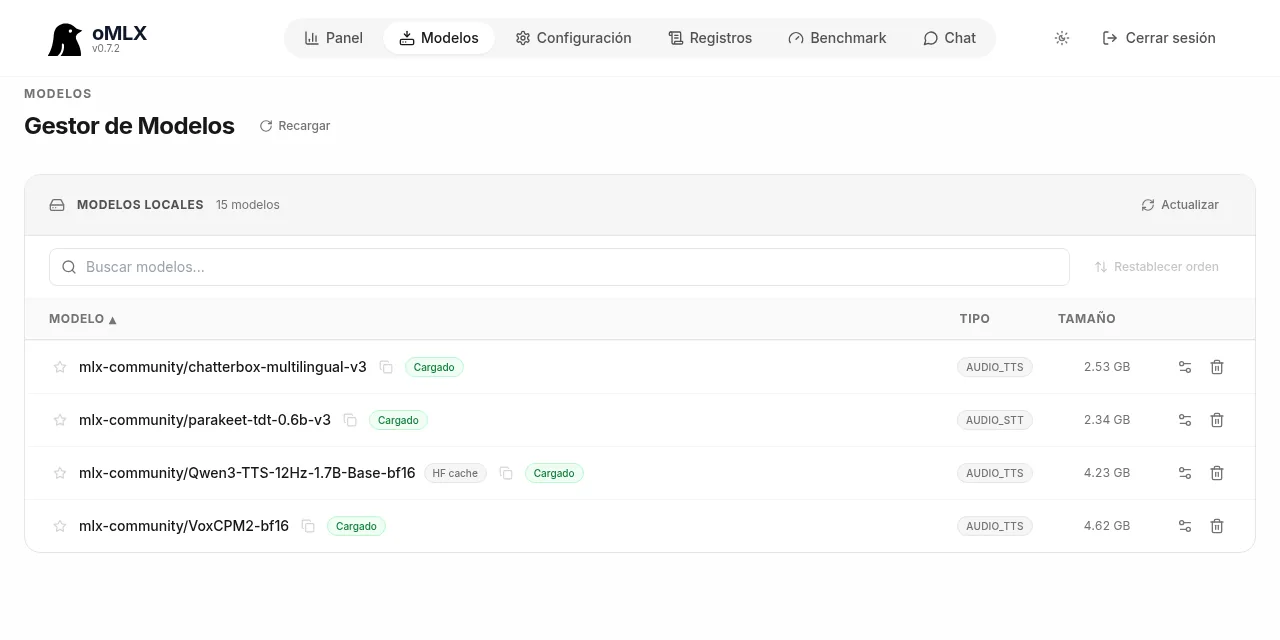
Table of contents
- Key takeaways
- Which voice models oMLX serves and which one to pick
- How to download a voice model in oMLX
- How to request audio from /v1/audio/speech
- Preset voices, described voices and cloning
- Preset voice with Kokoro or Qwen3-TTS CustomVoice
- Voice described with instructions
- Cloning from a reference
- How to transcribe with parakeet to get ref_text and check every clip
- How to hear the first audio before generation finishes
- How fast it is and how it sounds: what I measured on an M5 Max
- What you can do with locally generated speech on your Mac
- Pitfalls I ran into
- Consent, law and licences before you clone a voice
- Frequently asked questions
- Which oMLX TTS model is best for Spanish?
- Do I need an internet connection to generate speech with oMLX?
- Can I use the OpenAI client with oMLX to generate speech?
- Conclusion
- Sources
oMLX does more than serve language models: it also generates speech on your Mac through the same text-to-speech (TTS) API as OpenAI. oMLX is a model server for Apple Silicon Macs built on MLX; if you are new to it, start with what oMLX is and how it differs from Ollama and LM Studio. In this guide you download a voice model, request audio with a preset voice, a voice described in text or a cloned voice, check every clip with an automatic transcription, and see the speed and quality I measured on a 128 GB M5 Max running oMLX 0.7.2. I also go through what to avoid, starting with cloning voices without permission. There is a Spanish version.
Key takeaways
- oMLX 0.7.2 exposes
POST /v1/audio/speech(text to speech),POST /v1/audio/transcriptions(speech to text) andGET /v1/audio/voices, all compatible with the official OpenAI client. - There are three ways to pick a voice: a preset voice (
voice), a voice described in plain language (instructions) or a clone withref_audioin base64 plusref_text, which oMLX requires whenever you send reference audio. - On my M5 Max, Qwen3-TTS 1.7B Base and Chatterbox Multilingual v3 take 0.33 s for each second of audio; with
stream: truethe first chunk arrives after 0.14 s. - A parakeet-tdt-0.6b-v3 transcription gives you the reference’s
ref_textand flags misread clips, as long as you compare against the written text rather than the respelled text. - Clone only voices with explicit consent: in Spain, using someone’s voice for commercial purposes without permission is an unlawful intrusion under Organic Law 1/1982.
Which voice models oMLX serves and which one to pick
oMLX recognises a voice model from its configuration and serves it through mlx-audio, the audio library for MLX. Version 0.7.2 pins mlx-audio 0.5.7, which ships 41 text-to-speech model folders, according to the oMLX 0.7.2 pyproject.toml[1] and the mlx-audio repository[2]. In practice I have tested six voice models and one transcription model:
| Model | What it does | Languages | Licence |
|---|---|---|---|
| Qwen3-TTS 1.7B Base | Clones a voice from reference audio | 10, Spanish included | Apache-2.0 |
| Qwen3-TTS 1.7B CustomVoice | 9 preset voices with instruction control | 10 | Apache-2.0 |
| Qwen3-TTS 1.7B VoiceDesign | Creates a voice from a description | 10 | Apache-2.0 |
| Chatterbox Multilingual v3 | Clones a voice, also across languages | 23 | MIT |
| VoxCPM2 | Designs or clones voices and outputs 48 kHz audio | 30 | Apache-2.0 |
| Kokoro-82M | Preset voices, three of them Spanish | 8 | Apache-2.0 |
| parakeet-tdt-0.6b-v3 | Transcribes speech to text | 25 in Europe | CC-BY-4.0 |
The licences come from each model’s Hugging Face card: Qwen3-TTS[3], Chatterbox[4], VoxCPM2[5], Kokoro-82M[6] and parakeet-tdt-0.6b-v3[7]. If you want a single recommendation for Spanish, start with Qwen3-TTS 1.7B Base: it clones well, supports streaming and keeps the language you ask for.
On disk, according to the oMLX model manager on my Mac, they take:
- Chatterbox Multilingual v3: 2.53 GB
- parakeet-tdt-0.6b-v3: 2.34 GB
- Qwen3-TTS 1.7B Base in bf16: 4.23 GB
- VoxCPM2 in bf16: 4.62 GB
How to download a voice model in oMLX
The direct route is the admin panel: open http://localhost:8000/admin, go to Models, then the Downloads tab, search for Qwen3-TTS or chatterbox and pick the mlx-community MLX conversion. When it finishes, the Manager lists it with the type AUDIO_TTS. If a conversion is not detected properly, the model settings have a Model type selector with Audio STT, Audio TTS and Audio STS.
If you prefer the terminal, download with the Hugging Face CLI into the oMLX model directory, which defaults to ~/.omlx/models:
hf download mlx-community/Qwen3-TTS-12Hz-1.7B-Base-bf16 \
  --local-dir ~/.omlx/models/mlx-community/Qwen3-TTS-12Hz-1.7B-Base-bf16
Then press Reload in the model manager. The identifier you use in the API is the one GET /v1/models returns; on my Mac, the Qwen model downloaded from the Hugging Face cache shows up as mlx-community--Qwen3-TTS-12Hz-1.7B-Base-bf16. The DMG app and the Homebrew install already include mlx-audio; from source you need the audio extra. If your port or API key are not the defaults, see how to set the oMLX API key, port and endpoints.
How to request audio from /v1/audio/speech
The endpoint takes a JSON body with two required fields, model and input, and returns the audio in the response body. These are the fields 0.7.2 accepts, according to its OpenAPI schema and the audio routes source[8]:
model: the voice model identifierinput: the text to read; oMLX rejects an empty stringvoice: a preset voice name; if the model has no named voices, oMLX passes it on as a description or drops itlanguage: a language code such ases; it only reaches models that accept itinstructions: a plain-language description of the voice or tonespeed: a speed multiplier, 1.0 by defaultresponse_format:wav(default),mp3,opus,flacorpcmref_audioandref_text: base64 reference audio and its transcript, for cloningtemperature,top_k,top_p,repetition_penaltyandmax_tokens: sampling; 0.7.2 rejects zero or negative valuesstreamandstreaming_interval: chunked audio delivery, WAV only
The mapping depends on the model, and that is the first surprise. oMLX only hands language to models whose generation function has a lang_code parameter: Qwen3-TTS, Chatterbox and Kokoro have it, VoxCPM2 does not, so with VoxCPM2 the language you send is lost. Chatterbox, on the other hand, falls back to English if you say nothing.
The minimal curl requests list the models and, for a model with preset voices, their names:
curl -s http://localhost:8000/v1/models \
  -H "Authorization: Bearer your_api_key_here"
curl -s "http://localhost:8000/v1/audio/voices?model=Kokoro-82M-bf16" \
  -H "Authorization: Bearer your_api_key_here"
/v1/audio/voices reads the metadata without loading the model. For Kokoro it returns its voices, and the Spanish ones are ef_dora, em_alex and em_santa. For the cloning models it returns an empty list, because they have no named voices.
Preset voices, described voices and cloning
Picking the mode comes first, because each model supports one or two of the three. Preset voices are the most predictable, described voices let you create a character without recording anyone, and cloning reproduces a specific voice from a sample.
Preset voice with Kokoro or Qwen3-TTS CustomVoice
With a preset voice, send only voice. For Kokoro, oMLX infers the language from the first letter of the name (e is Spanish), so ef_dora reads Spanish even without language. Qwen3-TTS CustomVoice ships 9 voices, including Ryan and Aiden, and also takes instructions to change the tone. A warning if you write for Spain: none of these voices is Castilian, and you can hear it in the accent (more on that under the pitfalls).
Voice described with instructions
With VoxCPM2 or Qwen3-TTS VoiceDesign you describe the voice in instructions and the model invents it. That is how I produced the synthetic reference for this guide, without recording anyone:
curl -s http://localhost:8000/v1/audio/speech \
  -H "Authorization: Bearer your_api_key_here" \
  -H "Content-Type: application/json" \
  -d '{
    "model": "VoxCPM2-bf16",
    "input": "Hola, soy una voz sintética diseñada con una descripción.",
    "instructions": "A calm adult woman from Madrid, documentary narrator"
  }' -o reference.wav
The description is in English because VoxCPM2 and Qwen3-TTS follow Spanish instructions less reliably. The 7.5 s clip came out in 5.2 s, model load included, at 48 kHz. This is the result, downsampled to MP3:
Cloning from a reference
To clone, you send the reference audio in base64 as ref_audio and its exact transcript as ref_text. oMLX returns a 400 error if you send ref_audio without ref_text, even when the specific model ignores it, and accepts up to 20 MB of base64, about 60 s of audio. With the official OpenAI Python client, the non-OpenAI fields go in extra_body:
import base64
from pathlib import Path
from openai import OpenAI

client = OpenAI(base_url="http://localhost:8000/v1",
                api_key="your_api_key_here")
ref = base64.b64encode(Path("reference.wav").read_bytes()).decode()

with client.audio.speech.with_streaming_response.create(
    model="mlx-community--Qwen3-TTS-12Hz-1.7B-Base-bf16",
    voice="alloy",
    input="Con oMLX, tu Mac genera esta narración en local.",
    response_format="mp3",
    extra_body={"language": "es", "ref_audio": ref,
                "ref_text": Path("reference.txt").read_text()},
) as response:
    response.stream_to_file("narration.mp3")
The SDK requires voice, but oMLX does not forward it to Qwen3-TTS Base because that model has no named voices. I tested it with version 3.36.0 of the openai package, and the request took 1.18 s. The next clip is Qwen3-TTS 1.7B Base cloning the synthetic voice above: 11.7 s of audio generated in 3.09 s.
The same pattern lets you chain two models, as the Qwen3-TTS card recommends. You design a voice once and clone it in every clip, so the character sounds the same across a whole video.
How to transcribe with parakeet to get ref_text and check every clip
POST /v1/audio/transcriptions does two jobs in this workflow: it writes your reference’s ref_text and it checks that each generated clip says what you wrote. It takes the audio as a multipart form:
curl -s http://localhost:8000/v1/audio/transcriptions \
  -H "Authorization: Bearer your_api_key_here" \
  -F model=parakeet-tdt-0.6b-v3 -F language=es \
  -F file=@reference.wav
With the synthetic reference, parakeet returned all 22 words correctly in 0.37 s. For the automatic check I use the word error rate (WER), the percentage of words substituted, dropped or added relative to the original text. This function computes it with no dependencies:
import re
import unicodedata

def words(text):
    t = unicodedata.normalize("NFD", text.lower())
    t = "".join(c for c in t if unicodedata.category(c) != "Mn")
    return re.sub(r"[^\w\s]", " ", t).split()

def wer(written, heard):
    a, b = words(written), words(heard)
    d = list(range(len(b) + 1))
    for i, x in enumerate(a, 1):
        prev, d[0] = d[0], i
        for j, y in enumerate(b, 1):
            prev, d[j] = d[j], min(d[j] + 1, d[j - 1] + 1, prev + (x != y))
    return 100 * d[-1] / len(a)
Transcribe each clip with client.audio.transcriptions.create(model="parakeet-tdt-0.6b-v3", file=…, language="es") and listen to the ones above a threshold, for example 5 %. Always compare against the written text, digits included, and not against the respelled version you feed the model: parakeet writes numbers back as digits. With a respelled text, a naive comparison scored a correct clip at 45.8 % error.
How to hear the first audio before generation finishes
With "stream": true oMLX starts sending WAV audio as soon as the model produces the first chunk. Qwen3-TTS and Chatterbox do it natively, every 0.2 s by default (streaming_interval). For other models, oMLX splits the text into sentences of up to 300 characters and sends each one when it is done.
The difference is noticeable. For the same 11.7 s cloned clip, the full response took 3.09 s, while in streaming mode the first bytes arrived after 0.14 s. With the OpenAI SDK, add "stream": True to extra_body and iterate over response.iter_bytes(); that way I measured 0.18 s to the first chunk. It only works with response_format set to wav; any other format gets a 400 error.
How fast it is and how it sounds: what I measured on an M5 Max
On a 128 GB M5 Max, the voice models served by oMLX generate audio between 1.4 and 3 times faster than real time. I compared them with the CPU of the same Mac, from a Linux container running PyTorch, where the same models take 17 to 21 s for each second of audio. The metric is the real-time factor (RTF): seconds of compute per second of audio, with the model already loaded.
For quality I cloned a 26 s Spanish reference recording, made with its owner’s permission and not published, on three different texts. I transcribed each clip with parakeet to compute the WER and compared the timbre with a speaker verification model (SpeechBrain ECAPA). As a baseline, the real recording itself scores 1.8 % WER and 0.904 similarity between its two halves.
Chatterbox and Qwen3-TTS are effectively tied: 10.4 % against 11.0 % errors and the same timbre similarity. VoxCPM2 trails slightly, and 3 of its 12 clips started in English. MOSS-TTS produced no usable speech through oMLX.
For producing narration I settled on Qwen3-TTS 1.7B Base. It clones as well as Chatterbox, streams natively and keeps Spanish in every clip.
What you can do with locally generated speech on your Mac
The advantage of generating speech locally is that the text never leaves the machine and each clip costs nothing beyond electricity. These are the uses where I have seen it fit:
- Video and tutorial narration: one consistent voice across dozens of clips, regenerated whenever a script line changes
- Accessibility and read-aloud: audio versions of articles or internal documentation for people who prefer to listen
- Podcasts and audio mock-ups: trying a script with two described voices before recording it with people
- Phone menu (IVR) prototypes: menu prompts redone in seconds every time an option changes
- Localisation: Chatterbox Multilingual v3 clones a voice and makes it speak 23 languages, useful for dubbing your own video
The voice models take between 2.5 and 4.6 GB each. If you will serve them next to language models, see how oMLX manages memory across models.
Pitfalls I ran into
Most of the problems do not come from oMLX but from the text you give the model. These are the pitfalls I hit when moving from one-off tests to narrating full videos:
- Numbers get misread: Qwen3-TTS read the number 9443 as "nueve cuatro cuarenta y tres" (nine, four, forty-three). Spell numbers out in the text you send the model and keep the digit version to check the result.
- So do technical terms: "host" came out sounding like "lost" and npm came out mispronounced. A pronunciation dictionary that replaces each term with how it sounds in Spanish fixes it.
- VoxCPM2 drifts into English: oMLX does not pass it
language, and 3 of 12 Spanish clips started in English. With VoxCPM2, check every clip. - Chatterbox without
languagespeaks in English mode: the same Spanish text went from 0 to 3 misread words out of 30 when I removed"language": "es". - Not every model works: MOSS-TTS produced unintelligible audio twice as long as expected, and Higgs Audio 3 did not load in oMLX 0.7.1rc1 because mlx-audio does not recognise its model type.
ref_textis mandatory: without it oMLX returns a 400 error. Transcribe the reference with parakeet and fix by hand whatever it mishears.- The reference rules: a clean, read sample of 10 to 30 s clones better than a sung one or one with background music, and the reference’s accent carries over to the clone.
- A Spain accent is not built in: an accent classifier placed Kokoro’s
ef_doravoice in the Caribbean (Spain probability 0.085), and Qwen3-TTS described voices never came out with a Castilian accent for me.
Consent, law and licences before you clone a voice
Cloning a voice is technically trivial, but it is not legally neutral. In Spain, Organic Law 1/1982[9] treats as an unlawful intrusion, in article 7.6, "la utilización del nombre, de la voz o de la imagen de una persona para fines publicitarios, comerciales o de naturaleza análoga" (using a person’s name, voice or image for advertising, commercial or similar purposes). Article 2 lifts it only with the holder’s express consent, which they can also revoke at any time. My rule: I only clone voices whose owner has given me written permission for that use, and never voices from audiobooks, interviews or other people’s videos.
Labelling synthetic audio is the other half. The EU Artificial Intelligence Act[10], in article 50, requires disclosing that audio is artificial when it is a deepfake. That means it resembles a real person and could make someone believe it is authentic. The context is in what the EU AI Act changes for your company.
YouTube asks creators to disclose realistic AI-generated content, including content that makes a real person appear to say something they did not, according to its policy on disclosing AI-generated content[11]. Cloning your own voice for voice-overs is on its list of uses that need no disclosure, but I declare it in the description anyway.
Check the model licence too before using it in a commercial project. Qwen3-TTS, VoxCPM2 and Kokoro are Apache-2.0 and Chatterbox is MIT, but these three well-known models forbid commercial use:
- F5-TTS: CC-BY-NC-4.0[12]
- Fish Speech 1.5: CC-BY-NC-SA-4.0[13]
- Voxtral 4B TTS: CC-BY-NC-4.0[14]
The original Chatterbox package adds an inaudible watermark to its output; I have not checked whether the MLX conversion oMLX serves keeps it.
Frequently asked questions
Which oMLX TTS model is best for Spanish?
Qwen3-TTS 1.7B Base for cloning a voice with permission, with an 11.0 % word error rate and native streaming in my tests. Chatterbox Multilingual v3 gives equivalent quality and covers 23 languages, but you must send language on every request.
Do I need an internet connection to generate speech with oMLX?
Only to download the model the first time. After that, the text, the reference and the generated audio stay on your Mac, and oMLX answers on localhost without calling any external service.
Can I use the OpenAI client with oMLX to generate speech?
Yes. Point base_url at http://localhost:8000/v1 and call client.audio.speech.create. oMLX-specific fields such as language, ref_audio, ref_text or stream go in extra_body.
Conclusion
oMLX turns an Apple Silicon Mac into a local speech server with the API you already know from OpenAI. On an M5 Max it generates audio between 1.4 and 3 times faster than real time. Start with Qwen3-TTS 1.7B Base, check every clip with parakeet against the written text, respell numbers and technical terms, and do not clone any voice without written permission. If you do not have oMLX yet, the guide on how to install and tune oMLX on an M5 Max gets the server ready.
Sources: [1] oMLX README[15], [2] oMLX 0.7.2 audio routes[8], [3] oMLX 0.7.2 dependencies[1], [4] mlx-audio repository[2], [5] Qwen3-TTS 1.7B CustomVoice model card[3], [6] Resemble AI Chatterbox model card[4], [7] VoxCPM2 model card[5], [8] Kokoro-82M model card[6], [9] parakeet-tdt-0.6b-v3 model card[7], [10] Organic Law 1/1982 in the BOE[9], [11] Regulation (EU) 2024/1689 in the BOE[10], [12] YouTube policy on AI-generated content[11], [13] F5-TTS model card[12], [14] Fish Speech 1.5 model card[13], [15] Voxtral 4B TTS model card[14].
Sources
Source code
Access all the source code for this post on GitHub.
View on GitHub