oMLX API reference: endpoints, API key, port and error codes
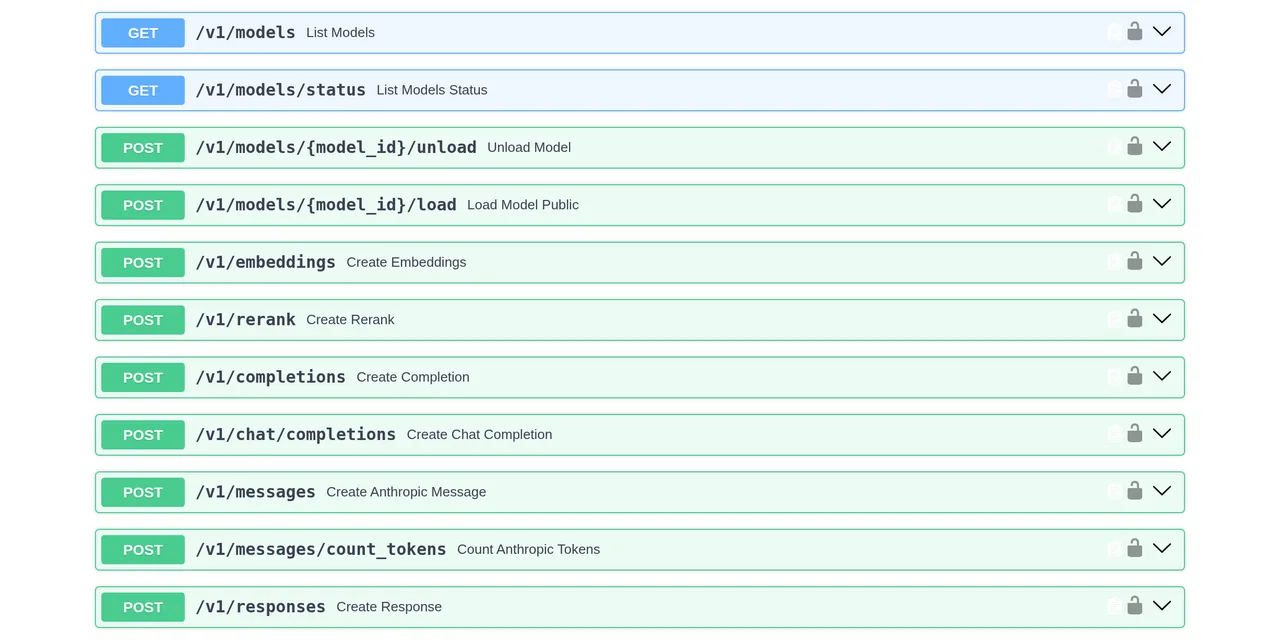
Table of contents
- Key takeaways
- Which endpoints oMLX 0.7.2 exposes
- How a request is authenticated
- When you can do without a key
- Resetting or rotating the key
- curl examples: OpenAI and Anthropic
- oMLX API error codes
- How to change port 8000
- Frequently asked questions
- What is the default oMLX port?
- Where is the oMLX API key?
- Why does oMLX answer "API key required"?
- Which max_tokens does oMLX use if I do not send one?
- How do I connect Claude Code to oMLX?
- Conclusion
- Sources
The oMLX API copies two that already exist, OpenAI’s and Anthropic’s, so any client written against them points at your Mac by changing the base URL. This reference covers the endpoints of version 0.7.2, how the key is sent, what each error code means and how to move off port 8000 without the server still listening on the old one. It was checked against the code of the v0.7.2 tag and against a running server on 27 October 2026.
Key takeaways
- The server listens on
127.0.0.1:8000. On that address no key is needed; on any other, oMLX refuses to start without one. - The key travels in
Authorization: Beareror inx-api-key. The second exists for the Anthropic SDK. - Eight wrong keys in a row from another machine lock that client out for 30 seconds with a
429; the next round, for 5 minutes. - Errors on
/v1/routes come back in OpenAI’s format, including those from/v1/messages. - Settings resolve in a cascade: command flags,
OMLX_*variables,~/.omlx/settings.jsonand the code defaults.
Which endpoints oMLX 0.7.2 exposes
oMLX serves OpenAI’s API, Anthropic’s Messages API and a few routes of its own for model management on the same port. This is the list of public routes in 0.7.2, taken from the OpenAPI schema the server publishes at /openapi.json:
| Method | Route | What it is for |
|---|---|---|
| POST | /v1/chat/completions |
Chat in OpenAI’s format, streaming or not |
| POST | /v1/completions |
Plain text completion |
| POST | /v1/responses |
OpenAI’s Responses API, the one Codex uses |
| POST | /v1/messages |
Anthropic’s Messages API, the one Claude Code uses |
| POST | /v1/messages/count_tokens |
Counts the tokens of an Anthropic request |
| POST | /v1/embeddings |
Embedding vectors |
| POST | /v1/rerank |
Document reranking |
| POST | /v1/systemone and /v1/decisions |
Decision models such as Clef |
| GET | /v1/models |
Model catalogue, with aliases |
| GET | /v1/models/status |
Which models are loaded |
| POST | /v1/models/{model_id}/load and /unload |
Load or unload a model |
| POST | /v1/audio/transcriptions and /v1/audio/speech |
Speech to text and text to speech, when mlx-audio is installed |
| GET | /v1/mcp/tools |
Tools from the configured MCP servers |
| POST | /v1/tokenize and /v1/detokenize |
The model’s tokenizer, also at the root as in vLLM |
| GET | /health |
Server status, no key |
Because /v1/chat/completions and /v1/messages live on the same server, an OpenAI library and Claude Code can share one loaded model without duplicating memory. The audio routes only exist when the mlx-audio package is installed; without it they return 404.
The /admin/... routes belong to the admin dashboard and accept the main key or a dashboard session, never a sub-key. The dashboard and its command line are covered in the oMLX admin dashboard.
How a request is authenticated
oMLX checks the key on every inference route unless the server listens on loopback only, that is, on 127.0.0.1 or ::1. There are three different credentials:
- Main key: opens the API and the admin dashboard. You set it at start-up or in the global settings.
- Sub-keys: only call the API. Hand them to applications and keep the main key for yourself.
- Dashboard session: a signed cookie that lasts 24 hours, or 30 days if you tick the remember box.
The two headers below are equivalent to the server. Use the first with OpenAI libraries and the second with the Anthropic SDK:
curl http://127.0.0.1:8000/v1/models \
  -H "Authorization: Bearer your_api_key"

curl http://127.0.0.1:8000/v1/models \
  -H "x-api-key: your_api_key"
The key needs at least four printable ASCII characters and no whitespace. The comparison runs in constant time, and the logs only keep a fingerprint of the key, never the key itself.
When you can do without a key
With the server on 127.0.0.1, the global settings let you skip verification, and if no key is configured oMLX does not ask for one either. Once you change host to 0.0.0.0 or to the Mac’s IP, 0.7.2 changes the rules: it does not start without a key and does not let you skip verification. The message reads "An API key is required when binding to a non-loopback host".
That lock matters because CORS origins default to open (["*"]), so without a key any page open in a browser on your network could use the server. A separate setting, allow_unauthenticated_inference, opens the inference routes only and keeps the dashboard protected. Turn it on only on a network you trust.
Resetting or rotating the key
There is no dedicated command: the key lives in ~/.omlx/settings.json, in the auth section. Change it from the dashboard’s global settings, edit the file with the server stopped, or start with --api-key. The OMLX_API_KEY variable sets it too and wins over the file.
If you lost the key and cannot get into the dashboard, stop the server, delete or change auth.api_key in settings.json and start it again. Rotating a sub-key only affects the application that used it.
curl examples: OpenAI and Anthropic
Both examples ran against an oMLX server on a Mac with the Qwen3.6-35B-A3B-oQ4e-mtp model loaded. Swap the name for one your /v1/models returns. First, OpenAI’s format:
curl http://127.0.0.1:8000/v1/chat/completions \
  -H "Content-Type: application/json" \
  -H "Authorization: Bearer your_api_key" \
  -d '{
    "model": "Qwen3.6-35B-A3B-oQ4e-mtp",
    "messages": [{"role": "user",
                  "content": "Answer in one sentence: what is MLX?"}],
    "max_tokens": 200,
    "chat_template_kwargs": {"enable_thinking": false}
  }'
The response holds the text in choices[0].message.content, and usage adds fields OpenAI does not have: time_to_first_token, prompt_tokens_per_second and generation_tokens_per_second. They let you measure without instrumenting the client. chat_template_kwargs turns thinking off on the Qwen models that support it.
The same question through Anthropic’s Messages API:
curl http://127.0.0.1:8000/v1/messages \
  -H "Content-Type: application/json" \
  -H "x-api-key: your_api_key" \
  -H "anthropic-version: 2023-06-01" \
  -d '{
    "model": "Qwen3.6-35B-A3B-oQ4e-mtp",
    "max_tokens": 1024,
    "messages": [{"role": "user",
                  "content": "Answer in one sentence: what is MLX?"}]
  }'
With a reasoning model, the first content block has type thinking and the text comes after it. In the test, with max_tokens at 200, the model spent the whole budget thinking and the answer ended with "stop_reason": "max_tokens" and no text block. Leave room, or turn thinking off in the model settings.
/v1/messages/count_tokens takes the same body without max_tokens and returns the count without generating anything: {"input_tokens": 20} for that question.
oMLX API error codes
Routes that start with /v1/ return errors in OpenAI’s format, with message, type, param and code inside an error object. This is the real 422 for a request with max_tokens set to 0:
{"error": {
  "message": "body -> max_tokens: Input should be greater than 0",
  "type": "invalid_request_error",
  "param": "max_tokens",
  "code": null}}
That format also applies to /v1/messages, so an Anthropic client expecting {"type": "error"} gets OpenAI’s shape. These are the codes the 0.7.2 server defines:
| Code | Type | When it shows up |
|---|---|---|
| 400 | invalid_request_error |
A request that does not match the model: images to a text-only model, or /v1/embeddings against a model that is not an embedding model |
| 401 | authentication_error |
"API key required" (no key sent) or "Invalid API key" |
| 404 | not_found_error |
Unknown model; the message lists the available ones |
| 409 | invalid_request_error |
The model is still loading, or was unloaded mid-request |
| 413 | invalid_request_error |
A body over 512 MB, or audio or an image over its own limit |
| 422 | invalid_request_error |
The body fails validation, such as max_tokens at 0 |
| 429 | rate_limit_error |
Lock-out after eight wrong keys; carries a Retry-After header |
| 503 | server_error |
Scheduler queue full, with Retry-After: 1, or the server still starting |
| 507 | server_error |
The model does not fit under the memory ceiling, even after evicting others |
The 507 and the prefill error you get when the context does not fit both come from the memory guard. What each one means, and how to measure how much context fits, is in how to measure oMLX and its memory ceiling.
How to change port 8000
The default port is 8000, and four layers can change it in a fixed order. From strongest to weakest:
- Command flags:
--port,--host,--api-key. - Environment variables:
OMLX_PORT,OMLX_HOST,OMLX_API_KEY,OMLX_MODEL_DIR. - The
~/.omlx/settings.jsonfile. - The code defaults.
For a one-off test, a flag or a variable is enough:
omlx serve --port 8080

OMLX_PORT=8080 omlx serve
For a permanent change, edit the file with the server stopped. Network settings live inside the server section; a bare "port" at the root of the JSON is ignored without a warning:
{
  "server": {
    "host": "127.0.0.1",
    "port": 8080
  }
}
The dashboard saves host and port too, but network changes only apply when the server restarts. The menu bar app reads the port from that same file and passes it as --port at start-up, so change it on the app’s server screen with the server stopped.
If you installed it with Homebrew, the service runs omlx serve with no arguments, so the file is all that counts. Restart with omlx restart and check the port with curl http://127.0.0.1:8080/health. The rest of the service lifecycle is in the Homebrew guide for oMLX.
Frequently asked questions
What is the default oMLX port?
8000, on 127.0.0.1. The API sits at http://127.0.0.1:8000/v1 and the dashboard at http://127.0.0.1:8000/admin. Change it with --port, with OMLX_PORT or in the server section of ~/.omlx/settings.json.
Where is the oMLX API key?
In ~/.omlx/settings.json, under auth.api_key, or in OMLX_API_KEY if you set it in the environment. The dashboard shows it in the global settings. If you never set one and the server listens on 127.0.0.1, there is no key and none is asked for.
Why does oMLX answer "API key required"?
Because the request carries neither Authorization: Bearer nor x-api-key and the server requires a key. That always happens when it listens beyond loopback, and on loopback when a key is configured and verification is not skipped.
Which max_tokens does oMLX use if I do not send one?
The one in the sampling settings, 32,768 tokens by default; each model can have its own in the dashboard. The field also accepts the max_completion_tokens alias, and a value of 0 or below returns 422.
How do I connect Claude Code to oMLX?
The short route is omlx launch claude, which exports ANTHROPIC_BASE_URL, ANTHROPIC_AUTH_TOKEN and the models for you. By hand, point ANTHROPIC_BASE_URL at http://127.0.0.1:8000 and put the key in ANTHROPIC_AUTH_TOKEN. The full recipe is in the guide to installing oMLX on an M5 Max.
Conclusion
The oMLX API has no format of its own to learn: if your code already talks to OpenAI or Anthropic, changing the base URL and the key is enough. The decision you do have to make is where the server listens, because 0.7.2 requires a key as soon as it leaves 127.0.0.1. And if you change the port in the file, do it inside server.
Every oMLX guide, ordered from installation to benchmarks, is on the oMLX page. The Spanish version of this reference is la API de oMLX.
Sources: [1] jundot/omlx, code of the v0.7.2 tag[1], [2] oMLX 0.7.2 release notes[2], [3] OpenAI chat API reference[3], [4] Anthropic Messages API[4], [5] Model Context Protocol specification[5].
Sources
Source code
Access all the source code for this post on GitHub.
View on GitHub