How to fix error: invalid argument: –mlock in llama.cpp
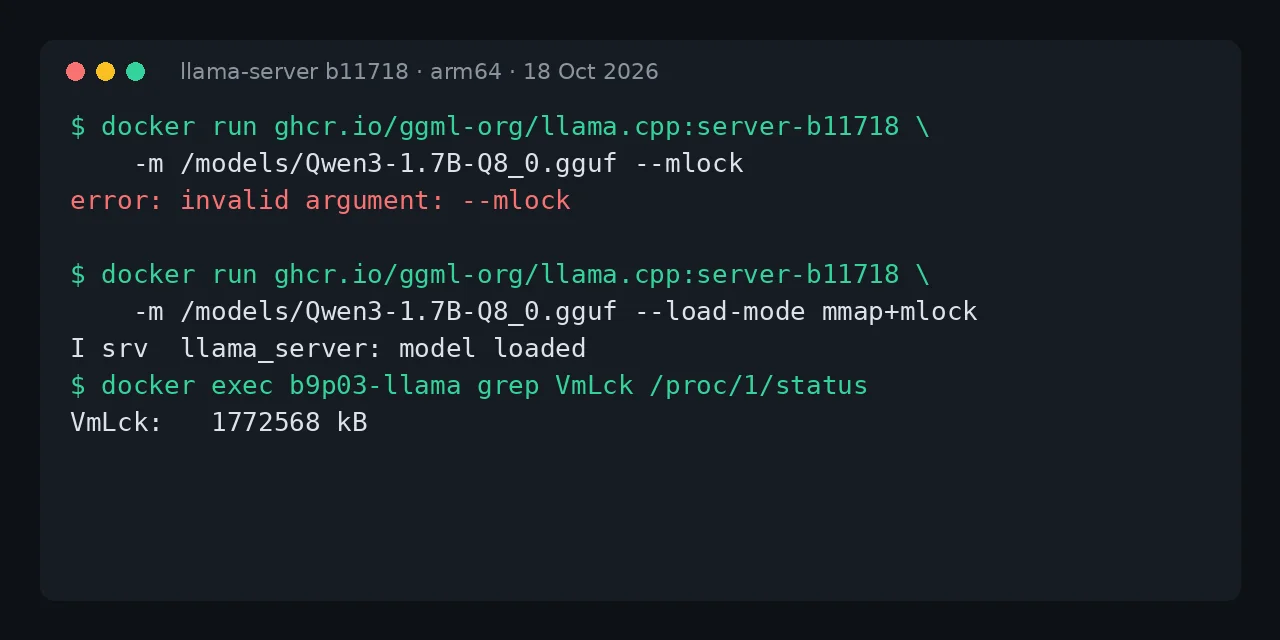
Table of contents
- Key takeaways
- What does error: invalid argument: --mlock mean?
- Which llama.cpp version removed --mlock, --no-mmap and --direct-io?
- The options before and after, copied from --help
- Why does --mlock become mmap+mlock and not mlock?
- The fixed command and docker-compose.yml
- How to check that the model is locked in RAM
- The silent failure: mlock without permission and old variables
- Frequently asked questions
- Can I keep using --mlock if I pin an old image?
- What do I use instead of --no-mmap?
- Does it affect llama-cli and llama-bench too?
- Conclusion
- Sources
The error: invalid argument: --mlock message appears because llama.cpp deleted the --mmap, --no-mmap, --mlock and --direct-io options in build b10875 (9 September 2026), and the fix is to replace them with --load-mode. The replacement for --mlock is --load-mode mmap+mlock, for --no-mmap it is --load-mode none and for --direct-io it is --load-mode dio. I reproduced it on 18 October 2026 on Linux arm64 with Docker 29.5.2, the ghcr.io/ggml-org/llama.cpp:server-b11718 image and a 1.8 GB Qwen3 1.7B in Q8_0. There is a Spanish version of this guide.
Key takeaways
- All five old loading options (
--mlock,--mmap,--no-mmap,--direct-ioand-dio) returninvalid argumentand the process exits with code 1. - The mapping depends on what your
--mlockdid: for years,--mlockalone meantmmap+mlock, and--no-mmap --mlockmaps tomlock. - The
LLAMA_ARG_MLOCK,LLAMA_ARG_MMAPandLLAMA_ARG_DIOvariables no longer fail: the server starts and ignores them. The new one isLLAMA_ARG_LOAD_MODE. llama-benchchanged too:-mmp 0returnserror: invalid parameter for argument: -mmp.- With
--load-mode mmap+mlockthe process locked 1,772,568 kB, 99 % of the model file; with an 8 MiBmemlocklimit it locked 0 and only logged a warning.
What does error: invalid argument: –mlock mean?
It means your binary’s argument parser no longer knows that option. Nothing is wrong with the model or the image: llama.cpp rejects the whole command line before it opens the GGUF file. This is the exact output with the :server image of 18 October 2026, which is build b11718:
$ docker run --rm -v $PWD/models:/models:ro \
    ghcr.io/ggml-org/llama.cpp:server \
    -m /models/Qwen3-1.7B-Q8_0.gguf --mlock
error: invalid argument: --mlock
$ echo $?
1
The other options in the same family fail the same way, with only the name changed: error: invalid argument: --no-mmap, error: invalid argument: --mmap, error: invalid argument: --direct-io and error: invalid argument: -dio. Because the container exits with code 1, a restart: unless-stopped policy in Compose restarts it in a loop and docker ps shows it as Restarting.
Which llama.cpp version removed –mlock, –no-mmap and –direct-io?
Build b10875, published on 9 September 2026, and the first numbered release that includes it is v0.4.1, from 14 September. The change comes from PR #28334[1] by Aaron Teo, approved by Georgi Gerganov. Its author explains it like this: "I think it has been a decent amount of time since we deprecated the --mmap, --mlock, and --direct-io flags in favor for --load-mode."
The notice period was seven weeks. The -lm, --load-mode option arrived on 23 July with PR #20834[2], which kept the old ones as deprecated aliases. The v0.4.1 release notes[3] sum it up in one line: "Removed deprecated --mmap/--mlock/--direct-io args in favor of --load-mode". To find out whether your image sits before or after the cut, check its build number:
docker run --rm ghcr.io/ggml-org/llama.cpp:server --version
# version: 0.7.0-dev (build 11718, commit 547208dca)
Any build at 10875 or above rejects the old options. I checked the two published images closest to the cut: server-b10868 still accepts them with a warning, and server-b10884 already returns invalid argument.
The options before and after, copied from –help
The help of build b10868 still listed the three options, marked as deprecated. This is what llama-server --help prints in that image, uncut:
--mlock          DEPRECATED in favor of `--load-mode`: force system to
                 keep model in RAM rather than swapping or compressing
                 (env: LLAMA_ARG_MLOCK)
--mmap, --no-mmap
                 DEPRECATED in favor of `--load-mode`: whether to
                 memory-map model. (if mmap disabled, slower load but
                 may reduce pageouts if not using mlock)
                 (env: LLAMA_ARG_MMAP)
-dio,  --direct-io, -ndio, --no-direct-io
                 DEPRECATED in favor of `--load-mode`: use DirectIO if
                 available
                 (env: LLAMA_ARG_DIO)
I narrowed the left column in this block and the next one so they fit; the text is the original. In b11718 those three entries are gone and only the new option is left, with its six modes:
-lm,   --load-mode MODE   model loading mode (default: auto)
  - auto: mmap, unless a device does not support it
  - none: no special loading mode
  - mmap: memory-map model (if mmap disabled, slower load but may
    reduce pageouts if not using mlock)
  - mlock: force system to keep model in RAM rather than swapping
    or compressing
  - mmap+mlock: mmap + force system to keep model in RAM rather
    than swapping or compressing
  - dio: use DirectIO if available

  (env: LLAMA_ARG_LOAD_MODE)
To check your own image without starting anything, filter the help: docker run --rm your_image_here --help | grep -A12 load-mode.
Why does –mlock become mmap+mlock and not mlock?
Because before the change memory mapping (mmap) was on by default, so --mlock alone meant "map the file and lock it in RAM". I checked it in the source of build b8100: use_mmap defaults to true and --mlock only sets use_mlock = true. The mlock mode of --load-mode does something else: it locks without mapping, like the old --no-mmap --mlock combination.
This is the confusion you will meet in other guides. During the final six weeks of the alias, --mlock changed meaning: PR #26135[4], from 27 July, redirected it to the non-mapping mlock mode. Build b10868 confirms it in its log with DEPRECATED: --mlock is deprecated. use --load-mode mlock instead, and the model file did not appear in /proc/1/maps. If your command line dates from before July, the faithful equivalent is mmap+mlock.
The full mapping, with the environment variables that Docker images use:
| Before (up to b10874) | Now (b10875 or later) |
|---|---|
| No option | -lm auto (the default, no need to write it) |
--mmap |
-lm mmap |
--no-mmap |
-lm none |
--mlock |
-lm mmap+mlock |
--no-mmap --mlock |
-lm mlock |
--direct-io, -dio |
-lm dio |
--no-direct-io, -ndio |
Remove it |
LLAMA_ARG_MLOCK=1 |
LLAMA_ARG_LOAD_MODE=mmap+mlock |
LLAMA_ARG_MMAP=0 |
LLAMA_ARG_LOAD_MODE=none |
llama-bench -mmp 0 |
llama-bench -lm none |
Issue #26110[5] explains why the mlock mode exists. Without it, anyone offloading the experts of a mixture-of-experts (MoE) model to the CPU with --n-cpu-moe lost the one combination that did not run out of memory.
The fixed command and docker-compose.yml
The fix is swapping one option for another, and in Docker it also pays to pin the build. This is the command that used to fail, now fixed:
docker run -d --name llama -p 8080:8080 \
  --ulimit memlock=-1 \
  -v $PWD/models:/models:ro \
  ghcr.io/ggml-org/llama.cpp:server-b11718 \
  -m /models/Qwen3-1.7B-Q8_0.gguf \
  --load-mode mmap+mlock -c 4096 --host 0.0.0.0 --port 8080
The --ulimit memlock=-1 option removes the container’s lockable-memory limit. In Compose the equivalent is the ulimits key, documented in the Compose services reference[6]. This is the file I brought up with docker compose up -d:
services:
  llama:
    image: ghcr.io/ggml-org/llama.cpp:server-b11718
    command: >
      -m /models/Qwen3-1.7B-Q8_0.gguf
      --load-mode mmap+mlock
      -c 4096 --host 0.0.0.0 --port 8080
    ulimits:
      memlock: -1
    volumes:
      - ./models:/models:ro
    ports:
      - "8080:8080"
The server answered {"status":"ok"} on /health, /props returned b11718-547208dca as build_info and a request to /v1/chat/completions replied Hola.. If you prefer environment variables, replace the --load-mode line with LLAMA_ARG_LOAD_MODE: "mmap+mlock" under environment; I tested it and it locks the same memory.
How to check that the model is locked in RAM
The process status tells you without reading logs: the VmLck field of /proc/<pid>/status counts the kilobytes locked with mlock. In the image, llama-server is PID 1:
docker exec llama grep VmLck /proc/1/status
# VmLck:   1772568 kB
The model file is 1,834,426,016 bytes, or 1,791,432 KiB, so mmap+mlock locked 99 % of it. I measured the four modes with the same model, -c 2048 and no memlock limit:
The non-mapping mlock mode locked only 316 MiB in this CPU-only test, and I have not investigated which buffers it covers. If your goal is to keep the weights out of swap, measure VmLck with your own model before you call the change done.
The silent failure: mlock without permission and old variables
There are two situations in which the server starts without an error and still locks nothing. The first is a low memlock limit: with --ulimit memlock=8388608:8388608, llama.cpp only logged this warning and carried on with VmLck at 0:
W warning: failed to mlock 336572416-byte buffer (after previously
locking 0 bytes): Cannot allocate memory
Try increasing RLIMIT_MEMLOCK ('ulimit -l' as root).
The mlock(2) man page[7] states the rule: a process without the CAP_IPC_LOCK capability cannot lock more than its RLIMIT_MEMLOCK limit, and Docker does not grant that capability by default. On this machine, running OrbStack, the limit was already unlimited; on another engine it may not be, so always declare memlock: -1.
The second is an environment variable with the old name. With LLAMA_ARG_MLOCK=1 or LLAMA_ARG_MMAP=0, b11718 started, answered ok on /health and left VmLck at 0 without printing anything. A command-line option fails loudly; an obsolete variable under environment fails silently, so check your .env files as well.
Frequently asked questions
Can I keep using –mlock if I pin an old image?
Yes, any build before b10875 accepts it with a warning, for example ghcr.io/ggml-org/llama.cpp:server-b10868. You lose every later fix, and b11718 is 850 builds ahead. Changing one option costs less than maintaining a frozen image.
What do I use instead of –no-mmap?
--load-mode none, or LLAMA_ARG_LOAD_MODE=none in the environment. That is the mapping the author of the change confirmed in PR #20834, and in my test the model file stopped appearing in /proc/1/maps.
Does it affect llama-cli and llama-bench too?
Yes. llama cli, the image’s unified binary, rejects the same options with one capital letter of difference: Error: invalid argument: --no-mmap. llama-bench has its own: in b10868 it marked -mmp, --mmap <0|1> and -dio, --direct-io <0|1> as deprecated, and in b11718 -mmp 0 ends with error: invalid parameter for argument: -mmp. Use -lm with the same values.
Conclusion
error: invalid argument: --mlock is not a model or Docker failure: it is the removal of three options that had been marked deprecated for seven weeks. Replace --mlock with --load-mode mmap+mlock, --no-mmap with --load-mode none and --direct-io with --load-mode dio, rename the LLAMA_ARG_* variables and check VmLck before you call the fix done. Also pin the server-bNNNNN tag so the next removal does not reach you unannounced.
If you are setting llama.cpp up from scratch, start with the guide on how to install llama.cpp on Linux, macOS and Docker. If you use it as a backend for your applications, see llama-server as an OpenAI-compatible API in Docker. To choose the GGUF file, the guide to model quantization and llama.cpp explains how much each format takes.
Sources: [1] llama.cpp, PR #28334: removing the mmap, mlock and dio options[1], [2] llama.cpp, v0.4.1 release notes[3], [3] llama.cpp, build b10875[8], [4] llama.cpp, PR #20834: introducing –load-mode[2], [5] llama.cpp, PR #26135: mlock mode without mmap[4], [6] llama.cpp, issue #26110 on –n-cpu-moe[5], [7] Docker, Compose services reference (ulimits)[6], [8] Linux man-pages, mlock(2)[7], [9] llama.cpp, images on GitHub Container Registry[9].
Sources
Source code
Access all the source code for this post on GitHub.
View on GitHub