How to fix Docker Hub toomanyrequests with your own pull-through registry cache
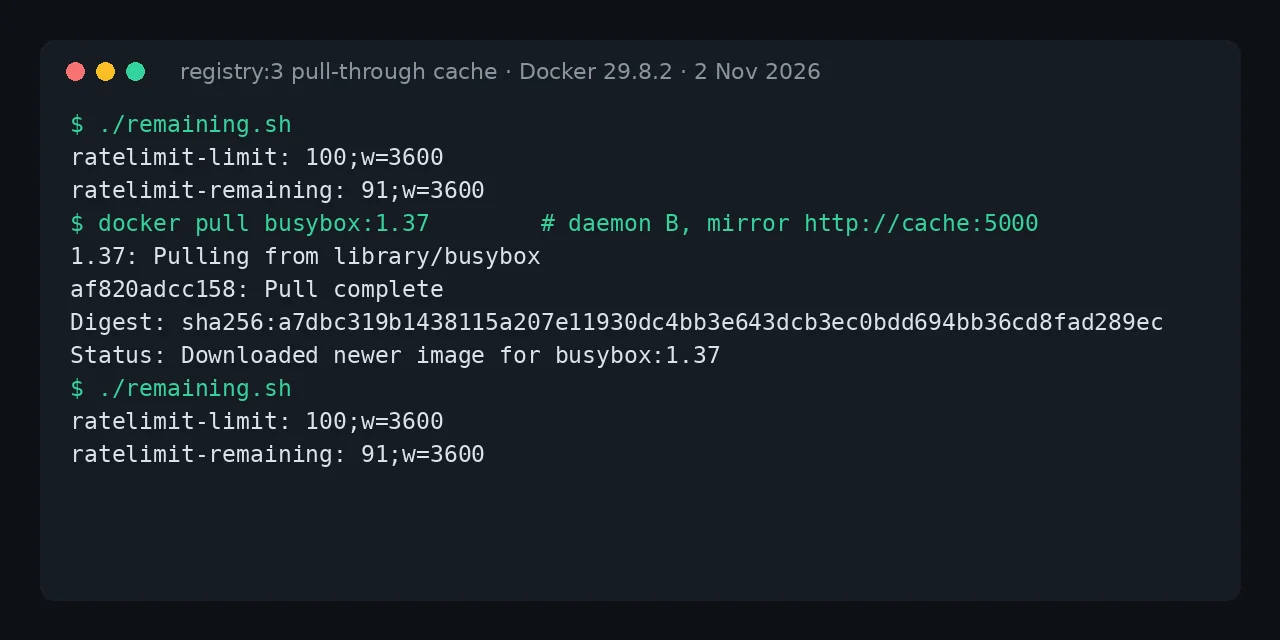
Table of contents
- Key takeaways
- Toomanyrequests: You have reached your unauthenticated pull rate limit
- How many Docker Hub pulls do you have left?
- The header says 1 hour and the docs say 6
- What counts as a pull
- Immediate fix: log in to Docker Hub
- How to run registry:3 as a pull-through cache
- How to point the Docker daemon at the cache
- Does the cache work? The second pull costs no quota
- What happens when the cache or Docker Hub fails
- Alternatives to your own cache
- FAQ
- How long does the Docker Hub limit take to reset?
- Does Docker Hub count a docker pull of an image I already have?
- Does the cache work for ghcr.io or quay.io images?
- Conclusion
- Sources
The toomanyrequests error means your IP address has used up its anonymous Docker Hub pulls, and there are two fixes: log in, which raises the quota, or serve images from your own cache so you stop asking for them again. The docs set the anonymous limit at 100 pulls every 6 hours per IP, shared by every machine that reaches the internet through it. This guide measures how many you have left without spending any, runs registry:3 as a pull-through cache and checks that the second pull leaves the counter alone. I tested it on 2 November 2026 on arm64 Linux with Docker Engine 29.5.2 and 29.8.2. There is a Spanish version of this guide.
Key takeaways
- Docker Hub allows 100 anonymous pulls every 6 hours per IP and 200 with a free Personal account; Pro, Team and Business accounts have no limit.
- You read the counter with an anonymous token and a
HEADrequest to theratelimitpreview/testrepository, which does not count as a pull. - On 2 November 2026 the header returned
100;w=3600, a 1-hour window, while the token and the docs say 21,600 seconds. - With
registry:3as a cache andregistry-mirrorsindaemon.json, a second daemon pulledbusybox:1.37and the counter stayed at 91. - If the cache goes down, Docker goes back to Docker Hub without telling you; if Docker Hub answers 429, the cache keeps serving what it already holds.
Toomanyrequests: You have reached your unauthenticated pull rate limit
This is the message you see when Docker Hub refuses a pull because of the limit. One user posted it on the Docker forum[1] after running docker compose pull, and another saw the same text in Kubernetes after reading manifest latest in docker.io/library/busybox:
Error response from daemon: toomanyrequests: You have reached your
unauthenticated pull rate limit. https://www.docker.com/increase-rate-limit
Your terminal prints it on one line. The word unauthenticated says the pull was made without an account, so the quota is your IP's and not a user's. Docker's docs quote a different body for the 429 response, You have reached your pull rate limit. You may increase the limit by authenticating and upgrading, so search for toomanyrequests rather than the whole sentence.
I did not trigger the 429 against Docker Hub on purpose: I share the outbound IP with eight other working sessions, and draining the quota would have blocked them. To see how a recent Docker displays it, I ran a 24-line Python server that answers 429 with that same body. Docker 29.8.2, which uses the containerd image store, showed it in two ways depending on which request gets refused:
error from registry: You have reached your unauthenticated pull rate
limit. https://www.docker.com/increase-rate-limit

Error response from daemon: unknown: failed to resolve reference
"fake429:8000/library/alpine:3.22": unexpected status from HEAD request
to http://fake429:8000/v2/library/alpine/manifests/3.22: 429 Too Many Requests
The first appears when the manifest GET receives the 429 with its body. The second appears when the earlier HEAD already gets it, and a HEAD has no body, so 429 Too Many Requests is all you get. If you search for your error and the word toomanyrequests is missing, look for that status code.
How many Docker Hub pulls do you have left?
You can read your IP's counter without spending a pull, because Docker's docs count downloaded manifests, not version checks. The official method asks for an anonymous token and sends a HEAD to a test repository. I saved it as a script that prints only the limit headers:
#!/bin/sh
AUTH="https://auth.docker.io/token?service=registry.docker.io"
SCOPE="repository:ratelimitpreview/test:pull"
TOKEN=$(curl -s "$AUTH&scope=$SCOPE" | jq -r .token)
curl -s --head -H "Authorization: Bearer $TOKEN" \
  https://registry-1.docker.io/v2/ratelimitpreview/test/manifests/latest \
  | grep -i '^ratelimit'
The first request gets an anonymous token for the test repository and the second reads the headers without downloading the manifest. You need curl and jq. I ran it three times in a row at 19:55 UTC on 2 November 2026 and all three returned the same thing:
ratelimit-limit: 100;w=3600
ratelimit-remaining: 93;w=3600
The number not dropping from one run to the next confirms that the HEAD costs no quota. The full response also carries docker-ratelimit-source, with the IP Docker Hub charges the pulls to. If that IP belongs to your router or to your continuous integration (CI) provider, the quota is shared.
The header says 1 hour and the docs say 6
The w=3600 header means a 3,600-second window. The Docker Hub documentation[2] says something else: "The pull rate limit is calculated on a 6-hour basis", and its example shows w=21600. The token that auth.docker.io returns contradicts the header too: its JSON Web Token (JWT) payload includes "pull_limit": "100" and "pull_limit_interval": "21600".
I could not find out which one wins, because checking it means draining the quota and waiting. Treat the header as what the registry announces today and the 6-hour figure as the written commitment. Plan for the worse of the two: 100 pulls that can take 6 hours to come back.
What counts as a pull
Docker counts manifest downloads, not layers. According to the docs, a multi-arch image counts once per architecture you pull, and a version check never counts. In my test, each docker pull busybox:1.37 that reached Docker Hub dropped the counter by 2, but other sessions shared the IP, so I cannot pin that figure on you with certainty. I can say where the quota goes:
- Continuous integration: every job starts on a clean machine and pulls all its base images again
- Automatic updaters: tools like Watchtower query each container's registry on every pass
- Shared NAT: an office, a lab or a cluster leaves through one public IP and adds up its pulls
Immediate fix: log in to Docker Hub
Logging in doubles the quota and is the smallest change. With a free Personal account you go from 100 pulls per IP to 200 per user every 6 hours, and paid accounts have no limit. Run docker login on each machine, or store the credentials as a secret in your CI. I did not test it with an account, so those figures come from the table in the docs.
Logging in does not protect you from two things. If ten machines use the same account, they share its 200 pulls. And if Docker Hub goes down or an image changes, you still depend on it, as happened with the MinIO images that vanished from Docker Hub or with Bitnami's move to bitnamilegacy, which left bitnami/minio without an image.
How to run registry:3 as a pull-through cache
A pull-through cache stores each image the first time someone asks for it and serves later requests from its own disk. Docker's official registry, registry:3, takes on this role with a single proxy section in its configuration. It is the same program as in the private Docker image registry guide, but in mirror mode: it does not accept push. This is the configuration I used:
version: 0.1
log:
  level: info
storage:
  filesystem:
    rootdirectory: /var/lib/registry
  delete:
    enabled: true
http:
  addr: :5000
proxy:
  remoteurl: https://registry-1.docker.io
  ttl: 168h
remoteurl points at Docker Hub, and ttl expires stored content after 7 days, which is the default. Docker's docs warn that the cleanup only works with delete enabled. You can add username and password so the cache pulls with your account, but then anyone who reaches the cache also sees your private repositories.
The Compose service mounts that file at the path the image reads and keeps the layers in a volume:
services:
  cache:
    image: mirror.gcr.io/library/registry:3
    volumes:
      - ./cache.yml:/etc/distribution/config.yml:ro
      - cache-data:/var/lib/registry
    ports: ["127.0.0.1:32400:5000"]
    restart: unless-stopped
volumes:
  cache-data:
I pulled registry:3 from mirror.gcr.io, Google's mirror of the official Docker Hub images, so that setting up the cache cost no quota. The version that started was distribution 3.1.2, the latest release on 2 November 2026. On your network, replace the 127.0.0.1:32400 port with the machine's LAN IP so other hosts can reach it.
One detail I ran into: if the cache cannot reach its remoteurl at startup, the process ends with a panic instead of retrying. With restart: unless-stopped, Docker launches it again until the network answers.
How to point the Docker daemon at the cache
Every machine that pulls images needs the registry-mirrors key in /etc/docker/daemon.json. In my lab the daemon ran in a docker:29-dind container and reached the cache by its service name:
{
  "registry-mirrors": ["http://cache:5000"]
}
On a real server, use http://your_cache_ip:5000. Docker accepted the http:// address in registry-mirrors without adding it to insecure-registries. If you already declare insecure-registries and a push to localhost:5000 fails since Docker 29.10, the fix is in server gave HTTP response to HTTPS client. No restart is needed: sudo systemctl reload docker sends a SIGHUP, and the daemon log showed Reloaded configuration with the new mirror. Check it like this:
$ docker info | grep -A1 'Registry Mirrors'
 Registry Mirrors:
  http://cache:5000/
The mirror only applies to Docker Hub images. An image from ghcr.io or quay.io still goes to its own registry, because Docker's docs say only the central Hub can be mirrored.
Does the cache work? The second pull costs no quota
To check it, I started two daemons with the same configuration and measured the counter before and after each pull. The first one pulled busybox:1.37 through the cache, which fetched it from Docker Hub and stored it: 1.9 MB on disk. Then the second daemon asked for the same image:
$ ./remaining.sh
ratelimit-remaining: 91;w=3600
$ docker pull busybox:1.37
1.37: Pulling from library/busybox
af820adcc158: Pull complete
Digest: sha256:a7dbc319b1438115a207e11930dc4bb3e643dcb3ec0bdd694bb36cd8fad289ec
Status: Downloaded newer image for busybox:1.37
$ ./remaining.sh
ratelimit-remaining: 91;w=3600
The counter stayed at 91, and the cache log recorded the second daemon's requests with a 200 response. The cache catalog confirms it: curl http://127.0.0.1:32400/v2/_catalog returned {"repositories":["library/busybox"]}.
What happens when the cache or Docker Hub fails
I tested both failures, and the cache comes out better than the daemon. First I stopped the cache and repeated the pull from the first daemon. Docker wrote trying next host in its log, pulled the image straight from Docker Hub, and the counter dropped from 87 to 85. Your CI does not break when the cache goes down, but it spends quota again without telling you.
Then I started a second cache on the same volume, on a network with no internet access. Its remoteurl pointed at the server that answers 429. busybox:1.37, already stored, pulled without errors: the cache got the 429 and served its copy. An image it did not hold, alpine:3.22, failed with not found instead of the 429, so that message in your CI can also mean Docker Hub has cut off your cache.
Alternatives to your own cache
If you do not want to run another service, these are the options:
| Option | What it solves | What it does not solve |
|---|---|---|
docker login with a Personal account |
Raises the quota to 200 per user | You still depend on Docker Hub |
mirror.gcr.io in registry-mirrors |
Popular images without touching your quota | Google decides which images it keeps |
Change image: to mirror.gcr.io/library/… |
Explicit control in each compose file | Covers official images only |
| Pro, Team or Business account | No pull limit | Costs money per user |
Google documents that the daemon tries the mirrors in order and describes the last step like this: "If the image still isn't found, the Docker daemon fetches the image from the canonical repository on Docker Hub". You can combine both: your cache first and https://mirror.gcr.io after it in the same list.
FAQ
How long does the Docker Hub limit take to reset?
It depends on which source you believe. The header I measured on 2 November 2026 announces a 1-hour window (w=3600), and the docs and the token say 6 hours. Run the script from this guide again to see how many pulls you have; it spends none.
Does Docker Hub count a docker pull of an image I already have?
If the image has not changed, Docker only checks the manifest, and the docs say that check does not count. If the tag points to a different digest, Docker downloads the new manifest and that does count. That is why docker compose pull on updated images spends quota even when nothing changes in your compose file.
Does the cache work for ghcr.io or quay.io images?
Not through registry-mirrors, which only affects Docker Hub. You can start another registry:3 instance with remoteurl pointing at that registry and pull from it by name, as in your_cache_ip:5001/organization/image. I did not test it in this lab.
Conclusion
toomanyrequests is a per-IP quota problem, not a problem with your image or your network. Measure the counter with the script from this guide, which spends no pulls, and log in to go from 100 to 200. If you have more than one machine or a CI, run registry:3 as a pull-through cache and point registry-mirrors at it: in my test, the second pull left the counter alone. Keep an eye on the cache, because when it is down Docker goes back to Docker Hub without warning.
Sources: [1] Docker Docs, Pull usage and limits[2], [2] Docker Docs, Docker Hub usage and limits[3], [3] Docker Docs, Mirror the Docker Hub library[4], [4] distribution 3.1.2, proxy configuration[5], [5] Docker forum, toomanyrequests on docker compose pull[1], [6] Docker forum, the same error in Kubernetes[6], [7] Google Cloud, Pull cached Docker Hub images[7], [8] Moby, docker.service systemd unit[8].