Upgrading Node-RED 4.1 to 5.0 with Docker: how to fix Flows stopped due to missing node types
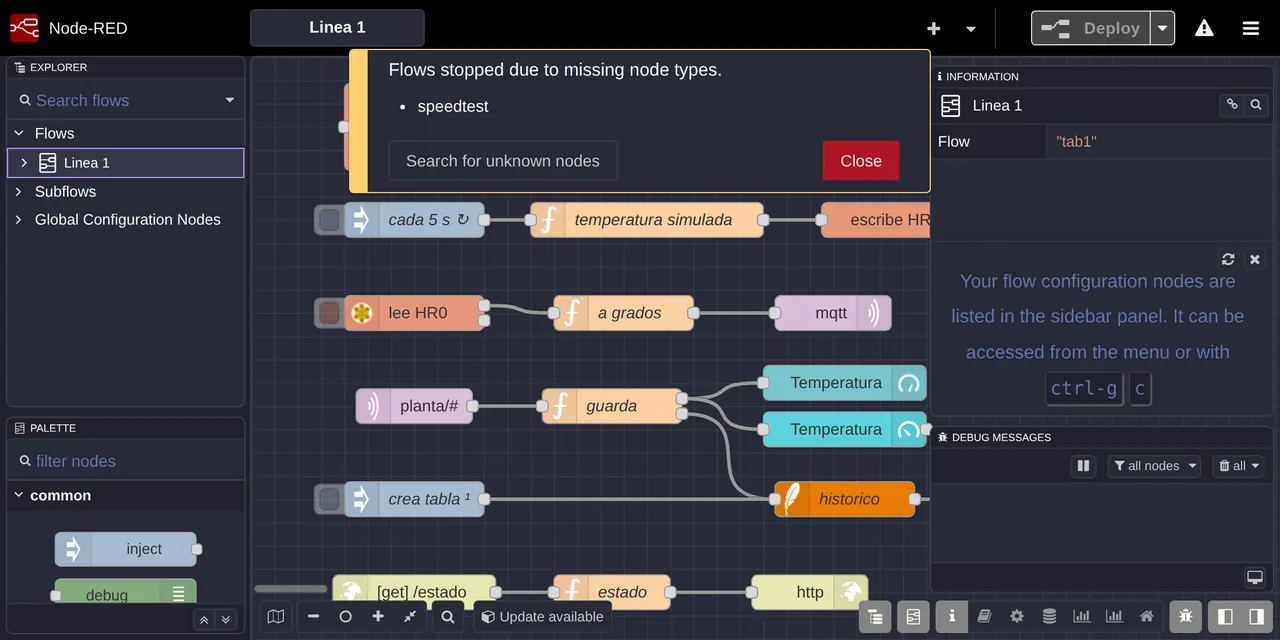
Table of contents
- Key takeaways
- What changes in Node-RED 5.0, and which image each tag gives you
- How I tested the upgrade
- Step 1: back up /data with Node-RED stopped
- Step 2: switch the image to 5.0.10 and read the log
- Error "Flows stopped due to missing node types" after upgrading to Node-RED 5.0
- How to fix it with npm rebuild inside /data
- Gotchas I hit when changing the image
- What happened to MQTT, Modbus, OPC UA and the dashboards
- How to roll back to Node-RED 4.1 if something goes wrong
- FAQ
- Why does one broken node stop every flow?
- Does the latest-22 tag give me Node-RED 5 on Node.js 22?
- Do I have to touch settings.js when upgrading?
- Conclusion
- Sources
If the editor shows Flows stopped due to missing node types after you move to nodered/node-red:5.0.10, the cause is almost certainly Node.js 24: the modules with native code that you installed into /data under Node.js 20 no longer load. Running npm rebuild inside /data and restarting the container fixes it. Until then no flow starts, even when the broken node has nothing to do with the rest. I repeated the upgrade on 22 November 2026 with a 4.1.18 volume that reads a simulated controller over Modbus and publishes over MQTT (Message Queuing Telemetry Transport). The same guide is available in Spanish.
Key takeaways
nodered/node-red:latesthas pointed to 5.0.10 with Node.js 24.22.3 since 17 November 2026. Your/datakeeps thenode_modulescompiled for Node.js 20.- A single node type that fails to load stops every flow. In my test it was
speedtest, and Modbus, MQTT, SQLite and the dashboard stopped with it. npm rebuildinside/datawith the regular 5.0.10 image fixed it. Theminimalimage cannot compile: it fails withgyp ERR! find Python.latest-22is not Node-RED 5 on Node.js 22: it is 4.1.18. The4.1tag stopped at 4.1.12 on 30 July.- The container stayed
healthywith the flows stopped. Watch the log or a flow endpoint, not only the healthcheck.
What changes in Node-RED 5.0, and which image each tag gives you
The change that breaks Docker installs is the Node.js version, not the new editor. Node-RED 5.0.0 came out on 9 June 2026 and requires Node.js 22.9 or later. The release announcement is explicit: "However, keeping in mind the Node.js support scheduled, we recommend using Node.js 24, and this is what our Docker images are based on."
I compared the two images with node -v and npm -v inside each. 4.1.18-20 ships Node.js 20.20.2, npm 10.9.10 and Alpine 3.23.4. 5.0.10 ships Node.js 24.22.3, npm 11.21.2 and Alpine 3.24.4.
Version 5.0 is only published for amd64 and arm64. The 4.1.18 tags still include arm/v7 and the 5.0.10 ones do not. A Raspberry Pi on a 32-bit system stays on 4.1.
The tags mislead more than the version change does. This is where each one pointed on Docker Hub on 22 November 2026, comparing the digest of each tag:
| Tag | What you get |
|---|---|
latest, 5, 5.0, 5.0.10, latest-24 |
Node-RED 5.0.10 on Node.js 24 |
latest-22 |
Node-RED 4.1.18 on Node.js 22 |
latest-20, latest-18 |
Node-RED 4.1.18 on Node.js 20 or 18 |
4.1 |
Node-RED 4.1.12, untouched since 30 July |
4, 4.1.18 |
They do not exist: 4.1.18 only ships with a suffix (4.1.18-20) |
latest-minimal, latest-debian |
Node-RED 5.0.10 without a compiler, or on Debian |
If you run Watchtower with latest, you have been on 5.0 since June. If you pinned 4.1 to avoid that, you have gone without patches since July. It is the opposite of Uptime Kuma, where latest stayed on the old version.
The compressed size Docker Hub lists for arm64 changes little between 4.1 and 5.0, and a lot between variants:
The other breaking changes in 5.0 are few. Node-RED now bundles its own npm for the palette manager. The default CORS (Cross-Origin Resource Sharing) rules of the admin API are gone. New credentials files are created next to the flows file.
The stock settings.js in 5.0.10 differs from the 4.1.18 one only in comments, and yours stays in /data untouched.
How I tested the upgrade
I ran Node-RED 4.1.18 with Docker 29.5.2 and Compose 2.40.3 on an arm64 Linux machine. I put /data in a named volume and a Mosquitto 2.0.22 next to it. I used the ghcr.io/node-red/node-red image, which publishes the same tags as Docker Hub. I installed 12 third-party modules with npm install inside /data, among them node-red-contrib-modbus, node-red-contrib-opcua, node-red-contrib-s7, both dashboards (node-red-dashboard and @flowfuse/node-red-dashboard), node-red-node-sqlite, node-red-contrib-i2c and node-red-contrib-speedtest.
The test flow has 31 nodes. A Modbus server node plays a simulated PLC (programmable logic controller). The flow writes and reads a register every 5 seconds and publishes the reading to Mosquitto with a username and password. Then it stores it in SQLite and draws it on both dashboards.
An HTTP endpoint, /estado, returns the counters, and I used it to check every start. The volume took 584 MB, of which 376 MB were node_modules.
Step 1: back up /data with Node-RED stopped
The volume backup is the only thing that takes you back to 4.1 with the modules intact. Pin the version in a .env file (NR_TAG=4.1.18-20) so the change is one line:
services:
  nodered:
    image: nodered/node-red:${NR_TAG}
    restart: unless-stopped
    ports:
      - "1880:1880"
    volumes:
      - nodered_data:/data
volumes:
  nodered_data:
Stop the container and archive the volume from a helper container. Compose prefixes the volume with the project name; check it with docker volume ls and replace nodered_nodered_data with yours:
docker compose stop nodered
mkdir -p backup
docker run --rm -v nodered_nodered_data:/data:ro \
  -v "$PWD/backup":/backup alpine:3.22 \
  tar czf /backup/nodered-data-4.1.18.tar.gz -C /data .
My archive took 155.7 MB. It holds flows.json, flows_cred.json, settings.js, package.json and all of node_modules. If you already take encrypted backups with restic, add this file before you continue.
Step 2: switch the image to 5.0.10 and read the log
The upgrade is one line in .env and an up -d. The official Docker documentation sums it up by saying that updating the base image "is now as simple as" pulling it and restarting the container, and it does not mention native modules:
sed -i 's/^NR_TAG=.*/NR_TAG=5.0.10/' .env
docker compose up -d nodered
docker compose logs -f nodered
In my test 5.0.10 started, loaded 11 of the 12 modules and sat waiting. The old dashboard answered on /ui, but /estado and /dashboard/planta returned Cannot GET, because no flow had started.
Error "Flows stopped due to missing node types" after upgrading to Node-RED 5.0
The editor shows the notice Flows stopped due to missing node types. with the list of missing types, and the log explains why a few lines earlier. This is mine, with the path wrapped to fit:
[info] Node-RED version: v5.0.10
[info] Node.js  version: v24.22.3
[warn] [node-red-contrib-speedtest/speedtest] Error: Cannot find
  module '/data/node_modules/lzma-native/
  binding-v4.0.6-node-v137-linux-arm64/lzma_native.node'
[info] Waiting for missing types to be registered:
[info]  - speedtest
The cause is the Node.js ABI (application binary interface). Each major release has a NODE_MODULE_VERSION number: 115 in Node.js 20, 127 in Node.js 22 and 137 in Node.js 24. lzma-native keeps its binary in a folder named after that number, binding-v4.0.6-node-v115-linux-arm64, and Node.js 24 looks for the node-v137 one, which does not exist. A Node-RED forum user pasted the same line with node-v127 on release day, on a Raspberry Pi running Node.js 22.
Node-RED does not start flows partially: if a node type is missing, it waits for it to register. That is why a speed test node took the Modbus reading out of service. The modules that use N-API, the stable Node.js interface for native code, survived untouched: sqlite3 and the serialport binaries loaded on Node.js 24.
How to fix it with npm rebuild inside /data
Recompile the native modules with the new Node.js and restart. The regular image ships Python and a compiler, so the fix is two commands:
docker compose exec -w /data nodered npm rebuild
docker compose restart nodered
npm 11.21.2 warns that 7 packages have install scripts that are not approved (not yet covered by allowScripts) and ends with rebuilt dependencies successfully. Despite the warning, the rebuild happened: the binding-v4.0.6-node-v137-linux-arm64 folder appeared. After the restart the log reached Started flows and /estado was counting again:
curl -s http://localhost:1880/estado
The answer was {"n":6,"modbus_ok":4,"mqtt_ok":5,"sqlite_ok":6,"ultima":20.5}. To check your install without an endpoint of your own, look for Started flows in the log and make sure Waiting for missing types is not there.
If you no longer need the broken node, the alternative is removing it from the flow. I deleted the speedtest node and deployed, and the flows started with no rebuild. The Home Assistant community thread about this error reaches the same way out: delete the unknown nodes and deploy.
The cause there was different, because add-on 22.0.0 stopped bundling the old dashboard and ui_base, ui_tab and ui_group were missing. In the official image that dashboard lives in your /data, and node-red-dashboard 3.6.6 started on 5.0.10.
Gotchas I hit when changing the image
The error changes shape with the image variant and with the module. These are the four variants I saw:
minimalimage:npm rebuildfails withgyp ERR! find PythonandCould not find any Python installation to use, because it has no compiler. Rebuild once with the regular image on the same volume, then startminimal.debianimage: on a/datacreated under Alpine, three types were missing (sqlitedb,sqliteandspeedtest), withError: libc.musl-aarch64.so.1: cannot open shared object file.npm rebuildinside thedebianimage fixed it.- Modules that load late:
i2c-busdoes not fail at startup. It fails when its node starts, withCouldn't load i2c-bus, is your platform supported ?and anError relocating /data/node_modules/i2c-bus/build/Release/i2c.nodethat ends insymbol not found. It does not stop the flows, so you only see it in the log. - Editor themes:
@node-red-contrib-themes/theme-collection4.1.1 kept working on 5.0.10. Version 5.0.1 requires Node-RED 5: installed on 4.1.18 it printedNode module cannot be loaded on this version. Requires: >=5.0. Update the theme after the image, not before.
This is the command to rebuild with the regular image when your service runs minimal:
docker compose stop nodered
docker run --rm -v nodered_nodered_data:/data -w /data \
  --entrypoint npm nodered/node-red:5.0.10 rebuild
docker compose up -d nodered
The image's healthcheck detects none of this. With the flows stopped, docker ps showed Up 43 seconds (healthy), because the check only requests the editor. If you rely on it for alerts, add a probe against a flow endpoint, as the guide to Docker Compose healthchecks explains.
The Node-RED forum also has a case I could not reproduce on arm64: a Synology with an Intel Celeron where the container died with Illegal instruction (core dumped) when loading any module after the update. Its author solved it by deleting package.json, package-lock.json and node_modules and reinstalling.
What happened to MQTT, Modbus, OPC UA and the dashboards
The industrial part of the flow survived whole once the broken module was rebuilt. The MQTT connection came back with the stored username and password: flows_cred.json did not change and the log showed Connected to broker: mqtt://mosquitto:1883. The Modbus TCP reading against the simulated PLC kept counting, and both dashboards answered 200.
node-red-contrib-modbus has a detail that only shows up afterwards. Under Node.js 20, npm installed 5.45.2, because the latest release requires Node.js 22 or later. Once on 5.0.10, npm outdated offered 5.62.1; I installed it and the reading kept working.
For node-red-contrib-opcua (OPC UA, Open Platform Communications Unified Architecture) and node-red-contrib-s7 I only checked that their 9 and 4 node types load on Node.js 24: I did not open a session against a real server. If you come from a project like the one in PLC and OPC UA, test that connection on a copy before touching the plant.
Fresh installs do not have the problem. On an empty 5.0.10 I installed node-red-contrib-speedtest, node-red-contrib-i2c and node-red-node-sqlite from the palette manager, and all three compiled and loaded on Node.js 24.
How to roll back to Node-RED 4.1 if something goes wrong
The reliable rollback is restoring the archive from step 1, not changing the tag. I tried the shortcut: with the volume already rebuilt, 4.1.18 started and the flows worked, but i2c-bus failed with symbol not found, because its binary now belonged to Node.js 24. The full restore is this:
docker compose stop nodered
docker run --rm -v nodered_nodered_data:/data \
  -v "$PWD/backup":/backup:ro alpine:3.22 sh -c \
  'find /data -mindepth 1 -delete &&
   tar xzf /backup/nodered-data-4.1.18.tar.gz -C /data'
sed -i 's/^NR_TAG=.*/NR_TAG=4.1.18-20/' .env
docker compose up -d nodered
After the restore, 4.1.18 started on Node.js 20.20.2 and /estado was counting readings again. Use 4.1.18-20 and not 4.1: the latter takes you back to 4.1.12. Anything you deployed on 5.0 between the backup and the rollback is lost, so export the new flows from the editor first.
FAQ
Why does one broken node stop every flow?
Node-RED checks that every node type in the flows file is registered before it starts any of them. If one is missing, it writes Waiting for missing types to be registered and waits. In my test, a speedtest node wired to nothing kept the Modbus reading, the MQTT publishing and the dashboard stopped until I rebuilt its module.
Does the latest-22 tag give me Node-RED 5 on Node.js 22?
No. On 22 November 2026, latest-22 had the same digest as 4.1.18-22, that is, Node-RED 4.1 on Node.js 22. The official 5.0 images are only published on Node.js 24: 5.0.10, 5.0.10-24, 5.0.10-minimal and 5.0.10-debian.
Do I have to touch settings.js when upgrading?
Not in my test. 5.0.10 started with the 4.1.18 settings.js, including the dracula theme I had enabled in editorTheme. The stock 5.0.10 file only changes comments: nodesDir accepts a list of paths and the code editor accepts the value basic.
Conclusion
Upgrading Node-RED 4.1 to 5.0 with Docker is a tag change, but the volume arrives with modules compiled for another Node.js. Stop the container, archive /data, pin 5.0.10 and read the log of the first start. If Flows stopped due to missing node types appears, run npm rebuild inside /data with the regular image and restart.
Then check what the healthcheck does not see: that the log reaches Started flows, that the broker connects and that the controller readings keep arriving. If Node-RED feeds your Home Assistant on Docker, check those automations too. To go back to 4.1, restore the archive and pin 4.1.18-20.
Sources: [1] Node-RED 5.0 release announcement[1], [2] Node-RED changelog[2], [3] Node-RED documentation for Docker[3], [4] node-red-docker repository, image variations[4], [5] nodered/node-red tags on Docker Hub[5], [6] Node-RED forum, questions on upgrading to version 5[6], [7] Node-RED forum, update issue on Docker[7], [8] Home Assistant community, Flows stopped due to missing node types[8], [9] Node.js ABI version registry[9].
Sources
- Node-RED 5.0 release announcement
- Node-RED changelog
- Node-RED documentation for Docker
- node-red-docker repository, image variations
- nodered/node-red tags on Docker Hub
- Node-RED forum, questions on upgrading to version 5
- Node-RED forum, update issue on Docker
- Home Assistant community, Flows stopped due to missing node types
- Node.js ABI version registry
Source code
Access all the source code for this post on GitHub.
View on GitHub