How to install Audiobookshelf with Docker for your audiobooks and podcasts
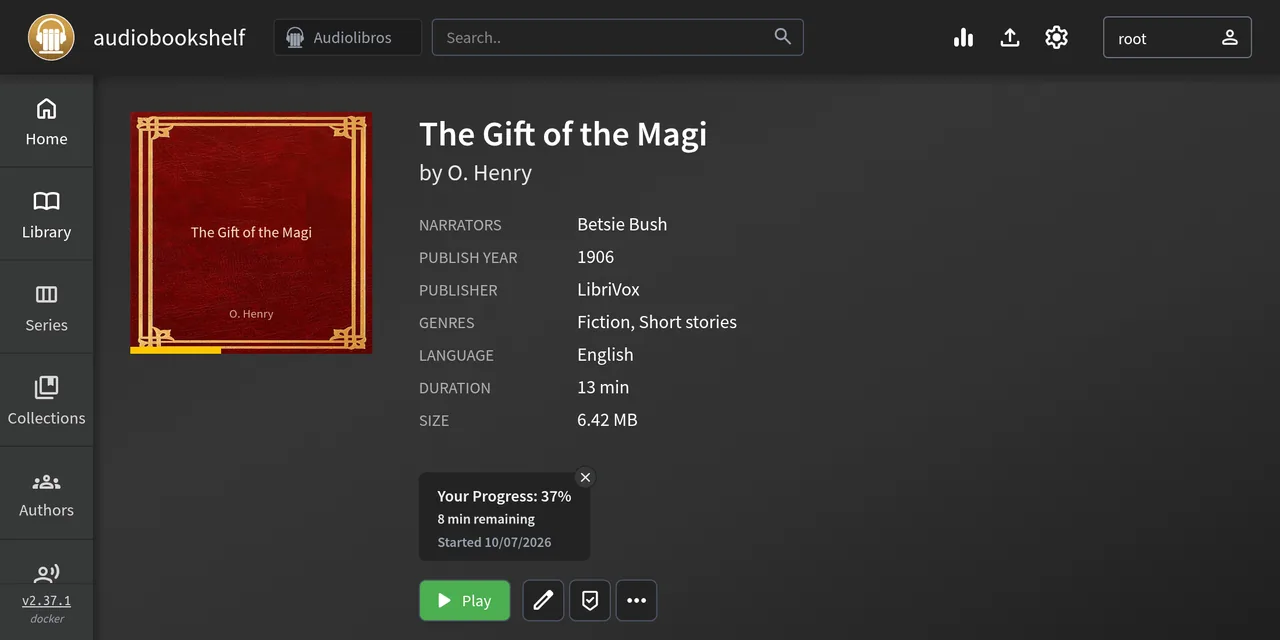
Table of contents
- Key takeaways
- What you need before you start
- What the Audiobookshelf docker-compose.yml looks like
- How to create the admin user and the libraries
- How to lay out the audiobook folders
- Which metadata wins: folder or MP3 tags
- How to match metadata with a provider
- How to add a podcast by RSS
- How to create users with limited permissions
- How to check progress sync through the API
- What changed in version 2.37
- How to listen from your phone
- Frequently asked questions
- Does Audiobookshelf replace Jellyfin?
- Where does Audiobookshelf keep my data and how do I back it up?
- Can I run the container as my own user instead of root?
- Conclusion
- Sources
Audiobookshelf is an open-source audiobook and podcast server that installs as a single Docker container with four folders. I started it on 7 October 2026 with version 2.37.1, added a public-domain LibriVox audiobook and an RSS podcast, and checked through the API that each user keeps their own progress. There is also a Spanish version.
Key takeaways
- One service, the
ghcr.io/advplyr/audiobookshelf:2.37.1image (487 MB on disk) and four mounted folders:/audiobooks,/podcasts,/configand/metadata. - An
Author/Titlefolder layout is not enough: if the MP3 carries embedded tags, they win over the folder name. My audiobook showed up asgift_of_the_magiuntil I fixed the metadata. - A podcast is added with its RSS URL. My feed had 564 episodes and I downloaded one of 84.3 MB with auto-download off.
- Each user stores progress separately and an API key acts with its user’s permissions: a limited user’s key got a 403 when requesting the podcast library.
- Version 2.37 moves Node.js to version 24, sets the explicit flag from Audible match results and lets API keys authenticate websockets.
What you need before you start
You need Docker with the Compose plugin and a free port. I used Docker Engine on arm64 Linux, an architecture the official image publishes. If you do not have Docker yet, the guide to installing Docker on Ubuntu 24.04 covers the prerequisite.
The official documentation[1] says "Docker is the recommended way to run Audiobookshelf", and defines the image tags: latest (newest stable), edge (every commit to the main branch) and #.#.# to pin a version. Pin the version, so an upgrade is your decision and not a side effect of docker compose pull.
What the Audiobookshelf docker-compose.yml looks like
The file needs one service, one port and four mounts. This is the one I ran, with port 29900 from my test range (the official one is 13378):
services:
  audiobookshelf:
    image: ghcr.io/advplyr/audiobookshelf:2.37.1
    ports:
      - "13378:80"
    volumes:
      - ./audiobooks:/audiobooks
      - ./podcasts:/podcasts
      - ./config:/config
      - ./metadata:/metadata
    environment:
      - TZ=Europe/Madrid
    restart: unless-stopped
/config holds the SQLite database (476 KB after my test) and /metadata holds covers, logs, backups and one metadata.json per item. The documentation warns that /config must sit on a local disk of the same machine, not on a network share, because SQLite over a network ends in database corruption. Each mount point must be its own directory, not contained inside another. For more on this kind of mount, see the guide to Docker volumes and bind mounts.
Start it with docker compose up -d. The log showed Listening on port :80 and curl localhost:13378/status returned "serverVersion":"2.37.1" with "isInit":false. The web interface opened under /audiobookshelf/ in my run, while the API answered at the root.
How to create the admin user and the libraries
The first sign-in creates the root user, the administrator. The browser shows a form; I did it through the API to keep it reproducible:
curl -s -X POST localhost:13378/init \
  -H 'Content-Type: application/json' \
  -d '{"newRoot":{"username":"root","password":"your_admin_password"}}'

curl -s -X POST localhost:13378/login \
  -H 'Content-Type: application/json' \
  -H 'x-return-tokens: true' \
  -d '{"username":"root","password":"your_admin_password"}'
The first call answers OK. The second returns the user with an accessToken, which I use as your_access_token_here in the other calls. With it I created one library per content type: mediaType is book for audiobooks and podcast for podcasts, and each points at one of the mounted folders:
curl -s -X POST localhost:13378/api/libraries \
  -H 'Authorization: Bearer your_access_token_here' \
  -H 'Content-Type: application/json' \
  -d '{"name":"Audiobooks","mediaType":"book",
       "folders":[{"fullPath":"/audiobooks"}]}'
I repeated the call with "name":"Podcasts", "mediaType":"podcast" and /podcasts. In the interface it is the same under Settings, Libraries, Add. A newly created book library did not import the file already in the folder until I ran POST /api/libraries/<id>/scan, which reported 1 Added.
How to lay out the audiobook folders
Each book is a folder, and the folder-based metadata format is Author/Series/Book or Author/Book. The official structure guide[2] also accepts a year prefix (1994 - Title), a series number (Vol 1 - Title) and the narrator in braces ({First Last}).
For the test I downloaded LibriVox’s "Gift of the Magi" by O. Henry, read by Betsie Bush: 13 min 22 s, a 64 kb/s MP3 of 6.42 MB, public domain (1906). I laid it out like this:
audiobooks/
  O. Henry/
    The Gift of the Magi/
      The Gift of the Magi.mp3
If a book has more than one MP3 file, put them all in the book’s folder: Audiobookshelf treats them as tracks of one book. A loose file from another book inside the author folder merges different books into one. The documentation says the only fix is deleting the book in the interface and rescanning, which erases the progress.
Which metadata wins: folder or MP3 tags
After the scan the book appeared as gift_of_the_magi by Henry_o, not as "The Gift of the Magi" by "O. Henry", which is what the folder says. The cause is that the LibriVox MP3 carries lowercase ID3 tags (metadata embedded in the file): ffprobe inside the container showed title: gift_of_the_magi and artist: henry_o.
The metadata documentation[3] explains the order: Audiobookshelf fills each field from the lowest-priority source and overwrites it with the next ones. By default the Audiobookshelf metadata.json file has the highest priority and the folder structure the lowest, so embedded tags beat the folder name. You can change that order per library under Settings, Libraries, Metadata order of precedence.
The same page says something worth remembering: "Matching your books against an online metadata provider is intentionally a manual action and must be performed by the server admin or through the use of the API." Nothing fixes itself, and external providers are a tool, not an automatic step.
How to match metadata with a provider
Matching happens from the book’s menu, Match, or with GET /api/search/books. I tried four providers with the title "The Gift of the Magi" and the author "O. Henry":
| Provider | Results | First result |
|---|---|---|
| Audible | 10 | Narrator Cindy Hardin Killavey, 2007 |
| Open Library | 50 | O. Henry, 1906, no narrator |
| iTunes | 60 | "The Gift of the Magi (Unabridged)", 2026 |
| Google Books | 0 | No results |
Audible returned commercial recordings with other narrators, so applying them would have put the wrong narrator on a LibriVox recording. Open Library made sense (a 1906 work), but when I went to apply the match its servers stopped accepting connections (ECONNREFUSED in the container log) and the server answered No openlibrary match found. A provider outage should not block you: I edited the book with the data from the LibriVox page[4], the real source of this recording:
curl -s -X PATCH localhost:13378/api/items/book_id_here/media \
  -H 'Authorization: Bearer your_access_token_here' \
  -H 'Content-Type: application/json' \
  -d '{"metadata":{"title":"The Gift of the Magi",
       "authors":[{"name":"O. Henry"}],
       "narrators":["Betsie Bush"],
       "publishedYear":"1906","publisher":"LibriVox",
       "genres":["Fiction","Short stories"]}}'
The response carries "updated":true, and Audiobookshelf wrote the result to /metadata/items/<id>/metadata.json, which has the highest priority on the next scan. The book page now shows the correct title, author, narrator, year and publisher, and it is the screenshot at the top of this article.
How to add a podcast by RSS
A podcast is added with its feed URL, and Audiobookshelf reads title, author, description and the episode list. In the interface, Add in the podcast library sidebar searches by name (using the library’s search region) or accepts a URL. Through the API it takes two steps. The first reads the feed:
curl -s -X POST localhost:13378/api/podcasts/feed \
  -H 'Authorization: Bearer your_access_token_here' \
  -H 'Content-Type: application/json' \
  -d '{"rssFeed":"https://talkpython.fm/episodes/rss"}'
The Talk Python To Me feed returned 564 episodes; the newest was #565, dated 2 October 2026. The second step creates the podcast with POST /api/podcasts (with the folder, the library and "autoDownloadEpisodes":false) and requests the episode with POST /api/podcasts/<id>/download-episodes. The file landed in podcasts/Talk Python To Me/ at 84,285,350 bytes and 5,266 s long.
Leave auto-download off until you decide how much space the podcast gets: 564 episodes of 84 MB add up to about 47 GB. The podcast structure guide[5] adds that podcasts use a flat structure, with no season folders, and that each audio file is one episode.
How to create users with limited permissions
Each person in the house has an account and progress of their own, and an administrator decides which libraries they see. I created the user familia of type user, with download allowed, no edit, delete or upload permissions, and access to the audiobook library only:
curl -s -X POST localhost:13378/api/users \
  -H 'Authorization: Bearer your_access_token_here' \
  -H 'Content-Type: application/json' \
  -d '{"username":"familia","password":"your_family_password",
       "type":"user","isActive":true,
       "permissions":{"download":true,"update":false,
         "delete":false,"upload":false,
         "accessAllLibraries":false},
       "librariesAccessible":["library_id_here"]}'
I then created an API key for that user with POST /api/api-keys (name, userId and expiresIn in seconds). The API keys documentation[6] says the key acts on behalf of a user, inherits its permissions and is shown only once. I checked it: with that key GET /api/libraries listed only the audiobook library, and GET /api/libraries/<podcast library id> returned 403.
How to check progress sync through the API
The apps and the web client use the same mechanism you can call yourself: they open a playback session and send the position every few seconds. I opened a session with POST /api/items/<id>/play, synced position 300 s and closed it:
curl -s -X POST localhost:13378/api/session/session_id_here/sync \
  -H 'Authorization: Bearer your_access_token_here' \
  -H 'Content-Type: application/json' \
  -d '{"currentTime":300,"timeListened":300,
       "duration":802.463667}'

curl -s localhost:13378/api/me/progress/book_id_here \
  -H 'Authorization: Bearer your_access_token_here'
The read returned "currentTime":300 and "progress":0.3738, the 37% the interface shows under "Your Progress". Any device with the same account reads that value. Then I set currentTime: 120 with the familia user’s key through PATCH /api/me/progress/<id> and read both: the administrator was still at 300 s and familia was at 120 s (14.95%). Progress is per user, not per book.
What changed in version 2.37
Version 2.37.0 came out on 28 September 2026 and 2.37.1 on 29 September. According to the 2.37.0 release notes[7]:
- Node.js 24: the server, the Docker image and the build scripts use Node 24 (the container reported
v24.21.0) - API keys on websockets: they can authenticate websocket connections
- Audible: match results now set the explicit flag
- Cover API: updating an item’s cover requires the path to be a file already on that item, and the cover and author image cache endpoints require a valid id and positive width and height
- Fixes: server crashes when decoding invalid filter groups and when collapsing sub-series sorted by author
2.37.1[8] fixes an EACCES error in the Debian install. It also cleans up abandoned mobile OIDC (OpenID Connect) login sessions and extends the callback cookie expiry to 10 minutes. On Docker, the change you notice is Node 24; the rest affects scripts and external authentication. The notes point to the new authentication system from 2.26.0, so if you are coming from an older version read that discussion[9] first.
How to listen from your phone
The official apps (Android and iOS, which the documentation calls beta) connect to your server URL with your user and download books for offline listening. I did not install them on a phone in this test. What follows comes from the connection profiles documentation[10]: downloaded media is tied to the profile you used to download it, and progress only syncs when you connect with the same profile. If you keep one profile for the internal IP and another for the VPN, listening through the second does not sync with the server.
To use it away from home you need an HTTPS URL and a reverse proxy; the official guides cover Nginx, Caddy and Traefik. With Traefik and Docker Compose it is one more label on the service. The Android app[11] is on Google Play.
Frequently asked questions
Does Audiobookshelf replace Jellyfin?
Not for the same use. Audiobookshelf is built for spoken audio: it stores progress per book, bookmarks and podcasts with episode downloads. If you want movies and series on the TV, that is still the job of Jellyfin with Docker, and you can run both on the same machine.
Where does Audiobookshelf keep my data and how do I back it up?
The database is in /config and metadata, covers and backups in /metadata. Copy those two folders plus your audio folders. The interface can also schedule automatic backups, which were off in my install (Auto Backups are disabled).
Can I run the container as my own user instead of root?
Yes. The documentation says Audiobookshelf does not use PUID or PGID and suggests the Compose user: 1000:1000 directive. In my test the container ran as root and the podcast folder it created was owned by root on the host.
Conclusion
Audiobookshelf 2.37.1 worked with one service and four folders, and the part worth reviewing is metadata: embedded tags beat folders, and an external provider can fail or offer a different recording. The API confirmed that progress is stored per user and that a limited key does not see other libraries.
Next step: pin the version, move /config to a local disk, create one user per person and put HTTPS in front before you use the apps away from home.
Sources: [1] Audiobookshelf Docker installation[1], [2] 2.37.0 release notes[7], [3] 2.37.1 release notes[8], [4] Audiobookshelf book metadata[3], [5] Audiobookshelf API keys[6], [6] LibriVox page for The Gift of the Magi[4], [7] Mobile app connection profiles[10].
Sources
Source code
Access all the source code for this post on GitHub.
View on GitHub