How to self-host Infisical with Docker Compose and feed secrets to your containers
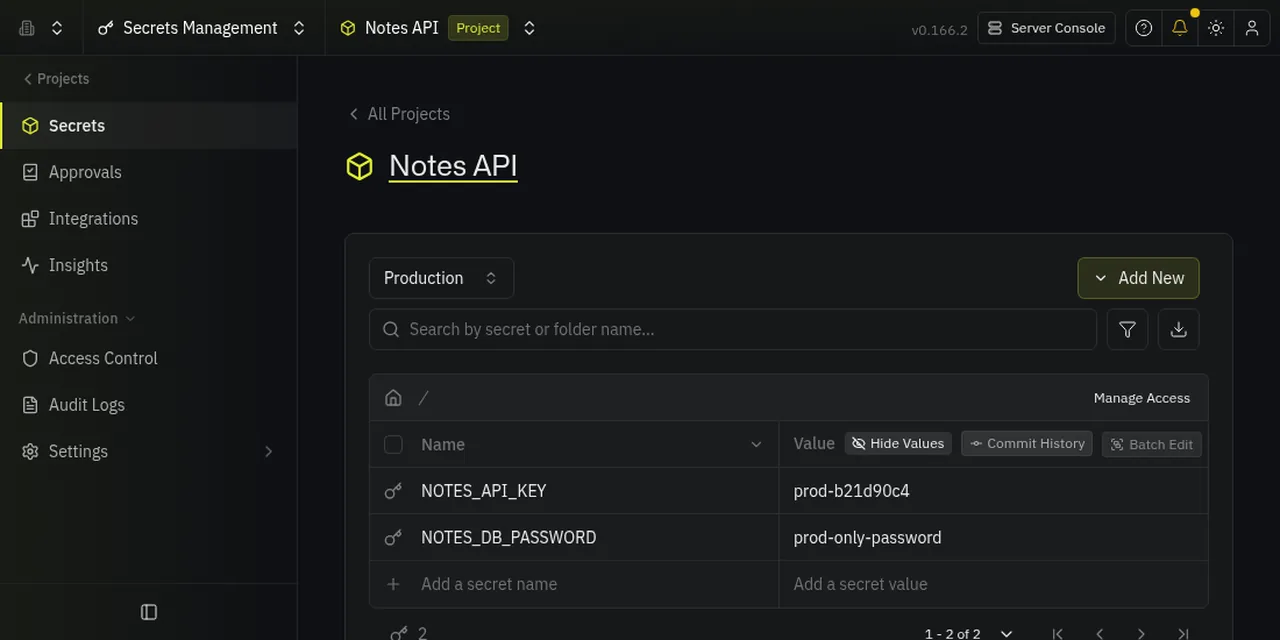
Table of contents
- Key takeaways
- What Infisical is and what it ships with
- How to install Infisical with Docker Compose
- Create a project, environments and secrets
- Create a machine identity for the container
- Inject the secrets with infisical run
- A real app in a container
- Alternative: the Infisical agent and a .env file
- What the free edition includes and what is paid
- When to choose Infisical, OpenBao or Docker secrets
- Frequently asked questions
- Is Infisical free to self-host?
- Can I use Infisical with Docker Compose without changing my application?
- Is it safe to leave the client secret in the container?
- Conclusion
- Sources
Infisical is an open-source secrets management platform that you install with Docker Compose as three containers (backend, PostgreSQL and Redis) and that hands each environment’s secrets to your services through its CLI. I installed it on 7 October 2026 with version v0.166.2, created a project with environments, stored secrets, and a Python container read its key through infisical run. Below are the steps with what I ran, what the unlicensed edition includes, and when to pick OpenBao or plain Docker instead. There is also a Spanish version.
Key takeaways
- Infisical v0.166.2 starts from the repository’s
docker-compose.prod.yml: backend, PostgreSQL and Redis. In my test the backend used 687.5 MiB of RAM, PostgreSQL 149 MiB and Redis 12 MiB. - The
infisical/infisical:v0.166.2image takes 2.74 GB on disk. The repository has 29,640 GitHub stars. - Without a licence, my instance had 4 of the 57 boolean plan flags on. Projects, environments, identities and members had no limit.
- Features such as dynamic secrets, rotation, approvals, SAML and the audit log are left out. The licence notes[1] put it like this: "While most features in Infisical are free to use, others are paid and require purchasing an enterprise license to use them."
- A Python container received
NOTES_API_KEYthroughinfisical run, anddocker inspectdoes not show that value.
What Infisical is and what it ships with
Infisical stores encrypted secrets in PostgreSQL, groups them into projects with environments (development, staging and production by default) and serves them to people and machines with access control. Redis handles caching and queues. The code outside ee/ directories is under the MIT licence, and what sits inside ee/ has its own licence, according to the repository’s LICENSE file[2].
The Docker Compose documentation warns that this setup is for trials and small deployments, without high availability. It asks for at least 2 cores, 4 GB of RAM and 20 GB of disk. For anything larger, the Kubernetes guide[3] is the route they recommend.
How to install Infisical with Docker Compose
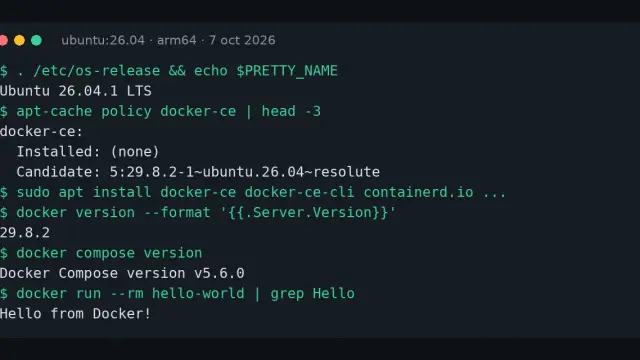
I started from the official docker-compose.prod.yml with three changes: I pinned the image to v0.166.2 instead of latest, used postgres:16-alpine and redis:8-alpine, and published the port on 29700. The official file uses postgres:14-alpine; I had no problems with 16. Docker Engine was 29.5.2 and Compose 2.40.3.
services:
  backend:
    image: infisical/infisical:v0.166.2
    depends_on:
      db: {condition: service_healthy}
      redis: {condition: service_started}
    env_file: .env
    ports: ["29700:8080"]
    environment: [NODE_ENV=production]
    restart: unless-stopped
  redis:
    image: redis:8-alpine
    volumes: [redis_data:/data]
  db:
    image: postgres:16-alpine
    env_file: .env
    volumes: [pg_data:/var/lib/postgresql/data]
    healthcheck:
      test: ["CMD-SHELL", "pg_isready -U infisical"]
      interval: 5s
      retries: 10
volumes: {pg_data: {}, redis_data: {}}
The .env holds the encryption key, the auth secret and the database credentials. Do not use the repository’s example values: generate your own.
PGPASS=$(openssl rand -hex 12)
cat > .env <<EOF
ENCRYPTION_KEY=$(openssl rand -hex 16)
AUTH_SECRET=$(openssl rand -base64 32)
POSTGRES_USER=infisical
POSTGRES_PASSWORD=$PGPASS
POSTGRES_DB=infisical
DB_CONNECTION_URI=postgres://infisical:$PGPASS@db:5432/infisical
REDIS_URL=redis://redis:6379
SITE_URL=http://localhost:29700
HTTPS_ENABLED=false
EOF
docker compose up -d
Keep ENCRYPTION_KEY outside the server: without it, a copy of the database is useless. HTTPS_ENABLED=false is only valid for testing on localhost; the self-hosting FAQ[4] explains that without HTTPS the secure cookies are not stored and the session is lost on reload. Behind a reverse proxy with TLS, remove it.
Once the backend finishes migrating the database, /api/status returns 200 and the container log shows the admin sign-up address:
Welcome to Infisical

Create your Infisical administrator account at:
http://localhost:29700/admin/signup
The first user to sign up becomes the super admin. I did it in the browser: name, email and a password of at least 14 characters, then the organisation name (Jacar Demo) and finally the sign-up policy, which defaults to invite-only. You will see a banner saying SMTP is not configured: without email you cannot invite users by mail, which does not matter for this test.
Create a project, environments and secrets
Under Secrets Management I created the project Notes API. Infisical creates it with three environments, Development, Staging and Production, and the environment menu lets you add more with "Add Environment". To load secrets I used Paste Secrets, which accepts .env, JSON or YAML:
# Development
NOTES_API_KEY=dev-7f3c1a9e
NOTES_DB_PASSWORD=dev-only-password

# Production
NOTES_API_KEY=prod-b21d90c4
NOTES_DB_PASSWORD=prod-only-password
These are test values. I checked that Infisical encrypts them before storing: I dumped the database with pg_dump, 3,371,132 bytes, and neither key appeared in plain text. The interface keeps a version history for each secret, which was still on in my unlicensed instance (secretVersioning: true).
Create a machine identity for the container
A container should not sign in as you. Infisical uses machine identities, and the most direct method is Universal Auth, which gives a client ID and a client secret. The steps in the interface are:
- Under Access Control, Machine Identities tab, create
notes-api-container. Universal Auth is already attached. - Under Add to Project, assign it to the
Notes APIproject with the Viewer role, which is read-only. - Under View Auth Method, copy the Client ID and click Add Client Secret. The secret is shown only once.
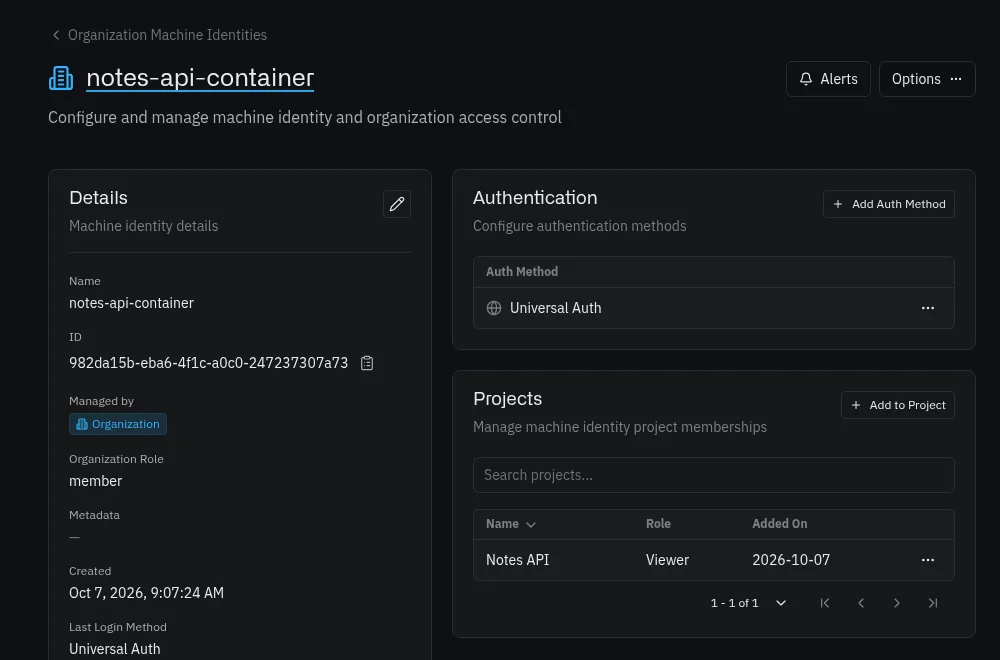
I checked that Viewer really is read-only: an infisical secrets set with that identity returned 403 You are not allowed to create on secrets. There is a limitation, though: the role applies to the whole project, so the same identity also read the Production secrets. Separating environments per identity needs custom roles, which are not in the unlicensed edition (rbac: false on my instance). The free alternative is one project per environment.
Inject the secrets with infisical run
The Infisical CLI (v0.43.139, released on 5 October 2026) is a single Go binary of about 150 MB. I first tried it outside Docker: infisical login with Universal Auth returns an access token, and infisical run uses it to launch a process with the secrets as environment variables.
T=$(infisical login --method=universal-auth \
  --client-id=$CLIENT_ID --client-secret=$CLIENT_SECRET \
  --domain=http://localhost:29700 --plain --silent)

for e in dev staging prod; do
  infisical run --domain=http://localhost:29700 \
    --projectId=$PROJECT_ID --env=$e --token="$T" -- \
    sh -c 'echo "key=$NOTES_API_KEY"'
done
The output was key=dev-7f3c1a9e for dev, empty for staging (with the notice "Injecting 0 Infisical secrets") and key=prod-b21d90c4 for prod. Environments are the slugs dev, staging and prod, not the names you see on screen.
A real app in a container
For a complete case I wrote a Python app that reads NOTES_API_KEY and answers over HTTP. The container mounts the CLI binary read-only and starts with a start.sh that signs in and hands over to infisical run:
#!/bin/sh
set -e
TOKEN=$(infisical login --method=universal-auth \
  --client-id="$INFISICAL_CLIENT_ID" --client-secret="$INFISICAL_CLIENT_SECRET" \
  --plain --silent)
exec infisical run --token="$TOKEN" --projectId="$INFISICAL_PROJECT_ID" \
  --env="${APP_ENV:-dev}" -- python /app/app.py
  notes:
    image: python:3.13-alpine
    depends_on: [backend]
    env_file: demo.env        # INFISICAL_CLIENT_ID, _CLIENT_SECRET, _PROJECT_ID, _DOMAIN
    environment: ["APP_ENV=${APP_ENV:-dev}"]
    volumes:
      - ./cli/infisical:/usr/local/bin/infisical:ro
      - ./app:/app:ro
    ports: ["29701:8000"]
    command: ["/app/start.sh"]
INFISICAL_DOMAIN points at the service by its name on the Compose network (http://backend:8080). With APP_ENV=dev, curl localhost:29701 answered NOTES_API_KEY loaded: True, 12 chars, starts with 'dev-'. After recreating the container with APP_ENV=prod it answered 13 characters and the prod prefix. The same container, with the image unchanged, reads a different value depending on the environment.
What interested me most was where the secret ends up. docker inspect shows only the bootstrap credentials (client ID, client secret and project), and a docker exec ... env finds no NOTES_ variable. The Python child process does have both. To be precise: the value is no longer in the Compose file or in docker inspect. But the Universal Auth client secret stays in the container’s environment, and whoever steals it can read everything the identity can see. That is why the read-only role matters and, when you can, a trusted-IP limit.
The CLI also has --watch, which restarts the application when secrets change (it polls every 10 s by default, per the infisical run help[5]). I did not test it.
Alternative: the Infisical agent and a .env file
If you do not want to wrap the process, the agent (infisical agent) renders the secrets into a file from a template. It helps with applications that only know how to read a .env. The configuration is:
infisical:
  address: "http://backend:8080"
auth:
  type: "universal-auth"
  config:
    client-id: "/agent/client-id"
    client-secret: "/agent/client-secret"
    remove_client_secret_on_read: false
templates:
  - source-path: /agent/notes.tmpl
    destination-path: /secrets/notes.env
    config:
      polling-interval: 60s
The template uses the agent’s[6] listSecrets function with the project ID, the environment and the path. My first attempt with polling-interval: 10s failed with polling interval must be at least 60 seconds, so 60 s is the minimum. With that value, the agent wrote /secrets/notes.env with both variables a few seconds after starting. Another container can read that file from a shared volume with env_file or a source.
What the free edition includes and what is paid
The pricing page[7] splits features by cloud plan. Free includes 5 identities, Pro adds secret rotation and SAML, Advanced adds dynamic secrets and custom roles, and Enterprise brings approval workflows, LDAP and SCIM. For your own instance, those identity limits do not apply without a licence, and the most reliable way is to ask your own server. I queried the organisation’s plan endpoint and it returned this:
| Item | Unlicensed (my v0.166.2 instance) |
|---|---|
| Projects, environments, identities, members | No limit (null) |
| Secret versions | On |
| Dynamic secrets, rotation, approvals | Off |
| SAML, OIDC, LDAP, SCIM, groups | Off |
Custom roles (rbac) |
Off |
| Audit log, point-in-time recovery | Off |
| Boolean flags that are on | 5 of 57 (one is has_used_trial) |
To turn on the paid features, the documentation[1] says you buy a licence, set the key in the LICENSE_KEY variable and let the instance validate it against the licence server. If the licence expires, Infisical keeps running and only the paid features switch off. Before deciding, check that page and the pricing page for what each plan covers on the day you deploy, because the offer changes.
When to choose Infisical, OpenBao or Docker secrets
| You need | Pick |
|---|---|
| Secrets for a couple of services on one host | Docker Compose environment variables and secrets |
| A team dashboard with projects, environments, history and a CLI | Infisical |
| Short-lived dynamic credentials, PKI and encryption as a service, with a policy engine | OpenBao, the heir of Vault |
Docker Compose covers the minimal case with nothing to install, and its secrets documentation[8] mounts each secret as a file under /run/secrets. Infisical adds what is missing there: an interface, environments, a history and per-identity access. OpenBao goes further in operations (you have to initialise and unseal it) and is what to look at if you need dynamic credentials without paying for a licence. Infisical charges for dynamic secrets in the cloud and in the Advanced edition.
Frequently asked questions
Is Infisical free to self-host?
The core is open source and, according to its documentation, most features are free. On my unlicensed instance there was no limit on projects, environments or identities. Rotation, dynamic secrets, SAML and custom roles need a paid licence.
Can I use Infisical with Docker Compose without changing my application?
Yes. infisical run -- your-command injects the secrets as environment variables, so the application stays the same. If it only reads a .env file, use the agent with a template.
Is it safe to leave the client secret in the container?
It is the weak point of the scheme. The real secrets do not show in docker inspect, but the Universal Auth secret does. Give the identity the Viewer role, limit the trusted IPs and rotate it if it leaves the server.
Conclusion
Infisical installs in a few minutes with Docker Compose and delivers what it promises: a project, three environments and a container that receives its key without the value living in the Compose file. In my test the unlicensed edition was enough for this flow, and it falls short on per-environment roles, rotation and auditing.
If you start today, pin the image version, keep ENCRYPTION_KEY apart and use a separate project for production. When you need dynamic credentials, compare with OpenBao before paying for a licence.
Sources: [1] Infisical repository on GitHub[2], [2] Release v0.166.2[9], [3] CLI release v0.43.139[10], [4] Infisical Enterprise (licence)[1], [5] Docker Compose in the Infisical documentation[11], [6] Infisical Agent[6], [7] Infisical pricing[7], [8] infisical/infisical image on Docker Hub[12], [9] Secrets in Docker Compose[8].
Sources
Source code
Access all the source code for this post on GitHub.
View on GitHub