How to install Open Archiver with Docker: archive an IMAP mailbox and search it
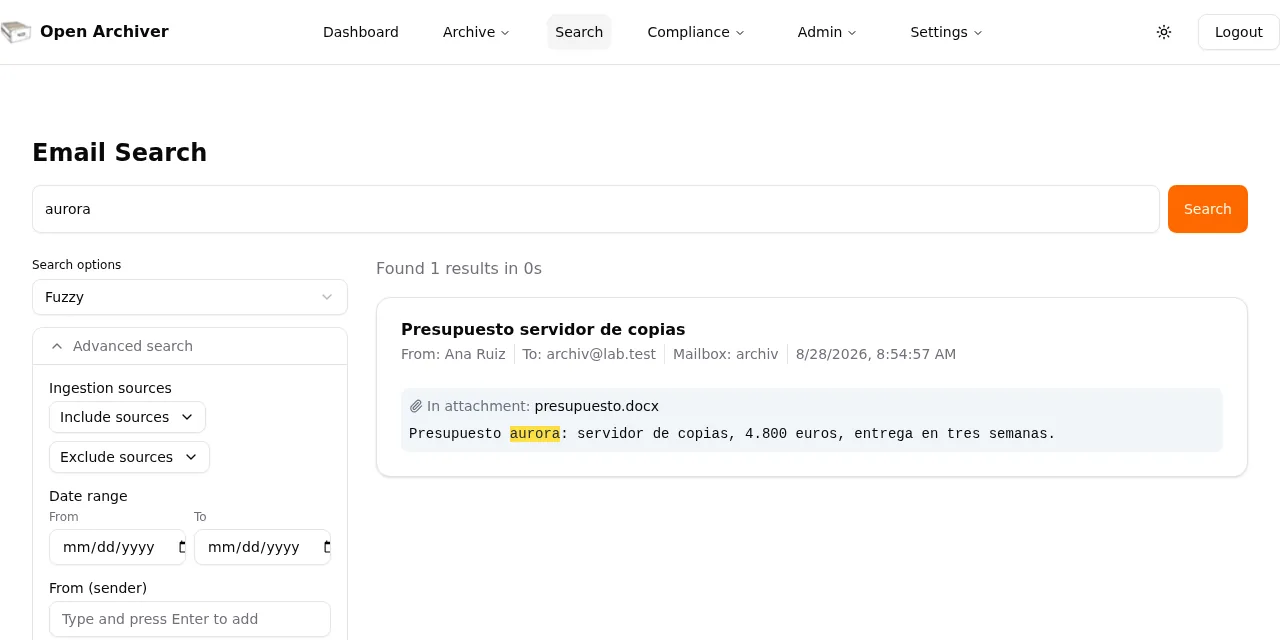
Table of contents
- Key takeaways
- What Open Archiver is and is not
- Requirements
- Install Open Archiver with Docker Compose
- Set up a test IMAP server with your own messages
- Archive the mailbox over IMAP
- Import an mbox and a zip of EML files
- Search the archive, attachments included
- How much space the archive takes
- Check integrity
- What I did not test
- Frequently asked questions
- Does Open Archiver replace a backup?
- Can I delete emails from the archive?
- Is it free for commercial use?
- Conclusion
- Sources
Open Archiver is an open-source platform, licensed AGPL-3.0, that archives mail from IMAP servers, Google Workspace, Microsoft 365 and PST, EML or mbox files, stores it in .eml format and indexes it so you can search the text of messages and attachments. On 7 October 2026 I installed version 0.6.0 with Docker Compose, archived a test IMAP mailbox, imported an mbox and a zip of EML files, and searched all of it. This guide covers the commands I ran, what I verified and what I did not. There is also a Spanish version.
Key takeaways
- Open Archiver 0.6.0 came out on 24 August 2026 under AGPL-3.0; the LogicLabs repository had 2,406 GitHub stars on 7 October.
- The deployment is 5 containers: the app, PostgreSQL 17, Valkey 8, Meilisearch 1.38 and Apache Tika. With the test IMAP server loaded, the stack used about 1.1 GiB of RAM.
- I archived 8 of 8 messages over IMAP, 3 of 3 from an mbox and 2 of 2 from a zip of EML files, with no failures.
- Search found the word "aurora", which only exists inside a
presupuesto.docxattachment, and it ignores accents: "retencion" and "retención" returned the same result. - Importing the same mbox under a second source archived it again: 16 rows for 13 distinct
Message-IDvalues. Deduplication is not global.
What Open Archiver is and is not
The project README[1] sums it up: "Use Open Archiver to keep a permanent, tamper-proof record of your communication history, free from vendor lock-in." It is an archive, not a mail server and not a backup. It reads from your mailboxes, keeps an immutable copy and lets you search for and retrieve single messages.
The ingestion sources the project lists are generic IMAP, Google Workspace, Microsoft 365, an OAuth mailbox for Outlook.com, PST, zipped EML, mbox and SMTP journaling. Version 0.6.0 brought two-factor authentication into the open-source edition and the "OAuth Mailbox" source, according to the release notes[2]. The documentation groups retention, legal holds, the audit log and SMTP journaling as "Enterprise" features, and I did not test them.
Requirements
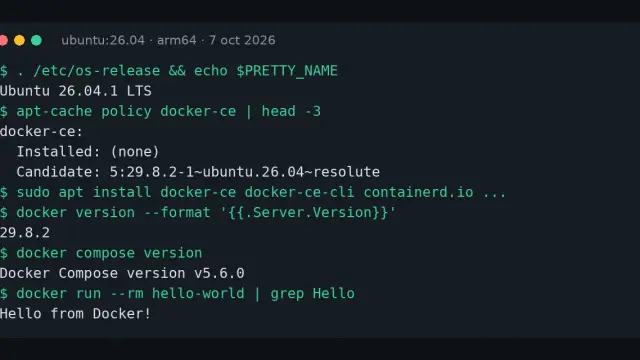
You need Docker with the Compose plugin. I used Docker 29.5.2 and Compose 2.40.3 on Linux arm64. The README asks for at least 4 GB of RAM, or 2 GB if you use external PostgreSQL, Valkey and Meilisearch instances. If you do not have Docker yet, start with how to install Docker on Ubuntu 24.04.
Install Open Archiver with Docker Compose
The repository ships its own docker-compose.yml using the latest image. I wrote a shorter one that pins version v0.6.0, so the result is reproducible:
services:
  open-archiver:
    image: logiclabshq/open-archiver:v0.6.0
    restart: unless-stopped
    ports: ["3000:3000"]
    env_file: .env
    volumes:
      - archiver-data:${STORAGE_LOCAL_ROOT_PATH}
    depends_on: [postgres, valkey, meilisearch]
  postgres:
    image: postgres:17-alpine
    restart: unless-stopped
    environment:
      POSTGRES_DB: ${POSTGRES_DB}
      POSTGRES_USER: ${POSTGRES_USER}
      POSTGRES_PASSWORD: ${POSTGRES_PASSWORD}
    volumes: [pgdata:/var/lib/postgresql/data]
  valkey:
    image: valkey/valkey:8-alpine
    restart: unless-stopped
    command: valkey-server --requirepass ${REDIS_PASSWORD}
    volumes: [valkeydata:/data]
  meilisearch:
    image: getmeili/meilisearch:v1.38
    restart: unless-stopped
    environment:
      MEILI_MASTER_KEY: ${MEILI_MASTER_KEY}
    volumes: [meilidata:/meili_data]
  tika:
    image: apache/tika:3.2.2.0-full
    restart: unless-stopped
volumes:
  pgdata: {}
  valkeydata: {}
  meilidata: {}
  archiver-data: {}
Tika is the attachment text extractor. Its full image weighs 1.16 GB, against 279 MB for the app, so it is the largest download in the stack. The named volumes follow the approach I explain in Docker volumes and bind mounts.
Download the project’s environment file and generate the secrets. .env.example leaves ENCRYPTION_KEY and STORAGE_ENCRYPTION_KEY empty, and ships the PostgreSQL password and the JWT key with sample values:
curl -s -o .env \
  https://raw.githubusercontent.com/LogicLabs-OU/OpenArchiver/main/.env.example
sed -i "s|^POSTGRES_PASSWORD=.*|POSTGRES_PASSWORD=$(openssl rand -hex 8)|; \
  s|^MEILI_MASTER_KEY=.*|MEILI_MASTER_KEY=$(openssl rand -hex 16)|; \
  s|^JWT_SECRET=.*|JWT_SECRET=$(openssl rand -hex 32)|; \
  s|^ENCRYPTION_KEY=.*|ENCRYPTION_KEY=$(openssl rand -hex 32)|; \
  s|^STORAGE_ENCRYPTION_KEY=.*|STORAGE_ENCRYPTION_KEY=$(openssl rand -hex 32)|;\
  s|^REDIS_PASSWORD=.*|REDIS_PASSWORD=$(openssl rand -hex 8)|; \
  s|^NODE_ENV=.*|NODE_ENV=production|; \
  s|^APP_URL=.*|APP_URL=http://localhost:3000|" .env
docker compose up -d
APP_URL must match the address you use to open the interface, because the project uses it for CORS and for the web server’s origin. Store both encryption keys in a password manager: with STORAGE_ENCRYPTION_KEY set, files are stored encrypted, and without that key they cannot be read. On first start the app container installs dependencies before it listens, so the web page takes a while to answer; in my test it returned a redirect to /setup once it was ready.
At /setup you create the administrator account. After you sign in, the interface shows Dashboard, Archive, Search, Compliance, Admin and Settings, with version 0.6.0 in the footer.
Set up a test IMAP server with your own messages
I did not want to connect a real mailbox, so I added GreenMail, a test mail server, to the same Compose file. The user archiv with password secret123 is created at startup:
  greenmail:
    image: greenmail/standalone:latest
    environment:
      GREENMAIL_OPTS: >-
        -Dgreenmail.setup.test.all -Dgreenmail.hostname=0.0.0.0
        -Dgreenmail.users=archiv:secret123@lab.test
    ports: ["3143:3143"]
I generated 8 Spanish-language messages with Python (imaplib and email) and added them to the inbox with the IMAP APPEND command. Two carry an attachment: a 36,626-byte presupuesto.docx whose text contains the word "aurora", which appears in no message body, and a 66-byte informe.txt. I also prepared an import.mbox with 3 messages (1,089 bytes) and an import-eml.zip with 2 .eml files.
Archive the mailbox over IMAP
On Ingestion Sources, the Create New button opens a form. I chose the Generic IMAP provider and filled in the host greenmail (the service name on the Compose network), port 3143, user archiv and the password. I unticked "Use TLS" because the test server speaks plain text; with a real server leave it ticked.
The source showed "auth success" and, on the next scheduler cycle, which runs every minute by default (SYNC_FREQUENCY='* * * * *'), the initial import finished with messagesSeen: 8, messagesArchived: 8 and messagesFailed: 0. Later cycles saw 0 new messages, as expected: sync is incremental and keeps running by itself.
By default the archive excludes the Junk and Trash folders (ALL_INCLUSIVE_ARCHIVE=false) and drafts (ARCHIVE_DRAFTS=false). Change them in .env if your retention policy includes them.
Import an mbox and a zip of EML files
Both file formats work as extra sources: you pick "Mbox Import" or "EML Import", give it a name and upload the file. The form also offers "Local Path", which the documentation[3] recommends for big files because it avoids the BODY_SIZE_LIMIT upload cap, set to 100M in .env.example.
| Source | Messages seen | Archived | Failures |
|---|---|---|---|
| IMAP (GreenMail) | 8 | 8 | 0 |
| Mbox | 3 | 3 | 0 |
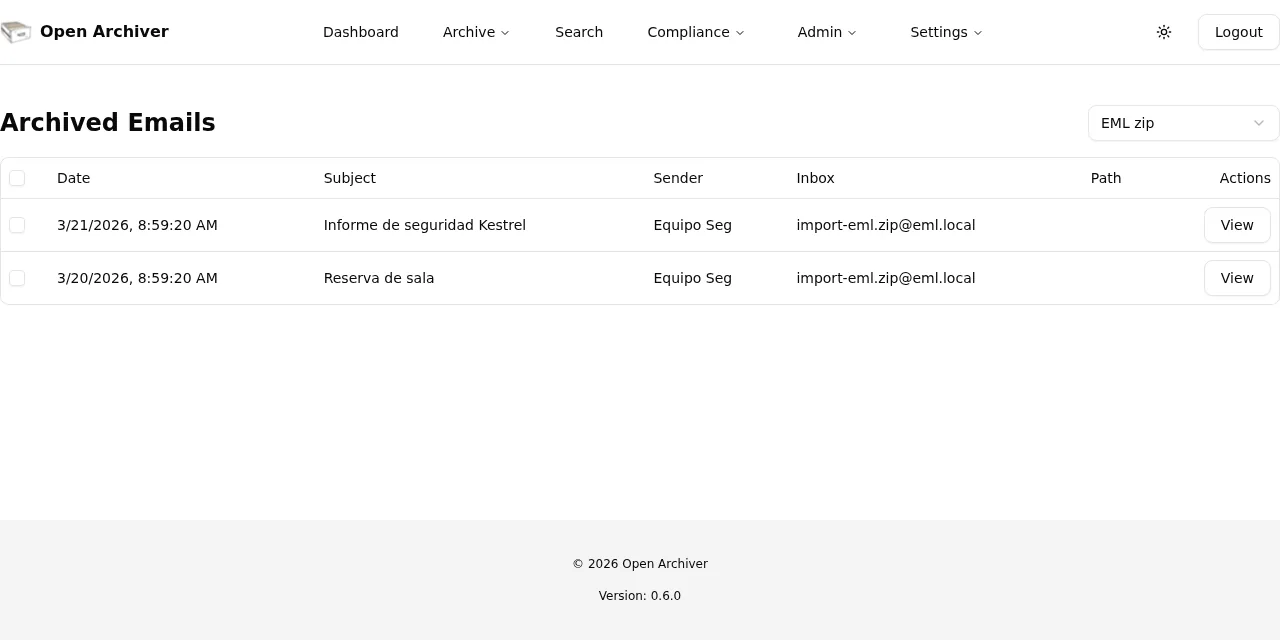
| EML zip | 2 | 2 | 0 |
To test duplicates I uploaded the same mbox again under a different name. Open Archiver archived it again: the archived_emails table ended up with 16 rows and 13 distinct Message-ID values. The project’s deduplication works within a source, not across sources, so do not upload the same file twice if you want an archive without repeats.
Search the archive, attachments included
The Search page uses Meilisearch. I ran these queries over the 16 archived messages:
| Query | Results | Where the text was |
|---|---|---|
aurora |
1 | only inside the presupuesto.docx attachment |
88431 |
1 | body and informe.txt attachment of the same message |
retencion and retención |
1 and 1 | the same message, with and without the accent |
presupuesto |
2 | subject of the original message and of its reply |
4.800 |
1 | message body |
zzzxyz |
0 | does not exist |
The aurora result shows the message and, below it, the attachment and the snippet with the word highlighted. That is the feature that justifies Tika: without it you would only search subjects and bodies. The "Search options" selector starts on Fuzzy, so servidor de copias returned 3 messages, one of them through approximate matching, and there are filters for source, dates and sender.
How much space the archive takes
I measured the app’s data volume, PostgreSQL and Meilisearch after archiving the 16 messages and 2 attachments:
The dashboard shows "Total Storage Used: 5.13 KB", the sum of the email sizes (5,249 bytes). It does not count attachments, so disk holds more than it reports.
Each encrypted file is 45 bytes larger than the original: the .docx went from 36,626 to 36,671 bytes and the .txt from 66 to 111. Attachments are stored apart from the .eml, in an attachments folder. The 8.9 MB database is mostly the empty schema, not my data.
On memory, Docker reported 610 MiB for the app, 210 MiB for Tika, 183 MiB for Meilisearch and 49 MiB for PostgreSQL with the archive loaded and the stack idle.
Check integrity
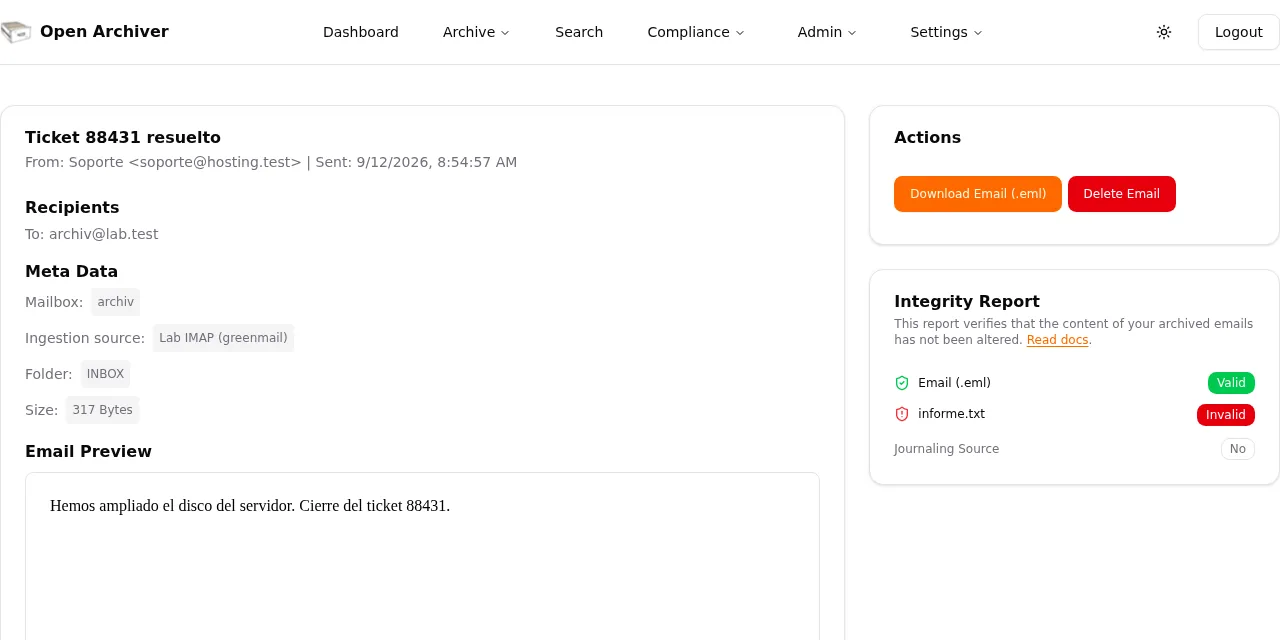
Every message you open shows an "Integrity Report". According to the documentation[4], Open Archiver computes a SHA-256 hash of the .eml and of each attachment when archiving, and recomputes it when you open the message. On my budget message, the .eml and the .docx both came out as "Valid".
To see whether it catches changes, I appended one byte (X) to the end of the stored informe.txt attachment in the volume and opened the message: the .eml stayed "Valid" and the attachment turned "Invalid". I then restored the original file.
It is a test for accidental change, not an audit: someone with access to the database and the encryption key could also rewrite the hash.
What I did not test
I did not connect Google Workspace or Microsoft 365, which need an OAuth app registered with your provider, and I did not import a PST. I also did not test the Enterprise features, S3 storage or how it behaves with mailboxes of tens of gigabytes. The figures above come from 16 messages, not a real archive, and I give no timings because the test machine was under load.
Frequently asked questions
Does Open Archiver replace a backup?
No. It archives mail so you can keep and search it, but it does not back up your mail server or Open Archiver’s own data. Back up the PostgreSQL and data volumes, and the encryption keys, with a tool such as restic.
Can I delete emails from the archive?
Not by default. .env.example ships ENABLE_DELETION=false, and the Delete Email button exists on a message page but depends on that setting. For a compliance archive, leave it off.
Is it free for commercial use?
The code is licensed AGPL-3.0, which allows commercial use if you meet its terms, including offering the source to users of a modified version you expose over a network. The documentation treats the Enterprise features separately, so check what you need before committing.
Conclusion
Open Archiver does what it promises in a controlled setup: 13 distinct messages archived through three routes, search inside a .docx, and detection of a single altered byte. What I still lack is a test with a real mailbox and its behaviour at large volume.
If you will use it, pin the image version, keep the encryption keys off the server and do not import the same file under two sources.
Sources: [1] Open Archiver repository[1], [2] Release v0.6.0[2], [3] Open Archiver documentation[5], [4] Mbox import guide[3], [5] Integrity check[4], [6] Meilisearch documentation[6], [7] Apache Tika[7], [8] GreenMail[8].
Sources
Source code
Access all the source code for this post on GitHub.
View on GitHub