How to install Pinchflat-ngx with Docker and migrate from Pinchflat
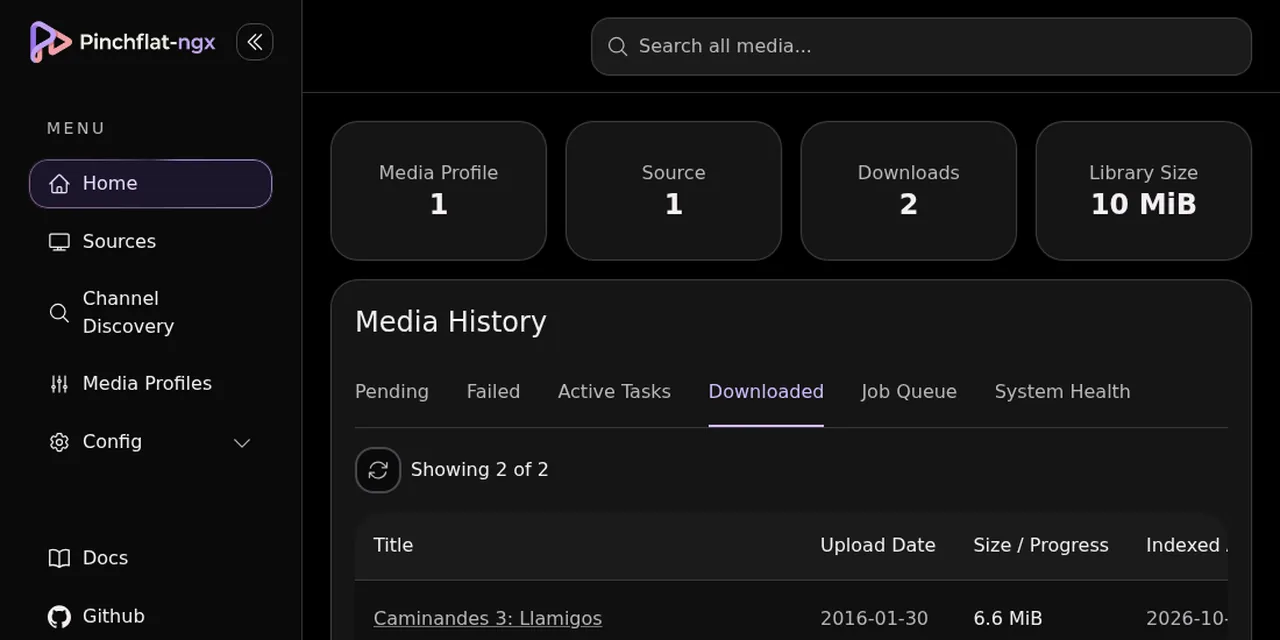
Table of contents
- Key takeaways
- What Pinchflat-ngx is and why it matters now
- Install Pinchflat-ngx with Docker Compose
- Migrate from Pinchflat to Pinchflat-ngx without losing sources
- A media profile for Jellyfin and Plex
- Download a playlist into a Jellyfin folder
- What happens when YouTube blocks the download
- When migrating is not worth it
- Frequently asked questions
- Is Pinchflat-ngx compatible with my Pinchflat database?
- Can I use Pinchflat-ngx with Plex instead of Jellyfin?
- Is it legal to download YouTube videos with this tool?
- Conclusion
- Sources
Pinchflat-ngx is a community fork of Pinchflat, the self-hosted manager that downloads YouTube channels and playlists to a folder, and it works as a drop-in replacement with Docker Compose. On 7 October 2026 I installed it from scratch, gave it the config volume of an old Pinchflat and downloaded two Creative Commons videos into a layout Jellyfin understands. Here are the compose file, the migration and what failed along the way. There is also a Spanish version.
Key takeaways
- The selfh.st newsletter of 2 October 2026[1] introduces the fork as "a fork of the popular YouTube video downloader project Pinchflat, which hasn’t seen any activity in ~10 months".
- Pinchflat’s last commit is from 16 December 2025 and its last release is v2025.9.26. Pinchflat-ngx published 2026.9.28 on 27 September 2026.
- Pinchflat-ngx keeps the same licence (AGPL-3.0), the same port (8945) and the same
/configand/downloadsvolumes. - I migrated by changing only the image: the old database applied 33 migrations and the profile and source were still there.
- With the Media Center profile I downloaded 2 videos (10 MiB in total) with their
.nfoand thumbnail, ready for Jellyfin or Plex.
What Pinchflat-ngx is and why it matters now
Pinchflat-ngx is a fork of Pinchflat[2] maintained by one person, TheBadFella, started on 16 June 2026. Pinchflat lets you define YouTube channels and playlists, and a yt-dlp[3] queue downloads them and stores them under the name you choose. It is what feeds a Jellyfin or Plex library without any manual work.
The reason for the fork is maintenance. The original repository has 5,396 stars, its last commit is from 16 December 2025 and its last release is dated 26 September 2025. The fork has 152 stars, five releases between 7 and 27 September 2026 and, according to its README, adds:
- Database: SQLite or PostgreSQL 18, with the
latest-postgresimage - Access: basic authentication or OIDC single sign-on
- Downloads: an optional PO-token provider for when YouTube blocks, and a local-disk staging folder for network destinations
- Sources: single videos as well as channels and playlists, and a choice of which playlist videos to fetch
- Operations: queue diagnostics and control of the yt-dlp update channel
It is a young single-maintainer project, so treat it as one: back up before migrating and pin a version instead of using latest.
Install Pinchflat-ngx with Docker Compose
The install is one service with two volumes. I used version 2026.9.28 on an arm64 machine with Docker, and the project README[4] and its wiki confirm the image is multi-platform (amd64 and arm64). This compose.yaml is mine, with the version pinned:
services:
  pinchflat-ngx:
    image: ghcr.io/thebadfella/pinchflat-ngx:2026.9.28
    environment:
      TZ: Europe/Madrid
    ports:
      - "8945:8945"
    volumes:
      - ./config:/config
      - ./downloads:/downloads
    restart: unless-stopped
Create the config and downloads folders, run docker compose up -d and open http://localhost:8945. Keep config on a local disk: the wiki warns that SQLite’s WAL mode is not designed for common network file systems. The image takes 990 MB on disk.
Two details from my test.
The container runs as root, so downloaded files end up owned by root; if Jellyfin runs as another user, check that it can read them (the UMASK variable defaults to 022, which leaves files readable). And on first start the log showed Couldn't resolve latest stable yt-dlp version ... HTTP request failed with status code 403. The version check hit GitHub’s rate limit from a shared IP. The app carries on with the yt-dlp in the image (2026.09.16.232951).
Migrate from Pinchflat to Pinchflat-ngx without losing sources
Migration means starting the new image on the /config volume of the old install, because Pinchflat-ngx migrates the SQLite database at startup. The maintainer warns in issue 82[5] that he has not tested the full jump from original Pinchflat. There, three users report that swapping the image worked for them.
I reproduced the case. I ran the original Pinchflat (ghcr.io/kieraneglin/pinchflat:latest, with yt-dlp 2025.09.26), created a media profile and a source, stopped it and copied config to config.bak. Then I started Pinchflat-ngx on the same config and downloads. One detail: that tag’s manifest only listed linux/amd64 on 7 October 2026, so I ran it under emulation on my arm64 machine.
The Pinchflat-ngx log showed 33 == Running ... migration lines, from 20260308222828 to 20260927170000. After them, the home page showed 1 media profile and 1 source: nothing was lost. If your install uses Basic Auth, carry over BASIC_AUTH_USERNAME and BASIC_AUTH_PASSWORD too. These are the steps I would follow on a real install:
- Back up. Stop the old container and copy the whole
configfolder, including thepinchflat.db-waland-shmfiles. - Change the image in your
compose.yaml, leaving volumes and port alone. - Start and check the home page: profiles, sources and library.
- Roll back if something fails: restore
config.bakand the old image. Migrations are not reversible, so the copy is your only way out.
The fork does not copy data from SQLite to PostgreSQL. For an existing install, its README says to stay on the latest (SQLite) image.
A media profile for Jellyfin and Plex
A media profile decides how videos are named and stored, and the Media Center preset leaves the output ready for a media server. On the New profile screen, pick "Media Center (Plex, Jellyfin, Kodi, etc.)" in the dropdown and press Load. That fills in the output template and turns on thumbnails and NFO files:
/shows/{{ source_custom_name }}/
  {{ season_by_year__episode_by_date_and_index }} - {{ title }}.{{ ext }}
I created the profile "Jellyfin", lowered the preferred resolution to 360p so the tests stayed small and turned subtitles off. The "Create NFO data" and "Download Series Images" switches stayed on. The "(pro)" label remains next to the first one, but the NFO files were generated anyway.
Download a playlist into a Jellyfin folder
A source is a channel or a playlist, and its profile decides where the files land. Before downloading anything, check what YouTube allows: its terms of service[6] prohibit downloading content unless the service itself permits it or YouTube gives written permission. So I only used videos under the Creative Commons Attribution (CC BY) licence, which yt-dlp reports in the license field, and the "Caminandes" animated shorts, made with Blender. This is not legal advice: check each video’s licence and your own situation.
The playlist has 13 items by different authors, and I did not want all of them. I created a source with the playlist URL, the name "Caminandes", a single index run and a 200 s maximum duration. I added the title filter ^Caminandes (1|3): Llam, which lets through only "Caminandes 1: Llama Drama" and "Caminandes 3: Llamigos", both CC BY. Pinchflat-ngx also adds manual selection of playlist items, which I did not use.
The result in downloads:
shows/Caminandes/
  Season 2013/
    s2013e020900 - Caminandes 1: Llama Drama - ....mp4  (3.9 MiB)
    s2013e020900 - Caminandes 1: Llama Drama - ....nfo
    s2013e020900 - Caminandes 1: Llama Drama - ....jpg
  Season 2016/
    s2016e013000 - Caminandes 3: Llamigos.mp4           (6.6 MiB)
    s2016e013000 - Caminandes 3: Llamigos.nfo
    s2016e013000 - Caminandes 3: Llamigos.jpg
The Llamigos video is H.264 at 640 by 360 with AAC audio. The colons in titles are stored as the full-width character :, because : is invalid on some file systems. Each NFO is an episodedetails that Jellyfin reads, with title, description, air date, season and episode:
<episodedetails>
  <title>Caminandes 3: Llamigos</title>
  <showtitle>Blender</showtitle>
  <uniqueid type="youtube" default="true">SkVqJ1SGeL0</uniqueid>
  <aired>2016-01-30</aired>
  <season>2016</season>
  <episode>013000</episode>
</episodedetails>
I did not connect Jellyfin to this folder, so I cannot confirm how it displays it. What the Jellyfin documentation[7] does say is that "Jellyfin can read and write local .nfo metadata files", and that an episode’s NFO must be named like its video file, which is what this output does. The series-level tvshow.nfo with the show poster is also missing: the "Download Series Images" option only works for full channels, not playlists. To set up the server, see how to install Jellyfin with Docker and point its library at shows; if you already run it, the guide to upgrading Jellyfin 12 with Docker covers the version change.
What happens when YouTube blocks the download
My first download failed with ERROR: unable to download video data: HTTP Error 403: Forbidden. It happened with the 2026.09.16 yt-dlp of the new image, after migrating: it got the format list but YouTube rejected the video chunks. The same source, with the 2025.09.26 yt-dlp of the original Pinchflat, had already failed earlier with The page needs to be reloaded and a warning that YouTube forces SABR streaming.
To try the remedy the fork offers, I added the PO-token provider brainicism/bgutil-ytdlp-pot-provider:2.0.0 as a second Compose service, under the pot-provider profile so it is optional, plus the POT_PROVIDER_URL variable:
services:
  pinchflat-ngx:
    environment:
      POT_PROVIDER_URL: http://pot-provider:4416

  pot-provider:
    image: brainicism/bgutil-ytdlp-pot-provider:2.0.0
    profiles: [pot-provider]
    restart: unless-stopped
You start it with docker compose --profile pot-provider up -d; the guide to Docker Compose profiles explains that flag. After bringing it up, I pressed the item’s download button and both downloads finished. I cannot credit the provider: I also ran yt-dlp by hand inside the container and it downloaded without it too, with PO Token Providers: none in its trace, so the 403 may have been intermittent. My takeaway is that on a 403 you should retry, update yt-dlp and, if it persists, enable the provider, which is what the yt-dlp PO Token Guide[8] recommends.
When migrating is not worth it
Stay on Pinchflat if it works and you need nothing from the fork: its image does not change, and yt-dlp can be updated without switching apps. Migrate if you care that someone publishes fixes, if you need PostgreSQL or OIDC, or if your old yt-dlp already fails against YouTube, as mine did. Against it, the fork has one maintainer and 152 stars against 5,396, and the migration path still has no official documentation.
Frequently asked questions
Is Pinchflat-ngx compatible with my Pinchflat database?
In my test it was: the original Pinchflat’s SQLite database applied 33 migrations and kept the profile and the source. The maintainer has not tested it end to end and there is no official guide, so copy config first.
Can I use Pinchflat-ngx with Plex instead of Jellyfin?
Yes. The season, episode and NFO layout that the Media Center preset produces is the same for Plex, Jellyfin and Kodi, according to the preset’s own description. I only verified the files, not how Plex or Jellyfin read them.
Is it legal to download YouTube videos with this tool?
It depends on the video. YouTube’s terms prohibit downloading unless the service allows it or YouTube gives written permission, so stick to your own content or videos under a licence that allows it, such as Creative Commons. Respect each licence’s attribution.
Conclusion
Pinchflat-ngx delivers as a replacement for Pinchflat: same port, same volumes and an automatic migration that, in my test, kept the profile and the source. It downloads with the structure and NFO files Jellyfin expects, and it ships the PO-token provider for when YouTube blocks.
Before migrating your real install, copy config, pin the image version and check the licence of what you download. If something fails against YouTube, the first step is to update yt-dlp.
Sources: [1] Self-Host Weekly, 2 October 2026[1], [2] Pinchflat-ngx on GitHub[4], [3] Issue 82: migration from Pinchflat[5], [4] Original Pinchflat on GitHub[2], [5] Jellyfin local .nfo metadata[7], [6] YouTube terms of service[6], [7] yt-dlp PO Token Guide[8].
Sources
Source code
Access all the source code for this post on GitHub.
View on GitHub