How to upgrade Karakeep to 0.34 with Docker without getting locked out
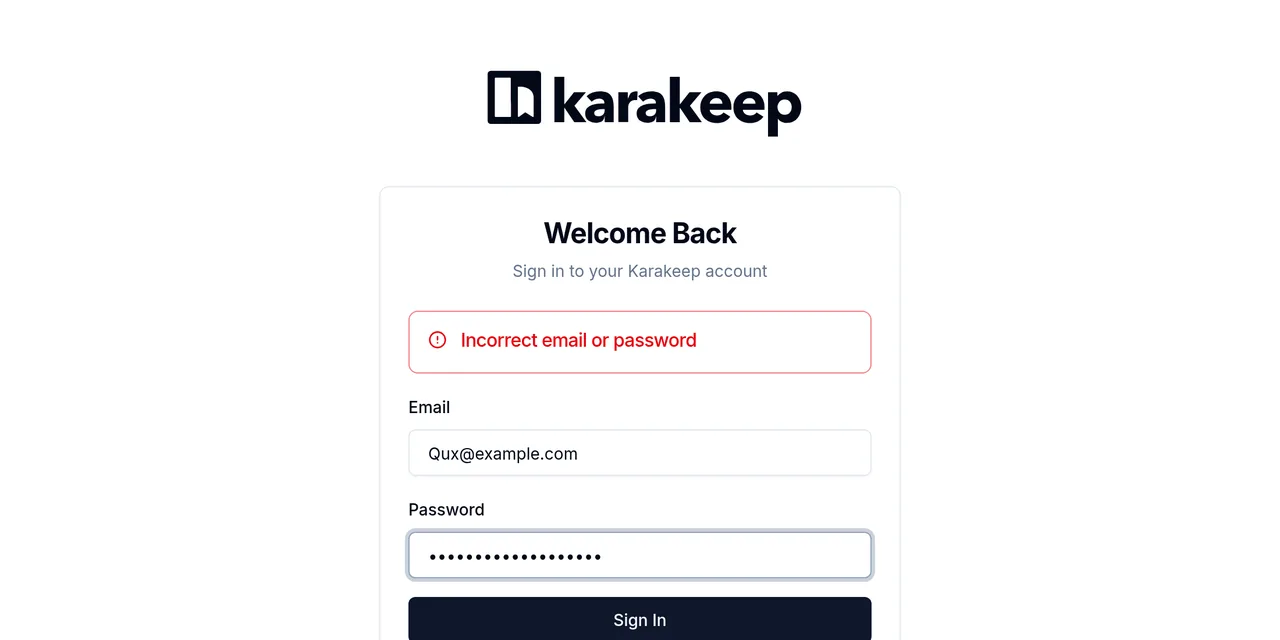
Table of contents
- Key takeaways
- What changes in Karakeep 0.34 and why it breaks sign-in
- How I tested the upgrade
- Step 1: look for emails that differ only in case
- Step 2: back up the data directory with Karakeep stopped
- Step 3: pin 0.34.1 and start the migration
- Error "Incorrect email or password" after upgrading to 0.34
- How to fix the lockout by editing SQLite
- Everyone signs in again: sessions in the database
- Moving to the karakeep-chrome image without losing screenshots
- What happens if you change only the image
- How big the new image is and which browser it runs on arm64
- AUTH_TRUSTED_ORIGINS: when you need to set it
- How to go back to Karakeep 0.33.2 if something goes wrong
- Frequently asked questions
- Can I stay on KARAKEEP_VERSION=release?
- Does 0.34 delete any of the duplicate accounts?
- Do I need any of this with a single account?
- Conclusion
- Sources
Before upgrading Karakeep to 0.34, check for accounts whose email differs only in case, such as Qux@example.com and QUX@example.com: the migration lowercases every email except those, and from then on neither of them can sign in. The screen answers Incorrect email or password even with the right password. You fix it by stopping the container and changing the email with an UPDATE in SQLite. This guide repeats the upgrade from 0.33.2 to 0.34.1 on 2 November 2026 and also covers the new sign-in, the karakeep-chrome image and AUTH_TRUSTED_ORIGINS. The same guide is available in Spanish.
Key takeaways
- 0.34.0 came out on 17 October 2026 and 0.34.1 on 22 October. On 2 November, the
releasetag points to 0.34.1, so adocker compose pullwith the default settings already upgrades you. - Web sessions move from signed tokens to sessions stored in the database. Everyone signs in again once; API keys keep working.
- Of my 6 accounts, the migration lowercased 2 and left 4 untouched because they collided. Both accounts of the
Qux/QUXpair were locked out, and whoever typedFoo@example.comlanded in thefoo@example.comaccount. - An
UPDATE ... SET email = lower(email)on both fails withUNIQUE constraint failed: user.email. One of the two has to move to a different address. - The
karakeep-chrome:releaseimage grew from 517 MB to 1.42 GB on arm64. If you change only the image and keep the remote-debugging arguments, bookmarks are saved without a screenshot.
What changes in Karakeep 0.34 and why it breaks sign-in
0.34 swaps the authentication library: Karakeep leaves next-auth for better-auth. The 0.34.0 release notes[1] explain that the migration runs by itself on startup. It comes with three warnings: it ends every web session, it lowercases emails and it adds the AUTH_TRUSTED_ORIGINS variable.
0.34.1 is a security release that goes back to the node:24-slim base image; inside the image I found Node v24.22.1, against v24.18.1 in 0.33.2.
The warning that matters is in the upgrade section. Mohamed Bassem, the maintainer, puts it this way: "You’ll get locked out if you have two conflicting accounts (neither of which are lowercase). If you get locked out, change the email address in the sqlite database to be lowercase to gain access back."
My test shows the problem is a little wider than that sentence: the uppercase account of a pair is also unreachable even when its twin is already lowercase.
If you do not run Karakeep yet, start with the guide to install Karakeep, which sets up 0.33.2 from the official compose file. This one starts from an install like that.
How I tested the upgrade
I ran Karakeep 0.33.2 with Docker 29.5.2 and Docker Compose 2.40.3 on an 18-core arm64 Linux machine, with Meilisearch v1.41.0 and the old Chrome, zenika/alpine-chrome:124. The data lived in a ./data directory mounted on /data. I created 6 users through the sign-up API: Ana@example.com, Bar@Example.com, the pair Foo@example.com and foo@example.com, and the pair Qux@example.com and QUX@example.com.
0.33.2 accepts both pairs without complaint and is case-sensitive at sign-in: Foo@example.com and foo@example.com open different accounts, and FOO@example.com returns 401. I saved a bookmark in 4 of the accounts and created an API key for Foo@example.com, to see what survived.
Step 1: look for emails that differ only in case
The query that finds collisions groups by the lowercased email. The Karakeep image does not ship the sqlite3 client, so I use keinos/sqlite3 read-only on the same directory:
docker run --rm -v "$PWD/data":/data:ro keinos/sqlite3 \
  sqlite3 -header /data/db.db \
  "SELECT lower(email) AS email, count(*) AS accounts,
          group_concat(email, ' ') AS variants
   FROM user GROUP BY lower(email) HAVING count(*) > 1;"
On my install it returned two rows: foo@example.com|2|Foo@example.com foo@example.com and qux@example.com|2|QUX@example.com Qux@example.com. If no row comes back, the tricky part of the upgrade does not affect you. If you use the named volume from the official compose file, replace "$PWD/data" with its name, which Compose prefixes with the project name (for example karakeep_data).
The release notes ask you to resolve each pair before upgrading by deleting the unused account. If both hold bookmarks, do not delete either: decide which one keeps the address and plan to move the other one, which is what I do in the fix section.
Step 2: back up the data directory with Karakeep stopped
The copy of the data directory is the only way back, because the migration rewrites the user and session tables. Stop the web service and archive the directory from a helper container, since the files belong to root:
docker compose stop web
docker run --rm -v "$PWD/data":/data:ro \
  -v "$PWD/backup":/backup alpine:3.22 \
  tar czf /backup/karakeep-data-0.33.2.tar.gz -C /data .
Stopping first avoids an inconsistent copy of db.db and queue.db, which SQLite writes while the app is alive. My archive took 13.1 MB, nearly all of it screenshots and archived pages. If you already run encrypted backups with restic, add this file before going on. Meilisearch needs no backup: its index rebuilds from the admin panel.
Step 3: pin 0.34.1 and start the migration
With the backup done, the upgrade is one line in .env and two Compose commands. Pin the version instead of leaving release, so you decide when the next one arrives:
sed -i 's/^KARAKEEP_VERSION=.*/KARAKEEP_VERSION=0.34.1/' .env
docker compose pull web
docker compose up -d web
docker compose logs -f web
The log shows Running db migration script, then Next.js 16.4.1 and Workers version: 0.34.1. No line warns about the accounts the migration skipped, so the check is yours to run. This query lists the emails that still contain uppercase letters:
docker run --rm -v "$PWD/data":/data:ro keinos/sqlite3 \
  sqlite3 /data/db.db \
  "SELECT name, email FROM user WHERE email <> lower(email);"
In my case Ana@example.com and Bar@Example.com were already ana@example.com and bar@example.com. Three rows were left: Foo@example.com, Qux@example.com and QUX@example.com; foo@example.com does not show up because it was already lowercase. Every row here is an account its owner cannot get into.
Error "Incorrect email or password" after upgrading to 0.34
The error shows up with the right password because 0.34 lowercases what you type into the form and then looks the email up as-is in the user table. For the Qux/QUX pair no row matches qux@example.com, and the screen gives the same answer for all three spellings:
Incorrect email or password
The authentication API returns a 401 with {"message":"Invalid email or password","code":"INVALID_EMAIL_OR_PASSWORD"}. With the Foo/foo pair the symptom is more misleading: typing Foo@example.com signs you in, but into the foo@example.com account. In my test both passwords were the same; with different passwords, the owner of Foo@example.com would see the same error. Their bookmarks are still in the database, but nobody can reach them from the web.
The API key I created for Foo@example.com kept working: GET /api/v1/users/me returned that user after the upgrade. If you use the browser extension or the mobile app with a key, you will notice nothing until you sign out.
How to fix the lockout by editing SQLite
The fix is to leave one lowercase email per person and give the other account a different address. The shortcut of lowercasing both does not work, because the table has a unique index on email:
Error in 2nd command line argument: UNIQUE constraint failed: user.email
Stop the web service before touching the database and run the client as root, because db.db belongs to root and the keinos/sqlite3 image runs as the sqlite user (without --user root it answers attempt to write a readonly database):
docker compose stop web
docker run --rm --user root -v "$PWD/data":/data keinos/sqlite3 \
  sqlite3 /data/db.db "
  UPDATE user SET email = 'qux+antigua@example.com'
    WHERE email = 'QUX@example.com';
  UPDATE user SET email = 'qux@example.com'
    WHERE email = 'Qux@example.com';
  UPDATE user SET email = 'foo+antigua@example.com'
    WHERE email = 'Foo@example.com';"
docker compose start web
Order matters: first move aside the account that gives up the address, then lowercase the one that keeps it. The password lives in the account table and is tied to the user id, not the email, so you leave it alone. After the restart, the four resulting addresses all signed in with a 200, and QUX@example.com typed that way now opens the qux@example.com account.
If you want the bookmarks in a single account, do it afterwards from the web: export them from the moved account and import them into the right one. 0.34.1 no longer lets anyone create new pairs: signing up Zed@Example.com stored zed@example.com, and signing up zed@example.com returned User already exists. Use another email.
Everyone signs in again: sessions in the database
Web sessions in 0.33 were an encrypted JSON Web Token (JWT) in a cookie; in 0.34 they are rows in the session table. Right after the migration that table had 0 rows, the old cookie returned null from /api/auth/get-session and the dashboard redirected to the sign-in form with a 307. Warn whoever uses your instance before upgrading.
Mobile apps and API keys are not affected, as the notes say and as I checked with the lab key.
The NEXTAUTH_URL and NEXTAUTH_SECRET variables keep their names. They are still required, so the 0.33 .env works unchanged.
Moving to the karakeep-chrome image without losing screenshots
Karakeep asks you to move to its own Chrome image, ghcr.io/karakeep-app/karakeep-chrome, and the old Google-hosted path no longer even downloads. On 2 November 2026 a docker pull gcr.io/zenika-hub/alpine-chrome:124 answered this:
Error response from daemon: error from registry: This API method
requires billing to be enabled. Please enable billing on project
#24742942950 by visiting https://console.developers.google.com/billing/
enable?project=24742942950 then retry.
The Docker Hub copy, zenika/alpine-chrome:124, did download, and with it 0.34.1 crawled a page and stored its screenshot. It works, but it misses this release’s anti-bot improvements. The Chrome image migration guide[2] gives the service to end up with:
  chrome:
    image: ghcr.io/karakeep-app/karakeep-chrome:release
    restart: unless-stopped
    init: true
    command:
      - --disable-gpu
      - --disable-dev-shm-usage
      - --hide-scrollbars
      - --disable-blink-features=AutomationControlled
      - --window-size=1440,900
Compared with the old service, --no-sandbox, --remote-debugging-address and --remote-debugging-port go away, and init: true comes in. Apply it with docker compose pull chrome and docker compose up -d chrome; the migration does not touch Karakeep’s data.
What happens if you change only the image
I first tried changing the image: line and keeping the old arguments. The container starts, but Chrome logs bind() failed: Address already in use (98) and the internal forwarder answers TCP4:127.0.0.1:9223: Connection refused. The image’s entrypoint starts Chrome on port 9223 and forwards 9222 with socat, so your --remote-debugging-port=9222 collides with that forwarder.
Karakeep does not go down. Its log repeats Failed to connect to the browser instance, will retry in 5 secs: browserType.connectOverCDP: socket hang up, and new bookmarks end with Completed successfully plus the line Skipping storing the screenshot as it's empty. It fails silently: you save links with no screenshot and no archive. With the corrected service, the next bookmark logged Captured the screenshot (121583 bytes).
How big the new image is and which browser it runs on arm64
The image grows because the browser changes. The release tag I had pulled earlier was 151.0.7922.47-r1, with Chrome Headless Shell, at 517 MB; on 2 November it was 156.0.8078.47-r2 at 1.42 GB on arm64. By 12 November release pointed at 157.0.8103.38-r1, the same size. The notes admit it: "This comes at the cost of the chrome image getting bigger unfortunatly."
On arm64 it does not ship Google Chrome. The image’s Dockerfile[3] installs Google Chrome only on amd64, because Google does not publish Chrome for Linux arm64, and falls back to Debian’s Chromium on arm64. Inside the container, karakeep-chrome --version returned Chromium 156.0.8078.73 built on Debian GNU/Linux 13 (trixie), and with 157.0.8103.38-r1 it returned Chromium 156.0.8078.79: on arm64 the tag number is the Google Chrome version, not that of the browser inside. To control when the browser changes, use the versioned tag (157.0.8103.38-r1) instead of release.
AUTH_TRUSTED_ORIGINS: when you need to set it
Leave it alone if your instance works after the upgrade. Its default, *, does not mean "any site": per Karakeep’s environment variable docs[4], it stands for the address the request was sent to, plus NEXTAUTH_URL. I checked it: signing in through the local network IP with a matching Host gave 200, and a request with another site’s origin gave 403 with {"message":"Invalid origin","code":"INVALID_ORIGIN"}.
If you set it, the list replaces that wildcard. With AUTH_TRUSTED_ORIGINS=http://localhost:33000, signing in through http://192.168.1.50:33000 failed with the same 403, and the log said ERROR [Better Auth]: Invalid origin: http://192.168.1.50:33000. Add every address you sign in from, separated by commas. If Karakeep sits behind Nginx Proxy Manager, the public address is the one in NEXTAUTH_URL and you do not need to repeat it.
The release notes add another change to the background workers: if one fails, the whole worker process now exits so the restart policy can act. Keep restart: unless-stopped on the web service for that reason. I tried to trigger it by starting 0.34.1 with Meilisearch stopped, and it did not exit; the search worker started anyway.
How to go back to Karakeep 0.33.2 if something goes wrong
Roll back by restoring the archive, not just the tag, because 0.34 has already rewritten the user and session tables. Stop the service, empty data, extract karakeep-data-0.33.2.tar.gz and pin KARAKEEP_VERSION=0.33.2 before the up -d. If you update your containers with Watchtower, exclude this one meanwhile, or the release tag will take you back to 0.34.1.
Frequently asked questions
Can I stay on KARAKEEP_VERSION=release?
Yes, and on 2 November 2026 release is 0.34.1, with the same digest as the 0.34.1 tag in GitHub’s container registry. The problem is that it upgrades you without a chance to look for colliding accounts first. Pin the version for this upgrade and go back to release afterwards if you prefer.
Does 0.34 delete any of the duplicate accounts?
No. In my test all 6 accounts and their 4 bookmarks were still in the database after the migration. The migration only skips colliding accounts, which keep their original email and have no way in from the web until you rename them.
Do I need any of this with a single account?
With a single account there is nothing to look for: the step 1 query cannot return a row. You still sign in again and, if you run an old compose file, change the Chrome service.
Conclusion
Upgrading Karakeep to 0.34 with Docker is a tag change, apart from one query you need to run first. If some emails differ only in case, resolve them before migrating or fix them afterwards with an UPDATE that moves one account aside and lowercases the other, with the service stopped.
Back up data and warn users that everyone signs in again. Also check that the Chrome service no longer has the remote-debugging arguments, or you will lose screenshots with no visible error. If the Chrome container interests you on its own, compare options in headless browsers for agents.
Sources: [1] Karakeep, release notes for 0.34.0[1], [2] Karakeep, release notes for 0.34.1[5], [3] Karakeep, migrating to the Chrome image[2], [4] Karakeep, environment variables[4], [5] karakeep-chrome Dockerfile at 0.34.1[3], [6] Better Auth, trusted origins[6], [7] SQLite, the UPDATE statement[7].
Sources
Source code
Access all the source code for this post on GitHub.
View on GitHub