Model management in oMLX: downloads, aliases, TTL and disk cache
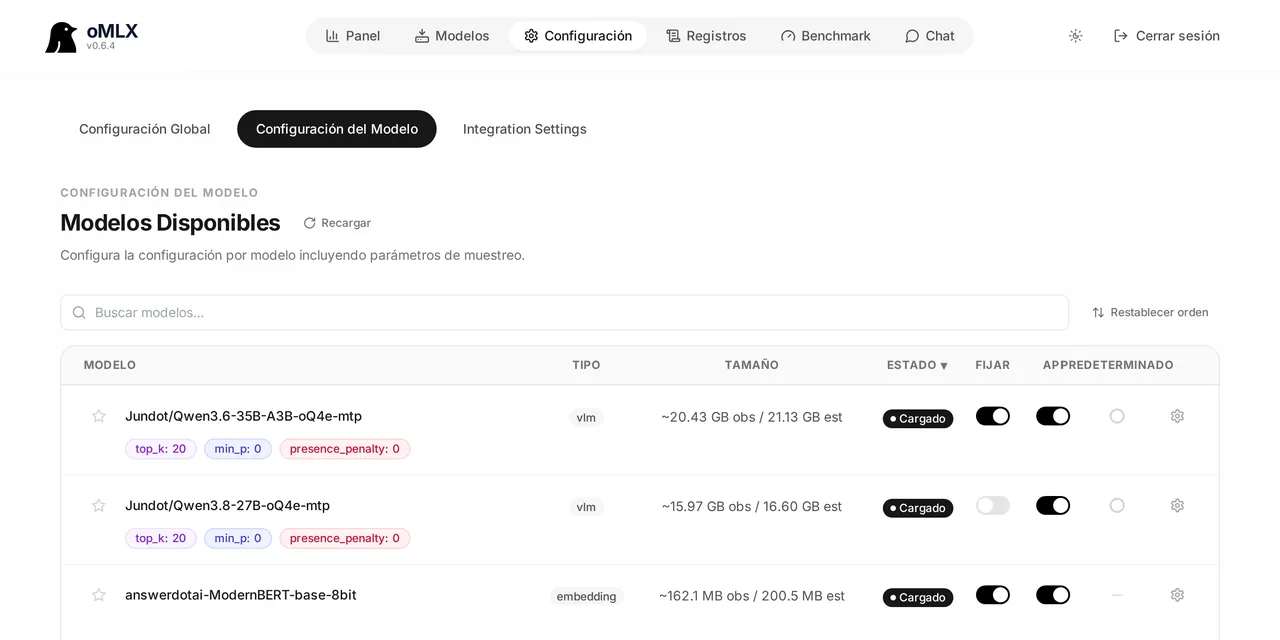
Table of contents
- Key takeaways
- Where models live
- The built-in downloader
- Aliases: separating the name from the path
- TTL, pinning and LRU eviction
- The tiered KV cache
- Where all of this is stored
- Frequently asked questions
- Does TTL unload a model mid-request?
- Does the SSD cache wear out the disk?
- Can I change a model's settings without restarting?
- Conclusion
- Sources
On a Mac with unified memory there is no separate VRAM: every model you load comes out of the same budget as the rest of the system. That is why the most interesting part of oMLX is not serving requests but deciding which model occupies RAM at any given moment. This article walks through the four pieces that govern that decision and how each is configured.
Key takeaways
- The built-in downloader searches and pulls MLX models from Hugging Face without leaving the admin dashboard.
- An alias changes the name the model shows up under in the API;
/v1/modelsreturns the alias, and requests accept both the alias and the directory name. - Per-model TTL unloads a model after an idle period, and LRU eviction frees the least recently used ones when memory runs short.
- The default total limit is system RAM minus 8 GB, designed to stop the whole Mac running out of memory.
- The tiered KV cache spills blocks to SSD in safetensors format and restores them later, even after a server restart.
Where models live
Models are stored in subdirectories of the model directory, chosen with --model-dir. oMLX supports two-level folders of the form mlx-community/model-name/, which is exactly how Hugging Face organises its repositories, and it auto-detects the model type.
That convention matters more than it looks. If you download weights yourself and drop them in a flat folder, you lose the correspondence with the source repository identifier and end up with ambiguous names in the API.
The built-in downloader
The admin dashboard includes a search that queries Hugging Face, shows model cards with file sizes, and downloads in one click. It is the recommended route because it leaves the weights in the correct two-level structure.
The manual alternative still works: clone the repository into --model-dir respecting the hierarchy. Check the size before you start, because a large quantised model can run to tens of gigabytes and the download is not resumable at will.
Aliases: separating the name from the path
An alias is an API-visible name distinct from the directory name. You set it per model in the panel, and from then on /v1/models returns the alias while requests still accept either.
It solves two concrete problems. First, stable names: if your client asks for fast-coder instead of Qwen3-Coder-30B-A3B-Instruct-mlx-8bit, you can swap the real model underneath without touching the client. Second, mapping names a client expects to find. It is the same trick you need when pointing Claude Code at your local server.
TTL, pinning and LRU eviction
This is where oMLX decides, without you, what leaves memory. Three mechanisms act at once:
| Mechanism | What it does | Where it is configured |
|---|---|---|
| Per-model TTL | Unloads the model after an idle period | Panel, per model |
| Pinning | Keeps a frequently used model always loaded | Panel, per model |
| LRU eviction | Evicts least recently used models when memory runs low | Automatic |
| Total limit | Process memory ceiling; by default, system RAM minus 8 GB | --memory-guard-gb, --memory-guard |
On a machine you use every day, the useful combination has three pieces. Pin the small model you use all day, put a short TTL on the large ones that only show up for specific tasks, and let LRU handle the rest. That way the expensive model unloads itself when you stop using it, instead of sitting on memory until you remember it.
The total limit deserves a note. Its default, system RAM minus 8 GB, is not arbitrary: those are the 8 GB the operating system and your applications need in order not to start paging. If you raise it with --memory-guard-gb, the one left without headroom is macOS.
The tiered KV cache
This is the least obvious piece and the one that pays off most in repetitive work. The key-value cache operates across two tiers: a hot one in RAM holding the blocks in active use, and a cold one on SSD.
When the hot tier fills, blocks are offloaded to disk in safetensors format. On later requests whose prefix matches, the project documentation says blocks "are restored from disk instead of recomputed from scratch, even after a server restart".
That the format is safetensors is not a minor detail. Hugging Face defines it as "a new simple format for storing tensors safely (as opposed to pickle) and that is still fast (zero-copy)": a zero-copy load format, which is exactly what you want when restoring blocks from disk on the critical path of a response.
You enable it by pointing at a directory:
omlx serve --model-dir ~/models
  --paged-ssd-cache-dir ~/.omlx/cache
  --hot-cache-max-size 20%
  --max-concurrent-requests 16
--hot-cache-max-size takes a percentage of the memory budget, and --max-concurrent-requests raises parallelism from its default of 8. Raising it makes sense if you serve more than one client at a time. For individual use, 8 is plenty, and every concurrent request competes for the same memory.
Where all of this is stored
Settings persist to ~/.omlx/settings.json, and command-line flags take precedence over what is stored. That precedence is worth remembering when something does not add up: if you started the server with a flag and later changed the value in the panel, the flag still wins for that run.
To inspect state without opening the panel, the admin API exposes each model’s load state, memory size and context window. If you would rather query it from a conversation than with curl, the MCP bridge for oMLX wraps exactly those endpoints.
Frequently asked questions
Does TTL unload a model mid-request?
No. TTL counts idle time; an in-flight request keeps the model alive.
Does the SSD cache wear out the disk?
It writes blocks continuously, so yes, it generates sustained writes. If that worries you, keep the hot tier larger and put the cold one on an external disk via --paged-ssd-cache-dir.
Can I change a model’s settings without restarting?
Yes. Sampling parameters, chat template kwargs, TTL, alias and model type override all change from the panel without a server restart.
Conclusion
Model management in oMLX comes down to deciding two things: what occupies RAM and what gets recomputed. Aliases and the downloader solve the organisation half; TTL, pinning and LRU solve the memory half; and the tiered KV cache avoids repeating work you already did. If you are setting this up from scratch, start with the oMLX install and tuning guide and come back here once you have more than one model competing for the same memory. The Spanish version is at gestión de modelos en oMLX.
Sources: [1] oMLX, inference server for Apple Silicon[1], [2] safetensors, Hugging Face documentation[2], [3] MLX, Apple’s official documentation[3].