How to install and tune oMLX on M5 Max 128 GB
Table of contents
- Quick answers
- Install
- Server settings for 128 GB
- Model stack for multi-LLM
- Point Claude Code at the local endpoint
- SSH from another Mac
- Benchmark on real hardware
- Advanced settings for maximum performance on 0.6.4
- Which acceleration method to use with each model
- Downloading the drafters
- Turning on Lightning MTP
- Turning on VLM MTP with an external drafter
- DFlash only pays off with short prompts
- Prefill on the Neural Engine: no gain with Lightning MTP
- The global settings that matter
- What does not make it faster
- Benchmarks on 0.6.4 on this M5 Max
- How it was measured
- Speed through the API with coding answers
- Speed through the API with 15,000 tokens of context
- Built-in benchmark by prompt length
- Compared with 0.3.8
- End-to-end verification
- What has changed since 0.3.8
- Lightning MTP speculative decoding
- Custom kernels, with a note for M5
- oQ and oQe quantisation
- The neural engine and cold starts
- New endpoints
- Sub-key authentication
- The setting names
- Other pieces that did not exist
- Sources and further reading
- Frequently asked questions
- Do I need to set an API key to use oMLX locally only?
- Can I use Claude Code from a MacBook against oMLX running on a Mac Studio?
- Are the benchmarks in this post still valid if I install 0.6.4?
- Sources
oMLX is an LLM inference server built on MLX, the framework Apple shipped in December 2023 for Apple Silicon. It adds continuous batching, two-tier KV cache (RAM + SSD), and an OpenAI- and Anthropic-compatible API.
On a Mac M5 Max with 128 GB of unified memory you can hold three or four large models at once with TurboQuant 3.5-bit on KV cache. That is enough to feed chat, agent and IDE in parallel. This guide collects the configuration tested in May 2026 to get the most out of that combination.
Quick answers
Which oMLX version do I use and how do I install it? Version 0.6.4 (released 29 August 2026, Apache 2.0). The direct route: download the .dmg from GitHub Releases[1], open it and drag to Applications. Or install via brew tap jundot/omlx https://github.com/jundot/omlx and brew install jundot/omlx/omlx.
The first load of the panel at http://localhost:8000/admin prompts for the API key. The full Homebrew route, including the service that starts on its own, is in installing, updating and uninstalling oMLX with Homebrew.
What TurboQuant setting makes sense on 128 GB? 3.5-bit. vLLM’s independent analysis published 11 May 2026[2] shows 3.5-bit matches full-precision quality with about 4x less KV-cache memory. On M5 Max that turns 128k context from "blows past available RAM" into "fits alongside other loaded models."
How much faster is it with the advanced 0.6.4 settings? Between 1.19x and 1.88x when generating code, and between 1.07x and 1.47x with 15,000 tokens of context, measured through the API on 15 September 2026. The biggest gain came from Lightning MTP on Qwen3.8-27B oQ4e, from 21.1 to 39.7 tok/s, and it needs a build of the model that keeps the MTP head. The details are in the advanced settings.
Which models can I load concurrently on 128 GB?
Primary: unsloth/Qwen3.6-35B-A3B-MLX-8bit (37.7 GB, MoE with 3B active). Fast helper: Qwen3-14B-Instruct-mlx-4bit (8 GB). Vision: Qwen2.5-VL-32B-mlx-4bit (18 GB).
Embeddings: BGE-M3-mlx (1.2 GB). Reranker: ModernBERT-base-mlx (150 MB). Comfortable sum: ~65 GB with headroom.
How do I point Claude Code at the local endpoint? Since 0.5.0 the short way is omlx launch claude, which exports the variables for you. By hand: export ANTHROPIC_BASE_URL=http://127.0.0.1:8000, ANTHROPIC_AUTH_TOKEN=<your_api_key> and the three ANTHROPIC_DEFAULT_*_MODEL variables (Opus/Sonnet/Haiku).
Launch with claude --bare to drop the system prompt to ~1,795 tokens. The dashboard’s Claude Code with oMLX section assembles the full command for you.
Does this replace Claude Opus 4.7? Not one for one. Claude Code is tuned for Claude’s tool-use format; a non-Claude model behind the endpoint loses reliability in agentic loops. Use this for offline work, sensitive data that should not leave the Mac, or as a fallback when api.anthropic.com is rate-limiting you.
Install
The easiest path: download the .dmg from GitHub Releases[1], open it and drag the app to Applications. The server starts in the background with a menu-bar icon.
Or install via Homebrew:
brew tap jundot/omlx https://github.com/jundot/omlx
brew install jundot/omlx/omlx
omlx start
omlx serve --model-dir ~/models
The first hit to http://localhost:8000/admin prompts for the API key. By default oMLX ships with no API key set (empty field), which is fine for local testing. If the instance only listens on 127.0.0.1 this is safe; the moment you expose it to the LAN or plan to share the endpoint, go to Settings → Auth & Info and set a long random string. The section accepts multiple keys at once.

Server settings for 128 GB
Settings → Global Settings holds the full server configuration. The decisions that matter on a 128 GB machine:
-
Server → Host:
Localhost only (127.0.0.1). If you open it to the LAN, put real auth in front first. -
Server → Port:
8000by default. -
Resource Management → Memory Limit (Total):
Auto. oMLX subtracts what macOS reserves; on 128 GB you end up around 110-114 GB for inference. -
Resource Management → Memory Limit (Models Only):
Auto. Keeps a percentage for activations, KV cache and auxiliary processes. -
Resource Management → Hot Cache Limit:
10%. Intermediate RAM-tier KV cache. With TurboQuant enabled on the models that support it (see below), 10% is the value people running this setup in practice land on for 128 GB. With TurboQuant off and a single model loaded you can drop to Off, but you stop gaining. -
Resource Management → Cold Cache Limit (SSD Cache):
10%. Around 80 GB of SSD for cold tokens without saturating it. -
Resource Management → Max Concurrent Requests:
16. Comfortable for a single user with an agent, a chat session and an IDE pinging at once. Raise to 32 if you share with a small team. -
Resource Management → Idle Timeout:
None. Keeps models warm; the first token arrives in well under a second instead of seconds later. -
Generation Defaults → Max Context Window:
256000as the global default. The Qwen3.6 family holds up at long context, and with TurboQuant the effective RAM stretches enough to actually use it. Each model can be capped lower in Model Settings. -
Generation Defaults → Max Tokens:
64000. Upper bound per response. Going higher only matters if you plan to generate full books in one shot. -
Generation Defaults → Temperature:
1.0for general use,0.2-0.5for code models. -
Model Settings → Experimental Features → TurboQuant KV Cache: enable at
3.5-biton the large dense models. vLLM’s independent study published 11 May 2026[2] of Google’s TurboQuant shows 3.5-bit matches full-precision quality with roughly 4x less KV-cache memory. On M5 Max that makes 128k context fit on models where FP16 does not. On 0.6.4 it cannot be combined with VLM MTP, and in these tests it did not speed up generation; if speed is what you are after, see the advanced settings.

Model stack for multi-LLM
With 128 GB you have room to load one large primary model, a fast helper, a VLM, embeddings and a reranker concurrently. Download them from Models → Downloader by pasting the Hugging Face repo URL.
The recommendation holding up in May 2026 comes from people actually running Claude Code on oMLX on M5 Max (see Diego R. Baquero’s gist[3] for the source): Unsloth’s Qwen 3.6 35B-A3B family in MoE with ~3B active parameters per token. On 128 GB the 8-bit fits without breaking a sweat:
-
Primary (chat + code + reasoning):
unsloth/Qwen3.6-35B-A3B-MLX-8bit(~37.7 GB). MoE 35B with 3B active. The all-rounder: long chat, code, agents. On 128 GB it fits alongside everything else without squeezing. -
More compressed alternative:
unsloth/Qwen3.6-35B-A3B-UD-MLX-4bit(~21.6 GB) if you want two primary models loaded at once. Loses a notch of quality versus 8-bit but leaves room to experiment. -
Dense reasoning (when MoE falls short):
Mistral-Large-2-123B-Instruct-mlx-4bit(~70 GB) orLlama-3.3-70B-Instruct-mlx-4bit(~40 GB). For deep reasoning in a single pass, where a dense architecture beats a small-activation MoE. -
Fast helper:
Qwen3-14B-Instruct-mlx-4bit(~8 GB). For cheap tasks in agents, parsing and summaries. -
Vision:
Qwen2.5-VL-32B-Instruct-mlx-4bit(~18 GB) covers OCR, image description and multimodal reasoning. -
Embeddings:
BGE-M3-mlx(~1.2 GB), dense + sparse + multi-vector in a single model. -
Reranker:
ModernBERT-base-mlx(~150 MB) to close the loop on a decent RAG pipeline.
Comfortable concurrent load with Qwen3.6 35B-A3B 8-bit as primary + 14B helper + VL-32B + embeddings + reranker: around 65-70 GB. Add Mistral Large 2 123B on top for dense reasoning and you hit ~135 GB nominal. The LRU policy moves idle models to SSD, so the cohabitation works in practice for sessions that do not pin everything at once. Pin the primary model from Model Manager so it never gets evicted.
Point Claude Code at the local endpoint
oMLX exposes an Anthropic-compatible API at http://127.0.0.1:8000. In current versions the routes live under /v1: POST /v1/messages and POST /v1/messages/count_tokens. Claude Code respects ANTHROPIC_BASE_URL, so pointing the CLI at your Mac is a matter of exporting environment variables. First, turn off the attribution header in Claude Code’s global config so the gateway does not bolt extra noise onto the prompt:
Since 0.5.0 there is a shortcut that does all of this for you and did not exist when this recipe was written:
omlx launch claudeIt sets ANTHROPIC_BASE_URL against your server, puts the configured key in ANTHROPIC_AUTH_TOKEN (or omlx if there is none), empties ANTHROPIC_API_KEY to force the base URL to be used, raises API_TIMEOUT_MS to 3,000,000 and disables non-essential traffic. It also sets CLAUDE_CODE_MAX_CONTEXT_TOKENS and CLAUDE_CODE_AUTO_COMPACT_WINDOW to what the engine can actually do, which is what the context-scaling option used to do by hand. It enforces a minimum window of 48,000 tokens and will not start if the chosen model falls short. There are equivalent commands for Codex, OpenCode, OpenClaw, Hermes and Pi, described in the dashboard and command line guide.
The manual recipe below still works and is the one to use if you want fine control over each variable.
~/.claude/settings.json:
{
  "env": {
    "CLAUDE_CODE_ATTRIBUTION_HEADER": "0"
  }
}
Then the startup command:
export ANTHROPIC_BASE_URL=http://127.0.0.1:8000
export ANTHROPIC_AUTH_TOKEN=<your_api_key>
export ANTHROPIC_DEFAULT_OPUS_MODEL=unsloth/Qwen3.6-35B-A3B-MLX-8bit
export ANTHROPIC_DEFAULT_SONNET_MODEL=unsloth/Qwen3.6-35B-A3B-MLX-8bit
export ANTHROPIC_DEFAULT_HAIKU_MODEL=Qwen3-14B-Instruct-mlx-4bit
export ANTHROPIC_DEFAULT_MODEL=unsloth/Qwen3.6-35B-A3B-MLX-8bit
export API_TIMEOUT_MS=600000
export CLAUDE_CODE_USE_BEDROCK=0
export DISABLE_NONESSENTIAL_TRAFFIC=1
claude --bare
The --bare flag skips hooks, LSP, plugin sync and auto-memory, dropping Claude Code’s system prompt to around 1,795 tokens (versus the thousands it uses with everything loaded). For offline work against a local model that is the sensible default: every token in the system prompt is bandwidth your Mac would otherwise burn. Drop the flag when you point back at api.anthropic.com.
The oMLX dashboard builds this command for you in the Claude Code with oMLX section: pick Opus, Sonnet and Haiku from three dropdowns and copy the ready-to-paste command. Set Context scaling for Claude Code to 64000: Claude Code requests 200k tokens by default, but a local model behaves better with a 64k ask than a 200k ask it cannot honor. The option scales the reported counts so auto-compact triggers at the target size.

A real caveat: Claude Code is tuned to Claude’s tool-use format and response patterns. A non-Claude model behind ANTHROPIC_BASE_URL works for autocomplete and reasoning, but you will see drops in tool-call reliability and in agentic loops. Use this for offline work, sensitive data that should not leave the Mac, or as a fallback when api.anthropic.com is rate-limiting you. It is not a 1:1 substitute for Claude Opus 4.7.
SSH from another Mac
If oMLX runs on a Mac Studio and you want to use Claude Code from your MacBook, SSH port forwarding is the bridge:
ssh -L 8000:localhost:8000 user@mac-studioOnce connected, 127.0.0.1:8000 on your laptop points to the Studio’s oMLX. Save this script as claude-local.sh:
#!/bin/bash
export ANTHROPIC_BASE_URL='http://localhost:8000'
export ANTHROPIC_AUTH_TOKEN=''
export ANTHROPIC_DEFAULT_OPUS_MODEL='Qwen3.6-35B-A3B-MLX-8bit'
export ANTHROPIC_DEFAULT_SONNET_MODEL='Qwen3.6-35B-A3B-MLX-8bit'
export ANTHROPIC_DEFAULT_HAIKU_MODEL='Qwen3-14B-MLX-4bit'
export ANTHROPIC_DEFAULT_MODEL='Qwen3.6-35B-A3B-MLX-8bit'
export API_TIMEOUT_MS=600000
export CLAUDE_CODE_USE_BEDROCK=0
export CLAUDE_CODE_DISABLE_NONESSENTIAL_TRAFFIC=1
claude --bare --dangerously-skip-permissions
Make it executable with chmod +x claude-local.sh and run it from the SSH session. The default API key is the empty field. If you set one in Settings → Auth & Info, replace '' with it.
--bare drops Claude Code’s system prompt to ~1,795 tokens. --dangerously-skip-permissions bypasses interactive permission prompts that don’t make sense in an automated pipeline.
Benchmark on real hardware
Bench → Performance runs tests on your actual hardware. The panel covers prefill at eight prompt sizes (pp1024, pp4096, pp8192, pp16384, pp32768, pp65536, pp131072, pp200000) and continuous batching at 2x, 4x and 8x concurrency. Results go to the public oMLX leaderboard[4], and My Submissions shows yours next to other machines on the same profile. On 0.6.4 the upload happens automatically when each run finishes; how to avoid it is in the 0.6.4 benchmarks.
Reference numbers measured on M5 Max 40-core with 128 GB on oMLX 0.3.8, in May 2026. Not extrapolated (the omlx.ai leaderboard[4] already has M5 Max submissions, and vLLM’s independent TurboQuant study published 11 May 2026[2] confirms the figures for the large dense models):
- Qwen 3.6 35B-A3B 8-bit (MoE, 3B active): 65-80 tok/s on decode at short context. The model that most changes day-to-day use on this machine. Live benchmarks from this setup:
Continuous batching (pp1024 / tg128):
-
Llama 3.3 70B 4-bit: 14-18 tok/s on decode.
-
Mistral Large 2 123B 4-bit with TurboQuant 3.5-bit on KV cache: 8-11 tok/s on decode. The number that matters at 128k context is peak memory, ~74 GB (FP16 KV blows past 128 GB). dasroot.net’s long-context M5 Max experiment[5] documents the same peaks for the 104B dense model.
-
gpt-oss-20b MXFP4-Q4 on M5 Max 40c per the public oMLX benchmark submission[6] lands around 100 tok/s on decode.
The figures above are our own measurement on 0.3.8, and on 15 September 2026 I re-ran the tests on 0.6.4 on this same machine. With no acceleration at all, this model goes from 15.2 to 77.9 tok/s with a 32k prompt. Speculative decoding adds between 1.07x and 1.88x, depending on the model and the context. The new figures are in the 0.6.4 benchmarks.
vLLM measured the TurboQuant KV-cache compression at 4.41x in May 2026. That figure is what separates "I have 128k context but it does not fit" from "I have it and can load two other models alongside it". At 4-bit and 3.5-bit, quality stays close to full precision; at 3-bit you start to feel it in code and long-form reasoning.

Advanced settings for maximum performance on 0.6.4
On 0.6.4, the biggest speed lever on this M5 Max is speculative decoding, and the right method depends on the model. Measured through the API at temperature 0.6, Qwen3.8-27B oQ4e went from 21.1 to 39.7 tok/s with Lightning MTP. Qwen3.6-35B-A3B 8-bit went from 79.7 to 117.5 tok/s with VLM MTP. Everything in this section was measured on 15 September 2026 on the machine this guide is about, and the method and the full charts are in the 0.6.4 benchmarks section.
Which acceleration method to use with each model
oMLX 0.6.4 has three speculative decoding methods and allows only one per model:
- Lightning MTP: uses the multi-token prediction (MTP) head that ships inside the weights. It only works if the conversion kept the
mtp.*tensors. - VLM MTP: uses an external MTP drafter under 2 GB, trained for that base model. It only kicks in when no other request is running.
- DFlash: uses a z-lab block-diffusion drafter that proposes up to 16 tokens per pass. It serves requests one at a time and keeps its own prefix cache.
In all three the large model verifies every proposed token, so the output comes from the large model, not from the drafter. This is what each combination measured on this M5 Max:
| Model | Method | What to download | Size | Decode writing code | Decode with 15,000 tokens of context |
|---|---|---|---|---|---|
| Qwen3.6-35B-A3B 8-bit | VLM MTP | mlx-community/Qwen3.6-35B-A3B-MTP-bf16 |
1.7 GB | 79.7 → 117.5 tok/s | 84.0 → 90.7 tok/s |
| Qwen3.6-35B-A3B oQ4e | Lightning MTP | Jundot/Qwen3.6-35B-A3B-oQ4e-mtp (full model) |
21.6 GB | 100.2 → 119.2 tok/s | 100.2 → 115.5 tok/s |
| Qwen3.8-27B oQ4e | Lightning MTP | Jundot/Qwen3.8-27B-oQ4e-mtp (full model) |
17.0 GB | 21.1 → 39.7 tok/s | 21.4 → 27.2 tok/s |
| Qwen3.8-27B 4-bit | VLM MTP | mlx-community/Qwen3.8-27B-MTP-bf16 |
0.87 GB | 24.1 → 34.5 tok/s | 21.7 → 23.2 tok/s |
| Gemma 4 12B 8-bit | VLM MTP | mlx-community/gemma-4-12B-it-assistant-bf16 |
0.88 GB | 27.4 → 50.5 tok/s | 26.6 → 39.2 tok/s |
| gpt-oss-20b | None | – | – | – | – |
For Qwen3.6-35B-A3B, the oQ4e build with Lightning MTP was the fastest in both tests and takes about 15 GB less than the 8-bit one. With long context and prose answers every gain shrinks, because the large model accepts fewer draft tokens, but no configuration was slower than its baseline.
If a Qwen model’s settings show the warning Config declares MTP layers but the weight files contain neither mtp.* tensors nor native nextn layers, the conversion stripped the MTP head. The default mlx-lm converters do that: it applied to the Qwen3.6-35B-A3B builds from mlx-community and the Qwen3.8-27B builds from lmstudio-community installed on this Mac. You have two ways out: download a build that keeps the head, such as the oQ4e-mtp builds published by the oMLX author, or turn on VLM MTP with an external drafter.
Downloading the drafters
Drafters download like any other model. In Models → Downloader, paste the Hugging Face repository id and start the download. oMLX recognises drafters by their type and marks them as helpers; with Hide Helper Models on, they also stay out of the API’s model list.

Turning on Lightning MTP
With a model that keeps its MTP head, open Settings → Model Settings, click the model’s gear icon and turn on Lightning MTP in the Acceleration block. When you save, oMLX reloads the model.
On Qwen the default is 3 draft tokens per cycle, and an adaptive controller adjusts it from each response’s acceptance rate. The oMLX log writes one line per response with that rate: on Qwen3.6-35B-A3B oQ4e it sat around 72-77%, with 2.5 to 2.9 tokens emitted per cycle. With greedy sampling the output matches the model without MTP, apart from tiny numerical differences. With temperature, rejection sampling keeps the large model’s distribution.

Turning on VLM MTP with an external drafter
In the same Acceleration block, turn on VLM MTP, pick the drafter from the drop-down and save. Three conditions in the 0.6.4 code are worth knowing first:
- The model has to load on the vision engine. The multimodal Qwen3.6 and Qwen3.8 builds do so by default, but on a text-only model the setting is silently ignored.
- It cannot be combined with TurboQuant or with repetition or presence penalties. The built-in Qwen presets set
presence_penaltyto 1.5, which turns it off. - It only speeds up a request when nothing else is running. With concurrent requests, oMLX falls back to normal batching.
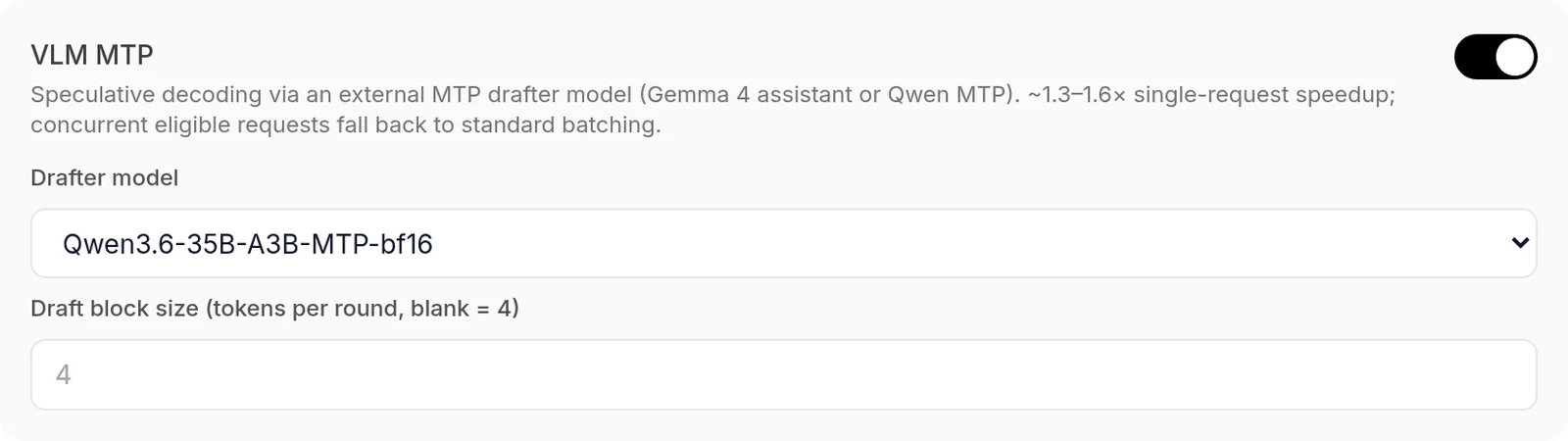
You can apply the same change through the admin API, which is handier when you configure more than one model or script it. The first command logs in with your key and stores the cookie; the second updates the model’s settings:
curl -c omlx.cookies -X POST http://127.0.0.1:8000/admin/api/login \
  -H "Content-Type: application/json" \
  -d '{"api_key": "your_api_key_here"}'

curl -b omlx.cookies -X PUT \
  http://127.0.0.1:8000/admin/api/models/Qwen3.6-35B-A3B-8bit/settings \
  -H "Content-Type: application/json" \
  -d '{"vlm_mtp_enabled": true,
       "vlm_mtp_draft_model": "Qwen3.6-35B-A3B-MTP-bf16"}'
The model name in the path and the drafter name are the ids shown in the model list. For Lightning MTP the body is {"mtp_enabled": true}. The endpoint rejects any field it does not know, so a typo does not slip through.
DFlash only pays off with short prompts
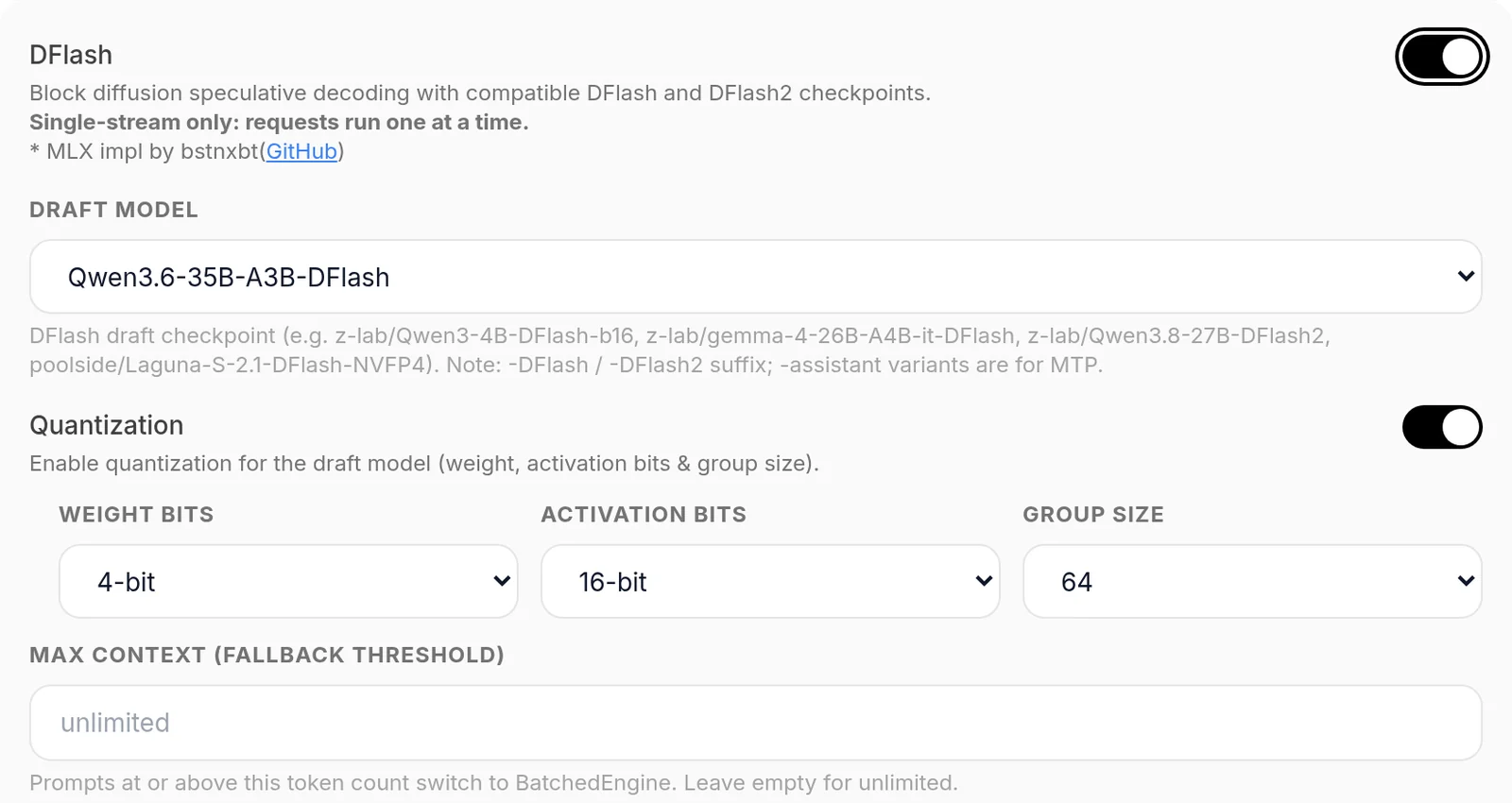
DFlash was the fastest method with 1,000-token prompts and the worst with long context. In the built-in benchmark, Qwen3.6-35B-A3B 8-bit rose from 92 to 112 tok/s with a 1k prompt, but dropped from 78 to 17 tok/s with 32k. Qwen3.8-27B 4-bit dropped from 23.5 to 6.3 tok/s with 32k. If you use Claude Code, which sends tens of thousands of tokens of context every turn, leave it off.
For short-prompt work such as chat or autocomplete, download the matching z-lab drafter: z-lab/Qwen3.6-35B-A3B-DFlash (0.77 GB), z-lab/Qwen3.8-27B-DFlash2 (3.85 GB) or z-lab/gemma4-12B-it-DFlash (1.46 GB). Turn it on in Acceleration → DFlash and quantise the drafter to 4 bits. On the 27B, the 4-bit drafter gave 48.2 tok/s with a 1k prompt against 36.9 tok/s in bf16, and used 2.5 GiB less.
It has two more limits. It serves one request at a time. And although dflash_max_ctx sends long requests to the normal engine, after the first one DFlash stays off until you reload the model.
Prefill on the Neural Engine: no gain with Lightning MTP
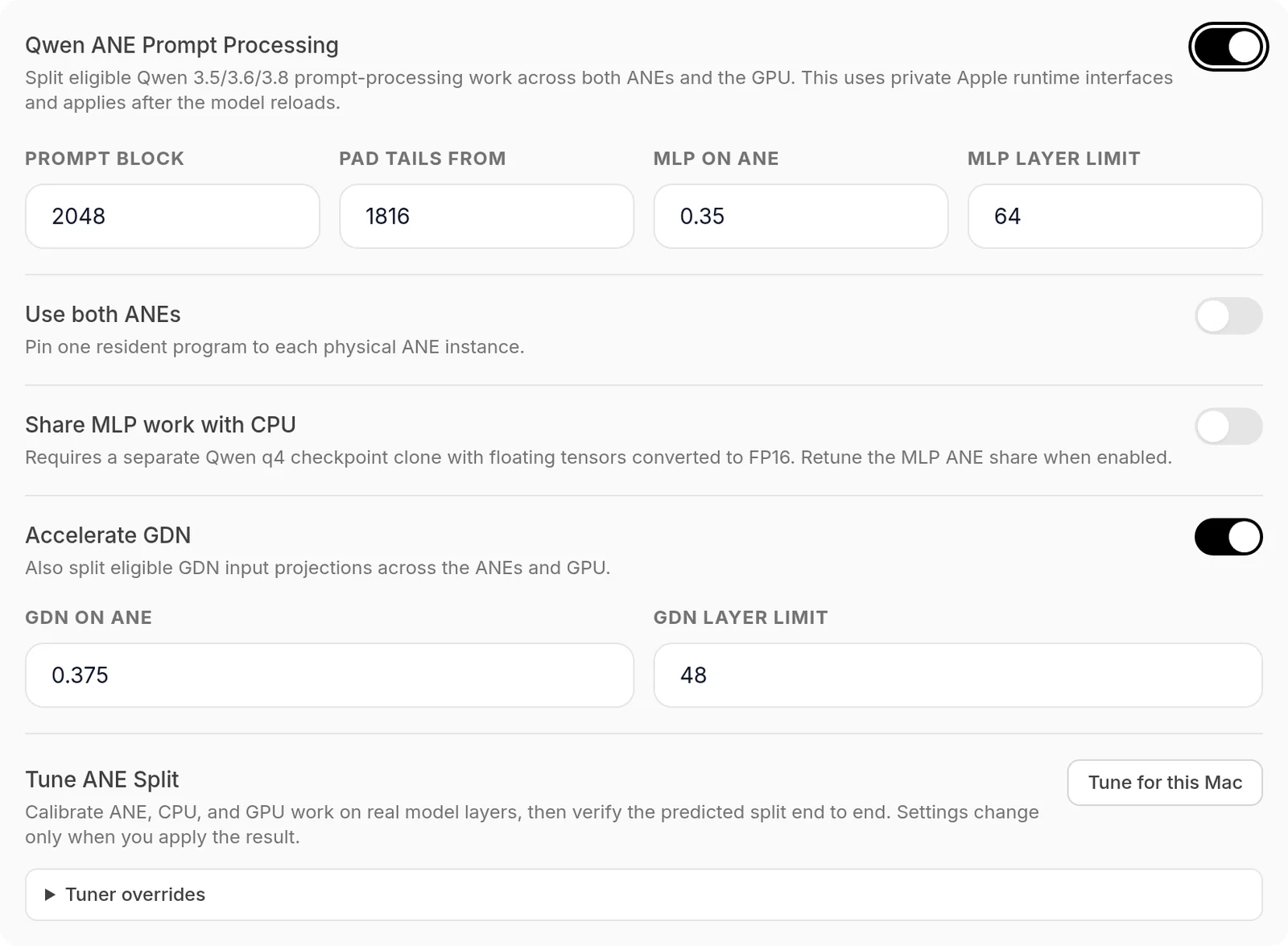
Qwen ANE Prompt Processing splits part of the Qwen3.5, 3.6 and 3.8 prefill between Apple’s Neural Engine (ANE) and the GPU. The Tune for this Mac button measures the best split on your machine and saves nothing until you apply the result. On Qwen3.8-27B oQ4e it recommended sending 35% of the MLP channels and 37.5% of the GDN layers to the ANE. With that split, prefill on an 8,193-token prompt went from 452 to 510 tok/s, 12.8% more.
That 12.8% did not hold with the full model. With the split applied and Lightning MTP on, the built-in benchmark measured 505 tok/s of prefill with a 4k prompt against 499 without the ANE, and 422 against 471 with 32k. Through the API, the first token with 15,100 tokens of context took 34.8 s, against 35.2 s without the ANE. In exchange the loaded model grew from 16.0 to 20.7 GB and loading went from 2 to 20 s, so on this Mac I left it off.
Before tuning it on an M5 Max, turn off Use both ANEs in the model settings. That mode is meant for the M3 Ultra, which joins two chips and has two ANEs. It only speeds up prompts of 2,048 tokens or more; generation stays on the GPU.
The project itself documents three costs. It is not bit-exact, because the ANE runs weights requantised to INT8. It relies on private Apple interfaces that a macOS update can break, and it lengthens model load. If you turn it on anyway, also turn on Reuse Compiled ANE Programs under Global Settings → Advanced so it does not recompile on every start.
The global settings that matter
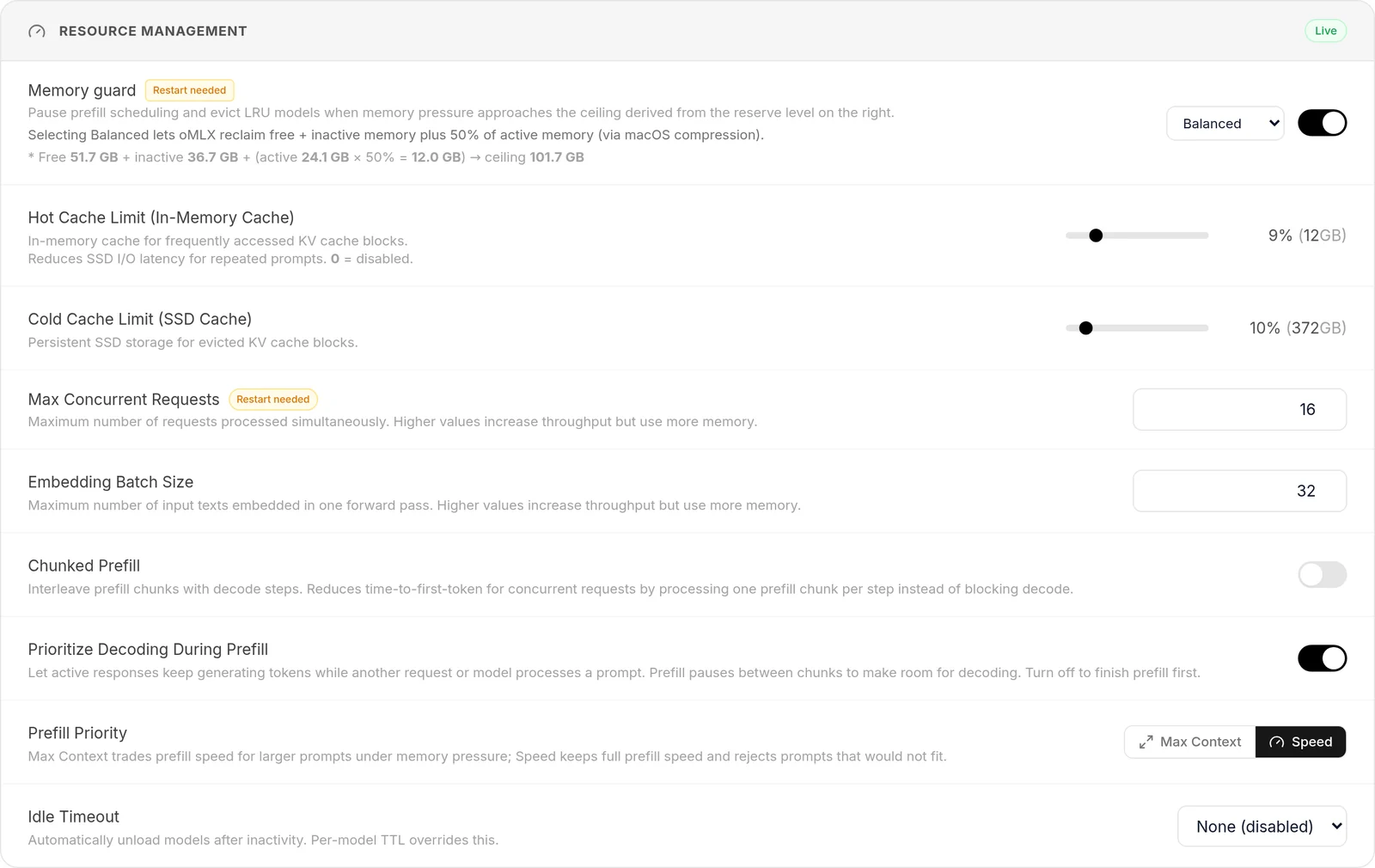
oMLX’s default global configuration already suits a single user, and only four settings change anything measurable:
- Kernel memory limit: macOS caps the memory the GPU can wire by default, and the dashboard shows a red warning when that cap is below what oMLX could use. Run
sudo sysctl iogpu.wired_limit_mb=124518, which on 128 GB is RAM minus 5%, and restart oMLX, which applies it at start-up. The value is lost when the Mac restarts. - Prefill Priority: set it to
Speed. When memory is tight,Max Contextshrinks prefill down to 32 tokens per step so the prompt fits, whileSpeedkeeps full speed and rejects what does not fit. - Hide Helper Models: turn it on so drafters stay out of
/v1/modelsand no client picks one by mistake. - Max Concurrent Requests: keep it between 8 and 16, and do not lower it to 1. The scheduler admits no new request while as many cache writes are pending as that limit.
Burst Decode can stay on Balanced. Aggressive holds tokens for up to 200 ms before sending them, against 100 ms, so the client sees the first token later. One last warning: clicking Save Settings unloads every loaded model, even if you did not touch the cache, because the dashboard resends every field.
What does not make it faster
Three settings with promising names did not improve single-user speed:
- TurboQuant KV: with Lightning MTP on Qwen3.8-27B oQ4e, turning it on at 4 bits left peak memory unchanged with a 32k prompt (24.4 GiB) and lowered decode from 35.4 to 30.3 tok/s. In these hybrid models only the full-attention layers keep a KV cache, so there is little to compress. It saves memory on huge contexts; it does not make generation faster.
- SpecPrefill: brings the first token forward by having a small model drop the prompt tokens it scores as unimportant. The large model never sees them, so it loses information by design.
- Chunked Prefill: it only cuts time to first token when requests overlap.
Benchmarks on 0.6.4 on this M5 Max
With 0.6.4 and the settings above, this M5 Max generates between 1.19 and 1.88 times more tokens per second when writing code. With 15,000 tokens of context, the gain sits between 1.07 and 1.47 times. Without any acceleration, Qwen3.6-35B-A3B 8-bit now holds 77.9 tok/s with a 32k prompt, where 0.3.8 dropped to 15.2 tok/s. The tests date from 15 September 2026.
How it was measured
There are two test sets, because the built-in benchmark shows how speed changes with context but cannot compare with and without acceleration:
- Through the API: streaming requests to
/v1/chat/completionsat temperature 0.6 with reasoning off. There are two tests. In the short one, each configuration answers three coding tasks (Python, TypeScript and Go) twice, with 768-token answers. In the long one, it answers two questions about roughly 15,100 tokens of source code, with 512-token answers. Timing is taken on the client. - Built-in benchmark: started from
POST /admin/api/bench/start, three repeats per configuration and the median, prompts of 1,025, 4,097, 16,385 and 32,769 tokens, 256 generated tokens and thecode_pythoncorpus. It always samples greedily, which is the best case for speculative decoding.
Every request starts with a unique prefix, so none of them benefits from the prefix cache. Charts show the median, with the minimum and maximum in brackets when they spread more than 10% from the median in the API tests, or more than 25% in the built-in benchmark.
The tests ran back to back for about three hours, with other applications open. The built-in benchmark records macOS thermal pressure, and 194 of its 242 measurements were taken at the Heavy level, the third of five (Nominal, Moderate, Heavy, Trapping and Sleeping). Only the first gpt-oss batch ran cold. Its prefill with a 16k prompt gave 3,140 tok/s cold and 1,755 tok/s hot.
Read the absolute figures as those of a hot Mac. The comparisons with and without each setting were run one after the other, so the relative gains are more reliable than the absolute values.
Two details of the 0.6.4 built-in benchmark change how to read it. First, when it finishes it uploads the results to omlx.ai with the chip, the models and an identifier derived from the Mac, and the dashboard has no option to prevent it. With a local model, the only way to keep the results on the Mac is to tick ANE-aligned prompts (+1 token). That is the checkbox I used, which is why the prompts are one token longer.
Second, it loads vision models on the text-only engine unless MTP is on, so comparing with and without acceleration mixes two engines. With short prompts, Qwen3.6-35B-A3B oQ4e scored 49 tok/s on that engine and 100 tok/s through the API. That is why the gains in this guide come from the API tests.
Speed through the API with coding answers
Speed through the API with 15,000 tokens of context
Each row is the median of two 512-token answers over the same code context. With this context the large model accepted fewer draft tokens than when writing code: on Qwen3.8-27B 4-bit, the VLM MTP gain fell from 1.43x to 1.07x.
Built-in benchmark by prompt length
Generation speed in tok/s by prompt length, with prefill at 4k and MLX peak memory, which includes the weights:
DFlash figures with a 1k prompt varied widely between repeats: on Gemma 4 12B they were 35.5, 92.4 and 158.0 tok/s. Speed depends on how many draft tokens the large model accepts, and that changes with the text it has to continue.
Compared with 0.3.8
The May measurement and this one are not fully comparable. That one was measured on the Qwen3.6-35B-A3B-MLX-8bit copy with 128 output tokens; this one, on the mlx-community copy with 256. Even so, the long-context improvement is too large to come from those differences:
End-to-end verification
A curl call to the OpenAI-compatible API to confirm the server is alive and a model responds:
curl http://127.0.0.1:8000/v1/chat/completions \
  -H "Authorization: Bearer your_api_key_here" \
  -H "Content-Type: application/json" \
  -d '{
    "model": "Qwen3-Coder-30B-A3B-Instruct-mlx-8bit",
    "messages": [{"role": "user", "content": "Hello from oMLX"}]
  }'
And from Claude Code, once you have exported the variables from the previous section:
claude --print "Are you running locally?"The reply should come back from local without touching api.anthropic.com. To confirm at the network level, open Activity Monitor → Network, filter by the claude process and check that the outbound connection is against 127.0.0.1:8000.

What has changed since 0.3.8
This guide was written against oMLX 0.3.8 in May 2026. The current version is 0.6.4, released on 29 August 2026, and more than a dozen releases in between touch exactly what is tuned here. What follows is the summary of what changed, with the figures attributed to whoever measured them.
Lightning MTP speculative decoding
This is the change that affects this configuration most. Version 0.5.0, from 10 July 2026[7], added native depth-k speculative decoding for Qwen3.6-27B, Qwen3.6-35B-A3B, DeepSeek-V4-Flash and GLM-5.2.
On an Apple M3 Ultra the project measured Qwen3.6-35B-A3B going from 89.6 to 140.4 tok/s, a 1.57x gain. Qwen3.6-27B went from 35.0 to 55.1 tok/s. On this M5 Max, measured through the API on 15 September 2026, Lightning MTP took Qwen3.8-27B oQ4e from 21.1 to 39.7 tok/s. How to turn it on, and when another method is the better choice, is in the advanced settings.
Custom kernels, with a note for M5
The same 0.5.0 added custom compute kernels for DeepSeek V4, Qwen3.5/3.6 and GLM-5.2, with prefill improvements measured on M3 Ultra. They are 45% on DeepSeek-V4-Flash (313.3 to 455.8 tok/s at 64k context), 33% on Qwen3.6-27B and 99% on GLM-5.2 at 32k. What matters for this machine is that dispatch is NAX-aware precisely to avoid regressions on the M5 series, so it is worth confirming the effect rather than assuming it.
oQ and oQe quantisation
oMLX no longer depends only on the weights you download: it brings its own quantisation scheme. Version 0.5.0 added oQe, an activation-importance calibration pass with expert-coverage tracking for MoE models. In the project’s measurements oQ4e improves average accuracy over oQ4 while staying in the same disk-size class. That is 83.88% against 82.83% on Qwen3.6-35B-A3B, and 73.09% against 70.01% on Qwen3.5-9B.
The neural engine and cold starts
The 0.6.3 branch worked on the prefill path over Apple’s neural engine. Two of the project’s figures matter day to day. Bank compilation memory dropped from 35.8 GB to 4.7 GB, and an optional persistent compile cache cuts fresh-process startup by 53% to 66%. Version 0.6.4 continued down that road and improved Qwen3.8-Flash-Next prompt processing by 33.5%, with 24.2% less total request time at 32k, again on M3 Ultra.
New endpoints
The OpenAI- and Anthropic-compatible pair has been joined by /v1/rerank for document reranking, /v1/responses for Codex compatibility and /v1/mcp/tools for Model Context Protocol. With an embedding model and a reranker loaded at once, a whole retrieval pipeline fits on the same server. The full breakdown is in the guide to the API, the key and the port.
Sub-key authentication
Where there used to be a list of equivalent keys, there are now three credentials with different powers. A main key opens the API and the panel; sub-keys only call the API and cannot log into the panel or change settings; panel session tokens are held in a signed cookie. If you are handing access to more than one application, hand out sub-keys.
The setting names
The memory configuration in the earlier section still holds as judgement, but the keys are named differently in ~/.omlx/settings.json. The memory ceiling is now memory_guard_tier, with four levels (safe, balanced, aggressive and custom), and the bespoke value goes in memory_guard_custom_ceiling_gb. By default the ceiling is system RAM minus 8 GB. The two cache tiers are hot_cache_max_size and ssd_cache_max_size, and the concurrency limit is max_concurrent_requests.
Watch one of them: hot_cache_max_size ships as "0", which disables the hot cache in RAM. I go through it in benchmarks and the memory ceiling.
Other pieces that did not exist
Profiles save named bundles of settings over a single model, exposed as model:profile and at no extra memory cost. Aliases rename a model as far as the API is concerned. And there is experimental distributed inference, splitting a model’s layers across more than one Mac over SSH according to each machine’s memory, accounting for whether the link is Thunderbolt or 10GbE. The first two are in the dashboard and command line guide.
Sources and further reading
-
Diego R. Baquero, "Running Claude Code with a local LLM"[3]: the tested configuration recipe this post’s settings are based on (TurboQuant 3.5-bit, 64k context, attribution off, Qwen 3.6 35B-A3B models).
-
A First Comprehensive Study of TurboQuant, vLLM blog, 11 May 2026[2]: independent analysis confirming 3.5-bit matches full-precision quality.
-
omlx.ai/benchmarks[4]: public leaderboard with real submissions from M5 Max and other machines.
-
Maxing Out M5 Max Context Windows: Memory Fragmentation and TurboQuant Benchmarks (dasroot.net, April 2026)[5]: the other detailed experiment on long-context M5 Max with TurboQuant.
-
Repositories: jundot/omlx[8], ml-explore/mlx[9], ml-explore/mlx-lm[10], huggingface.co/mlx-community[11], huggingface.co/unsloth[12].
If you came here wondering what this actually is and how it differs from Apple’s MLX framework, I separate the two in what is oMLX. For a cross-platform alternative outside Apple Silicon, the Ollama local LLM guide covers the model catalogue and OpenAI-compatible API. To wire the local endpoint into an agent, the Anthropic SDK tutorial and the MCP multi-vendor patterns already talk to this same format with no code changes.
Frequently asked questions
Do I need to set an API key to use oMLX locally only?
No. oMLX ships with the API key field empty, and as long as the instance only listens on 127.0.0.1 that is safe for local testing. The moment you expose it to the LAN or share the endpoint, go to Settings → Auth & Info and set a long random string. Current versions also offer sub-keys that can only call the API and cannot log into the panel or change settings, meant for handing access to more than one application.
Can I use Claude Code from a MacBook against oMLX running on a Mac Studio?
Yes, through SSH port forwarding: ssh -L 8000:localhost:8000 user@mac-studio makes 127.0.0.1:8000 on the laptop point at the Studio's oMLX. Then export the same variables (ANTHROPIC_BASE_URL, ANTHROPIC_AUTH_TOKEN and the ANTHROPIC_DEFAULT_*_MODEL set) in a script such as claude-local.sh, make it executable with chmod +x and run claude --bare from the SSH session. If you set a key in Settings → Auth & Info, replace the empty string with it.
Are the benchmarks in this post still valid if I install 0.6.4?
The May measurements, no: they were measured on 0.3.8, and when I re-ran them on 15 September 2026, 0.6.4 was faster on this same machine. Without acceleration, Qwen3.6-35B-A3B 8-bit goes from 15.2 to 77.9 tok/s with a 32k prompt. Lightning MTP or VLM MTP add between 1.07x and 1.88x, depending on the model and the context. If you measure on your own Mac, compare through the API and not only with Bench → Performance, which runs vision models on a different engine when MTP is off.
Sources
- GitHub Releases
- vLLM’s independent analysis published 11 May 2026
- Diego R. Baquero’s gist
- public oMLX leaderboard
- dasroot.net’s long-context M5 Max experiment
- gpt-oss-20b MXFP4-Q4 on M5 Max 40c per the public oMLX benchmark submission
- Version 0.5.0, from 10 July 2026
- jundot/omlx
- ml-explore/mlx
- ml-explore/mlx-lm
- huggingface.co/mlx-community
- huggingface.co/unsloth