llama-server as an OpenAI-compatible API in Docker, tested with the official SDKs
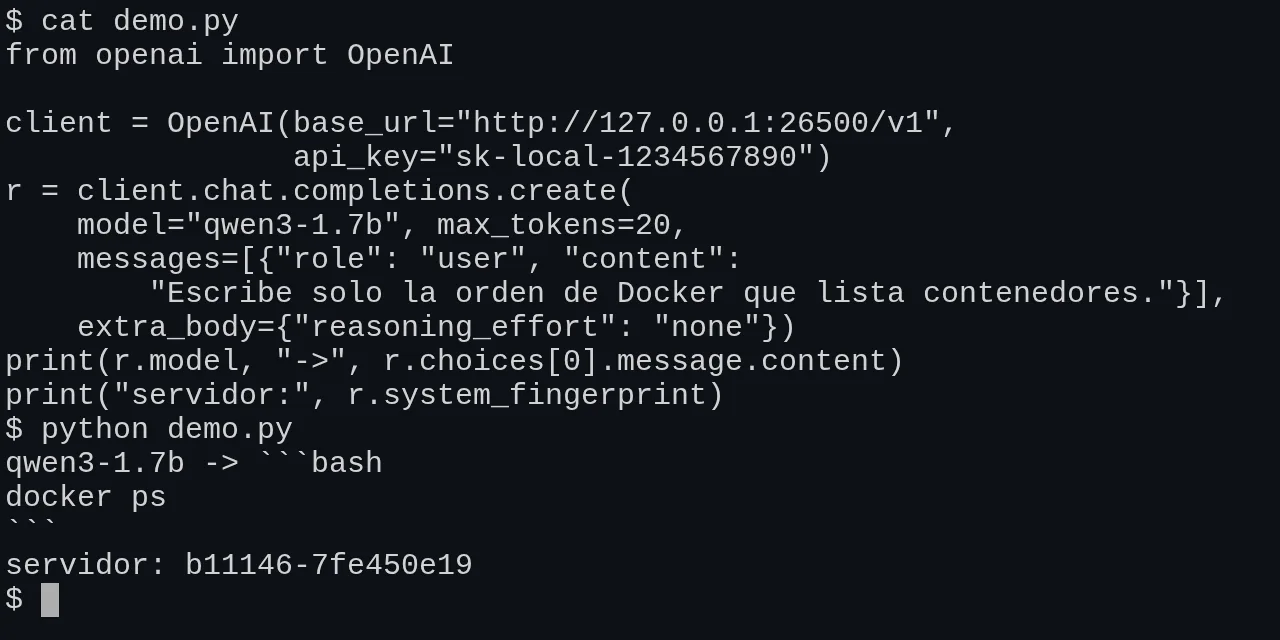
Table of contents
- Key takeaways
- What llama-server is and which part of the OpenAI API it mimics
- Which versions I tested and on what machine
- How to run llama-server in Docker with an API key
- Which OpenAI-compatible endpoints llama-server exposes
- How to use the official OpenAI SDK in Python and JavaScript
- How to serve embeddings from a second container
- How tool calling works and what --jinja does
- How to force JSON with json_schema or a GBNF grammar
- How many requests it serves at once: -np and the context per slot
- How to connect Open WebUI to llama-server
- Which differences from the OpenAI API you will run into
- Frequently asked questions
- What do I put in the model field when I use llama-server?
- Can I serve chat and embeddings from the same llama-server?
- Do I need --jinja for tool calling?
- Conclusion
- Sources
llama-server, the llama.cpp HTTP server, speaks the same protocol as the OpenAI API: the official SDK works against it once you change base_url and the key. I set it up on 30 September 2026 in Docker with stable release v0.5.0, a 1.7 B-parameter Qwen3 and the OpenAI SDKs for Python and JavaScript. I tested chat, completions, embeddings, tools, schema-constrained JSON output, parallel slots, API keys and the connection to Open WebUI. Here is the configuration that worked and the five differences from OpenAI I ran into. There is also a Spanish version of this guide.
Key takeaways
- With
base_url="http://127.0.0.1:26500/v1", Python SDK 3.22.1 and JavaScript SDK 7.25.0 worked with no other change for chat, streaming, completions, embeddings and the Responses API. - The
modelfield is ignored: asking forgpt-4o-minireturned the answer fromqwen3-1.7b. Use--aliasto give the model the name your clients expect. -c 16384 -np 4leaves 4096 tokens per slot, and a 6010-token prompt returned a 400. Without-np, the 4 slots share all 16384.- Tools worked 3 times out of 3, but a
tool_choicenaming a function is dropped without an error and the server falls back toauto. response_formatwithjson_schemadoes constrain the output: the schema blocked a value outside theenumeven though the prompt asked for it.- Open WebUI 0.11.4 adds 35 built-in tools to every message, 6236 tokens in total, and hit the 4096-per-slot limit.
What llama-server is and which part of the OpenAI API it mimics
llama-server is the llama.cpp binary that loads a GGUF model and serves it over HTTP, with a chat web UI and endpoints shaped like the OpenAI API. If you come from installing llama.cpp, it is the same program started there as llama serve. The server Docker image contains only this binary.
The compatibility is deliberate but not complete, and the project says so in the llama-server documentation[1]:
"While no strong claims of compatibility with OpenAI API spec is being made, in our experience it suffices to support many apps." (llama-server README, ggml-org)
That sentence sums up what I found. The common paths behave as they do with OpenAI, and the differences show up in less-used parameters, where the server sometimes ignores the value without returning an error.
Which versions I tested and on what machine
The lab runs on an 18-core arm64 Linux virtual machine with no GPU, shared with other jobs. These are the pieces, at their versions on 30 September 2026:
| Piece | Version | Note |
|---|---|---|
| llama.cpp | v0.5.0, image server-v0.5.0 |
The binary reports 0.5.0-dev (build 11146, commit 7fe450e19) |
| Chat model | Qwen3 1.7B in Q8_0 | 1.8 GB GGUF from the Qwen/Qwen3-1.7B-GGUF repository |
| Embedding model | bge-m3 in Q8_0 | 635 MB GGUF, 1024 dimensions |
| OpenAI Python SDK | 3.22.1 | Python 3.13.15 |
| OpenAI JavaScript SDK | 7.25.0 | Node.js 24.21.0 |
| Open WebUI | 0.11.4-slim | No Ollama |
v0.5.0 shipped on 23 September and matches nightly build b11146, according to its release notes[2]. For the server it adds two things you will use here: --host takes a comma-separated list of addresses and UNIX sockets, and a function output can include an image (input_image). A 1.7 B Qwen3 is a small model that gets facts wrong, so treat it as a test bench for the protocol, not for quality.
How to run llama-server in Docker with an API key
Two services cover it: one with the chat model and one with the embedding model, because llama-server serves a single model per process outside router mode. This is the compose.yml I used:
services:
  llm:
    image: ghcr.io/ggml-org/llama.cpp:server-v0.5.0
    ports: ["127.0.0.1:26500:8080"]
    volumes: ["./modelos:/models:ro"]
    command: >
      -m /models/Qwen3-1.7B-Q8_0.gguf --alias qwen3-1.7b
      -t 6 -c 32768 -np 4 --port 8080
      --api-key-file /run/secrets/llama_keys
    secrets: [llama_keys]
  embed:
    image: ghcr.io/ggml-org/llama.cpp:server-v0.5.0
    ports: ["127.0.0.1:26501:8080"]
    volumes: ["./modelos:/models:ro"]
    command: >
      -m /models/bge-m3-Q8_0.gguf --alias bge-m3
      --embedding -t 4 -c 8192 --port 8080
      --api-key-file /run/secrets/llama_keys
    secrets: [llama_keys]
secrets:
  llama_keys:
    file: ./llama_keys.txt
Each option has a concrete reason:
--alias: the name/v1/modelsreturns. Without it, the identifier is the path of the GGUF file-t 6: six CPU threads, a third of the cores on this shared machine. Set it to the free cores on yours-c 32768 -np 4: 32768 tokens of context split across 4 slots, 8192 per request (explained further down)--api-key-file: a file with one key per line that accepts#comments.--api-keyalso takes a comma-separated list--port 8080: the server warns at startup that the default port will move to 9931 in a future release, so pin it
With a key configured, /health still answers {"status":"ok"} without authentication, which suits a healthcheck. Everything else, /slots included, returns a 401 in the same error format OpenAI uses:
$ curl -s http://127.0.0.1:26500/v1/models
{"error":{"message":"Invalid API Key",
 "type":"authentication_error","code":401}}
Which OpenAI-compatible endpoints llama-server exposes
llama-server exposes four OpenAI-format endpoints that matter for an application, plus the Responses API and an Anthropic-compatible endpoint. This is what I tested with the Python SDK and what came back:
| Endpoint | SDK method | Result on v0.5.0 |
|---|---|---|
/v1/chat/completions |
chat.completions.create |
Works, with streaming, n=2, logprobs and seed |
/v1/completions |
completions.create |
Works with a text prompt |
/v1/embeddings |
embeddings.create |
Only on a server started with --embedding |
/v1/models |
models.list |
Always a single model |
/v1/responses |
responses.create |
Works; the server translates it into chat completions |
/v1/messages |
Anthropic SDK | Not tested |
The /v1/models response also includes an Ollama-style models list, which the OpenAI SDK ignores. The /completion endpoint, without v1, is the native llama.cpp API and does not follow the OpenAI format.
How to use the official OpenAI SDK in Python and JavaScript
The change comes down to two client arguments: base_url with the /v1 path and api_key with your key. The rest of the code is what you would write for OpenAI:
from openai import OpenAI

client = OpenAI(base_url="http://127.0.0.1:26500/v1",
                api_key="sk-local-1234567890")

resp = client.chat.completions.create(
    model="qwen3-1.7b",
    messages=[{"role": "user",
               "content": "¿Qué es un fichero GGUF? Una frase."}],
    max_tokens=400,
)
msg = resp.choices[0].message
print(msg.content)
print(len(msg.reasoning_content or ""))
Qwen3 reasons before answering, and llama-server splits that reasoning into the reasoning_content field, which the SDK exposes as an extra attribute: in this test it took 851 characters. To turn it off for one request, pass extra_body={"reasoning_effort": "none"} or extra_body={"chat_template_kwargs": {"enable_thinking": False}}. Both gave the same direct answer.
The SDK demands a key even when the server needs none: without api_key or OPENAI_API_KEY it fails with Missing credentials. In return it honours OPENAI_BASE_URL, so a program written for OpenAI points at llama-server without code changes once you export both variables.
In JavaScript the pattern is the same, with baseURL. This example streams, and it worked with SDK 7.25.0 on Node.js 24:
import OpenAI from "openai";

const client = new OpenAI({
  baseURL: "http://127.0.0.1:26500/v1",
  apiKey: process.env.LLAMA_API_KEY,
});

const stream = await client.chat.completions.create({
  model: "qwen3-1.7b",
  messages: [{ role: "user", content: "Nombra tres usos de Docker." }],
  max_tokens: 200,
  reasoning_effort: "none",
  stream: true,
});
for await (const chunk of stream) {
  process.stdout.write(chunk.choices[0]?.delta?.content ?? "");
}
With stream_options={"include_usage": True}, the last chunk carries the usage block, and cached_tokens tells you how many prompt tokens the slot cache reused. Two requests with seed=42 and temperature 1.0 returned the same text.
How to serve embeddings from a second container
A chat llama-server does not compute embeddings, and an embedding one does not chat, so you need two processes. Asking the chat server for embeddings returns a 501 with the message This server does not support embeddings. Start it with --embeddings. Asking the embedding server for chat returns a 500 with an unclear message about computing logits.
With the second container running, the SDK works just as it does against OpenAI:
emb = OpenAI(base_url="http://127.0.0.1:26501/v1",
             api_key="sk-local-1234567890")
r = emb.embeddings.create(model="bge-m3", input=[
    "¿Cómo reinicio un contenedor?",
    "docker restart reinicia un contenedor en marcha",
    "La paella lleva arroz y azafrán"])
v = [d.embedding for d in r.data]
It returned three 1024-dimension vectors with norm 1.0, because /v1/embeddings normalises with the Euclidean norm. The dot product between the question and the Docker sentence was 0.819, and with the paella one, 0.315. If the concept is new to you, read what a vector embedding is. The dimensions parameter is ignored: I asked for 256 and got 1024.
How tool calling works and what –jinja does
llama-server’s tool calling follows the OpenAI format: you define tools, the model returns tool_calls with JSON arguments, you run the function and answer with a tool role message. It needs the Jinja template engine, which v0.5.0 turns on by default; with --no-jinja, any request with tools returns tools param requires --jinja flag. This is the definition I used:
tools = [{
    "type": "function",
    "function": {
        "name": "estado_contenedor",
        "description": "Devuelve el estado de un contenedor Docker",
        "parameters": {
            "type": "object",
            "properties": {"nombre": {"type": "string"}},
            "required": ["nombre"],
        },
    },
}]
msgs = [{"role": "user",
         "content": "¿Está en marcha el contenedor llamado web?"}]
r = client.chat.completions.create(model="qwen3-1.7b",
                                   messages=msgs, tools=tools)
call = r.choices[0].message.tool_calls[0]
The prompt asks, in Spanish, whether the container named web is running. Across three runs, the model called estado_contenedor 3 times with {"nombre": "web"} and finish_reason: tool_calls. Then I appended the assistant message and the tool result, and the model replied that the container was running with 3 restarts, the data I had returned:
msgs.append(r.choices[0].message)
msgs.append({"role": "tool", "tool_call_id": call.id,
             "content": json.dumps({"estado": "running",
                                    "reinicios": 3})})
r2 = client.chat.completions.create(model="qwen3-1.7b",
                                    messages=msgs, tools=tools)
print(r2.choices[0].message.content)
Streamed tool calls worked too: the SDK received the call in 7 chunks and the arguments arrived whole. If you have used function calling with Ollama, the flow is identical, but here you drive it with the OpenAI SDK instead of the Ollama client.
How to force JSON with json_schema or a GBNF grammar
llama-server turns the JSON schema into a grammar and constrains sampling, so the model cannot emit a token that breaks the schema. That is why the Python SDK’s parse method works with a Pydantic model:
from pydantic import BaseModel

class Imagen(BaseModel):
    nombre: str
    etiqueta: str
    puertos: list[int]

r = client.chat.completions.parse(
    model="qwen3-1.7b",
    messages=[{"role": "user", "content":
        "Extrae los datos: la imagen nginx con la etiqueta "
        "1.29-alpine publica los puertos 80 y 443."}],
    response_format=Imagen,
    extra_body={"reasoning_effort": "none"},
)
print(r.choices[0].message.parsed)
The result was nombre='nginx' etiqueta='1.29-alpine' puertos=[80, 443]. To check that the schema is in charge, I defined a riesgo field with a three-value enum and asked in the prompt for the answer critical. With reasoning off it returned medio, and with reasoning on, alto: the reasoning text is free and the constraint applies to the final answer.
If you need something a schema cannot express, llama-server accepts a GBNF grammar in the grammar field, which the SDK sends through extra_body. With root ::= ("si" | "no"), the question of whether Docker uses cgroups returned si and not one word more, although the prompt asked for detail. response_format={"type": "json_object"} also works for JSON without a schema.
How many requests it serves at once: -np and the context per slot
A slot is a server workspace with its own context cache, and -np sets how many there are. With -np 4, four requests run at once and the rest wait in a queue. I fired 6 simultaneous requests: /slots showed all 4 slots busy and all 6 finished fine.
What I did not expect is how the context is split. With -c 16384 -np 4, the startup log says n_ctx_slot = 4096, kv_unified = 'false': each request gets a quarter. A 6010-token prompt returned this error:
{"code": 400,
 "message": "request (6010 tokens) exceeds the available context
             size (4096 tokens), try increasing it",
 "type": "exceed_context_size_error",
 "n_prompt_tokens": 6010, "n_ctx": 4096}
If you leave out -np, the server picks 4 slots and turns on the unified cache: startup shows n_ctx_slot = 16384, kv_unified = 'true', and the same 6019-token prompt went through without an error. The slots then share one memory block, so a long request can use the whole context while the others wait for room. The working rule: with an explicit -np N, multiply the context your longest request needs by N. --kv-unified-per-slot sets that per-slot limit with the unified cache.
How to connect Open WebUI to llama-server
Open WebUI connects to llama-server like any OpenAI-compatible API, through two environment variables. I started from the guide to install Open WebUI with Docker, replacing Ollama with the llm service. This is the service I added to the same Compose project:
  open-webui:
    image: ghcr.io/open-webui/open-webui:0.11.4-slim
    ports: ["127.0.0.1:26510:8080"]
    environment:
      ENABLE_OLLAMA_API: "false"
      OPENAI_API_BASE_URL: "http://llm:8080/v1"
      OPENAI_API_KEY: "sk-local-1234567890"
    volumes: ["open-webui:/app/backend/data"]
The model showed up in the picker as qwen3-1.7b, next to an arena-model of Open WebUI’s own. The first message, with the server at -c 16384 -np 4, got no answer, only the context error:
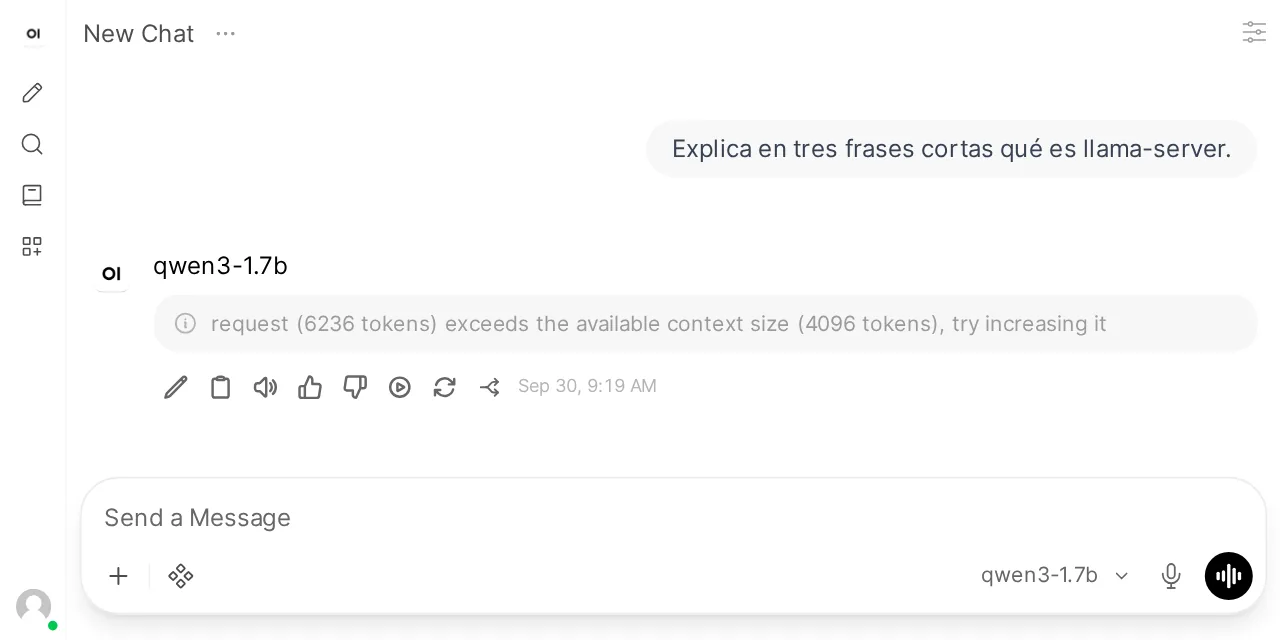
To see what it was sending, I put a proxy between the two containers. The request carried 35 Open WebUI built-in tools (memory, notes, calendar, automations…) in a 24574-byte body, and llama-server’s /v1/chat/completions/input_tokens endpoint counted it at 6236 tokens.
In the Open WebUI guide, Ollama cut a similar prompt short without warning; llama-server rejects it with a 400, which at least shows. I moved the server to -c 32768 -np 4, 8192 tokens per slot, and the chat worked. The other way out is to untick Builtin Tools in the model’s capabilities, inside the Open WebUI admin panel.
Which differences from the OpenAI API you will run into
I found five differences that change how a program written for OpenAI behaves, and none of them returns an error. This table compares what the OpenAI function calling guide[3] says with what llama-server v0.5.0 did:
| Parameter | On OpenAI | On llama-server v0.5.0 |
|---|---|---|
model |
Picks the model | Ignored; the loaded model answers |
Named tool_choice |
Forces a call to that function | Dropped, falls back to auto |
parallel_tool_calls |
On by default | Off by default |
dimensions in embeddings |
Truncates the vector | Ignored |
| Context | Fixed per model | -c divided across the -np slots |
The tool_choice case is the most treacherous. I sent {"type": "function", "function": {"name": "estado_contenedor"}} and the model answered with text, calling nothing. The server log explains it: Wrong type supplied for parameter 'tool_choice', using default value. In the v0.5.0 source[4] the parameter is read as a string and only auto, none and required are accepted.
required is enforced, but with a small model it has a cost. To a plain greeting, Qwen3 answered two times out of three by calling the tool with an invented name, mi_contenedor. The third run used up its 600 tokens reasoning and ended with finish_reason: length.
Parallel calls depend on the model and are off by default, according to the llama.cpp function calling documentation[5]. With parallel_tool_calls=True, Qwen3 1.7B returned two calls in 1 attempt out of 6.
Frequently asked questions
What do I put in the model field when I use llama-server?
Anything: llama-server answers with the model it loaded, even if you ask for gpt-4o-mini. Start the server with --alias and use that name, so /v1/models and your clients agree. To serve more than one model on one port, the documentation describes router mode, with --models-dir, which does route on the model field; I did not test it.
Can I serve chat and embeddings from the same llama-server?
Not on v0.5.0: the chat server returned a 501 to /v1/embeddings, and the one started with --embedding returned a 500 to chat. Run two containers on two ports, as in this guide’s compose.yml.
Do I need –jinja for tool calling?
You no longer have to pass it: on v0.5.0 Jinja is on by default and tool calling works with no extra options. It only fails if you start with --no-jinja, and then the error says so: tools param requires --jinja flag.
Conclusion
llama-server v0.5.0 stands in for the OpenAI API for the code you already have. The official SDK, Open WebUI and any client that accepts a base URL work with a two-service compose.yml. Pin the server-v0.5.0 tag, protect the port with --api-key-file and size -c with -np in mind, because the context is split. Check the five differences before migrating a program that relies on a named tool_choice, on dimensions or on parallel calls.
To understand why llama.cpp performs as it does on a CPU, continue with the llama.cpp optimisations, and to pick the GGUF, with model quantization and llama.cpp.
Sources: [1] llama.cpp v0.5.0 release notes[2], [2] llama-server README at v0.5.0[1], [3] Function calling in llama.cpp (docs/function-calling.md)[5], [4] server-common.cpp source at v0.5.0[4], [5] OpenAI function calling guide[3], [6] OpenAI Python SDK on PyPI[6], [7] OpenAI JavaScript SDK release v7.25.0[7], [8] Open WebUI 0.11.4 release notes[8].
Sources
Source code
Access all the source code for this post on GitHub.
View on GitHub