llama.cpp: Optimisations That Keep Surprising
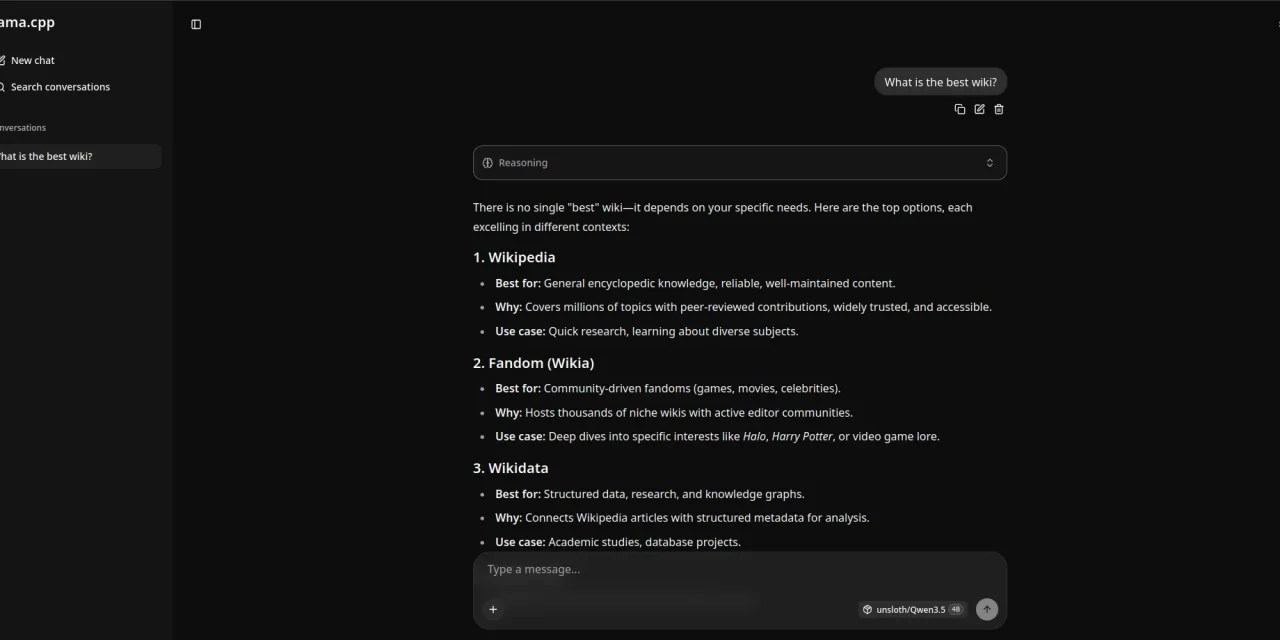
Table of contents
- Key takeaways
- What has changed since 2024
- What It Is and Why It Matters
- The 2024 Headliners
- Backends and Compilation
- Quantisation and the GGUF Format
- Server Mode and Bindings
- Apple Silicon and the Mac Case
- When to Go Direct and When Ollama Suffices
- Conclusion
- Frequently asked questions
- Which GGUF quantisation should I pick for a 70B model?
- Can llama-server serve several models at once, or do I still need Ollama for that?
- How much faster is speculative decoding, and does it hurt output quality?
- Sources
Updated: 2026-09-02
The llama.cpp[1] project, created by Georgi Gerganov, has become the piece on which nearly the entire local-LLM ecosystem leans. Ollama, LM Studio, Jan, Msty and dozens of lesser-known tools are, underneath, convenient wrappers around this C++ library. 2024 moved at a breathless pace: speculative decoding, distributed inference, new GPU backends and a finally stable GGUF format. It is worth looking carefully at what has changed and why understanding the tool directly still pays off, even when most day-to-day traffic goes through Ollama.
Reviewed on 2 September 2026: the section “What has changed since 2024” covers what arrived in 2025 and 2026. (Also available in Spanish: "llama.cpp: optimizaciones que siguen sorprendiendo".)
Key takeaways
-
llama.cpp is a pure C++ inference library that compiles with almost no external dependencies.
-
GGUF is now the de-facto standard for distributing quantised weights in the local ecosystem.
-
Speculative decoding delivers 2-3× speedups at no quality cost when the model pair is chosen well.
-
Q4_K_M is the sweet spot for large models: good quality, manageable size.
-
Ollama covers 90% of cases; go direct with llama.cpp when you need to squeeze uncommon hardware or specific flags.
What has changed since 2024
This article is a 2024 retrospective and what it says about that year still holds. What is missing is what came after. Checked on 2 September 2026 against the llama-server README[2], the build guide[3] and the pull requests cited; the repository now lives under the ggml-org organisation and the old URL redirects:
- New web UI: on 17 September 2025 the SvelteKit rewrite[4] of the
llama-serverweb UI was merged, replacing the React one: multimodal input, conversation management, MCP server integration and sampling settings from the browser. It is served by default on the same port as the API and turned off with--no-webui. - Router mode and multiple models: since December 2025 (announcement of 11 December[5]), starting
llama-serverwithout-mputs it in router mode: it discovers the GGUF files in the cache or in--models-dir, loads each model in its own process when a request names it inmodel, keeps up to--models-max(default 4) and evicts the least recently used.--models-presetpoints at an INI file with per-model parameters. That is a good part of what used to justify reaching for Ollama. - Sleeping when idle:
--sleep-idle-seconds N(PR 18228[6], 21 December 2025) unloads the model and its KV cache from memory after N seconds without requests and reloads it on the next one. It works in single-model and router mode. - Automatic fit to memory: the
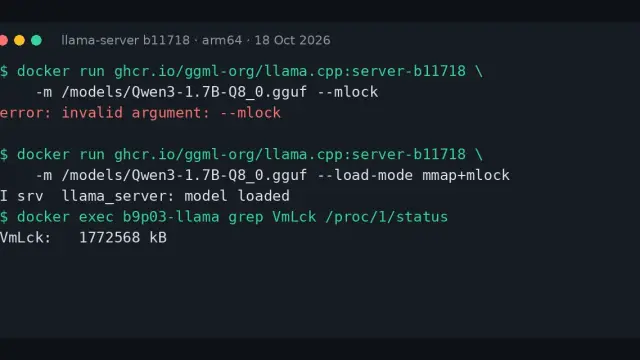
--fitoption, on by default through 2026, adjusts the arguments you leave unset (GPU layers, context) to fit device memory, with--fit-targetas a per-device margin and--fit-ctxas the minimum context. The-ngl 99in the example below still works, but you no longer have to guess it. --load-mode(PR 20834[7], 23 July 2026) folds--mmap/--no-mmap,--mlockand--direct-io, now deprecated, into one argument with the valuesauto,none,mmap,mlock,mmap+mlockanddio. The default,auto, avoidsmmapon integrated GPUs since 11 August 2026.- Building: the one-variable step the backends section mentions belongs to the old
Makefile. Today the build is CMake and each backend is an option:cmake -B build -DGGML_CUDA=ON,-DGGML_HIP=ON,-DGGML_VULKAN=ON,-DGGML_OPENCL=ON; Metal is on by default on macOS and turned off with-DGGML_METAL=OFF.
What It Is and Why It Matters
llama.cpp is an inference library written in plain C++, with almost no external dependencies, that compiles anywhere a decent toolchain exists. It ships a command-line interface, an OpenAI-compatible server and support for the major accelerators on the market. Its native format, GGUF, has standardised as the canonical way to ship quantised weights: a single self-contained file holding model metadata, tokeniser and reduced-precision tensors.
The reason for its success is this. Against vLLM, which shines in production with multi-GPU servers and aggressive batching, llama.cpp focuses on the individual case: one user, one machine, ideally free of Python dependencies. Against Ollama, which prioritises experience over control, llama.cpp exposes every knob and dial. And against proprietary solutions like Apple’s MLX, it keeps portability as a non-negotiable principle.
The 2024 Headliners
Speculative decoding is probably the year’s most tangible improvement. A small, fast draft model generates a block of tokens ahead; the large one verifies them in parallel and accepts those that match its own prediction. When the draft is right, the useful tokens per large-model pass multiply, with two- to three-fold speedups at no quality cost. That matches the results in the original speculative-decoding paper[8] by Leviathan, Kalman and Matias.
The second addition is the RPC server, which shards a model’s layers across separate networked machines. It does not replace a real multi-GPU system, but it does turn three modest laptops into a platform capable of running models none of them would swallow alone.
Finally, 2024 cemented tool use with compatible models (Llama 3.1 onwards): GBNF grammars to force valid outputs, Jinja templates and structured JSON generation with syntactic guarantees.
Backends and Compilation
The backend matrix is surprisingly complete today. On CPU it exploits AVX2, AVX-512 and NEON depending on the architecture; for GPU there are dedicated paths for:
-
CUDA on NVIDIA.
-
Metal on Apple Silicon.
-
ROCm on AMD.
-
SYCL on Intel graphics.
-
Vulkan or OpenCL as cross-platform alternatives.
In 2024 enabling each backend was a one-variable step with the old Makefile; today each is a CMake option such as -DGGML_CUDA=ON or -DGGML_VULKAN=ON (see the section above). The choice depends on the goal: CUDA delivers the highest raw throughput, Metal wins on efficiency, Vulkan buys cross-vendor reach and CPU remains the last refuge when the hardware is unhelpful.
Quantisation and the GGUF Format
Quantisation is where llama.cpp distances itself most from generic solutions. The GGUF format[9], documented by Hugging Face, spans the whole spectrum, but the useful range narrows to three anchors:
-
Q8_0: effectively indistinguishable from the original, serves as a quality-loss baseline.
-
Q5_K_M: a balance hard to beat, roughly 1-2% behind on real benchmarks and about half the size of Q8.
-
Q4_K_M: the sweet spot for large models. A 70B fits comfortably in 48 GB of VRAM or a Mac with generous unified memory.
Below that, Q3_K_M and Q2_K begin to show: fragile reasoning, more hallucinations, subtle errors. The IQ-family quants (IQ4_NL, IQ3_XXS) apply an importance-based strategy and outperform their classic counterparts at equal file size.
Server Mode and Bindings
llama-server spins up an OpenAI-compatible endpoint, which means any GPT client can be pointed at it without changing a line of code. This is what Ollama packages, but reaching the same point yourself takes a single command. It also exposes settings Ollama hides: custom context sizes, specific sampling parameters, explicit layer offloading with -ngl or on-the-fly LoRA adapter application.
./llama-server -m model.gguf --host 0.0.0.0 --port 8080 -ngl 99For those who prefer Python, the llama-cpp-python package wraps the same library with an idiomatic interface and its own server.
Apple Silicon and the Mac Case
Macs have become the reference hardware for large local models. Unified memory eliminates the classic bottleneck between system RAM and VRAM: an M3 Max with 128 GB can load a 70B quantised to Q4 and reserve generous context without shuffling across buses. The Metal backend is polished enough that, on efficiency per watt, it competes with mid-range NVIDIA setups. The result is 60-80 tokens per second on Llama 3 8B Q4, against 150+ on an RTX 4090 but at a fraction of the power draw.
When to Go Direct and When Ollama Suffices
Ollama is enough for 90% of cases. Calling llama.cpp directly pays off when you need to:
-
Squeeze uncommon hardware with specific flags.
-
Embed the binary in a Python-free application.
-
Experiment with sampling flags or run a feature weeks before Ollama adopts it.
-
Build services needing a single static binary in offline environments.
For production with concurrent users, however, the honest recommendation is vLLM: llama.cpp is optimised for a single inference flow at a time.
Conclusion
The fascinating thing about llama.cpp is that, while being the invisible engine behind nearly everything, it keeps an iteration speed no wrapper can match. Commits land daily, backends renew in weeks and GGUF has survived the pressure of being both the ecosystem’s lingua franca and a testbed for new quantisation ideas at once.
The sensible stance is to treat it the way you treat a compiler or a kernel. You do not need to rebuild it every week, but it is worth understanding what it offers and how it behaves under load. When the day comes that Ollama does not support the backend you need, knowing how to drop one layer down stops being optional. And that day arrives sooner than expected.
Frequently asked questions
Which GGUF quantisation should I pick for a 70B model?
Q4_K_M is the sweet spot for large models: a 70B fits comfortably in 48 GB of VRAM or a Mac with generous unified memory. If you have room, Q5_K_M sits roughly 1-2% behind on real benchmarks at about half the size of Q8_0, which is effectively indistinguishable from the original. Below Q4, Q3_K_M and Q2_K start showing fragile reasoning and more hallucinations; IQ-family quants such as IQ4_NL beat classic quants at equal file size.
Can llama-server serve several models at once, or do I still need Ollama for that?
Since December 2025, starting llama-server without -m puts it in router mode. It discovers the GGUF files in the cache or in --models-dir and loads each model in its own process when a request names it in model. It keeps up to --models-max (default 4) loaded and evicts the least recently used. Add --sleep-idle-seconds N to unload an idle model and its KV cache after N seconds, and --models-preset for per-model parameters in an INI file.
How much faster is speculative decoding, and does it hurt output quality?
It delivers two- to three-fold speedups at no quality cost when the model pair is chosen well. A small, fast draft model generates a block of tokens ahead and the large model verifies them in parallel, accepting those that match its own prediction. The useful tokens per large-model pass multiply. The result matches the original speculative-decoding paper by Leviathan, Kalman and Matias.