How to install Docker on Ubuntu 26.04 LTS, step by step
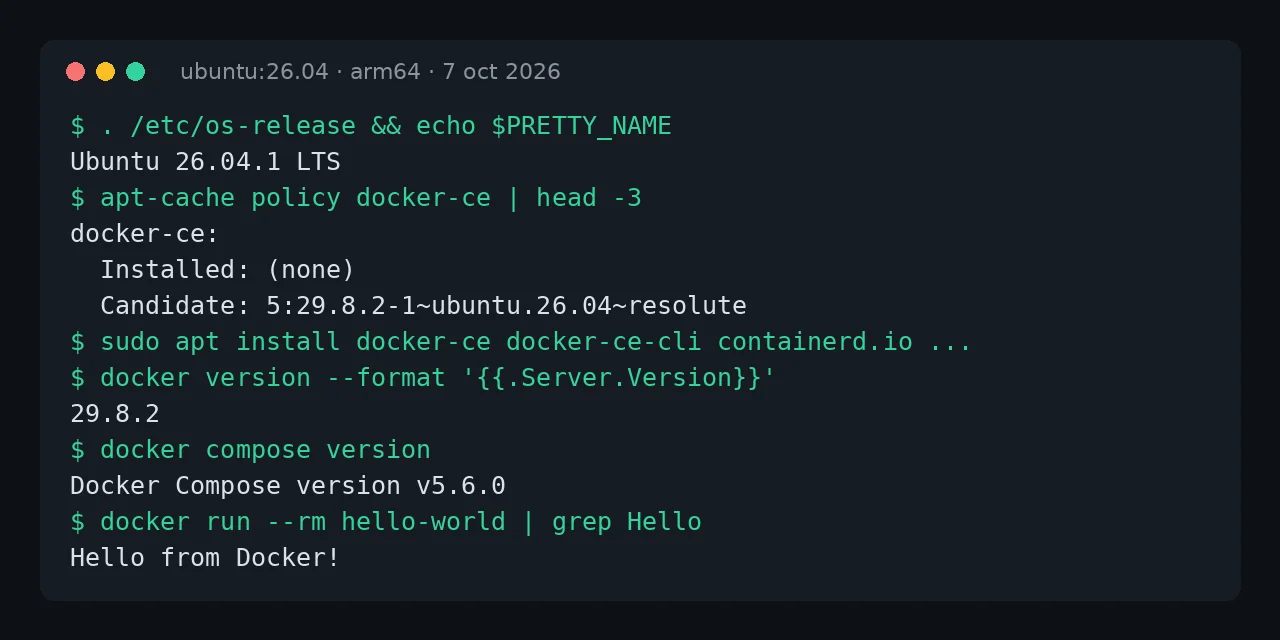
Table of contents
- Key takeaways
- Which Docker to pick on Ubuntu 26.04
- How to remove conflicting packages
- How to add Docker's official repository
- How to install Docker Engine and Compose
- How to use Docker without sudo
- What to check after installing
- Frequently asked questions
- Can I upgrade from Ubuntu 24.04 to 26.04 with Docker installed?
- What is the difference between docker-compose-plugin and docker-compose-v2?
- Does it work the same on arm64?
- Conclusion
- Sources
To install Docker on Ubuntu 26.04 LTS, add Docker’s official repository with its GPG key in a docker.sources file and install docker-ce, containerd.io and the Buildx and Compose plugins. I did it on 7 October 2026 on Ubuntu 26.04.1 LTS (Resolute Raccoon) on arm64, and also installed Ubuntu’s docker.io package to compare versions. Here are the exact commands, what they install and what to do afterwards. If you are on the previous release, there is a guide for Docker on Ubuntu 24.04, and there is also a Spanish version.
Key takeaways
- Docker officially supports Ubuntu 26.04 (Resolute), 24.04 (Noble) and 22.04 (Jammy), on x86_64, arm64, armhf, s390x and ppc64le.
- Docker’s repository installed Docker Engine 29.8.2, containerd 2.3.6, Buildx 0.37.1 and Compose 5.6.0.
- Ubuntu’s
docker.iopackage installed Docker 29.1.3 anddocker-compose-v22.40.3: seven Docker minor releases and three Compose majors behind. - The repository is declared in deb822 format, in
/etc/apt/sources.list.d/docker.sources, instead of the olddebline indocker.list. - Docker 29 uses the containerd image store by default:
docker infoshowedoverlayfsas the storage driver and cgroups v2.
Which Docker to pick on Ubuntu 26.04
On Ubuntu 26.04 you have three routes: Docker’s official repository, the docker.io package from Ubuntu’s archive and the snap. I tried the first two in clean ubuntu:26.04 containers:
| Docker repository | Ubuntu docker.io package |
|
|---|---|---|
| Docker Engine | 29.8.2 | 29.1.3 |
| containerd | 2.3.6 (containerd.io) |
2.2.2 |
| Docker Compose | 5.6.0 (plugin) | 2.40.3 (docker-compose-v2) |
| Buildx | 0.37.1 | 0.30.1, separate package (docker-buildx) |
| Updates | Published by Docker | Published by Ubuntu |
I recommend Docker’s repository. This blog’s guides use Compose 5 features and new releases arrive the same day. Ubuntu’s package makes sense if your policy only allows software from the distribution’s official archive.
How to remove conflicting packages
If the system already has Docker from another source, remove it first. This command, from Docker’s documentation, only removes packages that are installed:
sudo apt remove $(dpkg --get-selections docker.io docker-compose \
  docker-compose-v2 docker-doc docker-buildx podman-docker \
  containerd runc | cut -f1)
Images, containers and volumes under /var/lib/docker are not deleted when you uninstall the packages, so they are still there when you install the new version.
How to add Docker’s official repository
First install the prerequisites and download the key Docker signs its packages with:
sudo apt update
sudo apt install ca-certificates curl
sudo install -m 0755 -d /etc/apt/keyrings
sudo curl -fsSL https://download.docker.com/linux/ubuntu/gpg \
  -o /etc/apt/keyrings/docker.asc
sudo chmod a+r /etc/apt/keyrings/docker.asc
Then create the repository file. Ubuntu 26.04 uses the deb822 format, and Docker now documents it that way:
sudo tee /etc/apt/sources.list.d/docker.sources <<EOF
Types: deb
URIs: https://download.docker.com/linux/ubuntu
Suites: $(. /etc/os-release && echo "$VERSION_CODENAME")
Components: stable
Architectures: $(dpkg --print-architecture)
Signed-By: /etc/apt/keyrings/docker.asc
EOF
sudo apt update
VERSION_CODENAME is resolute on Ubuntu 26.04. Check that apt sees the repository with apt-cache policy docker-ce: in my test the candidate was 5:29.8.2-1~ubuntu.26.04~resolute.
How to install Docker Engine and Compose
With the repository active, install the five packages:
sudo apt install docker-ce docker-ce-cli containerd.io \
  docker-buildx-plugin docker-compose-plugin
sudo systemctl status docker --no-pager
sudo docker run --rm hello-world
The package starts the service and enables it. The last line pulls a test image and should print "Hello from Docker!". Check versions with docker version and docker compose version: mine returned 29.8.2 for client and server and v5.6.0 for Compose.
How to use Docker without sudo
By default only root and members of the docker group can talk to the daemon. Add your user to the group and open a new session:
sudo usermod -aG docker $USER
newgrp docker
docker run --rm hello-world
Being in the docker group is equivalent to root on the machine, because a container can mount any path on the system. On a shared server, consider the rootless mode described in Docker’s documentation.
What to check after installing
Three settings prevent surprises on a server:
- Bounded logs. Docker Engine still uses the
json-filedriver with no rotation. Add limits or switch to thelocaldriver, as I explain in the comparison of the local logging driver versus json-file. - Firewall. Ports published with
-pbypass UFW rules, because Docker writes its own iptables rules. To filter traffic to containers, use theDOCKER-USERchain or publish only on127.0.0.1. - Resource limits. Set memory and CPU on Compose services so one container does not starve the rest; the guide to Docker resource limits and logging has the examples.
Frequently asked questions
Can I upgrade from Ubuntu 24.04 to 26.04 with Docker installed?
Yes. Before do-release-upgrade, check that Docker’s repository file will point at the new release: if you use $VERSION_CODENAME rather than a fixed name, apt update moves from noble to resolute once the upgrade finishes. Images and volumes under /var/lib/docker are kept.
What is the difference between docker-compose-plugin and docker-compose-v2?
Both are Docker Compose as a CLI plugin (docker compose). docker-compose-plugin is published by Docker and was at 5.6.0 in October 2026; docker-compose-v2 is packaged by Ubuntu and stays at 2.40.3.
Does it work the same on arm64?
Yes. Every test in this guide ran on arm64, and Docker’s repository publishes the same packages for x86_64.
Conclusion
Installing Docker on Ubuntu 26.04 LTS takes three steps: the key, the docker.sources file and five packages. Docker’s repository gives you 29.8.2 and Compose 5.6.0, well ahead of Ubuntu’s package. Afterwards, bound the logs, check how it interacts with your firewall and decide whether your user should be in the docker group.
Next, bring up your first service with a compose.yaml and check that it starts after a reboot.
Sources: [1] Install Docker Engine on Ubuntu[1], [2] Post-installation steps for Linux[2], [3] Docker Engine 29 release notes[3], [4] docker.io package in Ubuntu Resolute[4], [5] Docker and iptables firewalls[5], [6] Ubuntu 26.04 LTS release notes[6].