How to fix “this model requires MLX support, but the MLX runtime is not available” in Ollama
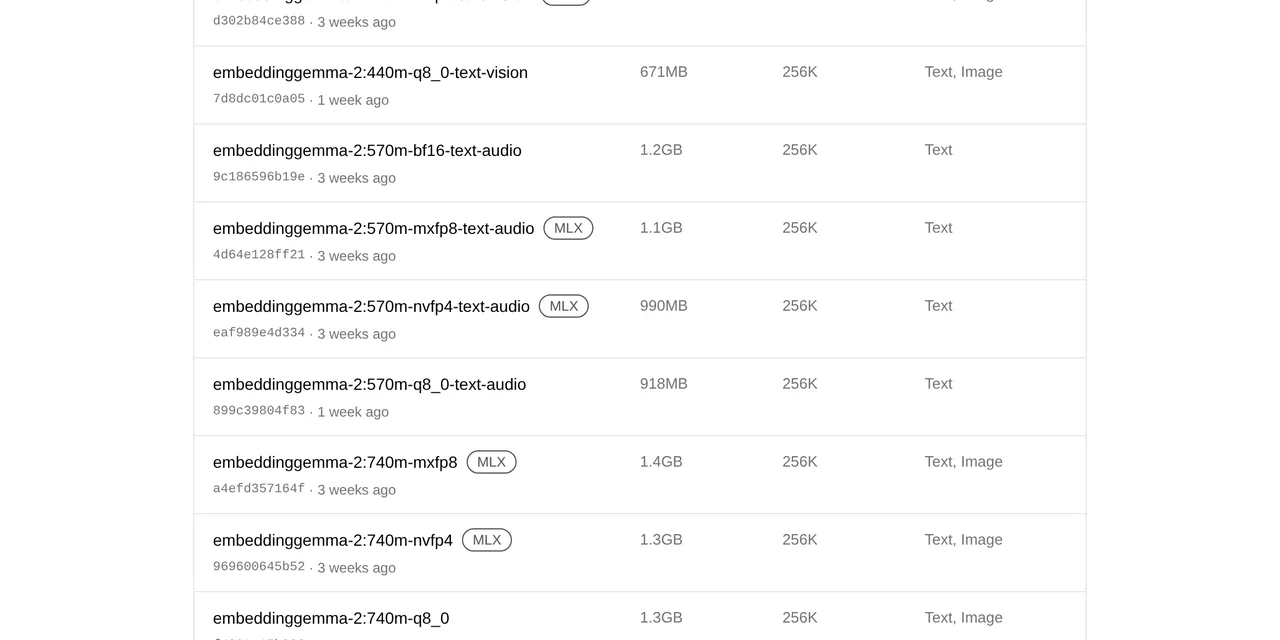
Table of contents
- Key takeaways
- What does this model requires MLX support mean?
- Why it fails: how Ollama decides a model needs MLX
- Which models and tags require MLX
- How to fix it: pull the GGUF variant
- Upgrade to Ollama 0.40.4 or later
- Force the engine with --runner llamacpp
- How to tell whether a tag is MLX-only before pulling it
- If you have an NVIDIA GPU on Linux
- Frequently asked questions
- Can I convert an MLX-only model to GGUF?
- Does it affect an Apple Silicon Mac?
- Why does ollama list not show the model after the error?
- Conclusion
- Sources
The this model requires MLX support, but the MLX runtime is not available error means the tag you asked for only exists as MLX safetensors and your Ollama cannot load that engine, and the fix is to pull the GGUF variant of the same model. It hits Linux arm64, Linux without an NVIDIA GPU and Windows with tags such as embeddinggemma-2:740m-bf16, any -mxfp8 or -nvfp4, or the phonon voice model. I reproduced it on 27 October 2026 with Ollama 0.40.11 in Docker, on arm64 and on emulated amd64. There is also a Spanish version of this guide.
Key takeaways
- Ollama checks the engine before downloading anything: if the manifest carries tensor layers and MLX does not load, it stops at
pulling manifest. - On 28 October 2026 ollama.com’s MLX category had 132 downloadable tags across 15 models: 74 are MLX-only, and
phononand the fourlfm3models have nothing else. - Four
bf16tags ofembeddinggemma-2are MLX-only and the website does not show the MLX badge on them. - The way out is the
q8_0tag, which is GGUF, but it needs Ollama 0.40.4 or later: 0.40.0 answers that you need a newer version. - The amd64 Docker image ships MLX for CUDA 13 (2.0 GB), but without the NVIDIA driver
libmlxc.sofails to load; the arm64 image does not ship it.
What does this model requires MLX support mean?
It means Ollama read the model manifest, saw that it only contains weights for its MLX engine and could not load that engine on your machine. MLX is Apple’s machine learning framework; since 0.40, Ollama uses it to run models in safetensors format, while GGUF models go through llama.cpp. These are the exact messages I got on Linux arm64 with Ollama 0.40.11:
$ ollama pull embeddinggemma-2:740m-bf16
pulling manifest
Error: this model requires MLX support, but the MLX runtime is not available

$ ollama run embeddinggemma-2:740m-bf16 hello
pulling manifest
Error: this model requires MLX support, but the MLX runtime is not available

$ ollama pull phonon:es
pulling manifest
Error: this model requires MLX support, but the MLX runtime is not available
The failure comes before a single byte of the model is downloaded, so it leaves no partial files behind. If another application pulls through the API, the response is an HTTP 500 with the same text (split over two lines here):
$ curl -s http://localhost:11434/api/pull \
    -d '{"model":"phonon:es","stream":false}'
{"error":"this model requires MLX support,
 but the MLX runtime is not available"}
Why it fails: how Ollama decides a model needs MLX
Ollama decides from the manifest. In 0.40.11, the requiresMLX function in server/images.go first reads the manifest’s runner field. If it is missing, any model with application/vnd.ollama.image.tensor layers, the safetensors weights, counts as MLX. If the answer is yes, it calls mlx.CheckInit(), and if the MLX library did not load when the server started, it returns the error.
Ollama’s development documentation sums up where that engine exists: "The MLX engine enables running safetensor based models. On macOS arm64, MLX is enabled by default. On other platforms, MLX backends are selected with OLLAMA_MLX_BACKENDS." Outside the Mac, the only MLX engine that gets built is the CUDA 13 one, for NVIDIA GPUs. I checked it inside both official ollama/ollama:0.40.11 images:
| Platform | MLX library in the image | Result without a GPU |
|---|---|---|
| Linux arm64 | missing | error on pull |
| Linux amd64 | /usr/lib/ollama/mlx_cuda_v13/libmlxc.so |
error on pull |
| macOS on Apple Silicon | bundled (Metal) | not applicable |
On amd64 the library is there, but it depends on libcuda.so.1, which comes with the NVIDIA driver. Without a GPU, ldd reports it as not found, and the server log says so when you request the model:
level=ERROR source=dynamic.go:33 msg="failed to load MLX dynamic
library: path=/usr/lib/ollama/mlx_cuda_v13/libmlxc.so"
On Windows the error is the same: a user reproduced it with three embeddinggemma-2 tags in Ollama issue 18825[1], opened on 6 October 2026 with 16 upvotes. There, project contributor pdevine replied that MLX was not yet available on Linux or Windows.
Which models and tags require MLX
MLX-only tags follow a naming pattern, with one confusing exception. I fetched the manifests of the downloadable tags in ollama.com’s MLX category on 27 October 2026 and repeated the count on the 28th, after release 0.40.12. These are the ones that do not work without MLX:
| Model | MLX-only tags | GGUF alternative |
|---|---|---|
phonon (voice) |
all 14 | none |
lfm3, lfm3-vl, lfm3-audio, lfm3-omni (new in 0.40.12) |
all 5 of each, latest included |
none |
d1, d1-omni |
the 2b ones (4 in each) |
3b in d1, 600m in d1-omni, latest |
embeddinggemma-2 |
-bf16, -mxfp8, -nvfp4 (12) |
-q8_0, latest |
d3 |
-mxfp8, -nvfp4 (7) |
the other tags |
clef, nimble, nimble-v3, pplx-decider, nemotron-3.5-bolt |
-mlx-bf16, -mxfp8, -nvfp4 |
the other tags |
clef-flash |
-mlx-bf16, -mxfp8 |
the other tags |
flint |
-mlx-bf16, -qat-int4 |
the other tags |
laya |
-mlx-fp16 (3) |
-bf16, latest |
On 28 October I checked with Ollama 0.40.12 on Linux arm64 that ollama pull lfm3 and ollama pull d1:2b end in this same error. The release notes say so: “lfm3 and d1 2b are supported on Apple hardware in this release. Support for Linux/Windows coming soon.”
The catch is bf16. In embeddinggemma-2, 740m-bf16 is MLX-only, but in laya, 322m-multilingual-bf16 is a GGUF that I pulled and ran on Linux without trouble. On top of that, the Ollama website does not mark the four bf16 tags of embeddinggemma-2 with the MLX badge, the bug reported in issue 18971[2]. The issue was closed on 17 October, but on the 28th the website still did not show the badge. Until mid-October, embeddinggemma-2:latest also pointed to an MLX variant; according to that issue, by 16 October it pointed to 740m-q8_0.
How to fix it: pull the GGUF variant
The fix is a different tag, not a different configuration. For embeddinggemma-2, use the q8_0 variant of the size you want. This is how it went in my test:
$ ollama pull embeddinggemma-2:270m-q8_0-text
writing manifest
success

$ ollama list
NAME                               ID              SIZE
embeddinggemma-2:270m-q8_0-text    c21dd30c1e38    303 MB
Then check that the model answers and which engine serves it. A request to /api/embed with two sentences returned two 768-dimension vectors, and ollama ps showed llamacpp in the RUNNER column:
$ curl -s http://localhost:11434/api/embed -d '{
  "model": "embeddinggemma-2:270m-q8_0-text",
  "input": ["El error de MLX en Linux", "MLX runtime error"]}'

$ ollama ps
NAME                               SIZE      PROCESSOR    RUNNER
embeddinggemma-2:270m-q8_0-text    528 MB    100% CPU     llamacpp
I trimmed some ollama ps columns to fit. If the error reaches you from a tool that pins the model by name, such as the settings of Open WebUI with Docker and Ollama, change the tag there. Then regenerate your embeddings, because vectors from two different variants are not interchangeable.
Upgrade to Ollama 0.40.4 or later
The GGUF variants of embeddinggemma-2 declare that they need Ollama 0.40.4, the release that added multimodal embeddings through llama-server on 12 October 2026. On 0.40.0, the MLX tag gives the error in this article and the GGUF tag gives a different one:
$ ollama --version
ollama version is 0.40.0
$ ollama pull embeddinggemma-2:270m-q8_0-text
The model you are attempting to pull requires a newer version of Ollama.
$ ollama show embeddinggemma-2:270m-q8_0-text   # on 0.40.11
    requires            0.40.4
In Docker, pin ollama/ollama:0.40.11 or later and recreate the container; the models live in the volume and are kept.
Force the engine with –runner llamacpp
ollama pull accepts a hidden option, --runner, that does not show up in ollama pull --help. With --runner llamacpp, Ollama picks the GGUF variant when the tag has one. With an MLX-only tag, the error changes and makes it clear there is no alternative:
$ ollama pull --runner llamacpp embeddinggemma-2:740m
success
$ ollama pull --runner llamacpp phonon:es
Error: no compatible manifest found for runners: llamacpp
The article on Ollama 0.40 running MLX by default on Apple Silicon explains how Ollama picks the engine on each platform and what the RUNNER column shows.
How to tell whether a tag is MLX-only before pulling it
The Ollama registry serves each tag’s manifest without authentication, and an MLX-only tag carries image.tensor layers. This shell function checks it without downloading the model:
mlx_only() {
  if curl -s "https://registry.ollama.ai/v2/library/$1/manifests/$2" \
      | grep -q image.tensor; then echo "$1:$2 -> MLX"
  else echo "$1:$2 -> GGUF"; fi
}
mlx_only phonon es               # phonon:es -> MLX
mlx_only embeddinggemma-2 740m-q8_0  # embeddinggemma-2:740m-q8_0 -> GGUF
mlx_only nimble 9b-nvfp4         # nimble:9b-nvfp4 -> MLX
The three results in the comments are the ones I got. Do not trust the website badge: the four bf16 tags of embeddinggemma-2 return MLX with this function and do not carry it.
If you have an NVIDIA GPU on Linux
With an NVIDIA GPU, the amd64 image can load MLX, because it ships the CUDA 13 library. The 0.40.4 release notes mention improved "Gemma 4 prefill performance on NVIDIA GPUs with the MLX runner". For the container to load it you need the NVIDIA Container Toolkit, --gpus all and a driver that supports CUDA 13.
I do not have an NVIDIA GPU on this machine, so I could not test this path. In issue 18971, another user fixed it on 13 October by installing libquadmath0 inside the container; in the 0.40.11 image I inspected, libquadmath.so.0 already ships in mlx_cuda_v13. If you still see the error with a GPU, look for the failed to load MLX dynamic library line in the log and run ldd on that path to see which library is missing.
Frequently asked questions
Can I convert an MLX-only model to GGUF?
Not with Ollama’s own registry: an MLX-only tag gives you safetensors weights and no Ollama command converts them. If the original model is on Hugging Face, you can convert it to GGUF with the llama.cpp tools and import it as the guide to import a Hugging Face model into Ollama explains. There is no published GGUF variant for phonon.
Does it affect an Apple Silicon Mac?
Not with the official Ollama app, which bundles MLX with Metal, and the documentation enables it by default on macOS arm64. You will see it if the MLX library fails to load; then the server log shows the same failed to load MLX dynamic library line with the path to the .dylib file. I did not test it on a Mac for this article.
Why does ollama list not show the model after the error?
Because Ollama downloads nothing: it checks the engine right after reading the manifest. There are no files to delete and no cache to clear; pull another tag and you are done.
Conclusion
this model requires MLX support, but the MLX runtime is not available is a tag problem: you asked for MLX weights on a machine without MLX. On Linux arm64, Linux without an NVIDIA GPU or Windows, upgrade to Ollama 0.40.4 or later and pull the q8_0 or latest variant. Before you change a tag in production, check its manifest with the mlx_only function, because the website badge is not reliable. If the model only exists for MLX, like phonon, you need a Mac or a server with an NVIDIA GPU.
Sources: [1] Ollama, issue 18825: Failed to pull embeddinggemma-2:740m on linux[1], [2] Ollama, issue 18971: tags missing the MLX badge[2], [3] Ollama, v0.40.4 release notes[3], [4] Ollama, development guide and MLX engine[4], [5] Ollama, server/images.go at v0.40.11[5], [6] ollama.com, embeddinggemma-2 tags[6], [7] ollama.com, phonon tags[7].
Sources
Source code
Access all the source code for this post on GitHub.
View on GitHub