File Browser alternatives now that the project is archived
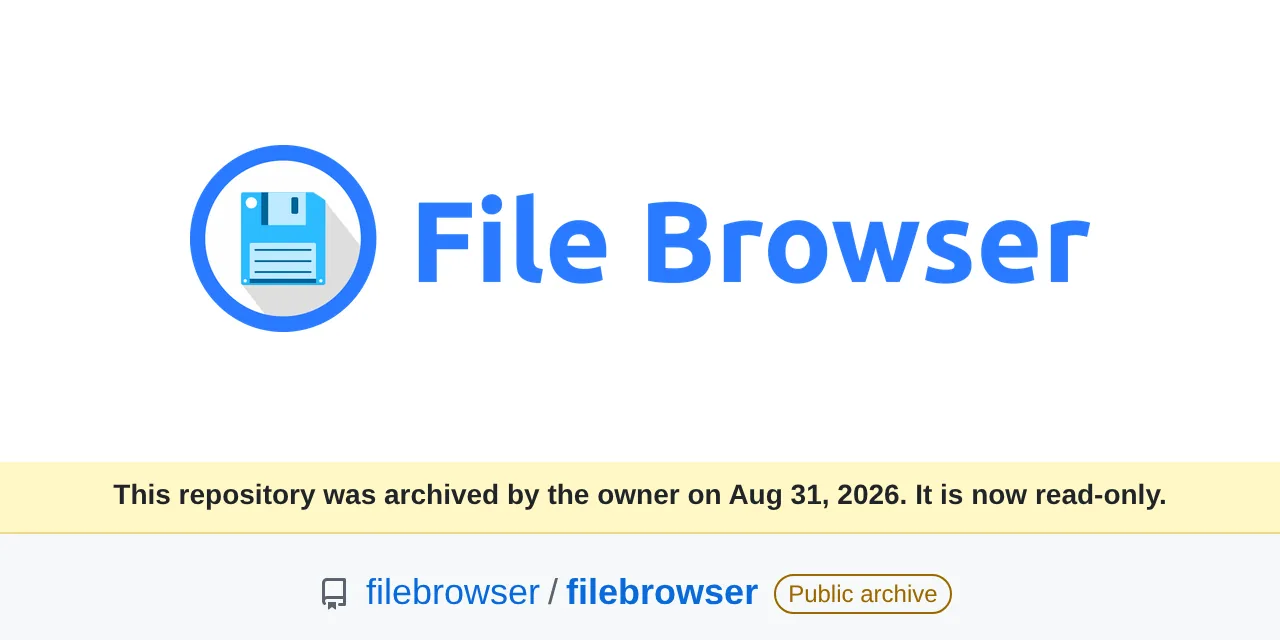
Table of contents
- Key takeaways
- What does it mean that File Browser is archived?
- Which File Browser flaws remain unfixed?
- Can you keep using File Browser while you migrate?
- The three alternatives I tested
- FileBrowser Quantum, the fork closest to the original
- Filestash, a web client for any storage
- copyparty, a file server in a single Python program
- Measured comparison on the same folder
- What I found while testing them that the documentation does not say
- Quantum opens the File Browser database, but widens permissions
- Filestash's local-users preset exposes the container
- copyparty protects itself in Docker, but its example opens up writes
- How to migrate from File Browser to FileBrowser Quantum
- Which File Browser alternative should you pick for your case?
- Frequently asked questions
- Does File Browser stop working now that it is archived?
- Can I reuse the File Browser database in FileBrowser Quantum?
- Is Filestash free for commercial use?
- Conclusion
- Sources
File Browser, the single-binary web file manager with 35,949 stars on GitHub, was archived on 31 August 2026 and will get no more releases or security patches. This article explains what changes for anyone still running it and compares three File Browser alternatives I ran in Docker against the same 320-file folder: FileBrowser Quantum, Filestash and copyparty. It ends with a recommendation per use case and the migration I tested, including what went wrong.
Key takeaways
- The last File Browser release is v2.63.23, from 27 July 2026, and the repository lists 62 published security advisories. Two classes of flaw, the command runner and JWT sessions, will not be fixed.
- I checked it: after changing the administrator password, the token issued before the change still opened the API with an HTTP 200.
- FileBrowser Quantum 1.5.6 opens the File Browser database and keeps users and passwords, but in my test it changed a user’s
/fotosscope to/and granted her delete permission. - Filestash is the most versatile with remote storage and the heaviest (273.8 MiB compressed), and its local-users preset let those users read the container’s whole filesystem until I set a path.
- copyparty is the lightest of the ones that generate video thumbnails (35.7 MiB compressed) and, in Docker, serves no files until you give it a configuration.
- Quantum replaces File Browser without changing your habits; copyparty wins for sharing and receiving large files; Filestash pays off when your data lives in S3, SFTP or SMB.
What does it mean that File Browser is archived?
Archived means the code and the images can still be downloaded, but nobody is going to fix anything. The README says so in its first line: "File Browser is archived on 2026-09-01. The last planned release has already shipped. There will be no further releases, bug fixes, or security fixes".
The repository became read-only on 31 August 2026 according to GitHub’s banner, one day before the date the README announces.
The last published release is v2.63.23, from 27 July 2026 at 20:04 UTC. That same release prints the notice on every container start, before it begins listening:
User 'admin' initialized with randomly generated password: 7jYw7p…
NOTICE: File Browser is being wound down.
NOTICE: The project is archived on 2026-09-01, after which there will be no
NOTICE: further releases and no security fixes. Known unfixed issues are at
NOTICE: https://github.com/filebrowser/filebrowser/security/advisories
Listening on [::]:80
Henrique Dias, who started the project at 15, explained the shutdown on his blog on 28 July: "What I’ve come to accept is that this can’t be patched into shape". In the same post he admits he cannot recommend a specific alternative because he has not compared or used them. That gap is what this comparison tries to fill.
Which File Browser flaws remain unfixed?
The README lists two classes of flaw that stay as they are, and both issues that explain them were closed as "not planned":
- Command execution, runner and hooks: the feature that runs shell commands from the web UI appears in the title of 11 of the 62 advisories, one of them a pre-authentication remote code execution. It is disabled by default, and re-enabling it with
--disable-exec=falseamounts to granting shell access to the host. - Sessions and JSON Web Tokens (JWT): the session is a self-contained JWT the server cannot revoke. Logging out, changing the password or renewing the token leaves the earlier ones valid until they expire.
The second one takes three requests to reproduce, so I tested it on v2.63.23. I logged in as administrator, changed the password through the API and repeated a request with the old token:
change pw 200
old token after pw change: 200
login old pw: 403
login new pw: 200
The old password no longer gets in, but the token issued with it keeps listing files. That is what the advisory "Password reset does not invalidate existing JWT sessions" describes, published in June 2026 with no fixed version. The token lasts 2 hours (the JWT exp sits 7,200 s after its iat), so a stolen token keeps working for that long even if you change the password.
Beyond those two classes, there are advisories that will never get a patch. The repository has 62 published advisories: 5 critical, 26 high, 25 medium and 6 low. Eight came out between 14 and 31 August, after the last release, and all eight affect versions up to v2.63.23 with no fixed version. The most serious, rated high, describes how the cleanup after a failed upload deletes directories recursively, bypassing the delete permission and the deny rules.
Can you keep using File Browser while you migrate?
File Browser does not stop working because it is archived: the filebrowser/filebrowser:v2.63.23 image starts, lists, uploads and shares exactly as it did in July. The risk depends on who can reach the interface. The README itself sets three conditions for keeping it:
- Do not expose it directly to the internet. Put it behind a reverse proxy that terminates TLS and performs its own authentication.
- Keep the command runner disabled. On my instance,
/api/command/answered 400 without touching anything. - Run it unprivileged, inside a container, mounting only the folder you want to serve.
Nobody can give you a date after which it stops being safe. What you do know is that every new vulnerability will be published without a patch.
If File Browser is only reachable from your LAN or your VPN and you are its only user, you can migrate calmly. If it is published under a domain, put an authentication layer in front of it this week. The comparison of Pocket ID, Authelia and Authentik helps you pick one, and the guide to Traefik with Docker Compose covers the proxy.
The three alternatives I tested
The three candidates meet the minimum a replacement needs: an official image for arm64 and amd64, active maintenance in September 2026 and an open-source licence.
FileBrowser Quantum, the fork closest to the original
FileBrowser Quantum is a File Browser fork maintained by Graham Steffaniak under the Apache 2.0 licence. It has two channels: stable 1.5.6, published on 4 September 2026, and a 2.0.6 beta from 11 September that changes the database format. Its documentation recommends the stable channel for new installs. The fork has had serious bugs too: 23 advisories published in 2026, 3 of them critical, and the latest was fixed in 1.5.6 itself, so do not install anything older.
Compared with the original, it adds WebDAV, sign-in with OpenID Connect (OIDC), LDAP, a second factor and proxy auth, access rules per user and group, and video and PDF thumbnails. The command runner is gone: the README says "shell commands are completely removed and will not be returned". And logging out revokes the token: in my test, the same request went from 200 to 401 after calling /api/auth/logout.
Two details from the first start. The initial user is admin with password admin unless you set FILEBROWSER_ADMIN_PASSWORD; with that variable set, admin/admin returned 401. And WebDAV does not accept your password, only an API token you generate in the UI and paste as the password in the client.
Filestash, a web client for any storage
Filestash, by Mickael Kerjean, is not built to serve a local folder but to put a web interface on almost any storage. The AGPL image I tested lists 22 storage backends in its console, among them S3, SFTP, SMB, WebDAV, FTP, Git and the local filesystem. Its latest tag on GitHub is v0.4, from 2019: the machines/filestash:latest image is rebuilt continuously, and the one I pulled identified itself as v0.6.20260914, from commit 8a85e85.
The licence has small print. The code is AGPL 3.0, and the pricing page describes the free self-hosted plan as "AGPL v3, up to 3 users".
In its table, SAML, OIDC and LDAP sign-in and the second factor only appear under the Enterprise plan. The install documentation also reserves per-action authorisation for "the enterprise build". The admin console of the AGPL version itself shows the notice "Upgrade to Filestash enterprise for production usage in a commercial environment".
copyparty, a file server in a single Python program
copyparty, by the developer who signs as ed, is a file server written in Python under the MIT licence. Version 1.20.23, published on 6 September 2026, serves the same tree over HTTP, WebDAV, SFTP, FTP, TFTP and SMB. In Docker it ships in five editions; the recommended one, copyparty/ac, includes Pillow and FFmpeg for thumbnails.
Its interface is the densest of the three and its configuration is a text file with accounts and volumes, with no admin panel. In exchange, browser uploads are chunked, hashed on the client and resumable. Two July 2026 releases, v1.20.17 and v1.20.19, carry SECURITY in their names, and the repository has 16 published advisories, all with a fixed version.
Measured comparison on the same folder
I measured everything below on 14 September 2026 in a linux/arm64 development container with 18 cores and 121 GB of RAM, no GPU. The test folder held 320 files and 22.7 MiB: 150 images, 70 documents including 10 PDFs, 80 source files, 15 audio files and 5 videos. Each application ran alone, in its own Docker Compose project, with an identical copy of the folder.
Other jobs shared the machine, with a load average between 21 and 47 on 18 cores during the measurements. That is why the timings are medians of three cold starts and are meant for comparison, not as absolute figures.
| File Browser 2.63.23 | FileBrowser Quantum 1.5.6 | Filestash 0.6.20260914 | copyparty 1.20.23 | |
|---|---|---|---|---|
| Status | archived | active | active | active |
| Licence | Apache 2.0 | Apache 2.0 | AGPL 3.0, with paid features | MIT |
| GitHub stars | 35,949 | 8,290 | 14,667 | 46,680 |
| GitHub security advisories | 62, 8 of them after the last release | 23 | none published | 16 |
| Image tested | filebrowser/filebrowser:v2.63.23 |
gtstef/filebrowser:1.5.6-stable |
machines/filestash:latest |
copyparty/ac:1.20.23 |
| Compressed arm64 download | 15.2 MiB | 72.3 MiB (25.0 MiB for slim) |
273.8 MiB | 35.7 MiB (14.5 MiB for min) |
| Idle resident memory (median) | 20.8 MiB | 72.4 MiB | 93.1 MiB | 49.7 MiB |
| First authenticated request (median) | 0.66 s | 0.78 s | 2.17 s | 0.61 s |
| Users and permissions | per-user scope, permissions and rules | per-source scopes, rules per user and group, OIDC, LDAP and second factor | local users, htpasswd and LDAP; OIDC, SAML and per-action permissions are paid | accounts and per-volume permissions in a text file |
| Share links | password and expiry | password, expiry and download limit | password, expiry and permissions | password and expiry, once shr is enabled |
| WebDAV | no | yes, with an API token | only on share links | yes, plus SFTP, FTP and SMB |
| 1 GiB upload through the API (median) | 0.47 s | 0.63 s | 0.92 s | 2.51 s |
| Thumbnails | images | images, video and PDF | images | images, video and audio |
| Setup for safe use | initial password in the log | 6 lines of YAML and change admin/admin |
web wizard and setting path by hand |
17 lines of copyparty.conf |
Time to first access runs from docker compose up -d to the first authenticated request that returns the listing, with the configuration already in place. Memory is the resident set size (RSS) of the container’s processes 60 s after that request.
The 1 GiB upload went through each application’s API, inside the same machine and onto a RAM-backed disk, with load averages between 17 and 47. All four accepted it and the SHA-256 matched, but those times measure each application’s overhead, not your network. copyparty took longer because it hashes the file as it receives it.
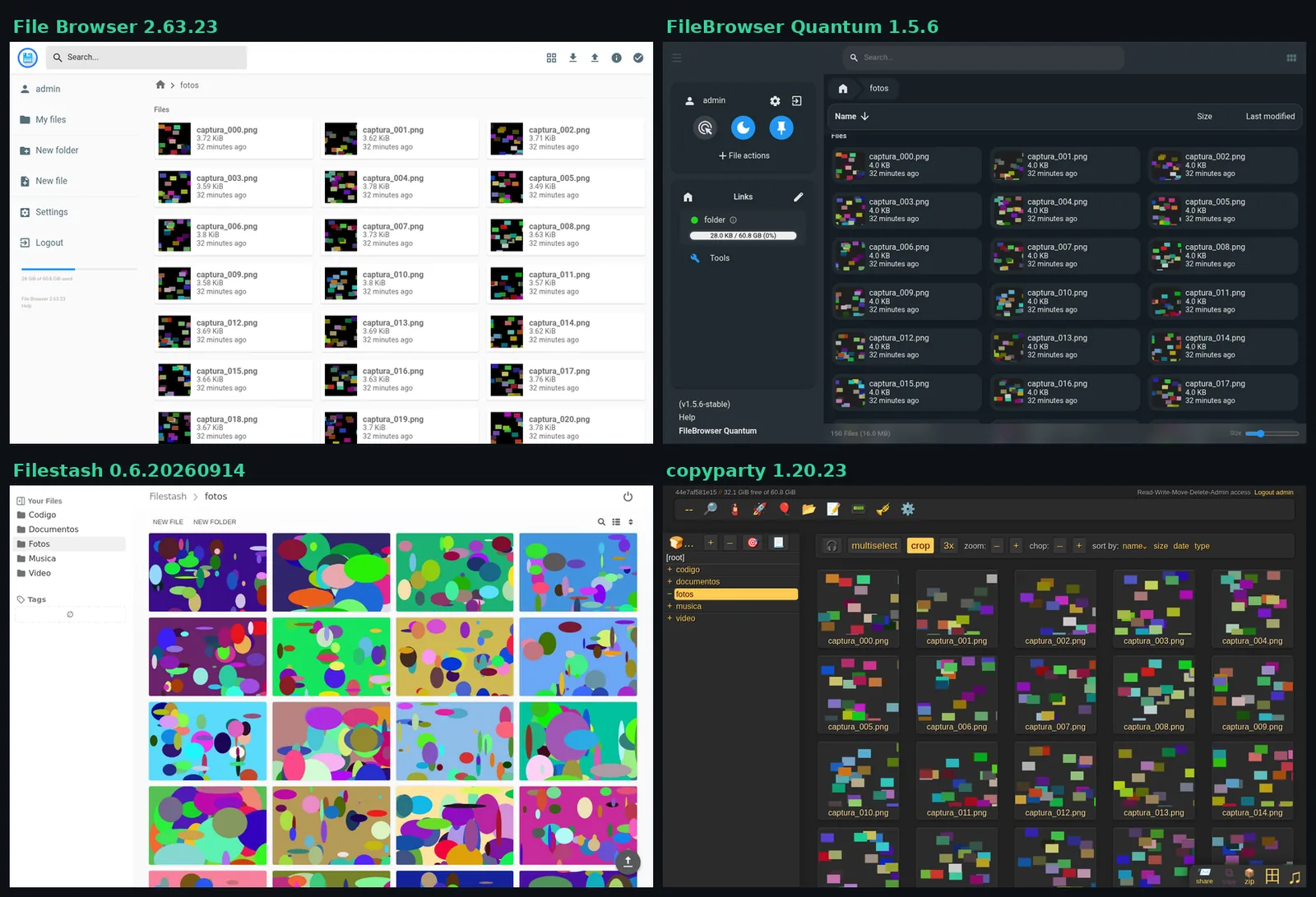
The screenshot shows the fotos folder in all four interfaces, each in its grid view. The table in Quantum’s README needs correcting: it gives 180 MB for its image, 31 MB for File Browser and 240 MB for Filestash. Compressed and on arm64, I measured 72.3 MiB, 15.2 MiB and 273.8 MiB. Its documentation speaks of 60 MB and 15 MB for the regular and slim tags, and the actual download was 72.3 MiB and 25.0 MiB.
What I found while testing them that the documentation does not say
Three of the findings change how you should install each alternative, and none of them appears in its getting-started guide.
Quantum opens the File Browser database, but widens permissions
I pointed Quantum 1.5.6 at a copy of a File Browser v2.63.23 database with two accounts: admin and ana, restricted to /fotos and without delete permission. Quantum accepted it and left these lines in the log:
Using existing database  : /home/filebrowser/data/database.db
Incompatible user settings detected, creating backup of database before converting.
Migrated 1 share links with default sidebar links
Both passwords kept working. The problem showed up when I reviewed ana: her scope became / of the source and her delete permission became true, so she could download /documentos/informe_00.pdf. The migrated share link opened its page, but downloading the file returned 404. If you migrate this way, review every user before opening the service.
Filestash’s local-users preset exposes the container
In Filestash I applied the wizard’s "Local Storage, Local Users" preset, created an unprivileged user and logged in as her. Her root folder was the container’s root: she could see /etc, read /etc/passwd and also /app/data/state/config/config.json, which holds the admin password hash and the instance’s secret key. She could also write to that directory.
The fix lives in the attribute mapping of the local backend: add "path": "/srv/datos/" to its parameters. With that field, the same user saw only the five data folders and /etc/passwd returned 404.
copyparty protects itself in Docker, but its example opens up writes
copyparty’s Docker documentation says the container shares /w read-write for anyone. On 1.20.23 that is no longer the case. Without a configuration file, it starts with a safeguard that blocks reads:
CRIT: Read-access has been disabled due to failsafe: Docker detected,
but no config-file was provided.
Anonymous uploads, WebDAV PROPFIND and deletes returned 401. The catch is in the example copyparty.conf that the log itself points to, which grants rw: *, read and write to anyone. Copying it as-is undoes the protection. One more detail: because my folder lived on tmpfs, copyparty removed write permission so uploads would not vanish on restart, and I had to enable wram knowingly.
How to migrate from File Browser to FileBrowser Quantum
Quantum is the natural destination if you want the same experience. The migration is five steps, and the fourth is the one you cannot skip because the automatic permission conversion failed in my test:
- Stop File Browser and copy
filebrowser.dbsomewhere safe. If you already run encrypted backups with restic, take one before touching anything. - Export the user inventory, with scopes and permissions, so you can reapply them by hand.
- Start Quantum against a copy of the database, never the original.
- Review each account’s scope and permissions in Quantum’s user management, and log in as each one to check.
- Recreate the share links you need and repoint your reverse proxy.
The inventory comes out of the File Browser binary itself, which has an export subcommand:
docker run --rm -u 1000:1000 -v "$PWD/copia:/exp" \
  --entrypoint filebrowser filebrowser/filebrowser:v2.63.23 \
  users export /exp/usuarios.json -d /exp/filebrowser.db
The resulting JSON carries each account’s scope and perm block, which is exactly what Quantum did not respect in my test. With that at hand, the Quantum 1.5.6 deployment looks like this:
services:
  filebrowser:
    image: gtstef/filebrowser:1.5.6-stable
    environment:
      FILEBROWSER_ADMIN_PASSWORD: your_admin_password_here
    volumes:
      - /path/to/your/files:/srv
      - ./data:/home/filebrowser/data
    ports:
      - "127.0.0.1:8080:80"
    restart: unless-stopped
Bear in mind that FILEBROWSER_ADMIN_PASSWORD overwrites the migrated admin account’s password: in my test, the old one returned 401 and the one from the variable, 200. The copied database goes in ./data/database.db, and the ./data/config.yaml file tells Quantum where it is and which folder to serve:
server:
  port: 80
  database: /home/filebrowser/data/database.db
  cacheDir: /home/filebrowser/data/tmp
  sources:
    - path: /srv
      config:
        defaultEnabled: true
If you would rather start from scratch, drop the database line and recreate the users from the inventory. With five accounts or fewer, that is what I would do: auditing the conversion takes longer than recreating them.
Which File Browser alternative should you pick for your case?
The choice depends on what you used File Browser for, not on which one wins more rows in the table:
- Replace File Browser without changing anything: FileBrowser Quantum, stable 1.5.x channel. If you need no video or document thumbnails, the
stable-slimtag brings the download down to 25.0 MiB. - Share and receive large files with outsiders: copyparty. It has links with password and expiry, resumable uploads, and WebDAV and SFTP to mount the folder on a desktop.
- Data spread across S3, SFTP, SMB or a NAS: Filestash. Assume single sign-on and fine-grained permissions are paid features, and always set the local backend’s path.
- Syncing phones and laptops, or calendars and contacts: none of the three. That is the territory of Nextcloud, Seafile or, without a web UI, Syncthing.
- A single user on the LAN with no time right now: you can keep File Browser behind the VPN and an authenticating proxy while you prepare the switch.
Frequently asked questions
Does File Browser stop working now that it is archived?
No. The v2.63.23 image can still be pulled and still works, and the binary depends on no external service. What ends is the fixes: any new vulnerability will be published without a patch, so the risk grows with time and with exposure.
Can I reuse the File Browser database in FileBrowser Quantum?
Yes, Quantum 1.5.6 opens it, makes a backup and keeps users and passwords. In my test it respected neither the scope nor the delete permission of a restricted account, and the migrated share link would not download. Review every account before opening the service.
Is Filestash free for commercial use?
The AGPL 3.0 licence allows commercial use if you meet its conditions, including offering the source of your modifications to anyone who uses the program over a network. Licence aside, Filestash reserves SAML, OIDC, the second factor and per-action authorisation for its paid plans, and advertises its free plan for up to three users.
Conclusion
File Browser will not break tomorrow, but it will not be fixed either, and its session flaw reproduces with three requests. FileBrowser Quantum is the direct replacement, as long as you review permissions if you import the old database. copyparty is the lightest option and the best for moving large files. Filestash makes sense when your files are not on a local disk. The Spanish version of this article is at Alternativas a File Browser ahora que el proyecto está archivado.
Sources: [1] filebrowser/filebrowser, README and archive notice[1], [2] File Browser v2.63.23, last published release[2], [3] Henrique Dias, Goodbye File Browser, for Real This Time[3], [4] File Browser, issue #5199 on command execution[4], [5] File Browser, issue #5216 on JWT sessions[5], [6] File Browser, published security advisories[6], [7] gtsteffaniak/filebrowser, FileBrowser Quantum repository[7], [8] FileBrowser Quantum 1.5.6, stable release notes[8], [9] FileBrowser Quantum, which version to use[9], [10] FileBrowser Quantum, configuration migration[10], [11] FileBrowser Quantum, WebDAV[11], [12] mickael-kerjean/filestash, repository[12], [13] Filestash, plans and pricing[13], [14] Filestash, install and upgrade[14], [15] 9001/copyparty, repository and README[15], [16] copyparty v1.20.23, release notes[16], [17] copyparty, Docker documentation[17].
Sources
- filebrowser/filebrowser, README and archive notice
- File Browser v2.63.23, last published release
- Henrique Dias, Goodbye File Browser, for Real This Time
- File Browser, issue #5199 on command execution
- File Browser, issue #5216 on JWT sessions
- File Browser, published security advisories
- gtsteffaniak/filebrowser, FileBrowser Quantum repository
- FileBrowser Quantum 1.5.6, stable release notes
- FileBrowser Quantum, which version to use
- FileBrowser Quantum, configuration migration
- FileBrowser Quantum, WebDAV
- mickael-kerjean/filestash, repository
- Filestash, plans and pricing
- Filestash, install and upgrade
- 9001/copyparty, repository and README
- copyparty v1.20.23, release notes
- copyparty, Docker documentation
Source code
Access all the source code for this post on GitHub.
View on GitHub