PostgreSQL 19 new features tested in Docker, with REPACK and pg_upgrade from 18
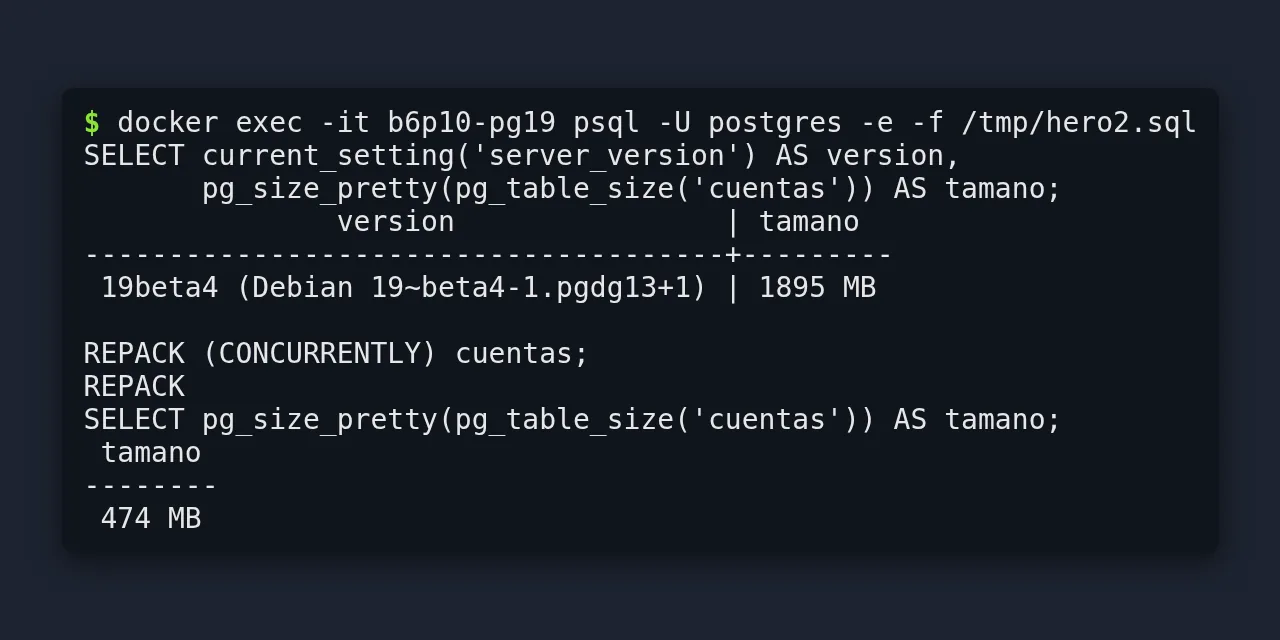
Table of contents
- Key takeaways
- What PostgreSQL 19 brings and what state it is in
- How to start PostgreSQL 19 in Docker
- What REPACK does and how it differs from VACUUM FULL
- What happens to writes during REPACK CONCURRENTLY
- Where REPACK CONCURRENTLY does not work
- Why REPACK CONCURRENTLY is not MVCC-safe
- How to wait on a replica with WAIT FOR LSN
- Logical replication of sequences without restarting the primary
- Other SQL changes I tested
- Which defaults change compared with 18
- How to upgrade from PostgreSQL 18 to 19 with pg_upgrade in Docker
- Which incompatibilities I hit when upgrading
- Should you upgrade now or wait for 19.1?
- Frequently asked questions
- Does REPACK replace the pg_repack extension?
- Can I just change the image tag from postgres:18 to postgres:19?
- When is the final release of PostgreSQL 19?
- Conclusion
- Sources
PostgreSQL 19, whose final release is planned for October 2026, adds REPACK: a command that compacts tables and, with the CONCURRENTLY option, does so without blocking reads or writes. I tested Beta 4, the newest build on 28 September, in Docker on arm64. A 1895 MB table with three quarters of its rows deleted shrank to 474 MB, and to about 490 MB when I compacted it while eight clients kept updating it. I also went through WAIT FOR, logical replication of sequences, the defaults that change and a real upgrade from 18 with pg_upgrade --link. There is a Spanish version of this guide.
Key takeaways
- REPACK replaces VACUUM FULL and CLUSTER, which still work, and REPACK (CONCURRENTLY) only takes the exclusive lock to swap the files at the end
- With eight pgbench clients updating rows, REPACK (CONCURRENTLY) lost no update in three runs and its worst second still did 3,526 transactions per second; with VACUUM FULL all eight clients waited 1.6 s and the worst second dropped to 16
- REPACK (CONCURRENTLY) is not MVCC-safe: a REPEATABLE READ transaction opened before it saw a 2-million-row table as empty
- WAIT FOR LSN lets a replica wait until it has replayed a specific write, and logical replication copies sequences when subscribing and on
REFRESH SEQUENCES, but not continuously - JIT is now off by default,
max_locks_per_transactiongoes from 64 to 128 andstandard_conforming_stringscan no longer be turned off pg_upgradefrom 18.6 rejected a btree_gist GiST index oninet, and the new cluster started without thepg_hba.confrule the Docker image adds
What PostgreSQL 19 brings and what state it is in
PostgreSQL 19 was at Beta 4 on 28 September 2026, with a final release planned for October. The PostgreSQL roadmap[1] sets 19 for that month. The Beta 4 announcement[2], dated 24 September, expected a release candidate in early October and added that the final release "may also occur in October".
Beta 4 pulled four features that had been announced: SQL/PGQ graph queries, online enabling of data checksums, temporal updates with FOR PORTION OF, and MERGE/SPLIT PARTITIONS. The announcement explains why: "The PostgreSQL community strongly believes that, first and foremost, PostgreSQL must be reliable." A feature list written before Beta 4 may include one of those four.
The PostgreSQL 19 release notes[3], current as of 14 September, highlight these features, and the last column says what I tested:
| Feature | What it does | Tested here |
|---|---|---|
| REPACK and REPACK (CONCURRENTLY) | Compacts and reorders tables; the concurrent mode does not block writes | Yes |
| WAIT FOR LSN | A replica waits until it has replayed a specific WAL position | Yes |
| Sequences in logical replication | CREATE PUBLICATION ... ALL SEQUENCES and REFRESH SEQUENCES |
Yes |
Logical replication with wal_level=replica |
Turns itself on when needed, no restart | Yes |
| Parallel autovacuum workers and scoring | Vacuums indexes in parallel and prioritises tables | The view only |
pg_plan_advice and pg_stash_advice |
Pins or corrects planner decisions | Yes, pg_plan_advice |
How to start PostgreSQL 19 in Docker
The official postgres:19beta4 image keeps the cluster in /var/lib/postgresql/19/docker, so the volume is mounted at /var/lib/postgresql, as with 18. The official image documentation[4] explains it: since 18, PGDATA includes the major version and the declared VOLUME is /var/lib/postgresql. If you come from 17 or from an old guide that mounts /var/lib/postgresql/data, the guide to installing PostgreSQL with Docker walks through that change.
This is the command I used for the tests, with the port published on the loopback interface only:
docker run -d --name b6p10-pg19 \
  -e POSTGRES_PASSWORD=labpass \
  -p 127.0.0.1:25000:5432 \
  -v b6p10-pg19data:/var/lib/postgresql \
  postgres:19beta4
docker exec b6p10-pg19 env | grep -E 'PG_VERSION|PGDATA'
The second command confirms the path and the package: PG_VERSION=19~beta4-1.pgdg13+1 and PGDATA=/var/lib/postgresql/19/docker. The arm64 image weighs 162 MB compressed according to the Docker Hub API and takes 674 MB once pulled. I pulled it from Docker Hub.
What REPACK does and how it differs from VACUUM FULL
REPACK rewrites the table into a new file without dead rows and returns the spare space to the operating system, as VACUUM FULL does; with USING INDEX it also reorders it, as CLUSTER does. The release notes say the two old commands did similar things under confusing names and are kept for compatibility. On Beta 4, VACUUM FULL and CLUSTER pedidos USING pedidos_pkey still worked without warnings.
The difference lies in CONCURRENTLY. According to the REPACK documentation[5], the concurrent mode copies the table, captures incoming changes through logical decoding and only requests the ACCESS EXCLUSIVE lock to swap the files. Until now that took an external extension, pg_repack[6], which according to its README works "without holding an exclusive lock on the processed tables during processing".
To test it I created an 8-million-row table with a primary key and deleted three rows out of four. Then I ran a plain VACUUM, which marks the space as reusable but does not return it to the disk:
CREATE TABLE cuentas (
  id      bigint PRIMARY KEY,
  saldo   bigint NOT NULL DEFAULT 0,
  relleno text NOT NULL
);
INSERT INTO cuentas (id, relleno)
SELECT g, repeat(md5(g::text), 6) FROM generate_series(1, 8000000) g;
DELETE FROM cuentas WHERE id % 4 <> 0;
VACUUM cuentas;
SELECT pg_size_pretty(pg_table_size('cuentas'));  -- 1895 MB
REPACK (CONCURRENTLY) cuentas;
SELECT pg_size_pretty(pg_table_size('cuentas'));  -- 474 MB
The table went from 1895 MB to 474 MB with the same 2 million live rows.
With no other load, REPACK (CONCURRENTLY) took a median of 1.42 s over three runs. VACUUM FULL took 1.09 s and REPACK without CONCURRENTLY 1.03 s: the concurrent mode costs a bit more because it also decodes and applies the changes. With the VERBOSE option, REPACK reports on each table. On a smaller one it printed repacking "public.pedidos" in physical order and turned 347 MB of table and 56 MB of indexes into 87 MB and 14 MB.
What happens to writes during REPACK CONCURRENTLY
Writes kept arriving during the whole REPACK (CONCURRENTLY) and none was lost. I ran pgbench with eight clients for 40 s, each adding 1 to the balance of a random account, and started the maintenance command 10 s in.
I repeated each mode three times and rebuilt the 1895 MB table before every run. The one-minute load average was below 3 at the start (between 1.25 and 2.97). This is the pgbench script:
\set k random(1, 2000000)
UPDATE cuentas SET saldo = saldo + 1 WHERE id = :k * 4;
If any update were lost when the files were swapped, the sum of balances would end below the number of transactions. That did not happen:
| Median of three runs | REPACK (CONCURRENTLY) | VACUUM FULL |
|---|---|---|
| Command duration | 2.50 s (1.52–2.89) | 1.70 s (1.69–1.96) |
| Worst second, transactions per second | 3,526 (695–4,118) | 16 (0–19) |
| Time with clients waiting for a lock | 0 s (0–0.9) | 1.6 s (1.6–1.9), all 8 clients |
| Failed transactions | 0 in all three | 0 in all three |
sum(saldo) equal to transactions |
Yes, in all three | Yes, in all three |
| Final table size | 488–491 MB | 488–492 MB |
Before the maintenance, pgbench was running at about 8,000 transactions per second, and I sampled pg_locks every 0.2 s looking for ungranted requests on the table. With REPACK (CONCURRENTLY), two runs recorded no wait at all and in the third a single client waited about 0.9 s, which fits the short lock of the final swap. Under load, the table ended at about 490 MB with both commands, slightly above the 474 MB without load, because updated rows take new space. With VACUUM FULL, the eight clients showed up in the queue and the server log recorded eight lines like this one, because log_lock_waits is on by default in 19:
LOG:  process 1288 still waiting for RowExclusiveLock on relation 16469
      of database 5 after 1000.811 ms at character 8
That extra millisecond over 1000 is the deadlock_timeout threshold, which is 1 s. While REPACK (CONCURRENTLY) was running, pg_replication_slots showed a temporary logical slot named pg_repack_2679 with the pgrepack plugin, and pg_stat_progress_repack went through the seq scanning heap and rebuilding index phases. The slot disappeared at the end. VACUUM FULL finished sooner but stopped every client to do it; REPACK (CONCURRENTLY) took longer and writes carried on, at under half speed in the worst second.
Where REPACK CONCURRENTLY does not work
The concurrent mode needs a primary key or a replica identity index, because it applies the captured changes by that key. These are the errors Beta 4 returned in each forbidden case:
| Case | Beta 4 message |
|---|---|
| Table without a primary key | Relation "sin_pk" has no identity index. |
UNLOGGED table |
This operation is only supported for permanent relations. |
| Materialized view | This operation is not supported for materialized views. |
Inside BEGIN |
REPACK (CONCURRENTLY) cannot run inside a transaction block |
| No table name | REPACK (CONCURRENTLY) requires an explicit table name |
The documentation adds partitioned tables, catalogs and TOAST tables, and the max_repack_replication_slots limit, which defaults to 5. It also requires free space for a copy of the table and its indexes, plus a little more for the changes that arrive during the copy.
Why REPACK CONCURRENTLY is not MVCC-safe
REPACK (CONCURRENTLY) shares a warning with TRUNCATE in the MVCC caveats section[7]: after the rewrite, the table appears empty to transactions whose snapshot is older. I reproduced it with a REPEATABLE READ transaction that first reads another table and waits 15 s:
BEGIN ISOLATION LEVEL REPEATABLE READ;
SELECT count(*) FROM notas;       -- takes the snapshot
SELECT pg_sleep(15);              -- REPACK (CONCURRENTLY) runs here
SELECT count(*) FROM cuentas;     -- 0
COMMIT;
SELECT count(*) FROM cuentas;     -- 2000000
The transaction counted 0 rows in a table holding 2 million. With REPACK cuentas, without CONCURRENTLY, the same test counted 2,000,000: the documentation lists only the concurrent mode among the commands that are not MVCC-safe. If you run long REPEATABLE READ reports that read this table alongside others, run the concurrent mode outside that window.
How to wait on a replica with WAIT FOR LSN
WAIT FOR LSN makes a session on a replica wait until it has replayed a specific WAL position, which gives "read your own writes" consistency with asynchronous replicas. The WAIT documentation[8] defines four modes: standby_replay, the default, standby_write, standby_flush and primary_flush. I set up a streaming replica with pg_basebackup -R and paused its replay to force the wait:
-- primary
INSERT INTO notas VALUES (1, 'escrita en el primario');
SELECT pg_current_wal_insert_lsn();              -- 4/6B0267A0
-- replica, with pg_wal_replay_pause() in effect
WAIT FOR LSN '4/6B0267A0' WITH (TIMEOUT '2s', NO_THROW);  -- timeout
SELECT pg_wal_replay_resume();
WAIT FOR LSN '4/6B0267A0';                       -- success
SELECT * FROM notas;                             -- the row is there
Without NO_THROW, the timeout is an error: timed out while waiting for target LSN 4/6B0267A0 to be replayed. On the primary, the default mode fails with recovery is not in progress, and WITH (NO_THROW) returns not in recovery. The application has to keep the LSN of its last write and pass it to the replica.
Logical replication of sequences without restarting the primary
Logical replication in 19 copies sequence values, but only when the subscription is created and when you ask for it. I checked it with two 19beta4 containers and a ventas database holding an identity table:
-- primary (wal_level = replica, the default)
CREATE PUBLICATION pub_ventas FOR ALL TABLES, ALL SEQUENCES;
-- subscriber
CREATE SUBSCRIPTION sub_ventas
  CONNECTION 'host=primario dbname=ventas user=postgres password=labpass'
  PUBLICATION pub_ventas;
ALTER SUBSCRIPTION sub_ventas REFRESH SEQUENCES;
After subscribing, the subscriber’s sequence had last_value 1000, the same as the primary. I added 500 rows on the primary: the table reached 1500 rows on the subscriber, but the sequence stayed at 1000 until I ran REFRESH SEQUENCES. In a migration that switches primaries, that step goes right before the cutover, or the first INSERT on the new node will collide with an existing key.
The other change shows in effective_wal_level. The primary kept wal_level = replica, and effective_wal_level went from replica to logical as soon as the subscription created its slot, without a restart. On 18 you had to set wal_level to logical and restart first; the guide to logical replication in PostgreSQL 16 describes how that worked.
Other SQL changes I tested
Four small changes fix things that used to need a workaround, and all four worked on Beta 4 as the release notes describe:
IGNORE NULLSinlag(),lead(),first_value(),last_value()andnth_value():lag(valor) IGNORE NULLS OVER (ORDER BY t)returns the last known value and skips the gapsON CONFLICT DO SELECT:INSERT ... ON CONFLICT (nombre) DO SELECT RETURNING idalso returns the row that already existed, without a secondSELECTCOPY ... TO STDOUT (FORMAT json): prints one JSON line per row, such as{"sensor":1,"t":1,"valor":10}json_array()with no rows: returns[]instead ofNULL, a change the release notes flag as incompatible
The pg_plan_advice extension, by Robert Haas, pins planner decisions. After LOAD 'pg_plan_advice', EXPLAIN (PLAN_ADVICE) printed INDEX_SCAN(cuentas public.cuentas_pkey) for a primary-key lookup. With SET pg_plan_advice.advice = 'SEQ_SCAN(cuentas)', the plan switched to a parallel sequential scan marked /* matched */. The pg_plan_advice documentation[9] warns that forcing a plan can backfire when the data changes.
Which defaults change compared with 18
I compared SHOW on two fresh containers, postgres:18.6 and postgres:19beta4, and these are the values that change:
| Parameter | 18.6 | 19beta4 |
|---|---|---|
jit |
on |
off |
max_locks_per_transaction |
64 | 128 |
default_toast_compression |
pglz |
lz4 |
log_lock_waits |
off |
on |
| I/O workers | io_workers = 3 |
io_min_workers = 2, io_max_workers = 8 |
standard_conforming_strings |
on, can be turned off |
always on |
The JIT change shows in query plans. The same aggregate on cuentas showed a JIT: Functions: 5 block with inlining and optimization on 18, and none on 19 until SET jit = on. The release notes explain that the costing that decided to turn it on "has been determined to be unreliable", so if you run large analytical queries, turn it back on and measure. On locks, the notes warn that each entry’s size changed: if you had 256, set 512 to keep the same capacity.
How to upgrade from PostgreSQL 18 to 19 with pg_upgrade in Docker
An upgrade with pg_upgrade --link works inside a single volume, because 18 and 19 live in /var/lib/postgresql/18/docker and /var/lib/postgresql/19/docker. The catch is that each official image carries only its own version’s binaries, and pg_upgrade needs both. I solved it with my own image that copies the 18 binaries into the 19 image:
FROM postgres:19beta4
COPY --from=postgres:18.6 /usr/lib/postgresql/18 /usr/lib/postgresql/18
COPY --from=postgres:18.6 /usr/share/postgresql/18 /usr/share/postgresql/18
Both images are based on Debian trixie, and ldd found no missing library for the copied 18 postgres binary. The compose.yaml defines the database and an upgrade service that only starts on demand and mounts the same volume:
services:
  db:
    image: postgres:${PG_TAG:-18.6}
    environment:
      POSTGRES_PASSWORD: cambia_esta_clave
    ports:
      - "127.0.0.1:25020:5432"
    volumes:
      - pgdata:/var/lib/postgresql
  upgrade:
    build: ./upgrade
    profiles: [upgrade]
    volumes:
      - pgdata:/var/lib/postgresql
      - ./upgrade.sh:/upgrade.sh:ro
    entrypoint: ["/upgrade.sh"]
volumes:
  pgdata:
The script creates the new cluster with the same encoding and locale as the old one and runs pg_upgrade. It runs from /var/lib/postgresql on purpose: pg_upgrade writes update_extensions.sql and delete_old_cluster.sh to the current directory, and in /tmp they would be lost when the container is removed. The last useful line copies pg_hba.conf, for a reason I explain below:
#!/usr/bin/env bash
# usage: upgrade.sh check|link
set -euo pipefail
OLD=/var/lib/postgresql/18/docker
NEW=/var/lib/postgresql/19/docker
if [ ! -s "$NEW/PG_VERSION" ]; then
  install -d -o postgres -g postgres -m 700 "$NEW"
  gosu postgres initdb -D "$NEW" -U postgres \
    --encoding=UTF8 --locale=en_US.utf8 > /dev/null
fi
cd /var/lib/postgresql
MODE=--check; [ "$1" = link ] && MODE=--link
gosu postgres pg_upgrade -U postgres \
  -b /usr/lib/postgresql/18/bin -B /usr/lib/postgresql/19/bin \
  -d "$OLD" -D "$NEW" $MODE
[ "$1" = link ] && cp "$OLD/pg_hba.conf" "$NEW/pg_hba.conf"
exit 0
With 18.6 running I loaded a 684 MB test database: btree_gist, pg_stat_statements, 2 million rows in cuentas and an accesos table with a GiST index on an inet column. Then I stopped the database and ran the check. I ran every Compose command with explicit -f and -p; they are shortened here:
docker compose stop db
docker compose build upgrade
docker compose run --rm upgrade check
The check failed on gist_inet_ops. The 19 release notes change the default operator class for inet and cidr from btree_gist to the built-in GiST one, because the btree_gist class "can exclude rows that should be returned", and pg_upgrade rejects the old indexes:
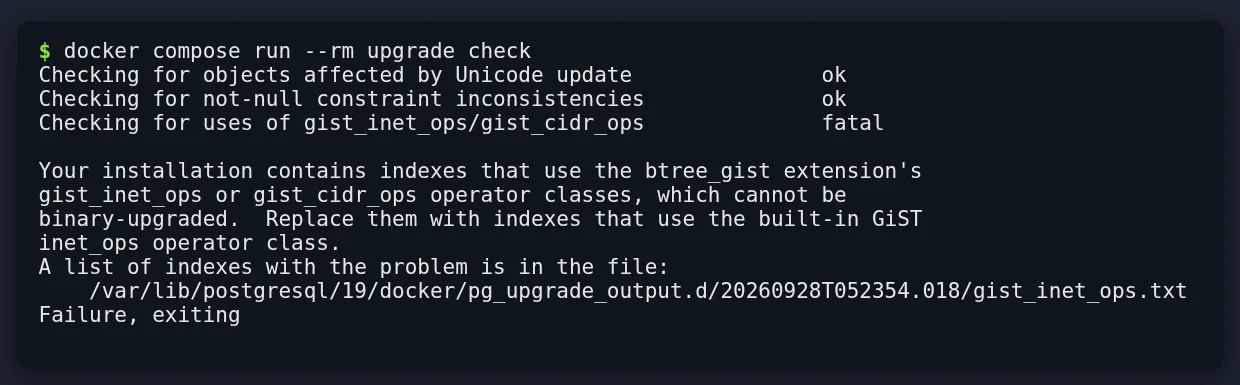
The file named in the message listed public.accesos_ip_gist. I rebuilt it on 18 with the built-in class, checked again and got *Clusters are compatible*:
docker compose start db
docker compose exec db psql -U postgres \
  -c "CREATE INDEX accesos_ip_inet ON accesos USING gist (ip inet_ops)" \
  -c "DROP INDEX accesos_ip_gist"
docker compose stop db
docker compose run --rm upgrade check
docker compose run --rm upgrade link
PG_TAG=19beta4 docker compose up -d db
pg_upgrade --link finished with Upgrade Complete and warned that the old cluster can no longer be started safely. Two steps remain, both suggested by pg_upgrade itself: update the extensions and build the statistics that are not transferred.
docker compose exec db psql -U postgres \
  -f /var/lib/postgresql/update_extensions.sql
docker compose exec db vacuumdb -U postgres --all \
  --analyze-in-stages --missing-stats-only
The first file moved btree_gist from 1.8 to 1.9 and pg_stat_statements from 1.12 to 1.13. The database started with data_directory at /var/lib/postgresql/19/docker, holding the 2,000,000 rows of cuentas and the 100,000 of accesos.
I repeated the lab with --copy to compare disk use: the whole volume took 1765 MB with --link and 2427 MB with --copy, 662 MB more, close to the size of the database. In time, pg_upgrade took a median of 1.61 s with --link and 2.65 s with --copy, over three runs of each mode with load below 3 at the start. At 684 MB the gap is small, but --copy grows with the size of the database and --link does not.
Which incompatibilities I hit when upgrading
Six problems came up during the tests, and pg_upgrade --check only warns about the first one:
- btree_gist GiST indexes on
inetorcidr:pg_upgraderefuses to continue; rebuild them withinet_opsbefore upgrading pg_hba.confwithout the Docker rule: the script’sinitdbdoes not add thehost all all all scram-sha-256line that the image’s entrypoint writes, and the first connection from another container failed withno pg_hba.conf entry for host; that is why the script copies the file from 18io_workersno longer exists: acommand: -c io_workers=3that worked on 18 makes 19 stop withFATAL: unrecognized configuration parameter "io_workers";io_min_workersandio_max_workersreplace it- Dumps from an old
pg_dumpwithstandard_conforming_strings = off: when restored on 19,SET standard_conforming_strings = offfails and a default of'C:\\datos'was stored asC:\\datos, with the backslash doubled and no warning; dumping the same 18 database with the 19pg_dumprestored correctly - MD5 passwords: they still work, but 19 warns when you create one (
setting an MD5-encrypted password) and on every login (authenticated with an MD5-encrypted password);md5_password_warningsturns the warning off - Changing only the image tag: starting
postgres:19beta4on an 18 volume deletes nothing, but the container exits with code 1 and the messagethere appears to be PostgreSQL data in: /var/lib/postgresql/18/docker
The release notes list more changes that did not affect me. RADIUS is gone, the MULE_INTERNAL encoding is removed and database, role or tablespace names can no longer contain line breaks; pg_upgrade rejects clusters that use them. If your cluster uses any of these, pg_upgrade --check or a test restore will tell you before the cutover.
Should you upgrade now or wait for 19.1?
For production, wait at least for the first minor release of 19 and use the time to rehearse. Version 18 is supported until 14 November 2030 according to the PostgreSQL versioning policy[10], so there is no rush. Beta 4 also showed that features can change until the end. What you can do now is run pg_upgrade --check against a copy of the volume with the image above, review your startup parameters and redo your dumps with the new pg_dump.
REPACK (CONCURRENTLY) is the strongest reason to move if you rely on pg_repack today or schedule maintenance windows for VACUUM FULL. It matters less if your tables carry little dead space, because regular autovacuum already reuses that space without rewriting anything. If you come from 17, the PostgreSQL 17 optimisations still apply and add to these.
Frequently asked questions
Does REPACK replace the pg_repack extension?
It covers its main use case, compacting a table without blocking writes, and it ships in core from 19. It has the restrictions described in the REPACK documentation: it needs a primary key or a replica identity index, it does not support partitioned tables and it is not MVCC-safe.
Can I just change the image tag from postgres:18 to postgres:19?
No. The 19 container stops when it finds data in /var/lib/postgresql/18/docker and leaves it untouched. You need pg_upgrade, with the binaries of both versions, or a dump made with the 19 pg_dump followed by a restore.
When is the final release of PostgreSQL 19?
The roadmap planned it for October 2026. On 28 September Beta 4 was out and the release candidate was expected in early October; check the postgresql.org news page for the exact date.
Conclusion
PostgreSQL 19 brings the maintenance feature that core was missing most. REPACK (CONCURRENTLY) compacted a 1895 MB table to 474 MB with writes in flight and without losing any. In exchange it needs a primary key, room for a copy and care with long REPEATABLE READ transactions.
WAIT FOR and sequences in logical replication make read replicas and primary-switching migrations easier. Before upgrading, rehearse pg_upgrade --check with an image that carries both versions and redo your dumps with the 19 pg_dump.
Sources: [1] PostgreSQL 19 release notes[3], [2] PostgreSQL 19 Beta 4 announcement[2], [3] PostgreSQL roadmap[1], [4] REPACK documentation[5], [5] MVCC caveats[7], [6] WAIT documentation[8], [7] Official postgres image documentation[4], [8] pg_repack README[6], [9] PostgreSQL versioning policy[10], [10] pg_plan_advice documentation[9].