What Soup does, the fine-tuning CLI that tells you when not to train
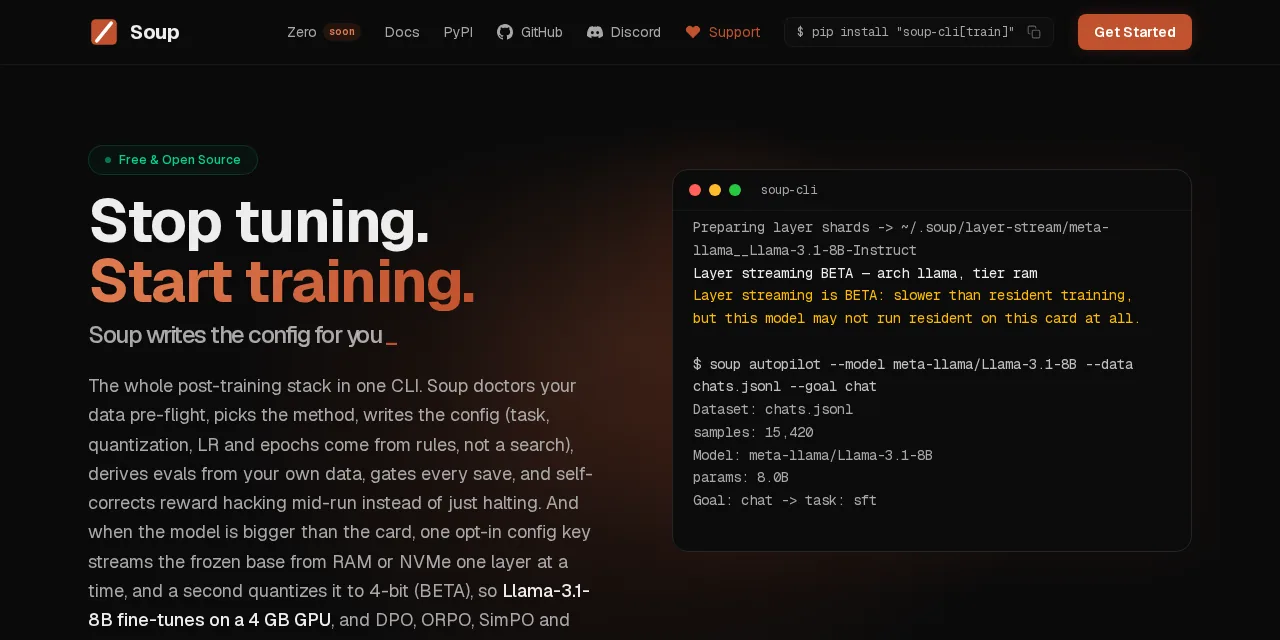
Table of contents
- Key takeaways
- What Soup is and what problem it solves
- How the decide, train and ship flow works
- What happened when I tested it on a machine with no GPU
- What layer streaming is and how much it promises
- When layer streaming beats DeepSpeed
- What the soup ship gate returns
- How it compares with Axolotl, Unsloth and LLaMA-Factory
- What to watch before adopting it
- Frequently asked questions
- Does Soup need a GPU?
- Is Soup free?
- Does it replace Axolotl or Unsloth?
- Conclusion
- Sources
Soup is an open-source command-line interface (CLI) that bundles the whole post-training of a language model into one program: deciding whether training is worth it, preparing the data, writing the config, training, evaluating and deciding whether the result ships. I installed version 0.76.1 on 15 October 2026 on a Linux arm64 machine with no GPU, trained a test LoRA adapter and ran the result through its quality gate. This is what it does, what worked and where the fine print matters.
Key takeaways
- Soup 0.76.1 ships 78 commands after eight months of life: the repository was created on 20 February 2026 and has 181 releases on PyPI.
soup quickstarttrained a LoRA on TinyLlama 1.1B in 30 s of CPU time, tuning 2.25 million parameters (0.20% of the model).soup adviseadvised against training on the quickstart’s own sample data: 20 rows fall short of its 50-row floor.- Layer streaming trains a Llama 3.1 8B on a 4 GB GPU, but the authors warn that the speed figure does not carry over to another machine.
soup shipgave that adapter DON’T SHIP (exit code 2): it got 5 of 6 questions right, the same as the base model.- Telemetry is off by default in 0.76.1; the local audit log is not.
What Soup is and what problem it solves
Soup covers the part a training script leaves out: deciding whether to train, picking the method and knowing whether the resulting model beats the one you started from. When you go fine-tuning an LLM, the job ends up spread across loose tools: one framework to train, another to evaluate, home-grown scripts to clean data and a spreadsheet to compare runs. Its website puts it in one line: "Every other tool stops at ‘hit train and hope.’"
Rafik Mamedov and Alpamys Makazhan publish the project under MePlay, Inc., with an Apache 2.0 licence. It runs on Python 3.10 to 3.12, on NVIDIA GPUs and, experimentally, on Apple Silicon through MLX. Underneath it uses the usual parts: Hugging Face Transformers, PEFT and TRL, bitsandbytes for quantization and, optionally, Unsloth, DeepSpeed or vLLM.
Development moves fast. On 15 October the repository had 9,050 stars, 1,473 forks and 196 open issues, and version 0.76.1 shipped on 14 October, two days after 0.76.0. That pace cuts both ways: fixes land within days, but options change between releases, so pin the one you use.
How the decide, train and ship flow works
The flow has four phases and each one is a command: soup advise decides, soup train trains, soup ship rules and soup diagnose or soup why explain what went wrong. Everything starts from a single soup.yaml file. soup init generates it from 21 templates: chat, code, reasoning, tool calling, vision, DPO, KTO or compliance profiles such as HIPAA or the EU AI Act.
The phases and their commands:
soup advise: analyses the dataset and recommends one of five routes: prompt engineering, RAG, SFT, DPO or GRPOsoup train: trains with 23 methods (SFT, DPO, ORPO, SimPO, KTO, GRPO, PPO, among others) and LoRA or QLoRAsoup ship: compares the tuned model with the base on your task and on eight general suites, and returns SHIP or DON’T SHIPsoup diagnose: looks for seven failure modes after training, such as catastrophic forgetting, over-refusal or memorizationsoup migrate: converts configs from Axolotl, LLaMA-Factory or Unsloth notebooks
If you already know LoRA and QLoRA, the news is not the training itself, which it hands to TRL, but everything around it. Preference methods such as DPO and its alternatives to RLHF are covered, and so is GRPO.
What happened when I tested it on a machine with no GPU
On CPU, Soup installs, trains a small model and evaluates, although every step is slow. I tested it in a Linux arm64 container with 18 cores and 47 GB of RAM, with no accelerator. The uv install pulled PyTorch 2.14.1, Transformers 5.19.0, PEFT 0.21.2 and TRL 0.29.1. soup doctor passed the environment with one warning: "Training will be slow without GPU."
uv venv -p 3.12 .venv && . .venv/bin/activate
uv pip install "soup-cli[train]"
soup doctor
soup quickstart --yes
These four commands create the environment, install Soup with the training dependencies, check the system and launch the demo. soup quickstart writes 20 Alpaca-format examples and a minimal config, and trains a rank-16 LoRA adapter on TinyLlama 1.1B. Training took 30 s and the whole command 46 s. Validation loss ended at 2.63.
Two details in the output give away the project’s haste. The final panel reads "Duration: 0m" and "Loss: -" even though TRL’s metrics, a few lines up, carry the real values. And soup --version does not exist: the version comes from soup version.
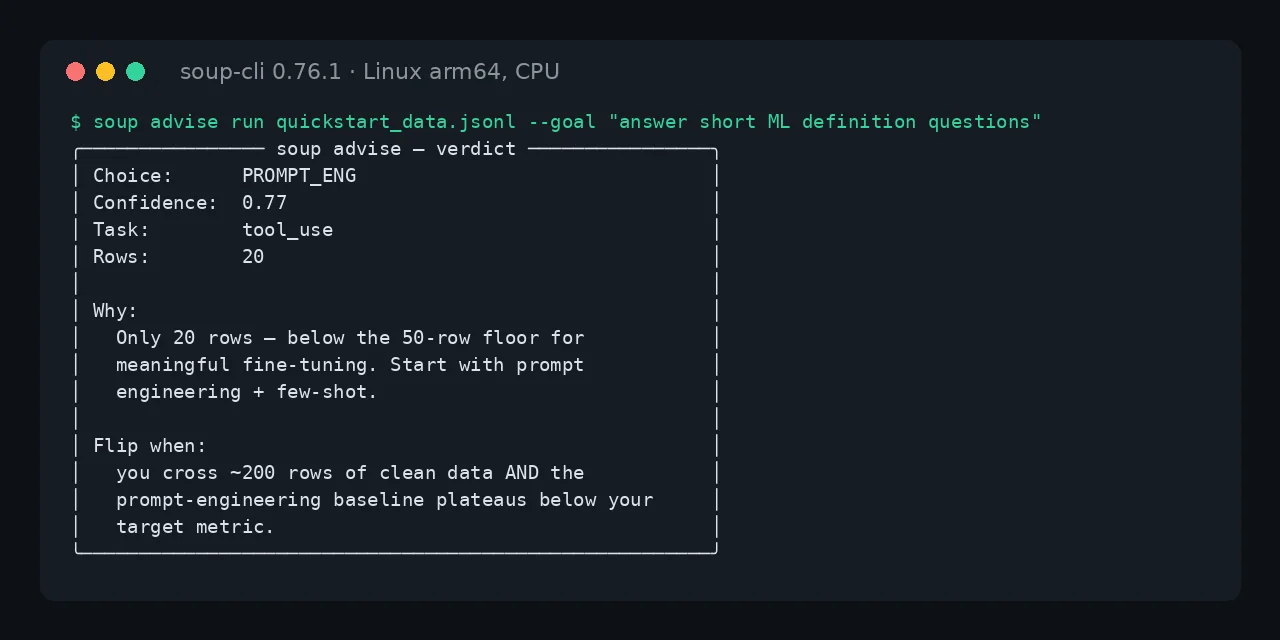
The most useful part of the test came next. I ran the same 20 examples through soup advise and it recommended not training: "Only 20 rows, below the 50-row floor for meaningful fine-tuning". It suggests starting with prompt engineering and switching route past roughly 200 clean rows. It classified the task as tool_use, which it is not, but the verdict was the right one.
What layer streaming is and how much it promises
Layer streaming keeps the frozen base model in RAM or on an NVMe drive and copies one decoder layer at a time into VRAM. Video memory then stops capping the model size. With the base model quantized to NF4, the authors train a LoRA on Llama 3.1 8B on a 4 GB RTX 3050 laptop GPU. One key turns it on, stream_layers: true, and it is in beta.
The figures come with more caveats than usual, which speaks well of the project. The 8B row predates a repair of NF4 gradients, and its VRAM peak was 3.32 GB. Nothing above 8B has been measured on that laptop, and the slowdown against training with the whole model on the GPU (1.43x) was measured only at 0.5B. The documentation says it plainly: "Treat the mechanism as the claim, not the multiplier."
The external validation, on a borrowed machine with eight H100s, found a serious defect. In NF4, above roughly 165 MiB per layer, streaming produced wrong gradients while the loss looked normal. It hit Qwen2.5 32B and 72B, not 8B or 14B, and was fixed in 0.73.0. If you trained a large model on 0.72, the documentation asks you to re-run it.
When layer streaming beats DeepSpeed
Layer streaming is for a single GPU that is too small, not for speed. On the same H100 in bf16, streaming trained at 63.52 tokens/s using 3,935 MiB of VRAM. DeepSpeed ZeRO-3 with CPU offload managed 21.65 tokens/s and took 38,135 MiB.
The authors do not sell that gap as a win. Their report says streaming "is not faster than DeepSpeed, built for a different situation, namely one card that is too small", and adds that eight cards on ZeRO-3 are slower than one card when the model fits on it. The practical rule comes from their own docs: if the model fits on your card, leave streaming off.
What the soup ship gate returns
soup ship folds two questions into one verdict: whether the tuned model wins on your task and whether it forgot what it already knew. The first leg uses a JSONL file with your test cases. The second runs eight suites bundled in the package, scored offline: mini MMLU, common sense, instruction following, arithmetic, tool calls, JSON, safety and over-refusal. By default, a drop of more than 5 points on the second leg already means DON’T SHIP.
soup ship --base TinyLlama/TinyLlama-1.1B-Chat-v1.0 \
  --adapter quickstart_output \
  --task-eval tasks.jsonl --device cpu -o verdict.json \
  --general-suite mini_mmlu,mini_arithmetic
echo $?
This command evaluates the base and the tuned model on six questions of my own plus two of the eight suites, and writes the verdict as JSON. The exit code is what makes it useful in continuous integration: 0 is SHIP, 2 is DON’T SHIP, 3 is a usage error and 1 a runtime failure. A misconfiguration never passes for a failed gate.
I limited it to two suites because the full evaluation did not finish. With all eight suites, float32 and no GPU, it had been generating for over an hour and a half when I stopped it. With two it took 957 s and returned DON’T SHIP with exit code 2. The quickstart adapter got 5 of 6 questions right, the same as the base model, and Soup requires a strict improvement to ship.
The MMLU drop is one answer out of 26 and stays under the 5-point threshold, so the second leg passed the model. The verdict is the sensible one: five steps on 18 generic examples teach the model nothing. With this few questions, --noise-floor is the option to use, since it re-runs the base model to measure how much the evaluation itself varies.
The documentation does not describe the task file format. I took it from the code: each line is an object with prompt and, optionally, expected and scoring (exact, contains, regex or semantic, among others).
How it compares with Axolotl, Unsloth and LLaMA-Factory
Soup does not compete with Axolotl, Unsloth or LLaMA-Factory on the mechanics of training; it competes on everything before and after. That is why it imports their configs: I ran soup migrate --from axolotl on a QLoRA YAML and it translated adapter: qlora into quantization: 4bit and lora_target_linear: true into target_modules: auto. The website warns that Hugging Face dataset names still have to be swapped by hand for local paths.
| Need | What Soup offers | What you do without it |
|---|---|---|
| Decide whether to train | soup advise with five verdicts |
Your own judgement |
| Write the config | soup init, 21 templates |
Axolotl or LLaMA-Factory YAML |
| Train on a small GPU | Layer streaming (beta) | QLoRA or DeepSpeed |
| Decide whether it ships | soup ship, exit codes 0 and 2 |
lm-eval and your own scripts |
| Migrate | soup migrate from three tools |
Not applicable |
What to watch before adopting it
First, the rate of change. Soup has 181 releases in eight months and a record of silent defects, such as wrong gradients at 32B or empty adapters before 0.75.1. Pin the version in your requirements.txt and read the notes before upgrading.
Second, telemetry and auditing. The 0.76.1 help describes --no-telemetry as a way to opt out of anonymous telemetry, but the code keeps it off unless you export SOUP_TELEMETRY=1. What is on by default is a local log: every command appends a line to ~/.soup/audit.jsonl with the user, a machine identifier and the arguments. Turn it off with --no-audit-log or SOUP_NO_AUDIT_LOG=1.
Third, the size. 78 root commands range from an ML-BOM generator to a Model Context Protocol (MCP) server for coding agents. Six cover a concrete use: init, advise, train, ship, export and serve. If you then want to serve the adapter, soup export converts it to GGUF for Ollama.
Frequently asked questions
Does Soup need a GPU?
Not to try it. On CPU it installs, trains small models and evaluates, as I did with TinyLlama 1.1B, but a 7B or 8B model needs an NVIDIA GPU or an Apple Silicon Mac.
Is Soup free?
Yes. It is open source under Apache 2.0 with no paid tier; donations pay for GPU time. The team is preparing a desktop app, Soup Zero, built on the same CLI.
Does it replace Axolotl or Unsloth?
Not entirely, since it uses Unsloth as an optional backend and imports Axolotl configs. What it adds is the pre-flight advice, the ship gate and layer streaming.
Conclusion
Soup is worth it for its two ends more than for the training itself. soup advise would have saved me a pointless run on 20 rows, soup ship confirmed it with DON’T SHIP, and that gate turns "it looks better" into an exit code a pipeline can respect. Layer streaming is the eye-catching feature, but its own authors ask you to treat it with care, and that is sound advice.
If you fine-tune regularly, start with soup advise on your real data before booking GPU hours. This review is also available in Spanish, as the original Soup CLI analysis.
Sources: [1] Soup official website[1], [2] Soup repository on GitHub[2], [3] soup-cli on PyPI[3], [4] Layer streaming documentation[4], [5] External validation on 8x H100[5], [6] soup ship documentation[6].
Sources
Source code
Access all the source code for this post on GitHub.
View on GitHub