How to use DeepSeek Harness with a local model
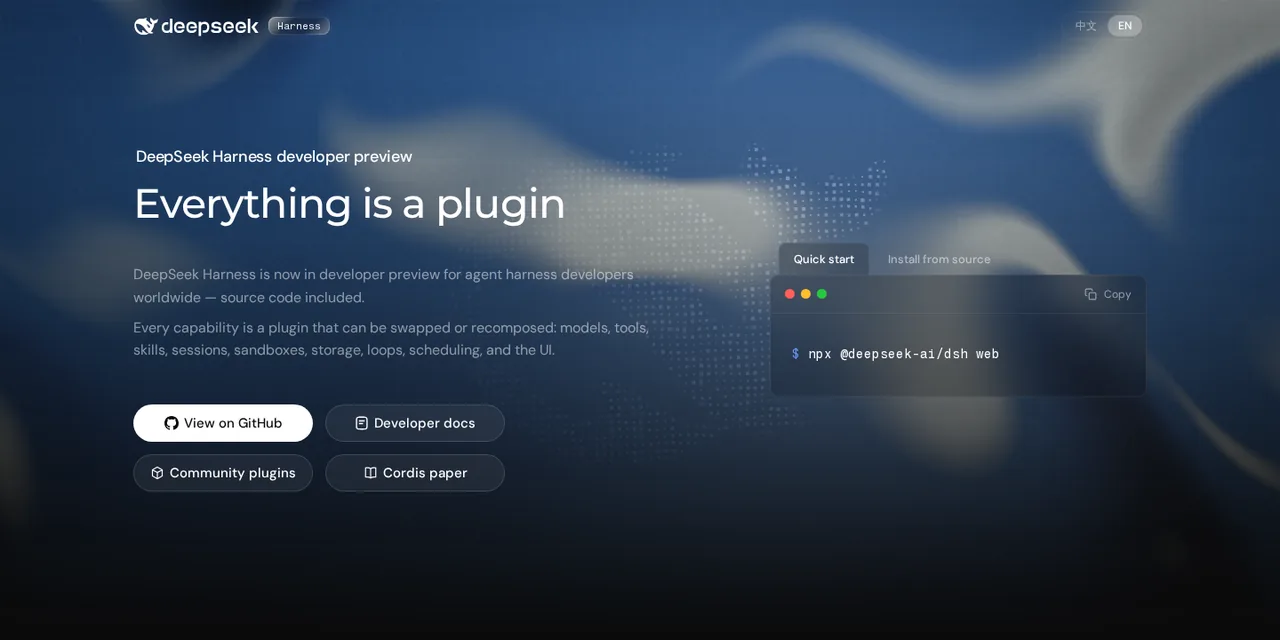
Table of contents
- Key takeaways
- What DeepSeek Harness is and who publishes it
- How it differs from Claude Code, Codex CLI or Goose
- What you need before you start
- How to install dsh with a pinned version
- How to start the local model with llama-server
- How to declare the local provider in settings.yaml
- How to run a task without an interface
- What the agent did with a real task
- The web UI and the session log
- Default sandbox, approvals and telemetry
- What works and what does not with a 4B model
- The short route with Ollama
- Frequently asked questions
- Do I need a DeepSeek API key to use DeepSeek Harness?
- Does DeepSeek Harness have a terminal interface like Claude Code?
- Which local model suits dsh?
- Conclusion
- Sources
DeepSeek Harness (dsh) is the open-source agent harness DeepSeek released in August 2026, and it does not require DeepSeek’s API: it accepts any OpenAI-compatible server. I installed version 0.1.5-rc.2, connected it to a local llama-server running Qwen3.5-4B on CPU and gave it a real coding task in a throwaway repository. This guide has the exact configuration, what the agent did step by step, and the limits that show up with a 4B model.
Key takeaways
- DeepSeek Harness comes from DeepSeek (its official site links to it), is MIT licensed and is a developer preview: its own README warns of breaking changes.
- Everything is a Cordis plugin, including the agent loop, and instead of a terminal interface it ships a web UI, a
headlessmode, an SDK and an ACP server. - To use a local model you need a custom provider in
$DSH_HOME/settings.yamlwith theopenai-completionsprotocol, a placeholder key and acontextWindowthat matches your server. - I tested it on 14 September 2026 on arm64 without a GPU: Qwen3.5-4B left the tests green in 4 of 5 attempts, the ones that finished took between 171 s and 25 min, and none of its code treated ß as a letter.
- By default it only writes inside the workspace, asks for approval to go beyond it and, in
headlessmode, denies without asking.
What DeepSeek Harness is and who publishes it
DeepSeek Harness is an agent harness: the program around the model that gives it tools (read and edit files, run bash, search, delegate to subagents) and keeps the session. The project shortens it to dsh, which is also the executable’s name. The npm package @deepseek-ai/dsh was first published on 10 August 2026. The deepseek-ai/deepseek-harness repository was created on GitHub on 13 August, the same day it reached Hacker News with 747 points.
I do not infer authorship from the GitHub organisation’s name, which has no verified domain. The official DeepSeek Harness page on deepseek.com[1] confirms it by linking to the repository. The MIT licence line "Copyright (c) 2026 DeepSeek" and an npm maintainer with a deepseek.com address add to it.
Adoption has been huge in raw numbers. On 14 September 2026 the repository had 223,890 stars and 26,619 forks, and npm counted 2,034,599 downloads between 10 August and 13 September. Stars measure attention, not quality.
The DeepSeek Harness README[2] warns on its first screen that this is a preview: "DeepSeek Harness is in developer preview and iterating rapidly. THERE WILL BE COMPATIBILITY-BREAKING CHANGES."
How it differs from Claude Code, Codex CLI or Goose
The main difference is that dsh has no privileged core. The dsh architecture documentation[3] puts it this way: "Every part of the product is a plugin, including the model adapter, the tool registry, the session log, and the agent loop itself". Those plugins run on Cordis, a composition framework whose design is described in the arXiv 2608.25512 paper on spatiotemporal composability[4] by Yifan Shi, Wei Zhang and Tianyi Cui.
Compared with Claude Code, Codex CLI and Muse Code, that changes three criteria:
- Surface: there is no terminal interface.
dsh webopens a web UI on127.0.0.1:3080,dsh --profile headlessruns one task and exits, and thesdkandacpprofiles serve other programs over standard input. - Composition: a profile is an ordered stack of YAML layers (
dsh-base, the surface layer and yourcordis.patch.yml). Changing the sandbox, the model or a tool is a patch, not a fork. - Log: everything the model sees comes from an append-only session log. The internal rule is "Model-visible means logged", and resume, fork and the trajectory view all come from that log.
Goose and OpenHands are also open source and work with different model providers. What is specific to dsh is that the agent loop and the permission policy are swapped the same way as the model provider. The official page describes four working modes:
| Mode | What it includes |
|---|---|
| Standard | Full agent with file editing, shell, search, skills, planning, goals, subagents and workflows |
| Code | The same capabilities, exposed as an SDK so the model chains steps inside a single TypeScript program |
| Minimal | Only two tools, persistent bash and str_replace_editor, for comparing models in a minimal setup |
| Creator | Meant for building agent presets, with runtime inspection and in-memory plugin experiments |
What you need before you start
The test fits on a laptop with spare memory, because the model weighs less than 3 GB. You need:
- Node.js; I used v24.16.0
- Docker, to serve the model without compiling anything, or llama.cpp installed on your machine
- A GGUF model that can call tools; I used unsloth’s
Qwen3.5-4B-Q4_K_M.gguf, 2.74 GB - About 5 GB of free RAM for the server, which used 4.85 GiB with a 32,768-token context
The machine was a linux/arm64 development container with 18 cores, 121 GB of RAM and no GPU, shared with other heavy workloads. That affects timings, so every speed figure comes with its load average.
How to install dsh with a pinned version
Install dsh in its own directory and pin the exact version. npm installs 520 packages, which take 282 MB in node_modules:
mkdir dsh-0.1.5 && cd dsh-0.1.5
npm init -y
npm install @deepseek-ai/dsh@0.1.5-rc.2
./node_modules/.bin/dsh --version
The last command prints 0.1.5-rc.2. Pin the full version and do not trust the tags: on 14 September latest pointed at 0.1.5-rc.1 and next at 0.1.5-rc.2. When I installed @deepseek-ai/dsh@0.1.5-rc.1, its 63 internal dependencies declared ^0.1.5-rc.1, a range that accepts rc.2. The result was the rc.1 launcher with 230 packages at rc.2, a combination that matches no published release.
dsh keeps configuration, credentials and sessions in ~/.dsh. The DSH_HOME variable changes that path, and it is worth using so tests do not mix with your normal use.
How to start the local model with llama-server
The llama.cpp server exposes /v1/chat/completions and, with --jinja, applies the model’s chat template, which is what turns its output into tool calls. This is the container I started:
docker run -d --name llama-dsh \
  -p 127.0.0.1:19701:8080 \
  -v "$PWD/models:/models:ro" \
  ghcr.io/ggml-org/llama.cpp:server \
  -m /models/Qwen3.5-4B-Q4_K_M.gguf \
  --host 0.0.0.0 --port 8080 --jinja \
  -c 32768 -t 8 --alias qwen3.5-4b
The image was llama.cpp build 10969 (commit 391fac164). Port 19701 was the one I had free; what matters is publishing it on 127.0.0.1 only, because the server asks for no key. --alias sets the model name dsh sends with every request.
Before adding the harness, check that the model emits tool calls with a minimal request that declares a bash function. Qwen3.5-4B answered with a well-formed ls -la /tmp call. If your model replies with text instead of tool_calls, dsh will not fix that; the guide to function calling with Ollama on your own machine explains how to diagnose it.
How to declare the local provider in settings.yaml
dsh reads providers from $DSH_HOME/settings.yaml and applies changes on the next request, without a restart. This is the exact file I used:
agent-default-model:
  provider: llamacpp
  model: qwen3.5-4b
llm-pi-ai:
  providers:
    llamacpp:
      displayName: llama.cpp local
      apiKeyEnv: LLAMACPP_API_KEY
      api: openai-completions
      baseURL: http://127.0.0.1:19701/v1
      compat:
        supportsDeveloperRole: false
        maxTokensField: max_tokens
        thinkingFormat: qwen-chat-template
      models:
        - id: qwen3.5-4b
          name: Qwen3.5 4B (Q4_K_M)
          contextWindow: 32768
          maxTokens: 4096
          reasoningEfforts:
            off:
            high: high
Each key solves a specific problem:
agent-default-model: the model new sessions start with,headlessones included. Without this section dsh usesdeepseek-officialwithdeepseek-flash.apiKeyEnv: the pi-ai adapter demands a credential even for a server with no authentication. Its documentation says it plainly: "a keyless local server needs a placeholder credential". ExportLLAMACPP_API_KEYwith any value.api:openai-completionsis Chat Completions. The other two protocols a custom provider accepts areopenai-responsesandanthropic-messages.compat: pi-ai treats a URL it does not recognise as if it were OpenAI’s API. The dsh model configuration guide[5] recommends starting withsupportsDeveloperRole: falseandmaxTokensField: max_tokenswhen a compatible server rejects requests.contextWindow: a hand-declared model inherits 262,144 tokens if you leave it out. With a 32,768-token server, context compaction would kick in too late.thinkingFormatandreasoningEfforts:qwen-chat-templatesendschat_template_kwargs.enable_thinking, Qwen3.5’s reasoning switch. If you pick no reasoning level, it stays off. In a first test without these keys the model opened its answer with a reasoning block; with them, none of the task’s steps had one.
How to run a task without an interface
The headless profile runs one task, prints the final answer to standard output and exits with code 0 if the turn completes. I prepared a repository with a four-line src/strings.js, a test and a package.json with no dependencies, and ran dsh from inside it:
export LLAMACPP_API_KEY=any_local_placeholder
export DSH_TELEMETRY_DISABLED=1
cd demo-repo
~/dsh-0.1.5/node_modules/.bin/dsh --profile headless "$TASK"
The TASK variable held this request:
In src/strings.js add and export a function slugify(text) that
lowercases the text, removes accents (for example á becomes a),
replaces every run of characters that are not letters or digits
with a single hyphen, and trims hyphens from both ends. Add tests
for slugify in test/strings.test.js and run `node --test` until
all tests pass.
The directory you launch dsh from is the workspace root, so the sandbox only allows writes there. Startup has a fixed cost. dsh’s first request carried 7,307 tokens, almost all of it system instructions and the schemas of 25 tools (25,585 characters of JSON). An equivalent request with no cache took a median of 110 s over three repetitions, with the load average between 16 and 26; on later steps llama-server‘s prefix cache reuses it.
What the agent did with a real task
Qwen3.5-4B left the tests green in 4 of 5 attempts, but the duration depended more on the machine’s load than on the model. And none of its slugify versions meets the request to the letter. These are the five attempts, with the one-minute load average when each one started:
| Attempt | Load at start | Duration | Calls | Tokens generated | Outcome |
|---|---|---|---|---|---|
| 1 | 21.4 | 1,225 s | 8 | 1,672 | 6 tests green after fixing one error |
| 2 | 20.3 | 1,147 s | 17 | 3,728 | 7 tests green after seven debugging steps |
| 3 | 12.1 | 171 s | 7 | 1,551 | 4 tests green on the first try |
| 4 | 6.4 | Stopped at 2,704 s | 21 | 4,966 | 5 of 7 tests green; stopped at the 45 min limit |
| 5 | 18.2 | 1,514 s | 25 | 5,504 | 6 tests green after a badly encoded test and two failed edits |
In attempt 1 the model read both files in parallel and wrote slugify with normalize('NFD') and an invalid regular expression, /^+-+|-+$/g. When it ran node --test, Node returned SyntaxError: Invalid regular expression: /^+-+|-+$/g: Nothing to repeat next to [exit code: 1]. On the next step it changed it to /^-+|-+$/g and all six tests passed.
Attempt 2 got stuck on a subtler bug. It left out the + in [^a-z0-9], so hello...world became hello---world, and for seven steps it blamed normalisation, a cache and the way the module was imported, with ad hoc checks in node -e. It eventually found the one-character fix and closed the task at 17 calls.
Attempt 4 started with the lowest load of all and was still the worst. Instead of normalize('NFD') it wrote a list of accented letters that it turned into capitals (é into E) right before a [^a-z0-9] that deleted them, so café became caf. It also wrote a test expecting test-123-, with the trailing hyphen the request itself said to trim. It piled up 21 calls, debugging in node -e, while the load climbed above 30, and I stopped it at 45 min.
Attempt 5 wrote another invalid expression, /^++|++$/, and two of its edits failed because the old_string no longer matched the file. On top of that, the model itself wrote café, a badly encoded accent, into its test at step 4, and did not fix it until 17 steps later. It ended with the same solution as attempts 1 and 3.
No attempt triggered an approval: every command ran inside the sandbox, in the workspace. All 78 calls arrived with valid arguments, and only 4 returned an error, all of them edits whose old_string no longer matched the file. The median duration was 1,225 s, counting attempt 4 as the longest.
Green tests do not mean the request was met. I ran the functions against inputs the model left out of its tests:
| Input | Attempts 1, 3 and 5 | Attempt 2 |
|---|---|---|
Año nuevo en España |
ano-nuevo-en-espana |
ano-nuevo-en-espana |
Straße |
stra-e |
strae |
Øresund |
resund |
resund |
Привет мир |
empty string | empty string |
The request asked to separate anything that is not "letters or digits", and [^a-z0-9] treats ß, ø and Cyrillic as separators. The tests missed it because the same model wrote them with Latin examples only.
On CPU the time goes into generating, not reading. The prefix cache in llama-server reused nearly all of the context. The web UI reported a 97% cache hit rate for attempt 1, where each step added between 88 and 497 new tokens.
Generation, on the other hand, ranged from 0.84 to 20.73 tokens/s, with a median of 4.98 over 81 requests. Meanwhile, the machine’s one-minute load average moved between 6 and 50.
The web UI and the session log
dsh web serves the interface on port 3080; with --port and --no-open I started it on another port without opening a browser. The URL it prints carries a process token, and without it the server returns 401. By default it only accepts connections from the same machine.
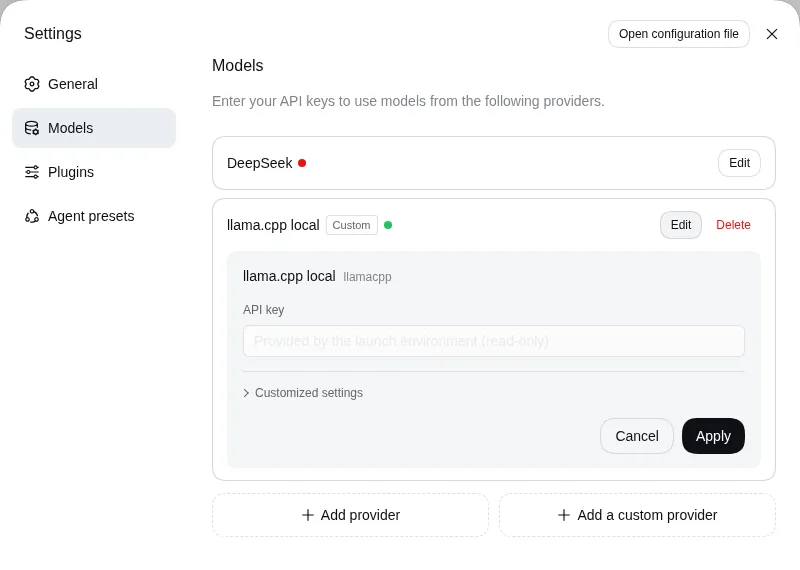
The interface reads the same $DSH_HOME, so sessions launched in headless mode show up in the sidebar with their title and history. Under Settings → Models the custom provider carries a Custom label. Its key shows as "Provided by the launch environment (read-only)", because it comes from an environment variable and not from the credential store.
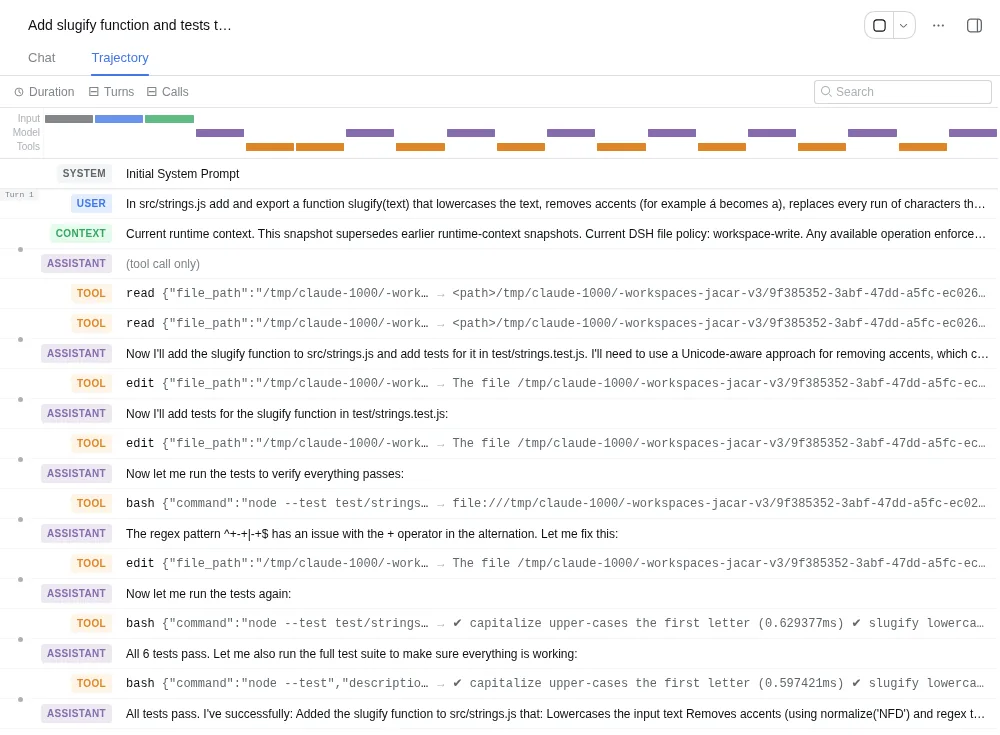
The Trajectory tab is the most useful part for debugging a small model. It lists, in order, every system message, every call with its arguments and every result, all taken from the session log. This is attempt 1:
Default sandbox, approvals and telemetry
dsh runs the commands the model generates on your machine. Its safety notice[6] admits it has not been audited and must not be treated as "secure or production-ready". These are the base layer defaults in 0.1.5-rc.2:
| Setting | Default | How to change it |
|---|---|---|
| File sandbox | workspace-write: writes to the workspace and temporary areas |
DSH_PERMISSION_MODE or the web UI selector |
| Approvals | ask; with danger-full-access it becomes never |
Per-session preset |
| Sandbox engine on Linux | bubblewrap or Landlock | dsh-sandbox-local plugin |
| Telemetry | FEEDBACK_ONLY: uploads the session only if you send a rating or written feedback |
DSH_TELEMETRY_DISABLED with any value |
| Log upload to the DeepSeek API | Off (enabled: false) |
Optional patch, official route only |
The bash tool does not ask permission for every command. It runs inside the sandbox, and only after the sandbox blocks something can the model retry the command asking for a wider mode, which is when approval kicks in. In headless mode there is nobody to answer, so that request is denied: the runtime context dsh injects into the model says so with "without an available answerer, the request fails closed".
I checked it with a task that asked to run touch /home/vscode/dsh-sandbox-probe.txt, outside the workspace. The sandbox returned "Read-only file system" and the marker [sandbox: file access denied under workspace-write mode]. The model retried the command asking for danger-full-access, the widest mode rather than the narrowest one the tool suggests. The log recorded the approval request with outcome unavailable, and the file was never created.
Telemetry deserves a note even with a local model. In FEEDBACK_ONLY mode, rating an answer or leaving written feedback sends the session prefix "including context" to harness-telemetry.deepseeksvc.com, according to the plugin documentation. If you run the model on your own hardware precisely so nothing leaves it, export DSH_TELEMETRY_DISABLED.
What works and what does not with a 4B model
With a 4B model, dsh works as a harness: calls arrived well formed and the run, read the error, fix loop worked when the error was explicit. What fails depends on the model and the hardware, summarised by criterion:
- Call format: works. All 78 calls arrived with valid arguments; the 4 errors were edits with a stale
old_string - Self-correction with tests: works with explicit errors, like attempt 1’s
SyntaxError, and gets lost with subtle bugs, like the missing+in attempt 2 or the accents in attempt 4 - Fidelity to the request: weak. No version treats ß or Cyrillic as letters, and attempt 3’s final summary claims it added four tests when it added three
- Speed on CPU: from 171 s to more than 45 min for a function under 20 lines, depending on machine load
- Context: with 32,768 tokens and 7,307 of them fixed, attempt 5 reached 20,416 tokens in use; a longer task will hit compaction sooner
- Reasoning: I turned it off for speed, and the Qwen3.5-4B model card[7] advises at least 128K of context "to preserve thinking capabilities", so turning it on here is not free
- Web search: the base layer configures it with
DEEPSEEK_API_KEY; I did not test it, but without that key do not count on it
One more detail for anyone thinking about CI. When I stopped attempt 4 with SIGTERM, the headless process exited with code 0 and printed an intermediate model message as if it were the final answer, even though the turn had not closed. Check the outcome with your own tests, not with the exit code.
The short route with Ollama
If you already use Ollama, Ollama release v0.32.11[8], published on 14 August 2026, added ollama launch dsh. According to Ollama’s DeepSeek Harness documentation[9], it installs @deepseek-ai/dsh if missing, stores its settings in ~/.ollama/launch/dsh/settings.yaml and does not touch your ~/.dsh/settings.yaml. I have not tested it on this machine; if you want that route, start by deploying Ollama on Ubuntu 24.04.
The llama-server route has one advantage for learning: you see and control every piece, from the chat template to the context size, and when something breaks you know which layer to look at.
Frequently asked questions
Do I need a DeepSeek API key to use DeepSeek Harness?
No. DeepSeek’s route is the default, but a custom provider in settings.yaml and agent-default-model pointing at it are enough to work without leaving your machine. The DeepSeek card stays in the interface with its red missing-key indicator, with no effect on anything else.
Does DeepSeek Harness have a terminal interface like Claude Code?
Not in 0.1.5-rc.2. It ships a web UI, a single-task headless mode, a JSON-RPC SDK server and an ACP server for automation clients. The launcher help mentions a tui profile, but as an example of a profile you would have to install yourself.
Which local model suits dsh?
One that emits reliable tool calls with your server’s template and whose context fits the 7,307-token startup prompt with room to work. Qwen3.5-4B at Q4_K_M handled a single-file task and fell short on fidelity to the request in all five attempts. I did not measure larger models for this guide, so I will not recommend a specific one: try yours on a task with tests and read the trajectory view.
Conclusion
DeepSeek Harness 0.1.5-rc.2 worked against llama-server without DeepSeek’s API and without touching its code: an openai-completions provider, a placeholder key and a correctly declared context were enough. With Qwen3.5-4B on CPU it makes a good test bench, because the session log and the trajectory view show exactly where a small model goes wrong. For real work, try a larger model behind the same settings.yaml, review the code even when the tests pass and pin the version, because the project promises to break compatibility.
If what you want is a terminal agent, compare first with Claude Code, Codex CLI and Muse Code. The Spanish version of this guide is at Cómo usar DeepSeek Harness con un modelo local.
Sources
- official DeepSeek Harness page on deepseek.com
- DeepSeek Harness README
- dsh architecture documentation
- arXiv 2608.25512 paper on spatiotemporal composability
- dsh model configuration guide
- safety notice
- Qwen3.5-4B model card
- Ollama release v0.32.11
- Ollama’s DeepSeek Harness documentation
- @deepseek-ai/dsh metadata on the npm registry
- Hacker News, DeepSeek Harness developer preview
Source code
Access all the source code for this post on GitHub.
View on GitHub