How to build an agent with Dify Agent and a local model
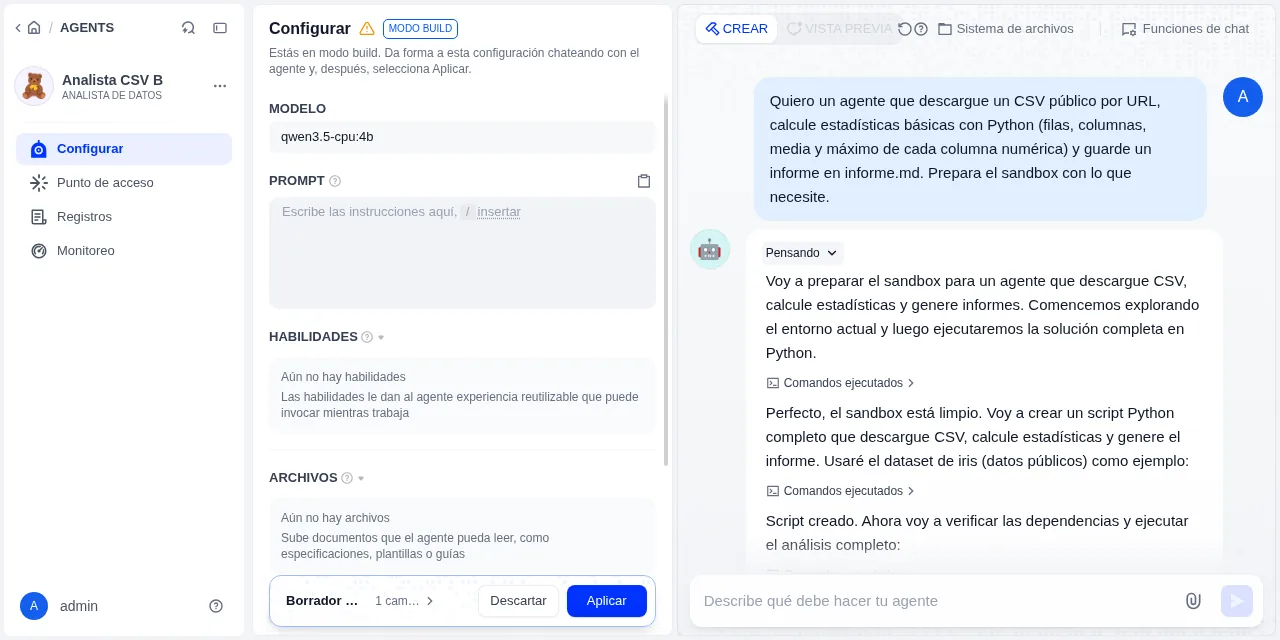
Table of contents
- Key takeaways
- What Dify Agent is and how it differs from the classic agent
- What you need before you start
- How to run Dify 1.17.1 without taking ports 80 and 443
- How to add Ollama to the same Compose project
- How to connect Ollama to Dify with the official plugin
- Why Dify flags your local model as incompatible
- How to configure and publish the agent in Community Edition
- What the published agent achieves with Qwen3.5-4B on a CPU
- What Build mode does with a 4B model
- What the sandbox can reach on the network
- Frequently asked questions
- Does Dify Agent work with a local model without a GPU?
- Why does Dify say my model is incompatible?
- Can the Dify Agent sandbox reach my local network?
- Conclusion
- Sources
Dify Agent is the Linux-sandbox agent that Dify released as a beta in version 1.16.0, and it comes switched on in its Docker Compose setup. This guide brings it up with Dify 1.17.1, connects a local model served by Ollama and reports what happened when I put it to work with Qwen3.5-4B on a processor with no graphics card: where it delivered, where it made up data and what its sandbox can reach on the network.
Key takeaways
- Dify 1.17.1 starts 16 services with
docker compose up -dand publishes ports 80, 443 and 5003. TheEXPOSE_*variables in.envmove them to another port and to127.0.0.1. - The local model comes in through the official
langgenius/ollama1.0.2 plugin with tool calling switched on. Ollama needs more context than the 4,096 tokens it assigns without a GPU: the published agent’s first request already took 2,703. - The agent’s model picker flags as "Incompatible" any model whose name starts with
qwen3.5,qwen2orgpt-4, among others. It is a list of regular expressions in the frontend, not a test of the model. - With a hand-written prompt, the published agent downloaded the CSV, installed pandas and returned the correct figures in three out of three runs, with a median of 182 s. In two of them it added commentary with false data.
- In Build mode, none of three sessions of 21 to 27 minutes ended with an answer: one made up its data, another counted 149 rows out of 150 and the third died on the Ollama plugin’s 300 s read limit.
- The sandbox reaches the internet through a Squid proxy that blocks private networks, but it reaches
agent_backenddirectly. Dify warns that it is not a hardened security boundary.
What Dify Agent is and how it differs from the classic agent
Dify Agent works inside a Linux sandbox of its own: it runs commands, installs programs and reads and writes files. The classic agent, which the documentation now calls Legacy Agent, only calls the tools you configure. The new one arrived as a beta in Dify 1.16.0[1], released on 17 July 2026, and its release notes ask you to offer it "only to trusted, non-malicious users".
Its configuration has two parts. The capability (prompt, model, skills, files and tools) is defined once. The task is the message of each run.
Version 1.17.0[2], from 25 August, added the E2B sandbox backend and a workspace-level skills manager. It also snapshots the home directory when you publish and compacts the history. The current release is 1.17.1[3], from 10 September.
The guide to Dify as a self-hosted LLMOps platform covers the rest of the platform on version 1.15.0. This article only deals with the new agent. The licence is unchanged: a modified Apache 2.0 that forbids running a multi-tenant service without permission and removing the logo from the console.
What you need before you start
The documentation asks for at least 2 cores, 4 GiB of RAM and Docker Compose 2.24.0 or later, not counting the model. I tested it on 16 September 2026 with this machine and these versions:
| Component | Version or detail |
|---|---|
| Machine | Linux arm64, 18 cores, 121 GB of RAM, no GPU, shared with other workloads |
| Docker | Engine 29.5.2 and Compose 2.40.3 |
| Dify | 1.17.1 (dify-api, dify-agent-backend, dify-agent-local-sandbox) |
| Plugin daemon | langgenius/dify-plugin-daemon:0.6.10-local |
| Ollama plugin | langgenius/ollama 1.0.2 |
| Ollama | 0.34.1 |
| Model | qwen3.5:4b: 4.7 B parameters in Q4_K_M, 3.4 GB, Apache 2.0 licence |
The machine was shared, and its one-minute load average moved between 6 and 73 during the tests. Every time I give comes with its load next to it. Call and token counts come from the Ollama log and from a small Python logging proxy I placed between Dify and Ollama from the second test onwards.
How to run Dify 1.17.1 without taking ports 80 and 443
Clone the release tag and create .env from the example:
git clone --depth 1 --branch 1.17.1 https://github.com/langgenius/dify.git
cd dify/docker
cp .env.example .env
The Compose file publishes nginx on ports 80 and 443 on every interface, and plugin_daemon on 5003. Because the port lines look like ${EXPOSE_NGINX_PORT:-80}, the listen address fits inside the variable. Change these lines in .env:
EXPOSE_NGINX_PORT=127.0.0.1:21580
EXPOSE_NGINX_SSL_PORT=127.0.0.1:21543
EXPOSE_PLUGIN_DEBUGGING_PORT=127.0.0.1:21503
TRIGGER_URL=http://localhost:21580
ENDPOINT_URL_TEMPLATE=http://localhost:21580/e/{hook_id}
NEXT_PUBLIC_SOCKET_URL=ws://localhost:21580
SERVICE_API_URL=http://localhost:21580
APP_WEB_URL=http://localhost:21580
Check with docker compose config that the three published ports bind to 127.0.0.1. The variables TRIGGER_URL, ENDPOINT_URL_TEMPLATE and NEXT_PUBLIC_SOCKET_URL ship with localhost and an implicit port 80, so I aligned them with the new port. SERVICE_API_URL and APP_WEB_URL ship empty, and that way the Access Point tab showed http://localhost/v1, without the port. With the value set, the addresses came out complete after recreating the containers. If you are upgrading an older install that uses the bundled Weaviate, the 1.17.1 notes require a staged Weaviate upgrade from 1.27.0 to 1.39.2 first.
Start the stack with docker compose up -d. The Docker Compose deployment guide[4] lists 16 services:
- seven core services:
api,api_websocket,worker,worker_beat,web,plugin_daemonandagent_backend - eight dependencies:
weaviate,db_postgres,redis,nginx,ssrf_proxy,agent_ssrf_proxy,sandboxandlocal_sandbox - the
init_permissionstask, which fixes permissions and exits
With the images already pulled, up -d took 20 s. Once running, the 15 containers used about 2.2 GB of RAM according to docker stats. Create the admin account at http://localhost:21580/install.
How to add Ollama to the same Compose project
Ollama goes in a separate file, docker-compose.ollama.yaml, so you do not touch the docker-compose.yaml that Dify generates. That way it shares the default network with plugin_daemon, the container that calls the model:
services:
  ollama:
    image: ollama/ollama:0.34.1
    environment:
      OLLAMA_CONTEXT_LENGTH: "32768"
      OLLAMA_KEEP_ALIVE: "60m"
    volumes:
      - ./volumes/ollama:/root/.ollama
    ports:
      - "127.0.0.1:21534:11434"
OLLAMA_CONTEXT_LENGTH is the line that matters most. According to the Ollama documentation[5], with less than 24 GiB of VRAM the default context is 4k, and for agents it recommends at least 64,000 tokens. The published agent’s first request already took 2,703 tokens, and the Build-mode sessions reached 25,753.
32,768 tokens was enough for me; if you have RAM to spare, go to 64,000. With that context and the model loaded, the Ollama container used 5.5 GB.
Export COMPOSE_FILE so you do not repeat both files in every command, then start Ollama and pull the model:
export COMPOSE_FILE=docker-compose.yaml:docker-compose.ollama.yaml
docker compose up -d ollama
docker compose exec ollama ollama pull qwen3.5:4b
The 3.4 GB download took 67 s.
On a busy machine, pin the thread count as well. With the threads Ollama picked, my first 200-token test request ran for more than five minutes without finishing, with the load average above 22. With num_thread 6, the same request finished in 37 s and 11 s on two consecutive attempts, at loads of 33.6 and 22.8. Note the model name too, because it matters in the next section:
docker compose exec ollama sh -c \
  'printf "FROM qwen3.5:4b\nPARAMETER num_thread 6\n" > /root/Modelfile \
  && ollama create lab/qwen35-cpu:4b -f /root/Modelfile'
How to connect Ollama to Dify with the official plugin
Dify talks to Ollama through the langgenius/ollama plugin, which you install from Marketplace. Once it is installed, add the model in the provider settings with these fields:
- Model Name:
lab/qwen35-cpu:4b, the exact name Ollama uses - Base URL:
http://ollama:11434, without/api, because the plugin appends/api/chat - Model context size:
32768, the same value asOLLAMA_CONTEXT_LENGTH - Function call support: Yes. It defaults to No, and the agent works by calling tools
- Vision support: Yes, because
qwen3.5:4baccepts images
Dify validates the credential with a 5-token request before saving it. Model requests leave from plugin_daemon, which sits on the default network and does not use the SSRF proxy, so the name ollama resolves directly. If Ollama runs on another machine, that address has to be reachable from that container.
To pick a different model, the comparison of open models with tool calling and the guide to function calling with Ollama on your own machine explain which families handle tools well.
Why Dify flags your local model as incompatible
With the first name I gave it, qwen3.5-cpu:4b, the agent’s model field showed an Incompatible badge, and the picker hid it behind Show incompatible models. The cause is the model-compatibility.ts[6] file in 1.17.1. It holds a list of regular expressions that the frontend matches against the model’s display name, including ^qwen3\.5, ^qwen3-, ^qwen2, ^gpt-4, ^deepseek-v3 and ^glm-4. A second list marks GPT-5.5, Claude Opus 4.8 and 4.7, Sonnet 4.6, DeepSeek V4 Pro and Flash, Qwen3.7 Max and GLM 5.1, among others, as suggested.
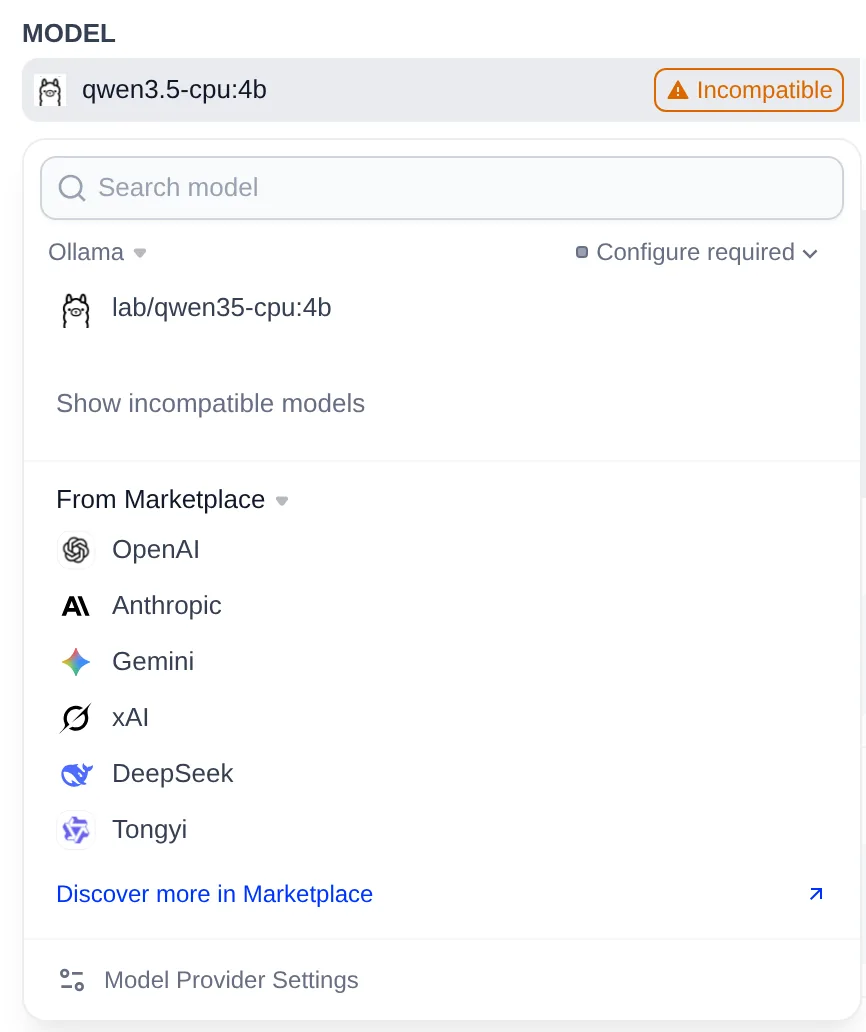
The check ignores the provider and does not test the model: it only reads the name. With the badge on, the agent still ran the three Build-mode sessions I describe below, but the model parameters button was disabled. Once the lab/qwen35-cpu:4b alias was registered in Dify, the badge went away and the button became active.
Renaming removes the warning, not the reason for it. The guide to building an agent[7] puts it this way: "Agent performance rises and falls with the model, so pick a recent one". The incompatible list holds the models Dify considers too weak for the sandbox. Qwen3.5 is on that list by name, and the tests in the next sections partly prove Dify right.
How to configure and publish the agent in Community Edition
From Agents, click Create and Create from Blank, give it a name and a role, and pick the model. Two details of the Community Edition change the flow the documentation describes:
- The Preview tab is disabled, with the notice "Preview is available on Dify Cloud and Enterprise only." To test what you publish you have the web app and the service API.
- On my first attempt, the prompt I typed had not been saved yet when I clicked publish, and the published version came out empty. Before publishing, reload the page and check that the prompt is still there.
For this agent I wrote the prompt by hand, with five steps and an explicit ban on making up data. I ran it in Spanish; this is the English translation:
You are a data analyst working in a Linux sandbox.
When the user gives you the URL of a CSV:
1. Download it with curl -fsSL to datos.csv. If the download fails,
   stop and explain the error. Do not make up data or use a
   sample dataset.
2. If pandas is missing, install it with
   python3 -m pip install --user pandas.
3. With Python, compute the number of rows and columns, and the
   mean and maximum of every numeric column.
4. Save the result to informe.md as a Markdown table.
5. Reply with the contents of informe.md.
Dify puts that text in front of its own system prompt. The first request to Ollama carried 8,294 characters of system prompt, 522 of them mine, and four tools: shell_run, shell_wait, shell_input and shell_interrupt. The rest describes the sandbox, the dify-agent command-line tool and a sample script that starts with #!/usr/bin/env -S uv run --quiet --script.
Publish with Publish update, create a key under Access Point and call the service API. The Agent API[8] only supports streaming responses. The query below is the Spanish one I sent ("Analyze this CSV"):
URL=https://raw.githubusercontent.com/mwaskom/seaborn-data/master/iris.csv
jq -n --arg q "Analiza este CSV: $URL" \
  '{inputs: {}, query: $q, response_mode: "streaming", user: "prueba"}' |
curl -sN http://localhost:21580/v1/chat-messages \
  -H "Authorization: Bearer your_api_key_here" \
  -H "Content-Type: application/json" -d @-
The response arrives as agent_thought events, carrying each tool call and its output, and agent_message events with the text. The message_end event closes the turn with the token count.
What the published agent achieves with Qwen3.5-4B on a CPU
With the hand-written prompt, the agent completed the task in all three runs I sent against the iris CSV from seaborn-data. All three tables matched my own independent calculation: 150 rows, 5 columns and means of 5.84, 3.06, 3.76 and 1.20. The free text it added around them was another story:
| Run | Total time | Tool calls | Model calls | Load average at start | Free text |
|---|---|---|---|---|---|
| 1 | 181.9 s | 5 | 6 + 1 for the title | 73.1 | says 49 flowers per species; there are 50 |
| 2 | 107.8 s | 6 | 7 + 1 for the title | 19.8 | attributes the global petal mean to setosa |
| 3 | 197.5 s | 13 | 14 + 1 for the title | 18.2 | no errors |
The median was 182 s. Generation ran between 23.8 and 35 tokens per second in 26 of the agent’s 27 model calls, with a median of 29.4. The remaining call, the first one of run 1, dropped to 6 with the load at 73. Dify sends the title call in parallel with the first step, with num_predict 500, and in all three runs it used up those 500 tokens.
Three more details came out of the logs:
- pandas 3.0.5 was downloaded again on every run. Whatever the agent installs during a published run is temporary; if you want to keep it, install it in Build mode and apply the draft.
- In run 3, the model tried to write to
/tmp, which the system prompt forbids and Landlock blocked, and it calledpython3with made-up paths before getting it right. - The figures come from the Python the agent runs; the sentences around them come from the model. If you plan to reuse the report, ask for the table only.
What Build mode does with a 4B model
Build is the mode in which the agent itself prepares the sandbox, the skills, the files and a note it reads at the start of every conversation. With the local model it was the part that went worst: none of three sessions ended with an answer.
I sent the same request, in Spanish and with no URL, to three new agents. In English it reads:
I want an agent that downloads a public CSV by URL, computes basic statistics with Python (rows, columns, mean and maximum of each numeric column) and saves a report to informe.md. Prepare the sandbox with whatever it needs.
| Session | Duration | Model calls | Input and output tokens | Load average | Outcome |
|---|---|---|---|---|---|
| A | 1,435.7 s | 32 | 409,504 and 13,008 | 13 to 38 | made up its data |
| B | 1,642.8 s | 46 | 685,345 and 17,812 | 6 to 15 | report with 149 rows out of 150 |
| C | 1,264.5 s | 24 | 316,730 and 19,664 | 6 to 10 | cut off by a 503 error |
Session A was the most worrying one, because its result looked right:
- It took four attempts to install pandas. It copied the sample script without the
-Sflag forenv(exit code 127), trieduv sync --add, which does not exist, anduv pip installwithout a virtual environment, before getting it right withpip install. - It tried nine dataset URLs that do not exist. I checked them afterwards from outside the sandbox: eight return 404 and one returns 403.
- It made up three different datasets, of 8×4, 6×3 and 5×5 rows by columns, and its code called the invented ones a "dataset real". It rebuilt the report twice, each time on a different file.
- It uploaded the last
data.csvto the agent’s files and wrote into its note that it would use a sample dataset if the download failed.
Session B picked a real URL, the iris.data file from the UCI repository. Because that file has no header row, pandas took the first flower as column names. That is why the report counts 149 rows and labels the columns 5.1, 3.5, 1.4 and 0.2.
Before that, nine of session B’s commands hit "Permission denied". It was trying to write to /tmp, to /workspace and to someone else’s home directory, and Landlock only lets it write to its working folder and its $HOME.
Session C tried seven URLs; six failed (five with 404 and one with 403) and the seventh, a real UCI CSV, was never processed. The uv run --script script that the system prompt suggests failed with Invalid cross-device link (os error 18) while unpacking a dependency.
Then session C died with a 503. The cache for Qwen3.5, a hybrid model, only recovered a 2,059-token checkpoint, so Ollama took 326 s to reprocess another 21,490 tokens. The Ollama plugin stops waiting after 300 s, as the error itself says (read timeout=300).
In A and B, the model’s last step was a reasoning block announcing a final summary it never wrote. B and C saved nothing to the configuration.
I applied none of the three drafts. With A’s draft, the published agent would have read, in every conversation, the instruction to use sample data when a download fails. With a small model, write the prompt and the skills yourself, and use Build only with concrete orders, such as installing a dependency you want to keep.
What the sandbox can reach on the network
The local_sandbox container sits on two internal networks only: one shared with agent_backend and one with agent_ssrf_proxy, a Squid 6.13 proxy. Its HTTP_PROXY and HTTPS_PROXY variables point at that proxy. The squid-agent.conf template[9] allows /agent-stub/ on agent_backend and /files/ on the API, blocks private networks and lets the rest of the internet through. I checked it from inside the container with curl and Python:
| Destination | Result |
|---|---|
https://pypi.org, https://example.com, http://neverssl.com |
200 through the proxy |
http://ollama:11434, http://redis:6379, http://api:5001/console/api/setup |
403 from Squid |
http://169.254.169.254 and host.docker.internal |
403 from Squid |
http://api:5001/files/… |
reaches the API, which answers 404 for a file that does not exist |
http://agent_backend:5050 without the proxy |
reaches it directly; the backend answers 404 |
| The internet without the proxy | fails, because the network is internal and does not resolve names |
The Compose comment on local_sandbox says the proxy "only allows agent_backend /agent-stub/ and the Dify API /files/*", but that sentence describes the exceptions inside the private network. The internet stays open, and the agent downloaded pandas and the CSV without me configuring anything. One more nuance: curl ignores the upper-case HTTP_PROXY for http:// URLs, so without -x it tries a direct connection and fails to resolve the name. Python’s urllib does use the proxy and gets the 403.
To let the agent reach an internal service, add its range to SSRF_PROXY_ALLOW_PRIVATE_IPS. Since 1.17.1 that variable also applies to the agent’s proxy, which used to ignore it. I found no variable in 1.17.1 to cut off internet access: the Squid template ends with http_access allow all.
The Community Edition interface describes the isolation plainly. The sandbox runs as an unprivileged user with Docker’s default capabilities. Landlock only protects the agent’s and the session’s files, and every process shares the same PID namespace.
The agent documentation[10] sums it up: "the Agent runtime is not intended to provide a hardened security boundary between mutually untrusted users or workloads". If you plan to open it to users you do not control, a code sandbox such as E2B, which Dify already supports as a backend, or a separate machine are better starting points.
Frequently asked questions
Does Dify Agent work with a local model without a GPU?
It works, within limits. With Qwen3.5-4B on 18 cores, the three published runs returned correct figures with a median of 182 s. By contrast, none of the three Build-mode sessions ended with an answer, and one made up its data. For open-ended tasks, Dify’s suggested list points to models such as GPT-5.5 or DeepSeek V4.
Why does Dify say my model is incompatible?
Because its name matches a list of regular expressions in the frontend that includes qwen3.5, qwen2, gpt-4 and glm-4. The badge did not stop the agent from running, but it disables the model parameters panel.
Can the Dify Agent sandbox reach my local network?
Not by default. Its Squid proxy returns 403 for private addresses, except for the API’s /files/ routes and the backend’s /agent-stub/, and the backend is also reachable without the proxy. To open an internal service, add its range to SSRF_PROXY_ALLOW_PRIVATE_IPS.
Conclusion
Dify Agent self-hosts with the usual Compose setup and accepts a local Ollama model once five fields are set right. With a 4B model on a CPU it handles short, well-described tasks, as long as you write the prompt yourself and trust only the figures that come out of the code. For the agent to build its own configuration, you need a model from the suggested list.
The next step is to give it a skill you wrote yourself: the pattern is explained in skills and subagents. The Spanish version is at Dify Agent con un modelo local.
Sources: [1] Dify 1.16.0[1], [2] Dify 1.17.0[2], [3] Dify 1.17.1[3], [4] Agent, Dify documentation[10], [5] Build an Agent[7], [6] Deploy Dify with Docker Compose[4], [7] Agent API[8], [8] model-compatibility.ts[6], [9] squid-agent.conf.template[9], [10] Ollama plugin on the Dify Marketplace[11], [11] Context length, Ollama documentation[5], [12] Ollama 0.34.1[12], [13] Qwen3.5-4B on Hugging Face[13], [14] Dify licence[14].
Sources
Source code
Access all the source code for this post on GitHub.
View on GitHub