How to install Open WebUI with Docker and Ollama, slim image included
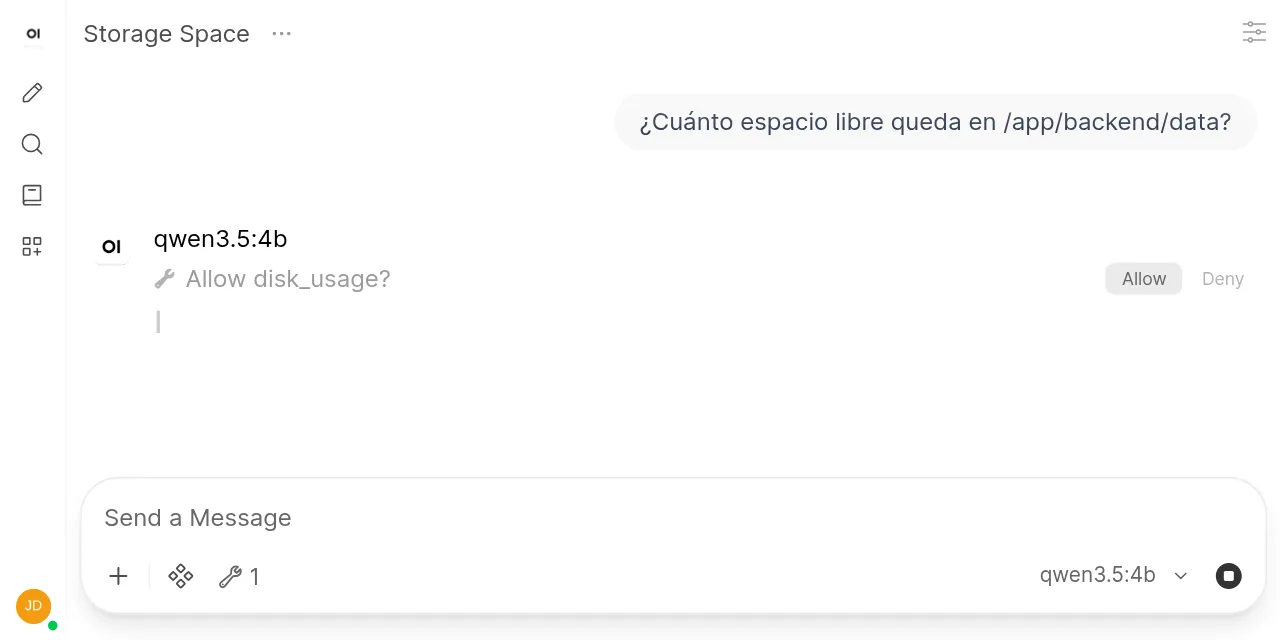
Table of contents
- Key takeaways
- What Open WebUI is and what version 0.11 brings
- What you need before you start
- Slim or full image: how much each one takes
- The docker-compose.yml with Ollama and Open WebUI
- How to start the stack and pull a model
- How to create the admin account
- Why gemma3:1b says it does not support tools
- The second failure: 12 minutes for 57 tokens
- How to turn on tool approval
- Why the model could not see the tool
- What happens when you click Allow or Deny
- How to upgrade from a version older than 0.11.1
- What the slim image does not do
- Frequently asked questions
- Which Open WebUI image should I pick to use with Ollama?
- Why does Open WebUI say my model does not support tools?
- Does tool approval work in every chat?
- Conclusion
- Sources
Open WebUI 0.11.4 installs from a two-service docker-compose.yml, Ollama plus the slim image, and on arm64 that image downloads 176 MB against 1.49 GB for the full one. I set it up on 27 September 2026 on an 18-core arm64 machine with no GPU. I created the admin account, chatted with two local models and tried the tool approval that shipped in 0.11.1. Along the way two failures turned up that the official install guide does not mention, and here they are with their fix. There is also a Spanish version of this guide.
Key takeaways
- The
0.11.4-slimtag took 829 MB on disk and the full one 5.82 GB. For chatting with Ollama models, slim does the same job. - With the default settings, gemma3:1b replies with the error "does not support tools". Unticking Builtin Tools on that model fixes it.
- The built-in tools take 6,274 tokens, and Ollama cut the prompt to 2,050 with its 4,096 context. Raise
num_ctxor your tool disappears without warning. - Tool approval is off by default and experimental. You switch it on in Admin > Interface > Tool Permissions, and each user picks Ask for approval in their chat.
- Version 0.11.1 fixed 12 CVEs published on 9 September 2026, with CVSS scores up to 8.7. Upgrade with a pinned tag and copy the volume first.
What Open WebUI is and what version 0.11 brings
Open WebUI is a self-hosted web interface for talking to language models: it manages users, stores chats and talks to Ollama or to any OpenAI-compatible API. The slim image runs no models itself, so it needs an engine such as Ollama next to it. If you are new to that engine, the guide to install Ollama on your computer covers it on its own.
The 0.11 series came out on 27 July 2026 and its latest patch, 0.11.4, on 21 September. The 0.11.4 release notes[1] put the slim image at "around 175 MB, near enough 89% smaller than the last release". Version 0.11.1[2], from 25 August, added human approval of tool calls and a security advisory that recommends upgrading as soon as you can.
What you need before you start
The install needs Docker with the Compose v2 plugin and about 5 GB free for the images and a small model. This is what I used:
- Docker 29.5.2 with Docker Compose v2.40.3. If you are starting from scratch, follow the guide to install Docker on Debian 13
- An arm64 Linux machine (an OrbStack VM on Apple silicon) with 18 cores, 47 GiB of RAM and no GPU
- Ollama 0.34.4, the release GitHub marked as latest on 27 September 2026. Version 0.40.0 already shows up in the repository, but its notes talk about a pre-release and Docker Hub only has
0.40.0-rc0 opensslto generate the session key
The Open WebUI image is multi-arch: the registry publishes linux/amd64 and linux/arm64 variants for both tags used here.
Slim or full image: how much each one takes
The slim image is the full one without the local machine-learning stack: no torch, no Whisper, no embedding models and no headless browser. I pulled both pinned tags, and this is what docker image ls --tree reported on arm64:
| Tag | Download (arm64) | On disk (arm64) | When to use it |
|---|---|---|---|
0.11.4-slim |
176 MB | 829 MB | Ollama or another API runs the models |
0.11.4 |
1.49 GB | 5.82 GB | RAG with local embeddings, PDFs, local voice |
0.11.3-slim |
1.38 GB | not measured | Baseline: the previous slim |
On arm64 the slim image shrank by 87 % between 0.11.3 and 0.11.4, close to the 89 % the notes announce. The image variants documentation[3] puts it this way: "Nothing extra is required to run it", and chat works exactly as on :main.
Always pin a version. :main and :latest are rebuilt on every change to the main branch, and :latest does not point to the newest stable release.
The docker-compose.yml with Ollama and Open WebUI
Create a folder for the project and, inside it, a .env file with the key that signs sessions. Without a fixed key, every time you recreate the container everyone gets logged out:
mkdir open-webui && cd open-webui
echo "WEBUI_SECRET_KEY=$(openssl rand -hex 32)" > .env
The docker-compose.yml starts two services on the same network. Open WebUI finds Ollama by its service name and only publishes its port on 127.0.0.1:
services:
  ollama:
    image: ollama/ollama:0.34.4
    volumes:
      - ollama:/root/.ollama
    restart: unless-stopped

  open-webui:
    image: ghcr.io/open-webui/open-webui:0.11.4-slim
    depends_on:
      - ollama
    ports:
      - "127.0.0.1:3000:8080"
    volumes:
      - open-webui:/app/backend/data
    environment:
      - OLLAMA_BASE_URL=http://ollama:11434
      - WEBUI_SECRET_KEY=${WEBUI_SECRET_KEY}
    restart: unless-stopped

volumes:
  ollama:
  open-webui:
The open-webui volume holds the SQLite database with users, chats and settings, and the ollama volume holds the models. Ollama does not publish port 11434 on the host, so only Open WebUI talks to it. In my test I used port 22300 instead and mounted a shared model cache in place of the ollama volume; the rest of the file is identical. For more on the .env file, see environment variables and secrets in Docker Compose.
How to start the stack and pull a model
Start both containers and pull the models inside the Ollama one:
docker compose up -d
docker compose exec ollama ollama pull qwen3.5:4b
docker compose exec ollama ollama pull gemma3:1b
curl -s http://127.0.0.1:3000/api/version
The last command returned {"version":"0.11.4","deployment_id":""} as soon as the container passed its health check. In the log, Open WebUI applies its database migrations and warns that CORS_ALLOW_ORIGIN is *, which you should set to your domain before exposing it. qwen3.5:4b weighs 3.4 GB and supports tools; gemma3:1b weighs 815 MB and does not, and that difference matters two sections below.
At idle, with the load average under 1.3, the Open WebUI container used 293 MiB of RAM (median of three samples). Ollama, with both models loaded and qwen3.5:4b at an 8,192-token context, used 5.7 GiB.
How to create the admin account
The first account that signs up becomes the administrator. Open http://127.0.0.1:3000, click Get started and fill in name, email and password in the Create Admin Account form. Keep that password safe: without it you lose access to the instance settings.
According to the Open WebUI quick start[3], sign-up closes by itself once the admin exists. To invite more people, turn on New Sign Ups in Admin > Authentication; new accounts stay Pending until you approve them. Right after creating the account, the model picker already listed qwen3.5:4b and gemma3:1b with no connection to configure, thanks to OLLAMA_BASE_URL.
Why gemma3:1b says it does not support tools
My first message to gemma3:1b got no answer, only this error: registry.ollama.ai/library/gemma3:1b does not support tools. The cause is that since version 0.10.0 every model uses the native function-calling mode. That mode adds Open WebUI’s built-in tools (memory, notes, calendar, automations…) to each request, and Ollama rejects the request if the model does not declare tool support.
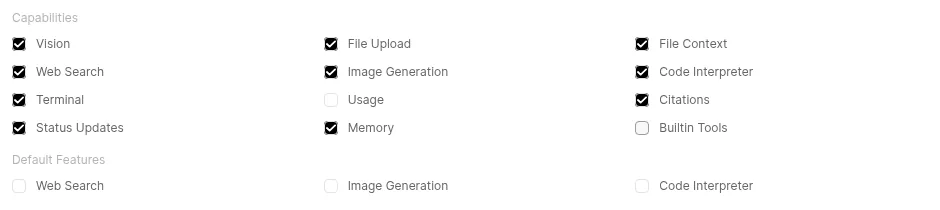
The fix is in Admin > Models. Edit gemma3:1b, untick Builtin Tools under Capabilities and click Save & Update. The tools documentation[4] recommends exactly this for small models that cannot handle the tools parameter. With the box unticked, the same question got two correct sentences in Spanish.
The second failure: 12 minutes for 57 tokens
That first gemma3:1b reply took 12 min 57 s to generate 57 tokens, with the machine shared with other workloads (load average 52). I repeated the measurement with the machine idle by calling the Ollama API. Each row is the median of three runs, all started with a load average under 3:
| Model | Threads | Tokens/s generating |
|---|---|---|
| gemma3:1b | 18 (default) | 0.44 |
| gemma3:1b | 17 | 120.3 |
| gemma3:1b | 16 | 123.7 |
| gemma3:1b | 8 | 125.2 |
| gemma3:1b | 4 | 106.2 |
| qwen3.5:4b | 18 (default) | 0.25 |
| qwen3.5:4b | 8 | 56.6 |
The slowdown did not come from other workloads: it repeats at idle. By default Ollama starts one thread per core, 18 on this VM, and with all 18 busy generation collapses; with 17 it already runs at 120 tokens/s. My hypothesis is that, with no core left free, any other process on the system stalls every thread, but I have not verified it. With 8 threads the same model ran 284 times faster than with 18.
I do not generalise this to other hardware, but if your CPU is this slow, try the num_thread (Ollama) parameter under the model’s Advanced Params with a value below your core count. I set it to 8 for both models.
How to turn on tool approval
Tool approval stops the model before each call and asks whether you allow it. It ships disabled and marked experimental, and it has two switches: one for the administrator and one for each user. The environment variable reference[5] documents the first one as ENABLE_TOOL_PERMISSIONS; I used the switch in the interface, which stores the same setting.
These are the steps I followed:
- In Admin > Interface, turn on Tool Permissions and save
- In Workspace > Tools, create a new tool with the code below and confirm the arbitrary-code warning
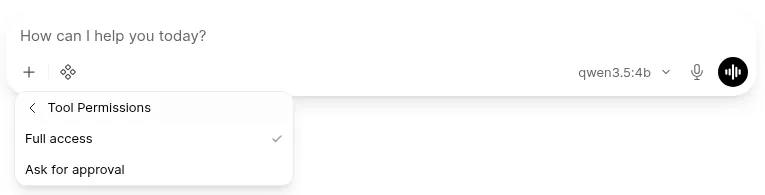
- In a new chat with qwen3.5:4b, open the + menu, go to Tool Permissions and pick Ask for approval
- In the integrations menu, turn on the Disk Usage tool
The test tool reports the free space in a directory on the server. It is harmless, but it runs inside the container, which is exactly what approval is meant to guard:
"""
title: Disk usage
description: Reports disk space for a directory on the Open WebUI server
version: 0.1.0
"""
import shutil

class Tools:
    def __init__(self):
        pass

    async def disk_usage(self, path: str = "/app/backend/data") -> str:
        """
        Report total, used and free disk space for a directory on the server.
        :param path: Directory to inspect
        """
        total, used, free = shutil.disk_usage(path)
        gib = 1024**3
        return (
            f"{path}: {total / gib:.1f} GiB total, "
            f"{used / gib:.1f} GiB used, {free / gib:.1f} GiB free"
        )
Open WebUI fills in the name, ID and description from the opening block. Each method’s docstring is what the model reads to decide whether to call it. As the tool development guide[6] warns: "Granting a user the ability to create or import Tools is equivalent to giving them shell access to the server."
Why the model could not see the tool
With everything switched on, qwen3.5:4b answered twice that it had no tool called disk_usage. The request did include it, and the Ollama log explained why: truncating input prompt limit=2050 prompt=6274. The built-in tools plus mine added up to 6,274 tokens. With the default 4,096 context, Ollama cut the prompt and the tool definition went with it.
You have two ways out. Raise num_ctx (Ollama) under the model’s Advanced Params, which is what I did (8,192), or untick Builtin Tools if you do not use memory, notes or the calendar.
With an 8,192-token context and a freshly restarted Ollama, the approval prompt appeared after 52 s (median of three runs). That time goes on loading the model and processing those 6,268 tokens on the CPU. In the following conversations, with the prompt already cached, it took 1.3 s (also a median of three).
What happens when you click Allow or Deny
When the model asks for the tool, the reply stops at "Allow disk_usage?" with two buttons. After Allow, the tool ran and the model answered "Hay 2155.1 GiB de espacio libre disponible en /app/backend/data" (2155.1 GiB free). That matches the 2.2 TB free that df -h reports inside the container. After Deny, Open WebUI hands the model the text Error: tool call rejected by user. and marks the call as denied.
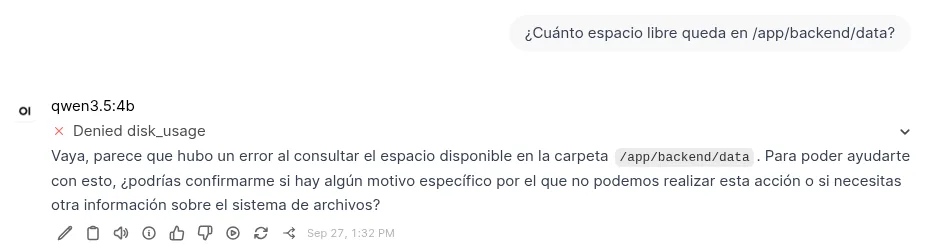
The pending call is stored in the message itself, so it survives a page reload. For the same reason it does not work in temporary chats, and automations and channel replies always run with full access. I cover this pattern of stopping an agent before it acts in human-in-the-loop in AI agents. The underlying mechanics are in function calling with Ollama on your own machine.
How to upgrade from a version older than 0.11.1
If your install predates 0.11.1, upgrade. On 9 September 2026 NIST’s National Vulnerability Database published twelve CVEs affecting versions "until 0.11.1". The most severe, CVE-2026-87995[7], has a CVSS 3.1 score of 8.7.
I tested the upgrade from 0.11.0-slim to 0.11.4-slim with a saved chat. First stop the container and copy the volume with a throwaway container (in my test the volume was called b5p3-upg_open-webui):
docker compose stop open-webui
docker run --rm -v open-webui_open-webui:/data:ro -v "$PWD":/backup \
  alpine:3.22 tar czf /backup/open-webui-backup.tgz -C /data .
Then change the tag in docker-compose.yml and run docker compose up -d. Open WebUI applied three migrations on start and the chat was still there. Check the size of the copy: 0.11.0-slim had downloaded 889 MB of embedding models into cache/embedding inside the volume. 0.11.4-slim no longer loads them, but it does not delete them either.
The volume name is prefixed with the Compose project name, which defaults to the folder name. Check it with docker volume ls before copying. Since 0.11.3, a failed migration stops the start instead of leaving it half done. That was the "chat.timer_at" failure when upgrading from 0.11.0, 0.11.1 or 0.11.2.
What the slim image does not do
The slim image starts and chats like the full one, but every feature that relied on a local model now needs an external service. According to the 0.11.4 notes and the documentation, these are the differences that matter most:
- Database: SQLite or PostgreSQL only. With MySQL or MariaDB it refuses to start
- File storage: local only. With S3, Azure or Google Cloud it refuses to start
- Documents and RAG: needs embeddings from Ollama, OpenAI or Azure and PostgreSQL with pgvector. A PDF or Word file fails without an external extractor
- Voice: no Whisper and no local voices; it needs external speech-to-text and text-to-speech engines
- Web search: no DDGS, so you need a provider with a key
- Code interpreter: the browser downloads numpy or pandas from cdn.jsdelivr.net
If you only use Open WebUI as a chat front end for Ollama, none of this affects you. If you need local RAG over PDFs, use the full image or run those services separately. To expose the instance outside your network with TLS, the guide to Llama 3.3 and Mistral with Ollama and Open WebUI on Ubuntu 24.04 covers the Traefik side.
Frequently asked questions
Which Open WebUI image should I pick to use with Ollama?
0.11.4-slim. It downloads 176 MB on arm64 against 1.49 GB for the full image, and chat with Ollama models works the same. Pick the full image only if you need local embeddings, PDF parsing without external services or local voice.
Why does Open WebUI say my model does not support tools?
Because since version 0.10.0 native mode adds the built-in tools to every request, and Ollama rejects it if the model does not support them. Untick Builtin Tools in that model’s capabilities or use a model with tool support, such as qwen3.5:4b.
Does tool approval work in every chat?
No. Only in saved chats whose user chose Ask for approval, and only if the administrator turned on Tool Permissions. Temporary chats, automations and channel replies always run with full access.
Conclusion
With Ollama 0.34.4 and the 0.11.4-slim image, Open WebUI stays at 829 MB on disk and under 300 MiB of RAM at idle. It is the option I recommend for a home server or a small VM. Both stumbles I hit come from the native tool mode: untick Builtin Tools on models that do not support tools and raise num_ctx on the ones that do.
Tool approval does what it promises: the model stops, you decide, and a denial reaches it as an error. It is still experimental, so do not treat it as a security boundary. Creating tools amounts to handing out a shell on the server, and that permission belongs to the administrator. If you want to compare against another engine, the guide to install llama.cpp is an alternative to Ollama.
Sources
Source code
Access all the source code for this post on GitHub.
View on GitHub