Frigate 0.18 with Docker Compose: what changes and how to upgrade from 0.17
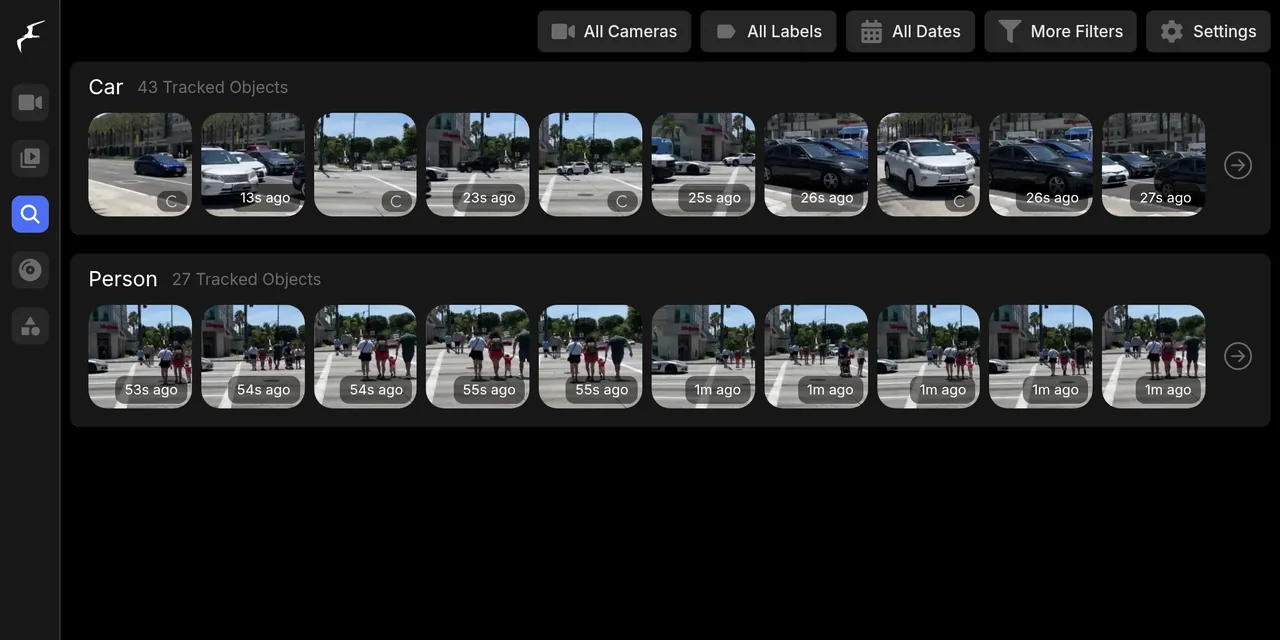
Table of contents
- Key takeaways
- What Frigate 0.18 brings
- How to install Frigate 0.18 with Docker Compose
- How to simulate an RTSP camera with mediamtx and ffmpeg
- How to add the camera and enable CPU detection
- First start and logging in
- Reviewing events, recordings and snapshots
- What changes when you upgrade from 0.17 to 0.18
- Profiles: switching detection without a restart
- What I did not test
- Frequently asked questions
- Can I try Frigate without a real camera?
- What do I do with my 0.17 config when upgrading?
- Do I need an accelerator to use Frigate 0.18?
- Conclusion
- Sources
Frigate 0.18, released on 12 September 2026, is the version that lets you configure the network video recorder (NVR) entirely from its interface and switch profiles without a restart. I installed it with Docker Compose, upgraded it from 0.17 with a simulated RTSP camera and noted what changes in your config. This guide works for a fresh install and for an upgrade. There is also a Spanish version.
Key takeaways
- Frigate 0.18.0 came out on 12 September 2026 and, as of 7 October, it is still the latest 0.18.x, according to the GitHub release list.
- The release notes say: "Frigate no longer saves annotated JPEG snapshots (.jpg) to disk." After upgrading, my install wrote no new
.jpgand kept the 15 from 0.17. - Going from 0.17 to 0.18 with Compose means changing the image tag. Frigate copies your config to
backup_config.yaml, migrates it, and on its own removedsync_recordings,timelapse_argsandclean_copy. - A profile that only tracks people stopped creating car events when I activated it from Settings, with no restart: 58 cars before and after, and people went from 34 to 50 in 100 seconds.
- With no GPU or accelerator, the
cpudetector works for testing, but the documentation does not recommend it for general use.
What Frigate 0.18 brings
Frigate 0.18 moves configuration into the browser and adds profiles, a chat with an AI agent and new video-review tools. The 0.18.0 release notes[1] separate breaking changes from new features. The table lists what matters most and whether I checked it myself.
| Change | Type | Tested |
|---|---|---|
| Full configuration from Settings, with per-field validation | Feature | Yes, I saw the per-camera menu |
| Configuration profiles that switch without a restart | Feature | Yes |
Chat with an AI agent and more than one GenAI provider with roles |
Feature and migration | No, I have no model connected |
| Motion search, debug replay and export cases | Feature | No |
Only the clean WebP snapshot is stored (<camera>-<id>-clean.webp) |
Breaking | Yes |
clean_copy, sync_recordings and timelapse_args removed |
Breaking | Yes, with automatic migration |
| FFmpeg 8 and go2rtc 1.9.14 | Breaking | Partly: the image ships FFmpeg 8.1.1 |
The DELETE /api/export endpoint is gone |
Breaking | No |
Version 0.18 also removes the DeGirum detector, deprecates DeepStack and schedules FFmpeg 5 for removal in 0.19. If you run the JinaV2 semantic search model on a GPU, you must reindex the embeddings, per the same notes.
How to install Frigate 0.18 with Docker Compose
Frigate 0.18 installs with one Compose service, one folder for the config and another for video. This is what I used on 7 October 2026, on an arm64 Linux box with Docker Engine 29.5.2 and Compose 2.40.3, no GPU. Add this service to a compose.yml in a working folder:
  frigate:
    image: ghcr.io/blakeblackshear/frigate:0.18.0
    restart: unless-stopped
    shm_size: "512mb"
    volumes:
      - ./config:/config
      - ./media:/media/frigate
      - type: tmpfs
        target: /tmp/cache
        tmpfs:
          size: 500000000
    ports:
      - "8971:8971"
      - "5000:5000"
Port 8971 is the authenticated interface and 5000 is the internal access without it, per the installation documentation[2]. On my shared machine I remapped them to 28000 and 28001. Shared memory (shm_size) comes from the formula (width × height × 1.5 × 20 + 270480) ÷ 1048576 plus about 40 MB for logs: with my 540×960 camera that gives about 55 MB, so the 512 MB above is more than enough. The standard image is multi-architecture, and the -tensorrt, -rk and -rocm variants target specific hardware.
A fresh install needs a minimal config. To reproduce this guide, write the config from the next sections before bringing anything up. The config and media folders are bind mounts: put them on a disk with room, because the video folder grows with every camera.
How to simulate an RTSP camera with mediamtx and ffmpeg
To try Frigate without a camera, publish a looped video over RTSP (Real-Time Streaming Protocol). I used MediaMTX[3] v1.21.1 as the server and the FFmpeg that already ships in the Frigate image as the publisher. The video is a 3-minute clip of a pedestrian crossing in Anaheim (California), CC0 on Wikimedia Commons[4].
The original file weighs 502.7 MB and is vertical (2160×3840). Download it and cut 50 seconds from the part with cars and pedestrians, scaled to 540×960 at 10 frames per second:
u=https://upload.wikimedia.org/wikipedia/commons/1/13
f=3_min_pedestrian_crossing_Katella_Avenue_%28Harbor_Boulevard%29
g=_Anaheim%2C_California_July_2022.webm
curl -sSL -A "jacar-lab/1.0" -o anaheim.webm "$u/$f$g"
docker run --rm -v "$PWD":/w \
  --entrypoint /usr/lib/ffmpeg/7.0/bin/ffmpeg \
  ghcr.io/blakeblackshear/frigate:0.18.0 \
  -v error -y -ss 130 -t 50 -i /w/anaheim.webm -an \
  -vf scale=540:960,fps=10 -c:v libx264 -preset veryfast \
  -crf 24 -g 20 -pix_fmt yuv420p /w/clip.mp4
The result, clip.mp4, is 7.3 MB. Now add the two services that publish it, above the Frigate one, in the same compose.yml:
name: b8p20
services:
  mediamtx:
    image: bluenviron/mediamtx:latest
    restart: unless-stopped
  publisher:
    image: ghcr.io/blakeblackshear/frigate:0.18.0
    entrypoint: ["/usr/lib/ffmpeg/7.0/bin/ffmpeg"]
    command: >
      -nostats -loglevel error -re -stream_loop -1
      -i /clip.mp4 -c copy -f rtsp -rtsp_transport tcp
      rtsp://mediamtx:8554/patio
    volumes:
      - ./clip.mp4:/clip.mp4:ro
    depends_on: [mediamtx]
    restart: unless-stopped
  # the frigate service from above goes here
-re reads the file at real speed, -stream_loop -1 repeats it forever and -c copy avoids re-encoding it. MediaMTX accepts an unauthenticated publisher on port 8554 by default, so the simulated camera lives at rtsp://mediamtx:8554/patio inside the Compose network. b8p20 is my lab's prefix; use any name you like.
How to add the camera and enable CPU detection
Frigate reads the camera, records and detects with a config of about 40 lines. This is the one I used after migrating it, saved as config/config.yml:
mqtt:
  enabled: false
detectors:
  cpu1:
    type: cpu
    num_threads: 3
ui:
  timezone: Europe/Madrid
record:
  enabled: true
  alerts:
    retain:
      days: 2
  detections:
    retain:
      days: 2
snapshots:
  enabled: true
  quality: 70
objects:
  track: [person, car]
The cpu detector avoids needing an accelerator. The object detectors guide[5] reads: "The CPU detector is not recommended for general use." Frigate repeats it in the log with CPU detectors are not recommended and should only be used for testing or for trial purposes. For a real camera you want a Coral, an OpenVINO detector on Intel or a GPU.
The second half of the config defines the camera and a zone. The calzada zone covers from 45% to 100% of the image height:
cameras:
  patio:
    ffmpeg:
      inputs:
        - path: rtsp://mediamtx:8554/patio
          roles: [detect, record]
    detect:
      enabled: true
      width: 540
      height: 960
      fps: 5
    zones:
      calzada:
        coordinates: 0,0.45,1,0.45,1,1,0,1
version: 0.18-0
The detect and record roles share one input, so Frigate opens a single stream. For a camera with two streams, the main one for recording and the substream for detection, you save CPU. Start everything with docker compose up -d.
First start and logging in
With authentication enabled, Frigate creates the admin user on first start and writes the password to the log once. Read it with:
docker compose up -d
docker compose logs frigate | grep -A4 "Created a default user"
Open https://localhost:8971 with that user (the certificate is self-signed, so the browser will warn you). Change the password in Settings, under Users. Port 5000 asks for no credentials: do not publish it outside your machine or behind a reverse proxy. In my test, with no limits, Frigate used about 736 MiB of RAM; if you want to cap it, see resource limits and logging in Compose.
Reviewing events, recordings and snapshots
As soon as the simulated camera publishes, Frigate starts creating events. The Explore tab lists tracked objects with their thumbnail, and Review groups alerts by moment. Frigate groups detected people and cars in Review, and notes on each event the zones they step on, such as calzada.
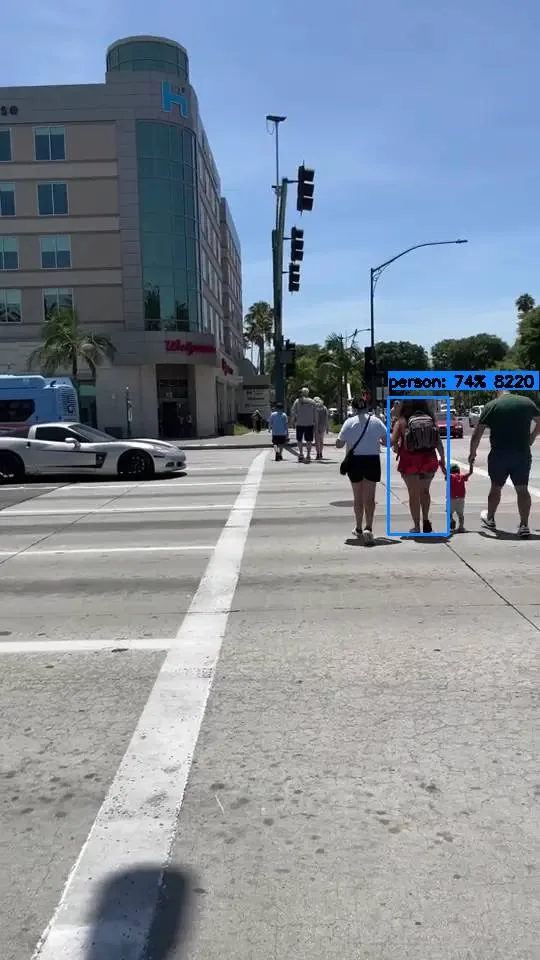
That image comes from the API: /api/events/<id>/snapshot.jpg?bbox=1 draws the box over the clean snapshot, which is what changed in 0.18. The same event offers its clip at /api/events/<id>/clip.mp4, which returned a 2.8 MB MP4, and the unannotated snapshot at snapshot-clean.webp, at 47 KB. After about 8 minutes of testing, media/recordings took 50 MB and media/clips 6.4 MB.
What changes when you upgrade from 0.17 to 0.18
Upgrading means stopping the container, copying the config and database, and changing the image tag. I started with Frigate 0.17.0 and the config from the previous section, but with the old options. Once it had 15 events, I made the copy and moved up a version:
docker compose stop frigate
mkdir -p backup && cp config/config.yml config/frigate.db backup/
sed -i 's/frigate:0.17.0/frigate:0.18.0/' compose.yml
docker compose up -d frigate
The copy follows the release notes' recommendation. The log showed Migrating frigate config from 0.17-0 to 0.18-0... and Making backup of DB before migrations..., and Frigate left backup_config.yaml and backup.db in /config. The backup_config.yaml was identical to my 0.17 config. This is what the migration removed, as a diff:
   enabled: true
-  sync_recordings: false
-  export:
-    timelapse_args: "-vf setpts=0.04*PTS -r 30"
   alerts:
...
   enabled: true
-  clean_copy: true
   quality: 70
...
-version: 0.17-0
+version: 0.18-0
Three more findings from this migration:
ui.date_formatalready failed on 0.17.0. The first time I included it, Frigate 0.17.0 loggedConfig Validation ErrorswithExtra inputs are not permitted, and my camera produced no events until I removed it and restarted.ui.time_formatkept working on 0.18.0, even though the notes list it as removed. The API returnedtime_format: 24hourwith no error. Do not rely on it: delete it when you can.- Zones needed no change. My zone with coordinates as a string loaded unedited, and the API returned it with the field
enabled: true. The notes warn of an automatic migration and say you may have to edit by hand if it fails.
On disk, the snapshot change shows when you count files: after the upgrade, media/clips held 15 .jpg files (all from 0.17) and no new ones, plus 104 -clean.webp. The 0.18.0 image takes 6.57 GB on disk (1.56 GB of content). The 0.17.0 image takes 6.21 GB (1.45 GB). The new one adds FFmpeg 8.1.1 next to versions 5 and 7.
Profiles: switching detection without a restart
A profile is a named set of changes on top of each camera's config, and it activates without a restart. The notes describe it this way: "Profiles let you define named overrides on top of your base camera configuration and switch between them on the fly". I defined one, solo_personas, that narrows what the camera tracks to people:
profiles:
  solo_personas:
    friendly_name: Solo personas

cameras:
  patio:
    profiles:
      solo_personas:
        objects:
          track:
            - person
I added both blocks to the config and restarted Frigate once so it would load them. Then I activated the profile in Settings, Global configuration, Profiles, without touching the container. The config API then returned track: ['person'] for the camera and /api/profile/active answered solo_personas.
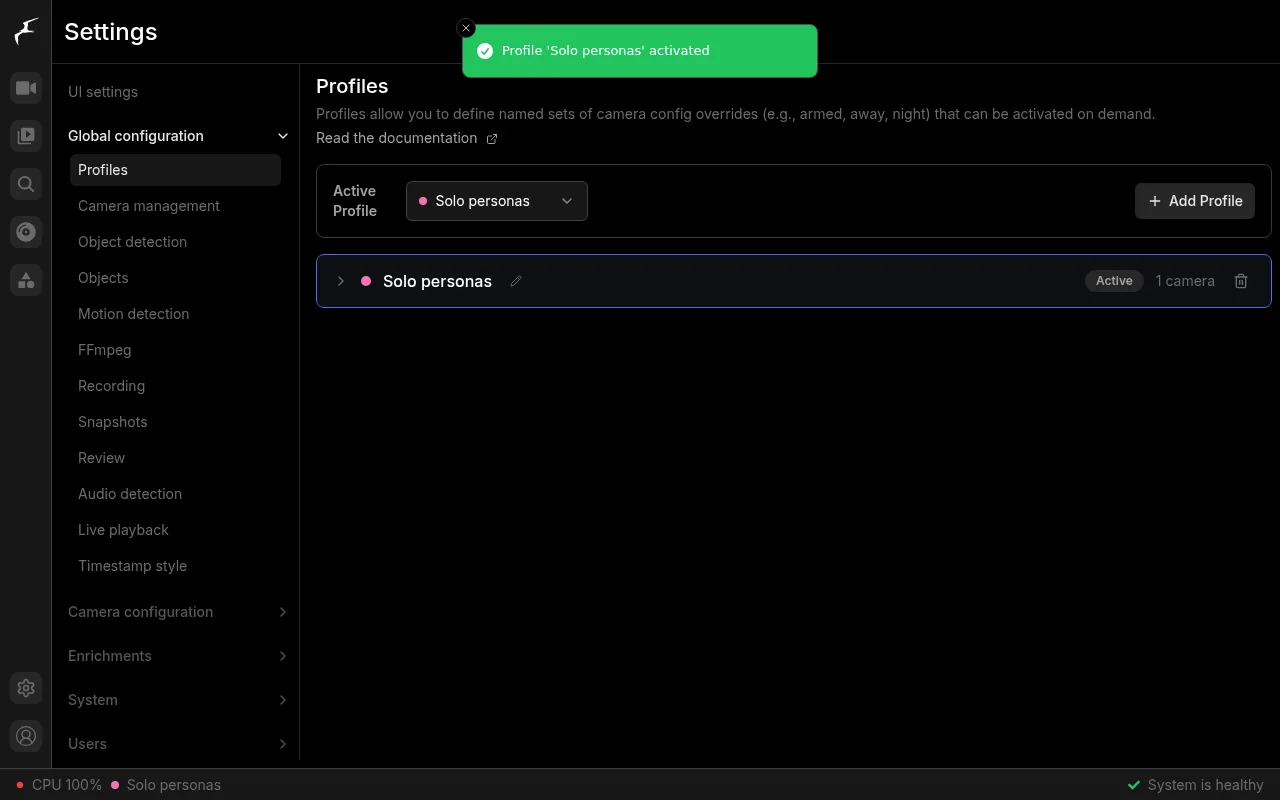
To check the effect I counted events before and 100 seconds after. Cars stayed at 58 and people rose from 34 to 50. A profile lets you alternate between "home" and "away" without editing the YAML. Per the notes, the active profile is stored over MQTT (Message Queuing Telemetry Transport) on frigate/profile/set, so a Home Assistant on Docker automation can change it.
What I did not test
I did not test the agent chat, the GenAI providers, remote embeddings, motion search or export cases. They need a connected large language model (LLM) or real accumulated video. I also did not measure inference speed: the machine was shared, with a load average above 30, so any millisecond figure would be meaningless. On your own server without a GPU, watch the detector latency indicator on the system statistics page.
If you connect the Home Assistant integration, the documentation[6] requires MQTT to be configured on both sides first, and it installs through HACS (Home Assistant Community Store). If both share a Compose network, the connection URL is http://frigate:8971.
Frequently asked questions
Can I try Frigate without a real camera?
Yes: MediaMTX receives a looped video over RTSP and Frigate treats it as a camera. In my test it detected cars and people in a public-domain clip, and it produced clips, snapshots and recordings as it would with a real device.
What do I do with my 0.17 config when upgrading?
Back up config.yml and frigate.db, change the tag to 0.18.0 and start. Frigate migrates the config and saves backup_config.yaml. Then read the log: if you see Config Validation Errors, remove the keys it points to.
Do I need an accelerator to use Frigate 0.18?
Not to try it, but yes for real use. The cpu detector starts with no hardware and the documentation warns it is not recommended for general use. With one or more real cameras you want a Coral, OpenVINO or a GPU.
Conclusion
Frigate 0.18 installs with one Compose service and upgrades from 0.17 by changing the tag, because the config and database migration is automatic and leaves a backup. What changes most day to day is browser-based configuration, profiles with no restart and the clean WebP snapshot instead of the annotated JPEG.
Before upgrading, copy config.yml and frigate.db and check whether your config uses the removed options. With the simulated camera you can rehearse everything without touching the install that watches over the real thing.
Sources: [1] Frigate 0.18.0 release notes[1], [2] Frigate installation[2], [3] Frigate object detectors[5], [4] Frigate Home Assistant integration[6], [5] MediaMTX on GitHub[3], [6] CC0 video on Wikimedia Commons[4].
Sources
Source code
Access all the source code for this post on GitHub.
View on GitHub