How to fix Plugin mysql_native_password is not loaded when moving to MySQL 9.7 in Docker
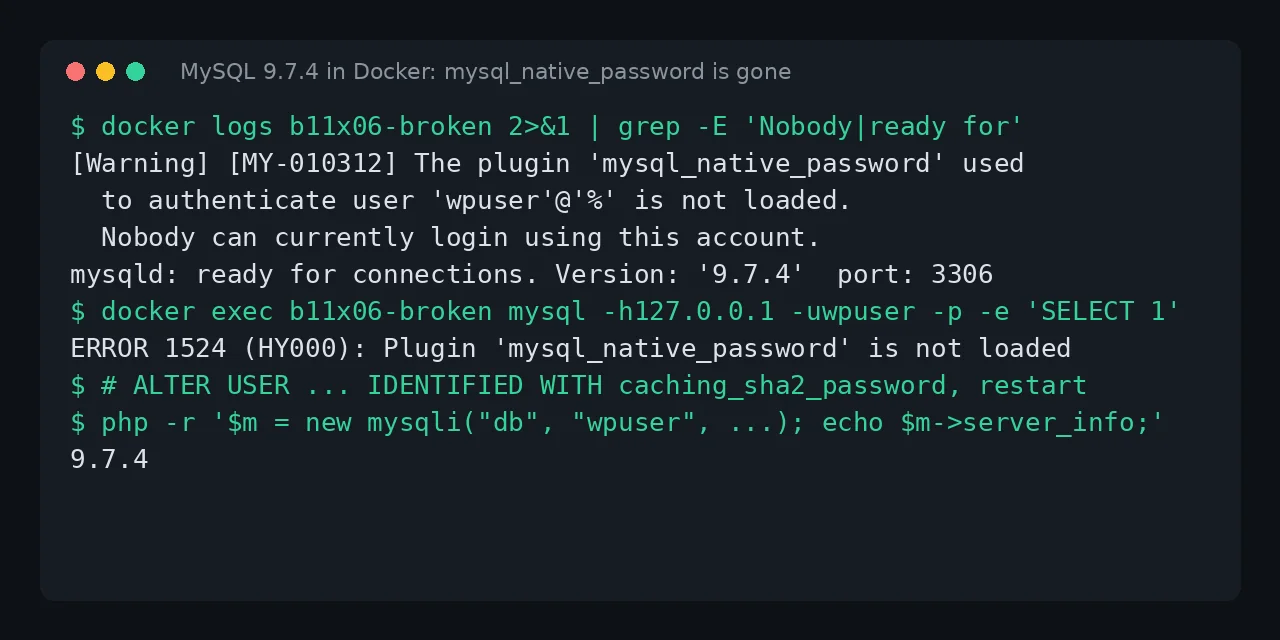
Table of contents
- Key takeaways
- What does Plugin 'mysql_native_password' is not loaded mean?
- Which MySQL versions trigger the error
- Fix: convert the accounts from MySQL 8.4
- Back up before touching the image
- Start 8.4 with mysql_native_password enabled
- List the accounts and convert them
- Move to 9.7
- If your compose file uses --default-authentication-plugin
- If you are already on 9.7 and root cannot log in either
- Why you cannot jump from MySQL 8.0 to 9.7
- How to check the migration worked
- mysql:latest is now 26.10: a one-way street
- When moving to MariaDB makes sense
- FAQ
- Can I load mysql_native_password again on MySQL 9.7?
- Do I have to change the passwords?
- Why does the container start if nobody can log in?
- Conclusion
- Sources
The Plugin 'mysql_native_password' is not loaded error means your MySQL account uses an authentication method the server no longer loads, and the fix is to convert that account to caching_sha2_password with ALTER USER. MySQL 8.4 disables it by default, MySQL 9.0 removed it, and the mysql:lts tag on Docker Hub now points to 9.7.4. This guide reproduces the error, converts the accounts from 8.4, gets you back in when root is locked out too, and explains the two jumps MySQL will not let you undo. I tested it on 2 November 2026 on arm64 Linux with Docker 29.5.2 and Compose v2.40.3. There is a Spanish version of this guide.
Key takeaways
mysql:lts,mysql:9andmysql:9.7point to 9.7.4, andmysql:latestto 26.10.0; 8.0.46 is the last of the 8.0 series, which reached end of life in April 2026.- On 9.7.4, the 3 accounts created with
mysql_native_password(two for root and the application’s) were locked out, even though the server started and accepted connections. - The only version that can still read those accounts is 8.4 started with
--mysql-native-password=ON; that is where you convert them withALTER USER … IDENTIFIED WITH caching_sha2_password. - A
--default-authentication-pluginin the compose file brings 8.4 down, but only after it has upgraded the data directory, which 8.0 can no longer open. - 9.7 rejects 8.0 data, and
mysql:latest(26.10) does not let you go back to 9.7 without a dump.
What does Plugin ‘mysql_native_password’ is not loaded mean?
It means the server started fine but does not have the authentication method your account’s password was stored with. That is why the container shows as running while the application cannot connect. This is the exact message from the mysql client in the 9.7.4 image, from PHP 8.5.12 mysqli and from PyMySQL 1.2.3:
ERROR 1524 (HY000): Plugin 'mysql_native_password' is not loaded

mysqli_sql_exception: Plugin 'mysql_native_password' is not loaded

OperationalError(1524, "Plugin 'mysql_native_password' is not loaded")
The server log warns at startup, one line per affected account. It is a [Warning], not an error, so docker compose logs db | grep ERROR will not find it:
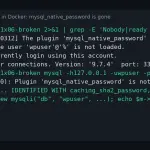
[Warning] [MY-010312] [Server] The plugin 'mysql_native_password'
used to authenticate user 'wpuser'@'%' is not loaded. Nobody can
currently login using this account.
My test printed three warnings: root@localhost, root@% and wpuser@%. Root is locked out as well, which complicates the fix if you are already on 9.7 (the section on --skip-grant-tables covers it).
Which MySQL versions trigger the error
The error appears as soon as an account with mysql_native_password reaches 8.4 or any 9.x. The MySQL 8.4.0 release notes[1] disabled the method by default, and the MySQL 9.0.0 release notes[2] removed it with this sentence: "The mysql_native_password authentication plugin, deprecated in MySQL 8.0, has been removed, and the server now rejects mysql_native authentication requests from older client programs which do not have CLIENT_PLUGIN_AUTH capability". This is where the official tags stood on 2 November 2026:
| Tag | Version | mysql_native_password |
|---|---|---|
mysql:8.0 |
8.0.46 | enabled |
mysql:8, mysql:8.4 |
8.4.13 | disabled, enable with --mysql-native-password=ON |
mysql:lts, mysql:9, mysql:9.7 |
9.7.4 | removed |
mysql:latest, mysql:innovation |
26.10.0 | removed |
I pulled the images through mirror.gcr.io/library/mysql, and their digests match the ones Docker Hub publishes for the same tags. 8.0 will get no more releases: the 8.0 series release notes[3] say "As of April 2026, with version 8.0.46, MySQL 8.0 reaches End of Life (EoL)". If you are still on mysql:8.0, you have to move to 8.4 and then to 9.7.
Your accounts use mysql_native_password in two cases. The first is that they come from an install older than 8.0. The second is that your compose file starts the server with --default-authentication-plugin=mysql_native_password, a workaround copied for years to support old PHP clients. WordPress’s own Docker development environment carried it until WordPress ticket 61218[4] adapted it to MySQL 8.4 in October 2024.
Fix: convert the accounts from MySQL 8.4
The safe fix goes through 8.4, because it is the last version that still authenticates those accounts. The plan has five steps:
- Take a
mysqldumpbackup while you can still log in - Start 8.4 with
--mysql-native-password=ON - List the affected accounts and convert them with
ALTER USER - Remove the option and check that your clients connect
- Switch the image to
mysql:9.7.4
Back up before touching the image
Take the backup before changing the tag, because every version jump rewrites the data directory without asking. This dump is written to the host, and I later loaded it into an empty 9.7 without errors:
docker compose exec -T db sh -c 'exec mysqldump -uroot \
  -p"$MYSQL_ROOT_PASSWORD" --all-databases --single-transaction \
  --routines --events' > backup.sql
Start 8.4 with mysql_native_password enabled
Switch the image to mysql:8.4 and replace any --default-authentication-plugin with the new option. It is the one the MySQL 8.4 native authentication docs[5] give:
services:
  db:
    image: mysql:8.4
    command: --mysql-native-password=ON
    volumes:
      - db_data:/var/lib/mysql
With that option my wpuser account logged in again and read its 500 rows. The log prints a deprecation warning on every connection, which is expected.
List the accounts and convert them
This query returns the accounts that will fail on 9.7. My lab had three:
SELECT user, host FROM mysql.user
WHERE plugin = 'mysql_native_password';
Convert each one with its current password. ALTER USER needs the password in clear text, because the old hash is useless to the new method; if you do not know it, set a new one and update the application:
ALTER USER 'wpuser'@'%'
  IDENTIFIED WITH caching_sha2_password BY 'current_wpuser_password';
ALTER USER 'root'@'%'
  IDENTIFIED WITH caching_sha2_password BY 'current_root_password';
ALTER USER 'root'@'localhost'
  IDENTIFIED WITH caching_sha2_password BY 'current_root_password';
Run the previous query again: it must return zero rows. Then remove the command: line and restart 8.4. If your clients connect without the option, they will connect to 9.7.
Move to 9.7
Switch the image to mysql:9.7.4 and start it. Pin the full version rather than lts, so the next jump is your decision. In my test the log showed the data dictionary and server upgrade from 80413 to 90704. The 500 rows kept the same CRC32 checksum, and mysqli and PyMySQL connected unchanged.
If your compose file uses –default-authentication-plugin
That option is gone since 8.4, and the server stops when it reads it. The problem is the order: in my test 8.4 first upgraded the 8.0 data and only then aborted. This is the log:
Server upgrade from '80046' to '80413' completed.
[ERROR] [MY-000067] [Server] unknown variable
'default-authentication-plugin=mysql_native_password'.
[ERROR] [MY-010119] [Server] Aborting
Going back to mysql:8.0 no longer works, because the directory is now in 8.4 format:
[ERROR] [MY-014061] [InnoDB] Invalid MySQL server downgrade: Cannot
downgrade from 80413 to 80046. Downgrade is only permitted between
patch releases.
It does no harm if you keep going: replace the option with --mysql-native-password=ON and carry on with the ALTER USER step. 9.7 has its own version of this trap: --mysql-native-password=ON on 9.7.4 ends the same way, with unknown variable 'mysql-native-password=ON' after upgrading the data.
If you are already on 9.7 and root cannot log in either
If your volume has already moved to 9.7 with the old accounts, you cannot go back to 8.4 to convert them. The way out is to start once without the grant tables, convert the accounts and restart normally. It worked in my test on 9.7.4:
services:
  db:
    image: mysql:9.7.4
    command: --skip-grant-tables
    volumes:
      - db_data:/var/lib/mysql
With that option the server disables networking (the log says port: 0), so you can only connect from inside the container. FLUSH PRIVILEGES reloads the grants so that ALTER USER works in the same session:
docker compose exec db mysql -uroot -e "
FLUSH PRIVILEGES;
ALTER USER 'root'@'localhost'
  IDENTIFIED WITH caching_sha2_password BY 'current_root_password';
ALTER USER 'root'@'%'
  IDENTIFIED WITH caching_sha2_password BY 'current_root_password';
ALTER USER 'wpuser'@'%'
  IDENTIFIED WITH caching_sha2_password BY 'current_wpuser_password';"
Remove command: and start again. In my test the three MY-010312 warnings were gone and PHP read the 500 rows. While it runs this way, the server lets anyone in from inside the container, so keep that window short.
Why you cannot jump from MySQL 8.0 to 9.7
MySQL only supports moving to the next Long-Term Support (LTS) release, from 8.4 to 9.7, without skipping any. The MySQL releases page[6] says so, and the server enforces it. Starting 9.7.4 on 8.0.46 data gave me this:
[ERROR] [MY-014060] [Server] Invalid MySQL server upgrade: Cannot
upgrade from 80046 to 90704. Upgrade to next major version is only
allowed from the last LTS release, which version 80046 is not.
This refusal is harmless: 9.7 does not touch the data, and 8.0 started again on the same volume. mysql:latest does the same with different wording: "The source and target must be in the same compatibility lineage, unless the source is the immediately preceding LTS for the target". From 8.0, the path is always 8.0 → 8.4 → 9.7.
How to check the migration worked
Check with a real connection, not with mysqladmin ping. With the accounts locked out on 9.7, mysqladmin ping printed error 1524 and still exited with code 0. The mysqladmin documentation[7] explains it: the status "is 0 even in case of an error such as Access denied". A mysqladmin ping healthcheck marks the container healthy while the application cannot connect.
A SELECT 1 with the application’s account does return 1 when authentication fails. This healthcheck left the service healthy on 9.7.4; the $$ stops Compose from substituting the variables:
    healthcheck:
      test: ["CMD-SHELL", "mysql -h127.0.0.1 -u\"$$MYSQL_USER\"
        -p\"$$MYSQL_PASSWORD\" -e 'SELECT 1'"]
      interval: 10s
      timeout: 5s
      retries: 5
      start_period: 60s
For more on start_period and depends_on, see the guide to Docker Compose healthchecks and restart policies. On the client side, PHP 8.5.12 mysqli (mysqlnd) connected with caching_sha2_password on 8.4.13, 9.7.4 and 26.10.0. PyMySQL 1.2.3 connected on 8.4.13 and 9.7.4 without Python’s cryptography package, also after a server restart.
mysql:latest is now 26.10: a one-way street
mysql:latest and mysql:innovation point to 26.10.0, released on 20 October 2026 according to its release notes[8]. It is an Innovation release: according to the MySQL releases page each one is supported only until the next, and after 9.7 MySQL numbers releases by year and month. For the problem in this article nothing changes: the only password methods loaded are caching_sha2_password and sha256_password.
The risk is going back. My 9.7.4 data upgraded to 26.10.0 without errors, but when I returned to mysql:9.7 the server refused:
[ERROR] [MY-014061] [InnoDB] Invalid MySQL server downgrade: Cannot
downgrade from 261000 to 90704. Downgrade is only permitted between
patch releases.
The way out was the dump: I loaded the backup.sql taken on 26.10.0 into an empty 9.7.4 and the 500 rows came back with the same checksum. If someone on your team uses latest or an updater such as Watchtower for Docker containers, pin mysql:9.7.4 before the volume upgrades itself.
When moving to MariaDB makes sense
If you depend on clients that only speak mysql_native_password, MariaDB still accepts that method. In the MariaDB 13 test in Docker, accounts with mysql_native_password kept logging in after the upgrade. Switching engines is not trivial: you need a dump and a load, and you should review the SQL differences first. To start from scratch there is the guide to installing MariaDB with Docker.
FAQ
Can I load mysql_native_password again on MySQL 9.7?
No. 9.0 removed the method from the server together with the --mysql-native-password option, and on 9.7.4 that option causes unknown variable. The 9.0 notes say it still exists on the client side, but that does not help an account stored on the server.
Do I have to change the passwords?
Not necessarily. ALTER USER … IDENTIFIED WITH caching_sha2_password BY accepts the same password, and my clients kept connecting with the usual credentials. You need it in clear text; if you do not have it, set a new one and change it in the application as well.
Why does the container start if nobody can log in?
Because an account without its authentication method is not a server failure. MySQL logs it as a [Warning] and opens port 3306 as usual. That is why a mysqladmin ping healthcheck misses the problem and a SELECT 1 one catches it.
Conclusion
Plugin 'mysql_native_password' is not loaded is not fixed with an option on 9.7: it is fixed by converting the accounts, and the version to do it on is 8.4. The order is a mysqldump backup, 8.4 with --mysql-native-password=ON, ALTER USER, a test without the option and, last, a pinned mysql:9.7.4. If you are already on 9.7, --skip-grant-tables gives you a session to convert them. Before touching anything, run the mysql.user query on your current server: if it returns zero rows, you can upgrade without this problem.
Sources: [1] MySQL 9.0.0 release notes[2], [2] MySQL 8.4.0 release notes[1], [3] MySQL 8.4, native pluggable authentication[5], [4] MySQL, LTS and Innovation releases[6], [5] MySQL 8.0 series release notes and end of life[3], [6] MySQL 26.10.0 release notes[8], [7] MySQL 9.7, mysqladmin and the ping exit status[7], [8] WordPress ticket 61218 on MySQL 8.4[4], [9] mysql tags on Docker Hub[9].
Sources
Source code
Access all the source code for this post on GitHub.
View on GitHub