PostgreSQL 19 is now postgres:latest in Docker: why your container won't start and how to upgrade from 18
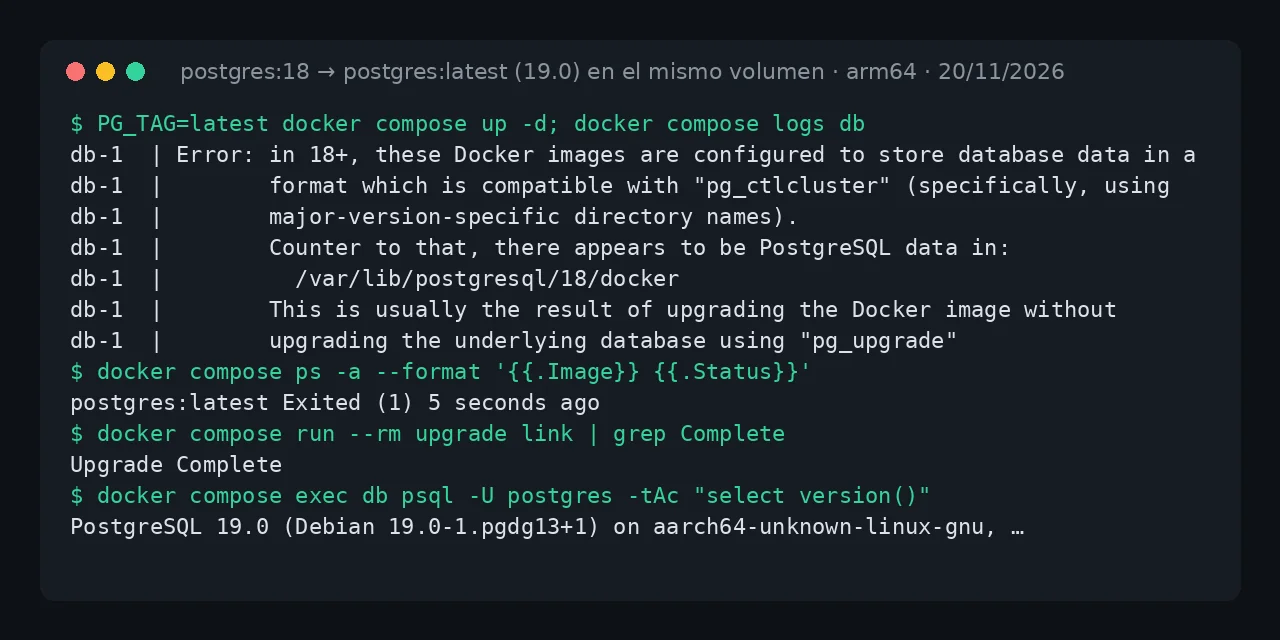
Table of contents
- Key takeaways
- What error does postgres:latest give with a volume from 18?
- What if the error is database files are incompatible with server?
- What changed on Docker Hub on 20 November?
- Immediate fix: pin postgres:18
- How to move the data to 19 with pg_dumpall
- How to upgrade in the same volume with pg_upgrade --link
- Which method should I pick to go from 18 to 19?
- How to stop latest from breaking your database again
- Frequently asked questions
- Did I lose my data when postgres:latest started?
- Can I keep using postgres:18 without upgrading?
- Is there an image that runs pg_upgrade automatically?
- Conclusion
- Sources
If your PostgreSQL in Docker stopped starting today, the cause is that postgres:latest moved from 18 to 19.0 and the new image refuses to open an 18 data directory. Your data is not lost: the container exits with code 1 before touching anything. Change postgres:latest to postgres:18 in your compose file to get running again, then upgrade to 19 with pg_dumpall and a restore or with pg_upgrade --link on the same volume. I reproduced it on 20 November 2026 on arm64 Linux with Docker 29.5.2, Compose v2.40.3, postgres:18 (18.7) and postgres:19 (19.0). There is a Spanish version of this guide.
Key takeaways
- Docker Hub published
postgres:19,19.0andlatestas 19.0 around 04:10 UTC on 20 November 2026, one day after the official announcement. - With the volume mounted at
/var/lib/postgresql, as the image recommends since 18, version 19 stops withthere appears to be PostgreSQL data in: /var/lib/postgresql/18/dockerand does not create an empty database. - If you pinned
PGDATA=/var/lib/postgresql/data, the message is different:FATAL: database files are incompatible with server. - Going back to
postgres:18started the database with the 50,000 test rows intact. pg_dumpallwith the 19 client andpg_upgrade --linkon the same volume both moved the data to 19.0; neither pgautoupgrade nortianon/postgres-upgradehad an image for 19 yet.
What error does postgres:latest give with a volume from 18?
The 19 image looks for its cluster in /var/lib/postgresql/19/docker, finds an 18 cluster in /var/lib/postgresql/18/docker and exits with an error from its entrypoint script. This is the compose file from the test, the layout the official image recommends since 18, with a single volume at /var/lib/postgresql:
services:
  db:
    image: postgres:${PG_TAG:-18}
    environment:
      POSTGRES_PASSWORD: change_this_password
      POSTGRES_DB: tienda
    ports:
      - "127.0.0.1:5432:5432"
    volumes:
      - pgdata:/var/lib/postgresql
volumes:
  pgdata:
I started 18.7, created a pedidos table with 50,000 rows, stopped the service and brought it up with PG_TAG=latest. The container exited with code 1 within seconds, and this is its full log:
$ docker compose logs --no-log-prefix db
Error: in 18+, these Docker images are configured to store database data in a
       format which is compatible with "pg_ctlcluster" (specifically, using
       major-version-specific directory names).  This better reflects how
       PostgreSQL itself works, and how upgrades are to be performed.

       See also https://github.com/docker-library/postgres/pull/1259

       Counter to that, there appears to be PostgreSQL data in:
         /var/lib/postgresql/18/docker

       This is usually the result of upgrading the Docker image without
       upgrading the underlying database using "pg_upgrade" (which requires both
       versions).

       The suggested container configuration for 18+ is to place a single mount
       at /var/lib/postgresql which will then place PostgreSQL data in a
       subdirectory, allowing usage of "pg_upgrade --link" without mount point
       boundary issues.

       See https://github.com/docker-library/postgres/issues/37 for a (long)
       discussion around this process, and suggestions for how to do so.
The message says the image was upgraded without upgrading the database. After the failure I checked the volume: 18/docker still held its 67 MB, and 19 had only left an empty 19/docker directory. The database never showed up empty, because 19 never gets as far as running initdb. The connected application does lose its database, since the service stays down.
What if the error is database files are incompatible with server?
That second message appears when your compose file sets PGDATA=/var/lib/postgresql/data and mounts the volume there, the pre-18 layout that older tutorials still show. Because 19 honours that PGDATA, the entrypoint script sees nothing wrong and the server itself refuses. I repeated the test with that layout and got this, wrapped to fit:
PostgreSQL Database directory appears to contain a database; Skipping
initialization

2026-11-20 08:20:27.607 UTC [1] FATAL:  database files are incompatible
with server
2026-11-20 08:20:27.607 UTC [1] DETAIL:  The data directory was
initialized by PostgreSQL version 18, which is not compatible with this
version 19.0 (Debian 19.0-1.pgdg13+1).
There is a third variant if your volume comes from 17 or earlier, mounted at /var/lib/postgresql/data without PGDATA: the same text as the first block, but pointing at /var/lib/postgresql/data (unused mount/volume). I checked it with a postgres:17-alpine volume. All three cases have the same fix: go back to the version that created the volume first, then upgrade.
What changed on Docker Hub on 20 November?
The PostgreSQL project released 19.0 on 19 November 2026, and Docker Hub moved the official image tags the next morning. This is what the registry and the Docker Hub API returned at 08:19 UTC on 20 November:
postgres:18: 18.7, pushed at 04:08 UTC, arm64 digestsha256:af98f9bf838b…postgres:19andpostgres:19.0: 19.0, pushed at 04:09 and 04:10 UTC, arm64 digestsha256:75428cce0b85…postgres:latest: 19.0, pushed at 04:11 UTC, with the same arm64 digest as19
latest and 19 have different index digests (fe9ef805… and bb6e70ad…), but they point to the same amd64 and arm64 images. I ran the whole lab on the arm64 variant; I only saw the amd64 one listed in the manifest. There is no rush to leave 18: according to the PostgreSQL versioning policy[1], it gets fixes until 14 November 2030, and 19 until 19 November 2031.
Immediate fix: pin postgres:18
Set the tag to the major version that created the volume and bring the service up again. In my compose file that meant dropping PG_TAG=latest; in yours, change the image: line:
image: postgres:18
Check that it is 18 and that your data is there:
docker compose up -d
docker compose exec db psql -U postgres -d tienda \
  -Atc "select count(*), sum(total) from pedidos" \
  -c "select version()"
It returned 50000|12524500.00 and PostgreSQL 18.7, the same values as before the failure. The same worked for the PGDATA=/var/lib/postgresql/data variant. Pin the tag even if you restart nothing today: with latest, the next docker compose pull would fetch 19. From here there are two ways to reach 19.
How to move the data to 19 with pg_dumpall
A logical dump is the path with the fewest moving parts: dump the running 18 to an SQL file, start 19 on a new volume and restore. The 19 release notes ask you to dump with the new client, and the warning matters:
"Dumps created using pre-PostgreSQL 19 versions of pg_dump or pg_dumpall, and using standard_conforming_strings = off, will not properly load into PostgreSQL 19 and later servers. Users should create dumps using PostgreSQL 19 or later versions of these applications", PostgreSQL 19.0 release notes[2], PostgreSQL Global Development Group.
So I ran pg_dumpall from a postgres:19 container attached to the project network, against the running 18. Compose names the network after the project plus _default, and in this example the project is called tienda:
docker run --rm --network tienda_default \
  -e PGPASSWORD=change_this_password postgres:19 \
  pg_dumpall -h db -U postgres > backup-18.sql
The file was 2.8 MB, and its header reads Dumped from database version 18.7 and Dumped by pg_dump version 19.0. Then I switched the service to image: postgres:19 with a new volume, pgdata19:/var/lib/postgresql, without POSTGRES_DB, and restored:
docker compose up -d
docker compose exec -T db psql -U postgres -q < backup-18.sql
The only error was ERROR: role "postgres" already exists, which is expected because the dump includes that role and the image already creates it. The check query returned 50000|12524500.00 with PostgreSQL 19.0 and data_directory at /var/lib/postgresql/19/docker. The old volume stays untouched, so you can go back to 18 if something fails. The price is downtime: your application must not write between the dump and the restore.
How to upgrade in the same volume with pg_upgrade --link
pg_upgrade --link converts the 18 cluster to the 19 format inside the same volume, using hard links instead of copying the files. It needs the binaries of both versions, and each official image ships only its own. At 08:25 UTC on 20 November, neither pgautoupgrade[3] nor tianon/postgres-upgrade had a tag for 19. I built an image with the trick the second one uses, which adds 18 from the PostgreSQL repository the image already has configured:
FROM postgres:19
RUN sed -i 's/$/ 18/' /etc/apt/sources.list.d/pgdg.list \
 && apt-get update \
 && apt-get install -y --no-install-recommends postgresql-18 \
 && rm -rf /var/lib/apt/lists/*
The resulting image has postgres 18.7 and pg_upgrade 19.0. In the compose file I added an upgrade service that only starts on demand, with that Dockerfile in ./upgrade and the same volume:
  upgrade:
    build: ./upgrade
    profiles: [upgrade]
    volumes:
      - pgdata:/var/lib/postgresql
      - ./upgrade.sh:/upgrade.sh:ro
    entrypoint: ["/upgrade.sh"]
The script creates the 19 cluster with the same encoding and locale as the 18 one and runs pg_upgrade in check or link mode. It runs from /var/lib/postgresql so the files pg_upgrade leaves behind stay in the volume, and it copies pg_hba.conf because the one from initdb does not accept connections from other containers:
#!/usr/bin/env bash
# usage: upgrade.sh check|link
set -euo pipefail
OLD=/var/lib/postgresql/18/docker
NEW=/var/lib/postgresql/19/docker
if [ ! -s "$NEW/PG_VERSION" ]; then
  install -d -o postgres -g postgres -m 700 "$NEW"
  gosu postgres initdb -D "$NEW" -U postgres \
    --encoding=UTF8 --locale=en_US.utf8 > /dev/null
fi
cd /var/lib/postgresql
MODE=--check; [ "$1" = link ] && MODE=--link
gosu postgres pg_upgrade -U postgres \
  -b /usr/lib/postgresql/18/bin -B /usr/lib/postgresql/19/bin \
  -d "$OLD" -D "$NEW" $MODE
[ "$1" = link ] && cp "$OLD/pg_hba.conf" "$NEW/pg_hba.conf"
exit 0
If your database was created with another locale, change --locale to yours (SHOW lc_collate on 18 tells you). With the database stopped, check first and then link:
docker compose stop db
docker compose run --rm upgrade check
docker compose run --rm upgrade link
docker compose rm -sf db
PG_TAG=latest docker compose up -d db
The check ended with *Clusters are compatible* and the link with Upgrade Complete. 19.0 started on /var/lib/postgresql/19/docker with the 50,000 rows and accepted connections from another container on the network. Two steps remain, both suggested by pg_upgrade itself: rebuild statistics and, once you are sure, delete the old cluster:
docker compose exec db vacuumdb -U postgres --all \
  --analyze-in-stages --missing-stats-only
docker compose exec db sh /var/lib/postgresql/delete_old_cluster.sh
delete_old_cluster.sh only contains rm -rf '/var/lib/postgresql/18/docker'. With --link there is no way back once 19 starts, and pg_upgrade says so (the old cluster cannot be safely started once the new cluster has been started). Copy the volume first. If your database uses extensions or GiST indexes on inet, read the pg_upgrade section of PostgreSQL 19 new features tested in Docker: there the check failed on a btree_gist index.
Which method should I pick to go from 18 to 19?
For a database of a few gigabytes, pg_dumpall is the path I recommend: it leaves 18 untouched and needs no custom image. pg_upgrade --link pays off on large databases, where dumping and restoring stretches the downtime too far. This is how the three paths compared in my test:
| Method | 18 data | Extra image | Rollback |
|---|---|---|---|
Pin postgres:18 |
untouched | no | not needed |
pg_dumpall + restore |
untouched, separate volume | no | go back to 18 |
pg_upgrade --link |
converted in the same volume | yes, with 18 and 19 | only from the prior copy |
The schema and data types are the same with either method. Before you choose, read the list of incompatibilities in the 19 release notes: it removes the io_workers parameter, turns JIT off by default and raises max_locks_per_transaction from 64 to 128.
How to stop latest from breaking your database again
Always pin the major version of a database (postgres:18, postgres:19) and keep latest for stateless services. The major tag still receives minor releases, like today's 18.7, which do not change the data directory format.
If you run automatic updates, exclude the database: the guide to Watchtower automatic Docker updates shows how to do it with a label. If you are setting up a new database, the guide on how to install PostgreSQL with Docker already mounts the volume at /var/lib/postgresql. The same floating-tag jump already broke bitnami/postgresql:latest, which I cover in the docker.io/bitnami/postgresql not found error.
Frequently asked questions
Did I lose my data when postgres:latest started?
No. In all three variants I tested, 19 stopped before writing to the 18 cluster. It only left an empty 19/docker directory, which pg_upgrade or 19 reuse later.
Can I keep using postgres:18 without upgrading?
Yes. 18 gets fixes until 14 November 2030, and the postgres:18 tag will keep moving to each new minor release. Upgrading to 19 is a decision you can plan.
Is there an image that runs pg_upgrade automatically?
pgautoupgrade does it for earlier versions, but on 20 November 2026 it had no tag for 19. Until it does, the four-line image in this article does the same job.
Conclusion
postgres:latest has been 19.0 since 20 November 2026, and it neither opens nor empties a volume from 18. Pin postgres:18 today, copy the volume, and choose calmly between pg_dumpall with the 19 client and pg_upgrade --link. Before changing the tag in production, rehearse the chosen method on a copy of the volume. The guide to Docker volumes and bind mounts explains how to copy one.
Sources: [1] PostgreSQL 19 Released[4], [2] PostgreSQL 19.0 release notes[2], [3] PostgreSQL versioning policy[1], [4] Official postgres image on Docker Hub[5], [5] docker-library/postgres, pull request 1259[6], [6] docker-library/postgres, issue 37[7], [7] pgautoupgrade on Docker Hub[3].