How to fix unknown storage type file when upgrading OpenBao to 2.7 with Docker
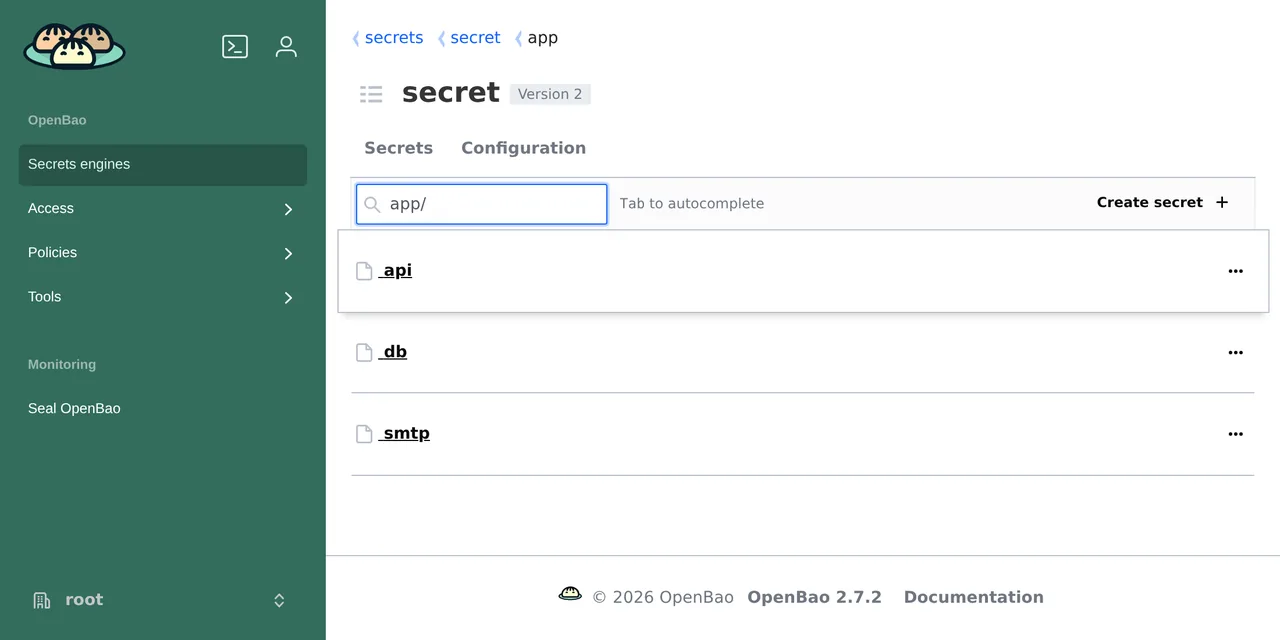
Table of contents
- Key takeaways
- What does unknown storage type file mean in OpenBao?
- Which OpenBao versions trigger the error?
- Immediate fix: stop the loop and back up the volume
- How to migrate from file to PebbleDB with bao operator migrate
- Start 2.7.2 on PebbleDB and check your secrets
- Alternative: migrate from file to Raft
- How to roll back if something goes wrong
- Frequently asked questions
- Do I lose my secrets with the unknown storage type file error?
- Do I have to go back to 2.6 to migrate?
- Do I need the unseal keys to migrate?
- Conclusion
- Sources
The unknown storage type file error means your configuration uses storage "file", a backend OpenBao 2.7.0 removed, and you fix it by migrating the data with bao operator migrate, not by going back to 2.6. Your secrets are still intact on the volume. The 2.7.2 image itself still reads file as a migration source, so you can move to PebbleDB or Raft without downgrading. I tested it on 2 November 2026 on arm64 Linux with Docker 29.5.2, Compose 2.40.3 and the official 2.6.5 and 2.7.2 images. There is a Spanish version of this guide.
Key takeaways
- OpenBao 2.7.0, released on 23 September 2026, drops the
filebackend; 2.7.2 from 26 October is thelatesttag on Docker Hub and quay.io. - With
restart: unless-stoppedthe container loops: in my test it reached 7 restarts with the sameunknown storage type fileline before I stopped it. - The 2.7.2
bao operator migratecopied all 34 keys fromfileto PebbleDB; 2.6.5 cannot do it, because it does not know thepebbledbbackend. - The migrated server starts sealed with the same unseal keys and root token, and the source volume stays intact as your rollback.
- 2.7.x is the last line that reads
filein a migration: the 2.7.0 notes announce its removal frombao operator migratein v2.8.0.
What does unknown storage type file mean in OpenBao?
It means the server does not recognise the storage type in your storage block, because the file backend is no longer compiled into 2.7. It is not a permissions problem and the data is not corrupt: the process exits with code 1 before it opens the volume. This is what docker compose logs returned after I switched the image from openbao/openbao:2.6.5 to 2.7.2 on an install with storage "file":
$ docker compose logs openbao
[INFO]  proxy environment: http_proxy="" https_proxy="" no_proxy=""
unknown storage type file
[INFO]  proxy environment: http_proxy="" https_proxy="" no_proxy=""
unknown storage type file
I removed the timestamp at the start of each [INFO] line. docker compose ps -a showed the service as Restarting (1), and docker inspect gave exit=1 restarts=7 within seconds. While the loop lasts, the API on port 8200 does not even accept connections, so your applications see a connection error rather than a sealed-server 503.
Which OpenBao versions trigger the error?
Every release in the 2.7 line, from 2.7.0 on, triggers it when the server configuration still says storage "file". The 2.7.0 release notes[1] cover it in one line, "Remove file storage backend support", and the PebbleDB migration guide[2] is blunt: "Because OpenBao 2.7.0 removes the File storage backend, you must migrate to a different backend."
| Version | Date | What changes for file |
|---|---|---|
| 2.6.x (2.6.5 the newest) | up to 26 October 2026 | starts with a deprecation warning |
| 2.7.0 | 23 September 2026 | the server no longer recognises it; PebbleDB arrives |
| 2.7.1 | 1 October 2026 | Linux packages switch their default config to pebbledb |
| 2.7.2 | 26 October 2026 | no storage changes |
| 2.8.0 | not dated | bao operator migrate stops reading file |
The dates are the tag dates on the quay.io registry[3], and on 2 November 2026 latest, 2 and 2.7 pointed at the same digest as 2.7.2 (sha256:5046911075e1…), on Docker Hub too. If your compose file uses openbao/openbao:latest, the next docker compose pull moves you to 2.7.2 without warning. An automatic updater such as Watchtower does the same overnight.
2.6.5 already warned on every start, with a line that 2.7.2 still prints during the migration: the file physical backend is deprecated; use bao operator migrate to move to a supported storage backend by v2.7.0. This blog’s guide to installing OpenBao with Docker used Raft for that reason.
Immediate fix: stop the loop and back up the volume
Stop the container first: the migration needs the server down, and the restart loop would keep starting it every few seconds. This was the starting service, with the configuration in ./config/bao.hcl and the data in the bao-file volume:
services:
  openbao:
    image: openbao/openbao:2.7.2
    command: server
    restart: unless-stopped
    cap_add: [IPC_LOCK]
    ports:
      - "127.0.0.1:8200:8200"
    environment:
      BAO_ADDR: http://127.0.0.1:8200
      SKIP_CHOWN: "true"
    volumes:
      - ./config:/openbao/config:ro
      - bao-file:/openbao/file

volumes:
  bao-file:
In my lab the published port was different and the image came from quay.io, with the same digest as the Docker Hub one. SKIP_CHOWN stops the entrypoint script from trying to change the owner of the read-only ./config mount and filling the log with Read-only file system warnings. With the service defined like this, stop the container and archive the volume with the same OpenBao image:
docker compose stop openbao
docker compose run --rm --no-deps --user root --entrypoint tar \
  -v "$PWD:/backup" openbao czf /backup/bao-file.tgz -C /openbao/file .
In my test, with three secrets in a key-value (KV) v2 engine and one policy, the file volume took 136 KB and the compressed archive 12 KB. The official guide asks for at least 60 % free disk, because the data exists twice during the migration. What a named volume stores and where is covered in Docker volumes and bind mounts.
How to migrate from file to PebbleDB with bao operator migrate
PebbleDB is the direct replacement for file: an embedded store in a single directory, with no high availability (HA) or clustering, added in 2.7.0 itself. The migration copies the encrypted keys as they are, without unsealing anything. Write migrate.hcl next to the compose file, outside ./config, because the server loads every file in that directory:
storage_source "file" {
  path = "/openbao/file"
}

storage_destination "pebbledb" {
  path = "/openbao/data"
}
Add a second volume, bao-data, mounted on /openbao/data. Keep the file one too, since it is your rollback:
    volumes:
      - ./config:/openbao/config:ro
      - bao-file:/openbao/file
      - bao-data:/openbao/data

volumes:
  bao-file:
  bao-data:
Now change the owner of the new volume and run the migration with the 2.7.2 image. The chown is not optional: /openbao/data does not exist in the image, Docker creates the volume as root and the image runs as the openbao user (UID 100). Without it the migration failed with failed to open database: open /openbao/data/LOCK: permission denied.
docker compose run --rm --no-deps --user root --entrypoint chown \
  openbao openbao:openbao /openbao/data
docker compose run --rm --no-deps \
  -v "$PWD/migrate.hcl:/tmp/migrate.hcl:ro" \
  openbao operator migrate -config=/tmp/migrate.hcl
The output ends like this; in between there is one copied key line per key, 34 in my case:
[WARN]  the file physical backend is deprecated; use bao operator
        migrate to move to a supported storage backend by v2.7.0
[INFO]  copied key: path=core/mounts
[INFO]  copied key: path=core/root-key
[INFO]  copied key: path=core/seal-config
Success! All of the keys have been migrated.
I first tried the intuitive route, migrating with 2.6.5 before upgrading, and it does not work for this target: Error migrating: error mounting 'storage_destination': no Vault storage backend named: "pebbledb". PebbleDB only exists from 2.7.0 on, so the migration to PebbleDB runs on 2.7.x.
Start 2.7.2 on PebbleDB and check your secrets
After the migration, change only the storage block in ./config/bao.hcl and leave the rest of the configuration as it was:
storage "pebbledb" {
  path = "/openbao/data"
}
Start the service, unseal with your usual key and read a secret. Replace your_unseal_key with your key from bao operator init, and your_root_token with the root token or one with read access:
docker compose up -d
docker compose exec openbao bao status
docker compose exec openbao bao operator unseal your_unseal_key
docker compose exec -e BAO_TOKEN=your_root_token openbao \
  bao kv list secret/app
The first bao status returned Initialized true, Sealed true and Storage Type pebbledb, and after unsealing bao kv list listed the three secrets (api, db and smtp) with their values. The app-read policy was still there too. The startup log showed Storage: pebbledb and Version: OpenBao v2.7.2, and the restart counter stayed at zero.
Watch for Initialized true, because it is the check that matters. If you change the storage block without migrating, 2.7.2 starts cleanly on an empty directory and bao status says Initialized false. It looks like a fresh install. Do not run bao operator init in that state: you would create a separate store with new keys while your secrets stay on the file volume.
Alternative: migrate from file to Raft
Pick Raft if you plan to add nodes or want snapshots with bao operator raft snapshot; for a single home server, PebbleDB needs less configuration. The procedure is the same with two different blocks. This is the migrate.hcl:
storage_source "file" {
  path = "/openbao/file"
}

storage_destination "raft" {
  path    = "/openbao/data"
  node_id = "bao-1"
}

cluster_addr = "http://127.0.0.1:8201"
In bao.hcl, the storage "raft" block takes the same path and node_id, and the configuration also needs cluster_addr = "http://127.0.0.1:8201". I restored the volume backup into a separate project, migrated with 2.7.2 (34 keys again) and 2.7.2 started with Storage Type raft and HA Enabled true. After unsealing, bao operator raft list-peers showed a single bao-1 node as leader. The Raft install guide covers snapshots and migrating from file with 2.6.
How to roll back if something goes wrong
Go back to the storage "file" configuration and the 2.6.5 image: the source volume stays intact. bao operator migrate only adds a lock file while it copies, and when it finished the volume held the same 34 files. I checked by starting 2.6.5 on the already migrated file volume: it unsealed with the same key, showed Storage Type file and returned the api secret.
Keep two limits in mind before you roll back:
- Anything you write to PebbleDB after the migration does not exist in
file, so you would lose those changes - 2.6.x is not a stable destination:
fileis not coming back, and 2.6.5 from 26 October 2026 only buys you time
The bao-file.tgz archive from the first step covers the worst case, a volume damaged for some other reason. Once 2.7.2 has run for a few days, delete the bao-file volume and its line in the compose file.
Frequently asked questions
Do I lose my secrets with the unknown storage type file error?
No. The server exits before it touches the volume, and in my test all 34 files were still on bao-file after seven restarts. You get them back by migrating or by returning to 2.6.5 with the same configuration. Back up the volume before migrating anyway.
Do I have to go back to 2.6 to migrate?
No, and for PebbleDB it does not even work: 2.6.5 does not know that backend. 2.7.2 reads file as a bao operator migrate source and writes to PebbleDB, Raft or PostgreSQL. The 2.7.0 notes warn that this source goes away in 2.8.0, so do not put the migration off.
Do I need the unseal keys to migrate?
Not for the copy: the migration moves the encrypted data without decrypting it. You do need them right after, to unseal 2.7.2 on the new store. If you lost them, the migration does not help, because the new store is encrypted with the same root key as the old one.
Conclusion
unknown storage type file is the 2.6 deprecation warning come true: OpenBao 2.7.0 removed the file backend, and latest already points at 2.7.2. Stop the loop, back up the volume, chown the new volume and migrate to PebbleDB with 2.7.2; you unseal with the same keys as before. Do it during the 2.7 line, before 2.8.0 also removes the file source from the migration. If you are comparing secret managers, the introduction to HashiCorp Vault explains the model OpenBao starts from, and how to self-host Infisical with Docker shows an alternative with a different approach.
Sources: [1] OpenBao, 2.7.0 release notes[1], [2] OpenBao, 2.7.1 release notes[4], [3] OpenBao, file to PebbleDB migration guide[2], [4] OpenBao, operator migrate documentation[5], [5] OpenBao, PebbleDB storage backend[6], [6] openbao/openbao tags on quay.io[3], [7] openbao/openbao tags on Docker Hub[7].
Sources
Source code
Access all the source code for this post on GitHub.
View on GitHub